
GigBox - Live Performance
Live Player for MIDI and MP3
Designed for iPhone, iPad
Free · In-app purchases
- Age rating4+
- CategoryMusic
- DeveloperChristian Gehring
- LanguagesEnglish+ 1 more
- Size18.0 MB
Links to the official App Store page
Download.org hosts no file of GigBox - Live Performance. The button opens its official App Store page, published by Christian Gehring. Listing last checked on Nov 12, 2026.
Screenshots

About
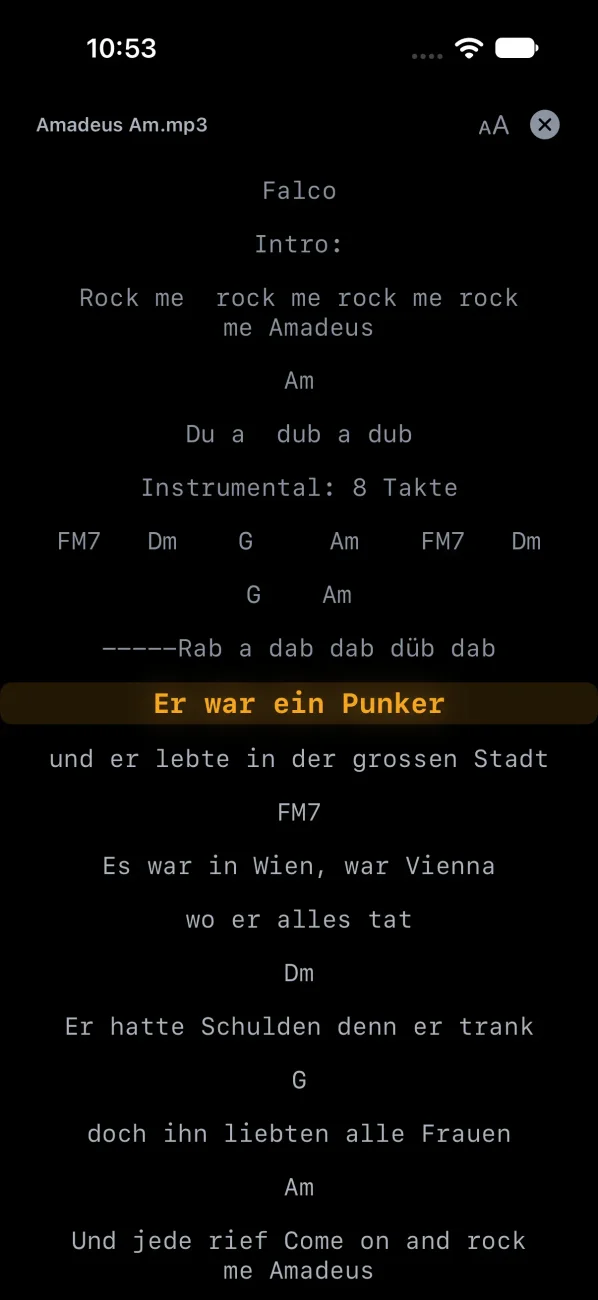
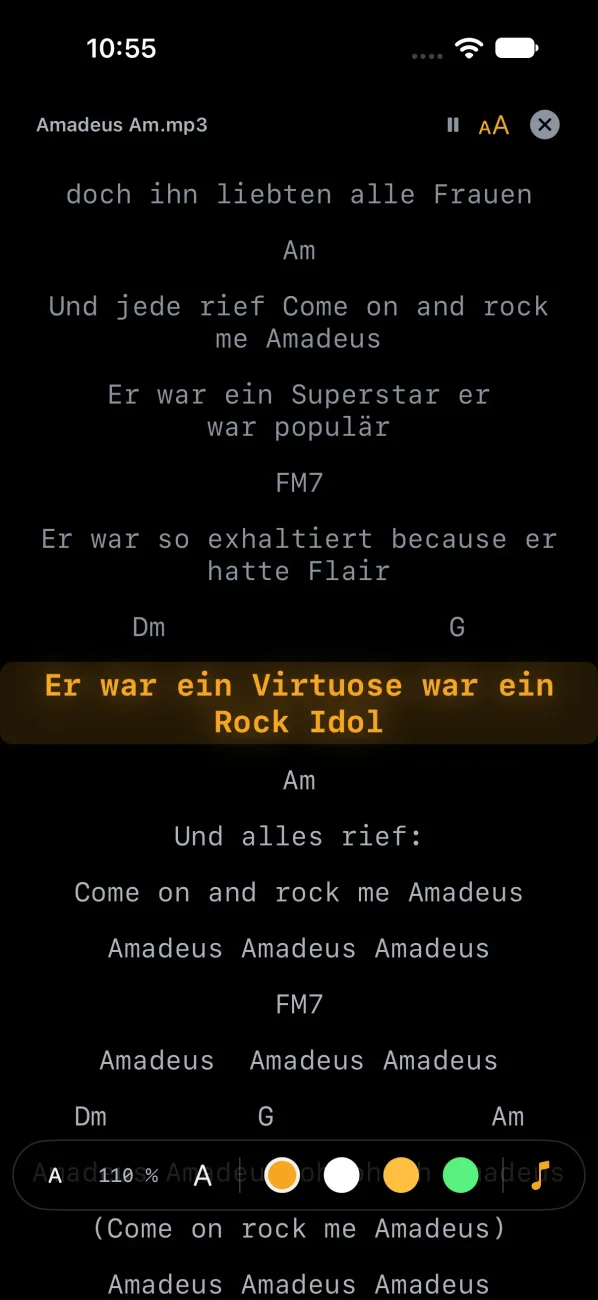
GigBox turns your iPad into the hub of your live show. It plays MIDI files, styles and MP3 backing tracks through your connected keyboard, sound module or the iPad's audio output, and shows lyrics and chords at stage size.
For solo entertainers, duos, bands, choirs and everyone who performs live with MIDI and backing tracks.
LIBRARY & SETLISTS
• MIDI files, styles, MP3 and lyrics in one place, with search, groups and favorites
• Setlists that mix MIDI, styles and MP3
• Import via the Files app, storage in iCloud
MIDI PLAYER
• 16-channel mixer with volume, pan, solo/mute and sound selection per channel
• Karaoke lyrics and optional chord display
• Tempo and transpose, save settings per song
• MIDI analyzer for files
MP3 PLAYER
• Backing tracks with lyrics from the file tags
• Transpose, separate volume, selectable output (e.g. AirPlay or USB)
LIVE
• Stage-size lyrics for MIDI and MP3
• Function keys F1–F12 and setlist at hand
ARRANGER
• Auto-accompaniment with styles (STY, PRS): intro, main A–D, fill, break, ending
• Chord detection with adjustable split point, One Touch Settings
• MIDI learn for pads and buttons
MULTIPLAYER
• Up to 8 audio stems of a song in sync, with mixer, reverb, delay and master
• Stem songs in the Library, setlists and Live mode
CREATOR, FX & SYNTH
• Your own performances from four sound zones with split and layer
• Reverb, chorus and EQ matched to your instrument
• Play AUv3 instruments directly on the iPad
YOUR INSTRUMENT
Choose your device from about 70 device profiles or use General MIDI and GM2. Two separate MIDI outputs for files and live playing.
LYRICS ON IPHONE AND A SECOND IPAD
The current lyrics appear over Wi-Fi on an iPhone or a second iPad – free, no purchase needed.
PRICE
GigBox is free to download. Try every area free for 7 days, with no subscription and no automatic charge. After that, a one-time in-app purchase unlocks every area for good, no subscription. The lyrics display always stays free.
The app is available in English and German.
Questions and feedback: cg@it-secrets.de
What’s new
Version 1.01 · Nov 7, 2026
NEW: Multiplayer – play up to 8 audio stems of a song in sync, with mixer and effects, in the Library, setlists and Live mode.
GigBox is now free to download. Try every area free for 7 days, with no subscription and no automatic charge. After that, a one-time in-app purchase unlocks everything for good.
App privacy
What Christian Gehring declares on the App Store about how this app handles data.
-
Data not linked to you
May be collected but is not linked to your identity.
- Usage data
- Diagnostics
Privacy practices may vary, for example with the features you use or your age.
Information
- Seller
- Christian Gehring
- Category
- Music
- Version
- 1.01
- Updated
- Nov 7, 2026
- Released
- Nov 6, 2026
- Size
- 18.0 MB
- Requires
- iOS 17.0 or later
- Age rating
- 4+
- Price
- Free
- In-app purchases
- Yes
- Languages
- English, German
- Copyright
- © 2026 Christian Gehring
You might also like
-
 PianoviaMusic
-
 NotePulse: MIDI VisualizerSee, hear, explore your music.
-
 Audio USB BridgeWired Audio transfer · AUv3
-
 AR MIDI PatchboxVirtual MIDI patchbay
-
 HarmonyKeenHarmonize your melodies
-
 Metro ArrangerKeyboard arranger and sounds
-
 ChoirXMLScan & play choir sheet music
-
 PlayStems: Audio Stem PlayerIsolate Vocals, Practice & Mix
-
 NoteHoundSlow down songs to learn them
-
 KQ Sampei 26Sampler Synthesizer