GPS Track Log
Record tracks of daily life
Designed for iPhone, iPad
In-app purchases
- Age rating4+
- CategoryUtilities
- DeveloperHIROTAKA SAKAIDA
- LanguagesGerman+ 13 more
- Size8.4 MB
Links to the official App Store page
Download.org hosts no file of GPS Track Log. The button opens its official App Store page, published by HIROTAKA SAKAIDA. Listing last checked on Nov 12, 2026.
Screenshots


About
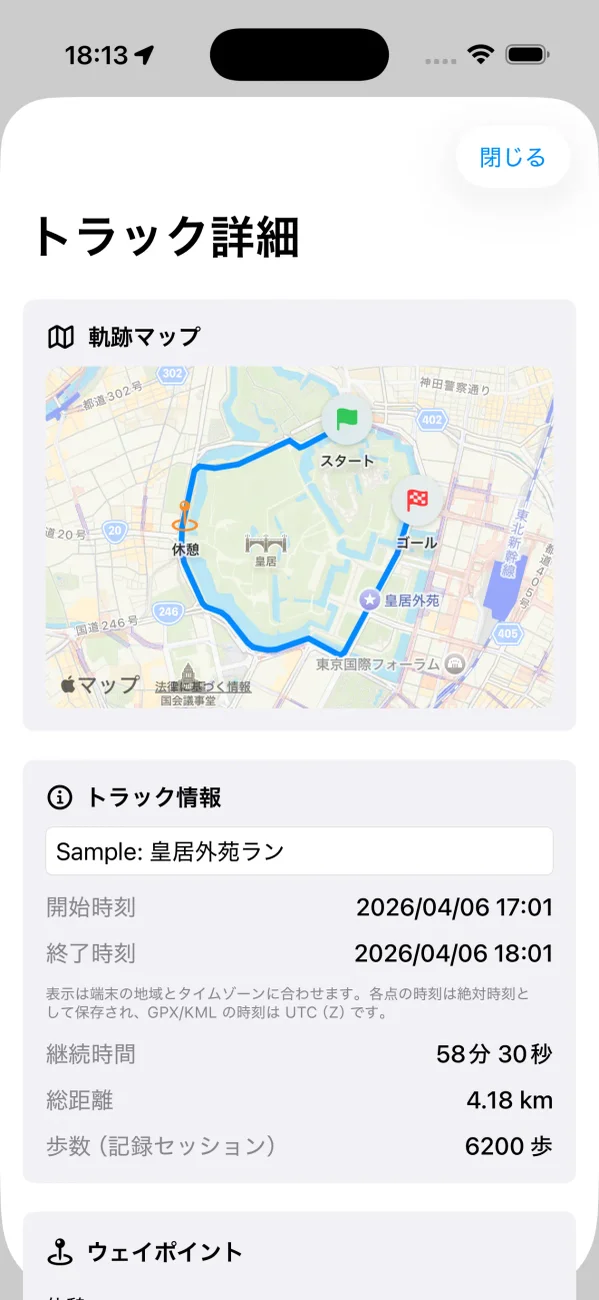
GPS Track Log records your route with iPhone location, from walking and cycling to cars, boats, highways, and flights, and exports to GPX or KML.
■ What you can do
• Record, pause, and stop; a live map; waypoints with notes and photos
• Distance, time (active time, excluding pauses), point count, and steps (steps are a guide for walking)
• In the track details, choose GPX or KML and save the file. You can also send it from the share sheet
• Recording modes for different uses (general, boat, fast travel on land, flight). A setting can switch modes automatically
• Lock Screen and Dynamic Island (depends on the device and system settings). Pausing from the Lock Screen can be turned on or off
• A list of saved tracks, renaming, and graphs of speed and altitude
• Settings for the recording interval, filters, appearance, map, and speed units. Optional automatic stop when you return home
■ How recording works
• Each mode assumes something different for slow movement and fast movement.
• Where the position tends to jump, such as indoors, near buildings, or on Wi-Fi, those off points are kept off the track from the start (adjustable in Settings).
• When a fix is unavailable, a setting can bridge the line. Walking uses your steps and heading. Cars, boats, and flights use the speed and direction you already had, and the line meets the point where GPS returns.
• Measured parts and filled-in parts use different colors on the map. While you are stopped, the line does not extend.
■ Data
Tracks and photos stay on your iPhone. In the track details, choose GPX or KML, save that file, and send it to other apps from the share sheet. To keep the photos with the track, use a full backup.
■ Notes
Requires iOS 17 or later. The position and distance you see depend on the surroundings. Recording in the background needs Location set to Always.
■ Ads
Banners appear on the start screen and on the list of saved tracks. Some regions may show a consent message. In Settings, a donation through “Coffee for the developer” removes the ads, and the purchase can be restored.
What’s new
Version 1.1.4 · Nov 2, 2026
Recording now centers on a dashboard instead of the map. You can see speed, distance, elapsed time, point count, steps, and altitude without opening the map.
• The map opens only when you need it. Coming back from the Lock Screen also starts on the dashboard.
• In Settings, “Coffee for the developer” removes ads. You can restore the purchase, and you can donate another coffee afterward.
App privacy
What HIROTAKA SAKAIDA declares on the App Store about how this app handles data.
-
Data used to track you
May be used to track you across apps and websites owned by other companies.
- Location
- Identifiers
- Usage data
-
Data not linked to you
May be collected but is not linked to your identity.
- Location
- Identifiers
- Usage data
Privacy practices may vary, for example with the features you use or your age.
Information
- Seller
- HIROTAKA SAKAIDA
- Category
- Utilities
- Version
- 1.1.4
- Updated
- Nov 2, 2026
- Released
- Apr 8, 2026
- Size
- 8.4 MB
- Requires
- iOS 17.0 or later
- Age rating
- 4+
- In-app purchases
- Yes
- Languages
- German, English, French, Indonesian, Italian, Japanese, Korean, Portuguese, Russian, Spanish, Thai, Traditional Chinese + 2 more
- Copyright
- © 2026 Utsugumi
You might also like
-
 Smart割り勘Utilities
-
 PinMark - Map Memo & NotesSave, organize & navigate
-
 Window Seat GPSPassenger Offline Flight Info
-
 TouchRouteEasily create and share routes
-
 CALINTTrack your location with map
-
 PA Verify for WatchUtilities
-
 日めくりみくじUtilities
-
 mapry測量Utilities
-
 mapry林業Utilities
-
 Fermi Practice Drill with AIFor Job and Case Interview