PinMark - Map Memo & Notes
Save, organize & navigate
Designed for iPhone, iPod touch
Free · In-app purchases
- Age rating4+
- CategoryUtilities
- Developerkouhei sasaki
- LanguagesEnglish+ 1 more
- Size85.4 MB
Links to the official App Store page
Download.org hosts no file of PinMark - Map Memo & Notes. The button opens its official App Store page, published by kouhei sasaki. Listing last checked on Nov 14, 2026.
Screenshots




About
What is PinMark?
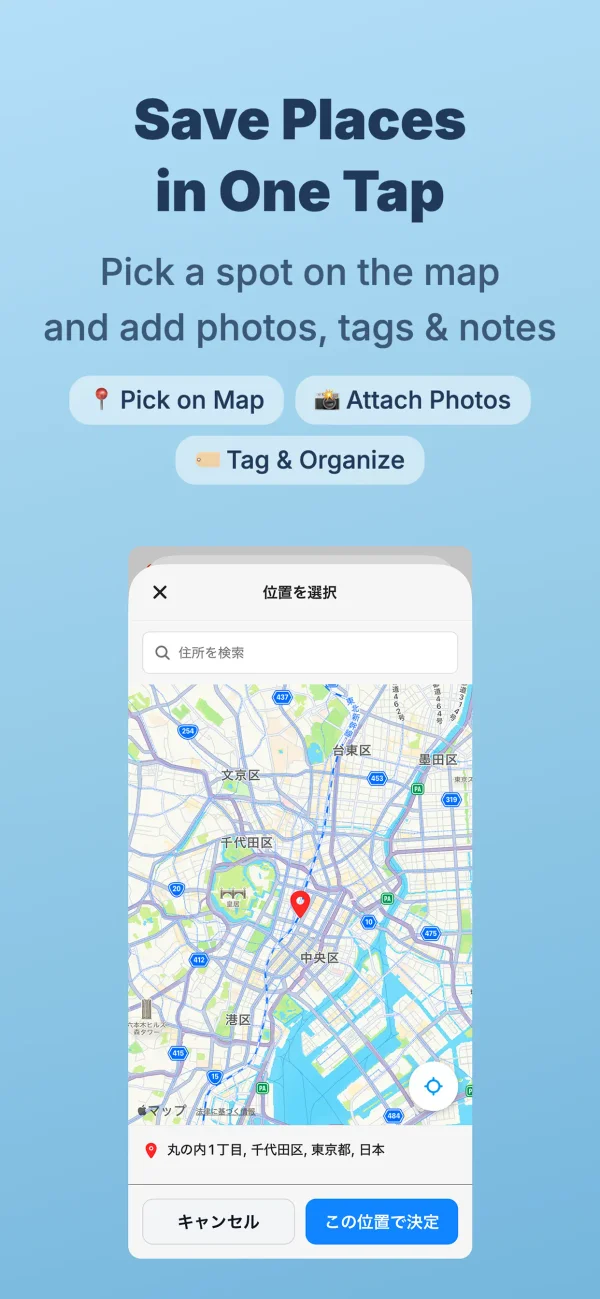
PinMark is a simple location memo app that lets you pin notes to places on a map. One tap captures your GPS coordinates, auto-fills the address, and saves your memo with photos, videos, notes, and tags. Organize memos by purpose in workspaces, then search across every workspace whenever you need to find a place again.
--------------------
Who is PinMark for?
--------------------
1. People who forget where they parked
- Save parking spots with photos and get directions back
2. Workers who visit multiple locations
- Record site addresses and photos together
- Navigate with one-tap directions
3. Anyone who loves collecting places
- Save favorite cafes, parks, and travel memories
- Build your personal map of experiences
--------------------
Main Features
--------------------
One-tap location saving
Tap "+" to capture GPS and auto-fill the address. No manual input needed.
Map with pins
All memos appear as pins on the map. Tap a pin to view details or get directions.
Photos & video
Attach multiple photos or videos from camera or library. Preview and share with one tap.
Tag organization
16 preset tags (Parking, Work, Travel, Gourmet, etc.) plus custom tags with your own colors.
Workspace organization
Organize memos and navigations for work, travel, personal plans, or any purpose.
Create unlimited workspaces on every plan, choose from 120 icons, and move a memo from its edit screen.
3 view modes
Swipe between List, Gallery, and Map views to browse memos your way.
Cross-workspace search & sort
Search titles, memo text, and addresses across every workspace, then filter results by workspace.
Within each workspace, sort by title, address, created date, or updated date and combine sorting with tag filters.
Place search & manual pin
Search any address from the location picker and fine-tune the pin on the map before saving.
Directions
Open Apple Maps or Google Maps for directions to any saved location.
Multi-Navigation
Bundle multiple memos into a "navigation" with an ordered destination list.
From your current location, see the full route to each destination on the map.
Mark destinations complete to auto-advance the next-destination highlight.
Great for trips, errand runs, sales rounds, and any multi-stop plan.
Light & dark mode
Follows your device appearance automatically.
Offline ready
Browse, create, and edit memos without an internet connection.
(Map tiles, address lookup, place search, and route planning require a connection.)
--------------------
Plans
--------------------
Free
- Every feature with no limits
- Unlimited workspaces
- Includes banner ads and full-screen ads when the app opens
Remove Ads (monthly / annual)
- Hides all ads
- Every feature remains available with no limits
- Cancel anytime
Subscriptions are billed through your Apple ID or Google account and renew automatically. Prices are shown at the time of purchase.
--------------------
Security & Privacy
--------------------
Memos, media, tags, workspaces, and navigations are stored on your device. PinMark does not provide cloud sync or automatically upload this content to our servers.
Map display, address lookup, place search, and route planning send required coordinates, search text, and related request data to map or OS services. Memo text, photos, tags, and workspace names are not sent automatically.
--------------------
Use Cases
--------------------
- Parking: Save where you parked with a photo, navigate back easily
- Food & cafes: Tag and organize restaurants you want to visit
- Travel: Build a photo map of places you visited
- Work: Record site locations with photos for reports
- Trip planning: Bundle multiple stops into a Multi-Navigation and follow them in order
--------------------
Support
--------------------
Questions? Email: support@sikalab.app
Terms of Use: https://pinmark.sikalab.app/terms
Privacy Policy: https://pinmark.sikalab.app/policy
PinMark - save your favorite places on the map.
What’s new
Version 1.4.0 · Sep 15, 2026
- Added workspaces.
- Keep memos and navigations organized by purpose, such as work, travel, and personal.
- Changed the support contact address to support@sikalab.app.
- Improved the UI and the app internals.
App privacy
What kouhei sasaki declares on the App Store about how this app handles data.
-
Data used to track you
May be used to track you across apps and websites owned by other companies.
- Usage data
-
Data not linked to you
May be collected but is not linked to your identity.
- Usage data
Privacy practices may vary, for example with the features you use or your age.
Information
- Seller
- kouhei sasaki
- Category
- Utilities
- Version
- 1.4.0
- Updated
- Sep 15, 2026
- Released
- Oct 28, 2025
- Size
- 85.4 MB
- Requires
- iOS 15.1 or later
- Age rating
- 4+
- Price
- Free
- In-app purchases
- Yes
- Languages
- English, Japanese
- Copyright
- © 2026 PinMark
You might also like
-
 Map Memos - Location NotesCustom maps, lists, places
-
 GPS Track LogRecord tracks of daily life
-
 MicroProjects: Big GoalsSmall Steps. Real Progress.
-
 ADWize: Ad Revenue MonitorLive ad revenue stats
-
 Mappino: Map Marker & PlacesPin places. Organize. Go.
-
 Dicey: Real Dice CupShake & Roll with Real Physics
-
 Trucker ETA PlannerLong haul road trip calculator
-
 Visited Places BetaTrack All Visited Places
-
 YuJian:fishing Catch Log & MapTrack catches, spots, species
-
 Zhuole Brick: 3D BuilderStep Guides, Parts & Progress