
- Age rating4+
- CategoryMusic
- DeveloperDavid Smith
- LanguagesEnglish
- Size4.0 MB
Links to the official App Store page
Download.org hosts no file of Guitar Tap. The button opens its official App Store page, published by David Smith. Listing last checked on Nov 17, 2026.
Screenshots
About
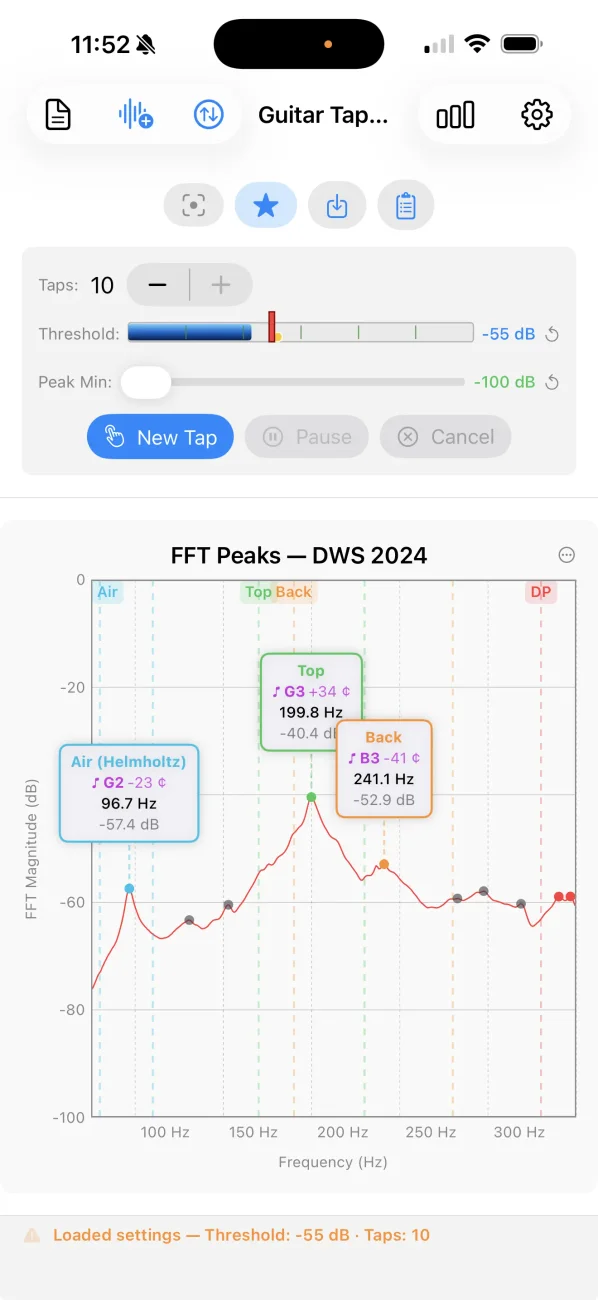
Guitar Tap turns your device into a precision tap-tone analyzer for guitar
builders and tonewood enthusiasts. Tap a guitar body, a raw tonewood plate, or a
brace, and Guitar Tap captures the ring-out, runs a 65,536-point FFT (about
0.67 Hz resolution), and shows you the resonant peaks that reveal how the
structure and material behave.
Built around the tap-tone workflow used by luthiers following Trevor Gore's
methodology — but approachable enough for any builder curious about what their
wood is telling them.
THREE WAYS TO MEASURE
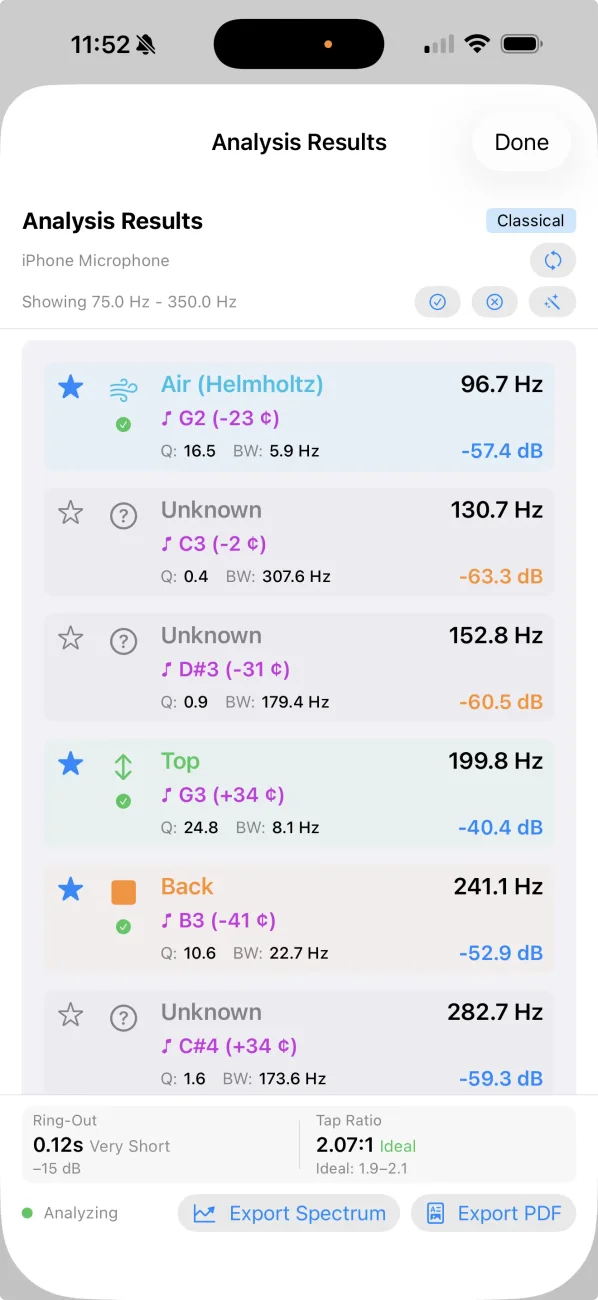
• Guitar mode — Identify the key structural resonances of a finished body: Air
(Helmholtz), Top, Back, Dipole, and Ring modes. Each peak is labeled with its
frequency, pitch, Q factor, and bandwidth. See the Tap Tone Ratio and ring-out
decay time at a glance.
• Plate mode — Measure a rectangular tonewood blank with free-free bending taps.
Guitar Tap derives Young's modulus along and across the grain, speed of sound,
specific modulus, radiation ratio, and a quality grade — plus a Gore target
thickness for your guitar's dimensions.
• Brace mode — A fast single-tap measurement of a brace strip's stiffness and
quality.
FEATURES
• Real-time spectrum that freezes automatically the instant a tap is detected
• Multi-tap averaging (2–10 taps) to cut noise, with per-tap comparison view
• Color-coded peak labels you can drag, toggle, and reclassify
• Compare 2–5 saved guitar measurements overlaid on one chart
• Save measurements with names and notes; export as files, spectrum images, or
PDF reports
• Import and share measurements via the Files app, AirDrop, and more
• Microphone calibration support for measurement mics
• Spruce quality scale, anisotropy ratio, and density checks built in
• Play an audio file through the analyzer instead of the live mic
PRIVACY
Everything runs on your device. Guitar Tap has no accounts, no ads, no tracking,
and never sends your audio or measurements anywhere.
Works on iPhone, iPad, and Mac.
What’s new
Version 1.1.0 · Nov 7, 2026
• Measurement type beside New Tap — switch between Generic, Acoustic, Classical, Flamenco, Plate and Brace, and start a new tap of it, in one step.
• Saved Measurements — sort and filter the list, export or share all of it or only your selection, and import several files at once.
• Appearance — choose Light, Dark or System.
• Microphones — Guitar Tap now tells you when a microphone can't be used, when the input goes silent, or when a measurement was made with a different microphone.
• A cleaner, consistent look across Settings, Analysis Results and Measurement Details, and an updated Quick Start Guide.
Plus many bug fixes and reliability improvements.
App privacy
What David Smith declares on the App Store about how this app handles data.
-
Data not collected
The developer does not collect any data from this app.
Privacy practices may vary, for example with the features you use or your age.
Information
- Seller
- David Smith
- Category
- Music
- Version
- 1.1.0
- Updated
- Nov 7, 2026
- Released
- Jun 24, 2026
- Size
- 4.0 MB
- Requires
- iOS 17.6 or later
- Age rating
- 4+
- Price
- $14.99
- Languages
- English
- Copyright
- © 2026 Dolce Sfogato
You might also like
-
 FFTMusic
-
 MS50G EditorPatch Editor for ZOOM MS-50G
-
 FFT AUv3 VisualizerMusic
-
 Utalog: Karaoke Song ListScore Tracker & Singing Stats
-
 AudiolyzeReal-Time Audio Analyzer
-
 FabFilter Pro-L 2True-peak limiter plug-in
-
 StringMateChromatic Tuner & Metronome
-
 Metronome Watch SpecialMetronome app for Apple Watch
-
 Harmonica Bending Trainer+for all harmonica players
-
 Practis: Music PracticeDiary, score reader & planner