
- Age rating17+
- CategoryProductivity
- DeveloperKyu-Hee Jang
- LanguagesEnglish
- Size92.0 MB
Links to the official App Store page
Download.org hosts no file of Gyroscope+ Level IMU Logger. The button opens its official App Store page, published by Kyu-Hee Jang. Listing last checked on Nov 26, 2026.
Screenshots
About
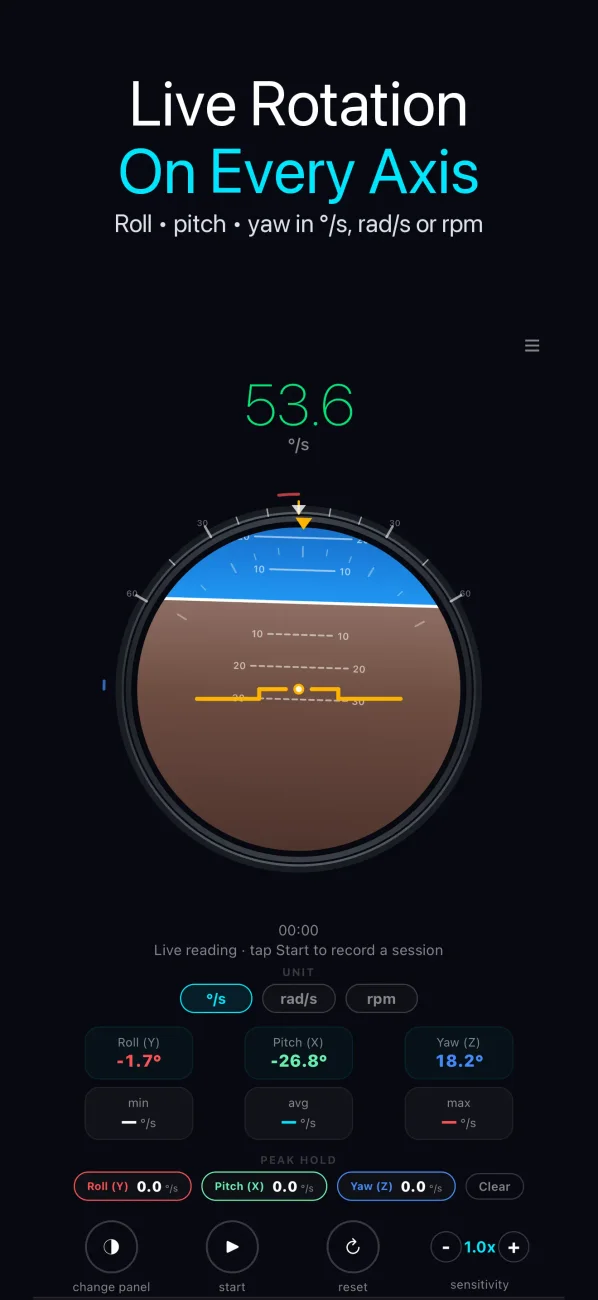
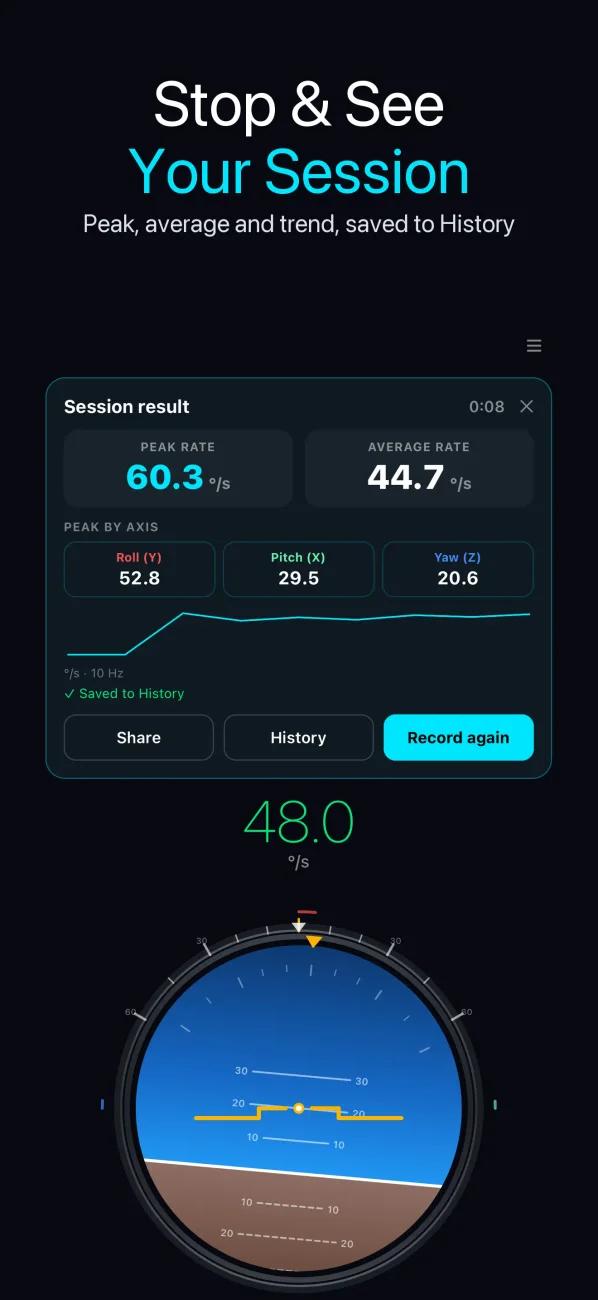
Gyroscope+ Level IMU Logger shows how fast your phone rotates the moment you open it, on every axis, then turns each measurement into a result you can read: press Start, press Stop, and a session card shows the peak rate, the average rate and the peak on each axis.
▶ Live rotation rate from the first second
• The gauge moves as soon as the screen opens; no button needed to see the rate
• Roll (Y), pitch (X) and yaw (Z) rotation rates side by side, plus the combined rate
• Pick °/s, rad/s or rpm with one tap (360 °/s = 60 rpm)
• Roll, pitch and yaw angles, and a scrolling chart of each axis
▶ Stop and see the session
Press Start to record, then Stop, and a Session result card appears:
• Duration, peak rate and average rate in the unit you picked
• The peak on each axis: roll, pitch and yaw
• A second-by-second trend line (up to 30 minutes)
Every finished session is saved to History once (the last 50). A recording shorter than 2 seconds is not saved. If you switch apps mid-session, recording pauses in the background and the same session continues when you return, and a session cut off when the system closes the app is recovered into History on the next launch. Share a result as text in one tap.
▶ Recording that you can trust
• Hold the phone still for a moment when a recording starts (the first 20 samples, 2 seconds at 10 Hz) so the sensor's resting offset can be measured; it is only taken when the readings show the phone held still (a turn slower than about 1 °/s cannot be told apart from that offset)
• Min, average, max and peak while you record, plus peak-hold chips for each axis with Clear
• 10 Hz by default, 50 Hz in high-precision mode
• Zero sets the current angles as your reference; a 0.5x–2.0x sensitivity control scales the displayed and recorded rotation rates (not the angles)
▶ Turntable rpm and Wow & Flutter
Switch to rpm to read the spin of a record player or any platter lying flat: the app compares it with 33⅓, 45 and 78 rpm and shows the deviation in %. A 10-second Wow & Flutter test at 20 Hz grades the speed stability as good, fair or poor.
▶ Attitude and sensor health
• An artificial horizon for pitch and roll, and a gyro heading that you can reset (it drifts slowly, as every gyro heading does)
• A sensor health check at rest reports the offset and noise on each axis as good, fair or poor
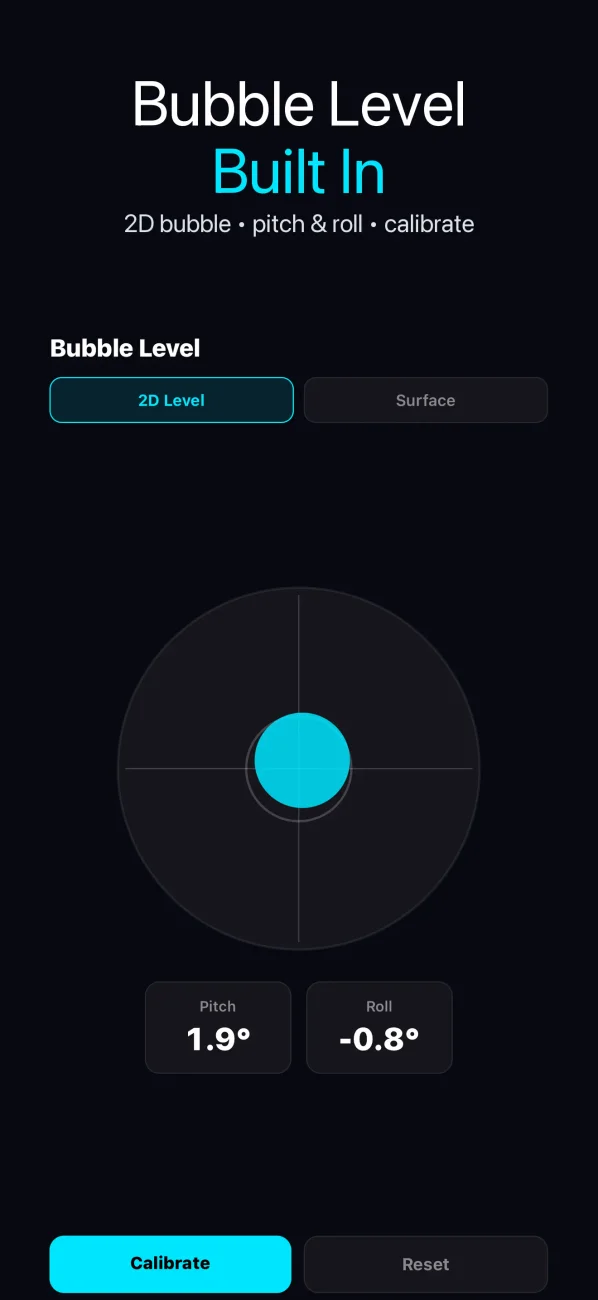
▶ Bubble level
The Level tab reads the accelerometer: a 2D bubble with surface, pitch and roll angles. Calibrate on a flat surface you trust. To check a surface, measure, turn the phone 180° and measure again; the true error is half the difference.
▶ History and export
Every session with its trend, exportable as CSV (rates in °/s). The recording itself exports as CSV too, up to 18,000 samples. A statistics CSV of all sessions unlocks for 24 hours after a short ad.
▶ Good to know
Readings come from the phone's own gyroscope and accelerometer, so keep the phone away from strong vibration and re-zero if angles drift. The heading is gyro-based, not a compass. A Guide tab explains every axis and unit. Interface in 30 languages.
For makers testing gimbals and drones, vinyl fans checking turntable speed, physics students, developers checking motion sensors, and anyone curious how fast something spins.
What’s new
Version 1.0.44 · Nov 25, 2026
• Gyro: the Peak hold row now wraps onto a second line instead of running off the right edge, so the Roll, Pitch and Yaw highs and the Clear button stay visible on narrow screens and with larger text.
• Readings, sessions, units, Attitude, the level and History are unchanged.
App privacy
What Kyu-Hee Jang declares on the App Store about how this app handles data.
-
Data used to track you
May be used to track you across apps and websites owned by other companies.
- Identifiers
- Usage data
-
Data not linked to you
May be collected but is not linked to your identity.
- Identifiers
- Usage data
- Diagnostics
Privacy practices may vary, for example with the features you use or your age.
Information
- Seller
- Kyu-Hee Jang
- Category
- Productivity
- Version
- 1.0.44
- Updated
- Nov 25, 2026
- Released
- Mar 10, 2026
- Size
- 92.0 MB
- Requires
- iOS 16.4 or later
- Age rating
- 17+
- Price
- Free
- Languages
- English
- Copyright
- Copyright © 2026 Simon Jang. All rights reserved.
You might also like
-
 Sensor-AppAccess all device sensors
-
 Angle Gradient InclinometerAngle 360 Degree, Gradient%
-
 GyralineFast Wheel Alignment
-
 UTM Remote Virtual MachinesRemote desktop for VMs
-
 STL Simple ViewerView 3D STL 3MF STEP & DXF CAD
-
 Google AI Edge EloquentUnlimited, no cost dictation
-
 ASUS GlideXMirror and Extend
-
 Onshape 3D CADSpeed Up Your Product Design
-
 Bitwarden AuthenticatorGenerate 2FA on your device
-
 CPU-x Dasher z Battery lifeReal cpu frequency & speedtest