
- Age rating4+
- CategoryUtilities
- DeveloperPavel Shlyapnikov
- LanguagesEnglish+ 3 more
- Size1.5 MB
Links to the official App Store page
Download.org hosts no file of Happened: Event Logger. The button opens its official App Store page, published by Pavel Shlyapnikov. Listing last checked on Nov 12, 2026.
Screenshots


About
This app was made for personal use, but it turned out too good to hide from the App Store.
Log events happening in your life with one simple tap. Whether it’s symptoms, birdwatching, superstitions, you name it. Collect data and analyze it with metrics.
Taxonomy
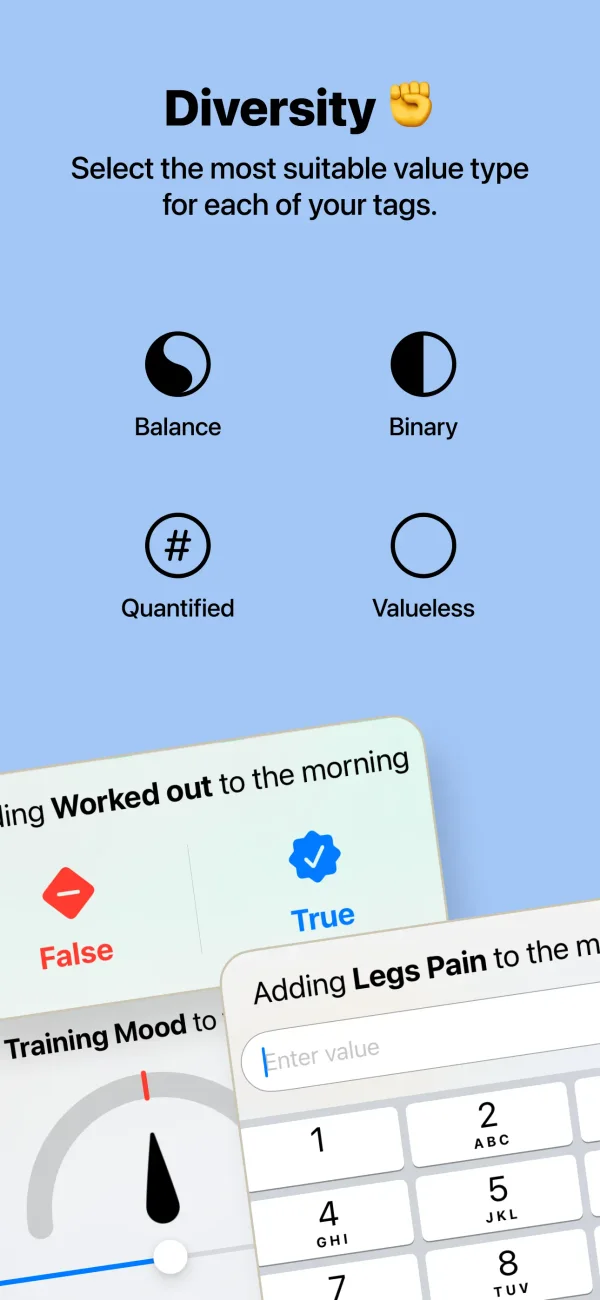
The app supports four types of tags:
- Valueless: Just to log events that happened.
- Quantified: Each event has a numeric value. Users can also add a measurement unit.
- Balance: Events have a visual gauge in the range of –1 to 1. Suitable for cases such as “better or worse than the baseline”.
- Binary: Events have a true or false value, representing the outcome of an event.
Timeline
To speed up the creation and management of events, the day is divided into five parts. Tapping on a tag creates an event in the current part of today. Drag & drop tags to add events to any part of any day.
Management
Tags are categorized into groups, each with its own color. Add, edit and move your tags without losing associated events.
Analytics
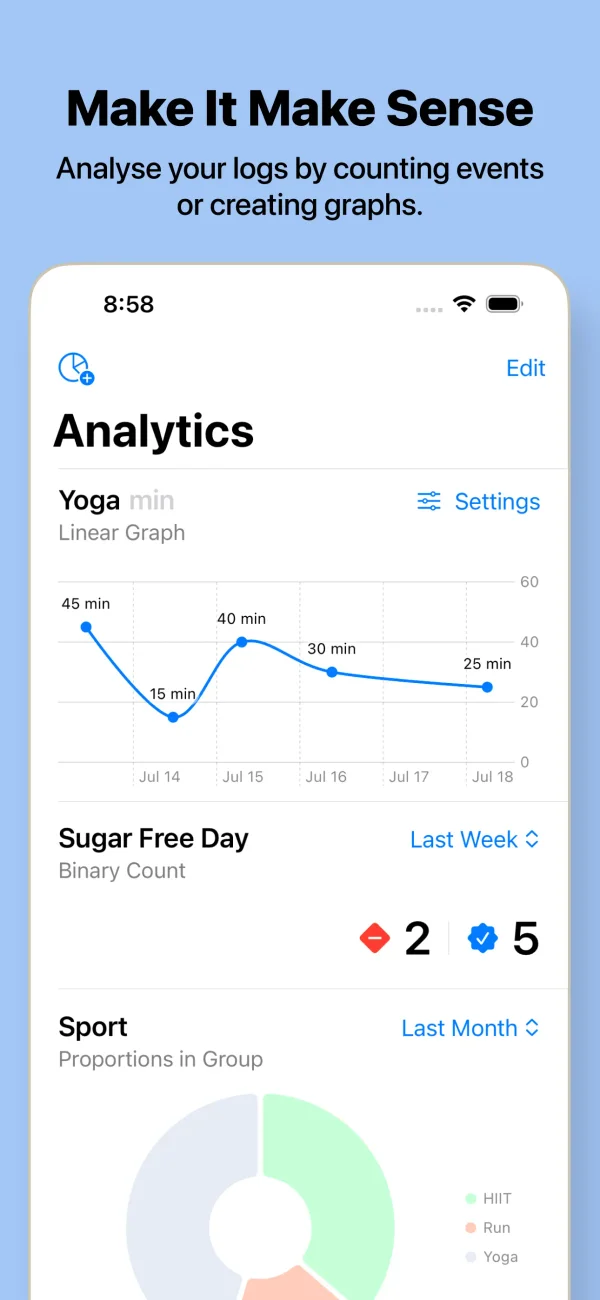
The app offers 10 types of metrics to visually represent data, including counters, min/avg/max calculators, pie charts, linear graphs, and more. Each tag type has a specific set of metrics.
Each metric can be limited by a time range: last week or the last one, three, six, or twelve months.
Convenience
- Gestures: swipe left and right on the timeline to navigate between days. Double-tap on the timeline returns to today’s view.
- Swiping right on the Tag Groups stripe reveals a sandwich glyph (three horizontal lines). Dragging it vertically changes the height of the area with tags.
- Change the order of Tag Groups and Metrics by holding and dragging them in the corresponding sections.
- The plus glyph in the tag area on the home screen allows you to quickly add a new tag to the selected group.
Privacy
All your data is stored using the CloudKit framework provided by Apple. This means it’s either stored locally on the device or in your iCloud account. For encryption, opt into Advanced Data Protection in your iCloud settings (availability may vary by region). In any case, the developer DOES NOT have access to user data. The app DOES NOT use any analytics tools, so feel free to log your sensitive data. It stays only with you and no one else.
What’s new
Version 1.5 · Sep 15, 2025
iOS 26 ready
App privacy
What Pavel Shlyapnikov declares on the App Store about how this app handles data.
-
Data not collected
The developer does not collect any data from this app.
Privacy practices may vary, for example with the features you use or your age.
Information
- Seller
- Pavel Shlyapnikov
- Category
- Utilities
- Version
- 1.5
- Updated
- Sep 15, 2025
- Released
- Jul 18, 2024
- Size
- 1.5 MB
- Requires
- iOS 17.6 or later
- Age rating
- 4+
- Price
- Free
- Languages
- English, Russian, Simplified Chinese, Traditional Chinese
- Copyright
- © Pavel Shlyapnikov, Julia Shliapnikova, 2024
You might also like
-
 QuietMe - Call BlockerBlock Spam & Unwanted Calls
-
 Tally Counter ۬Tap, Click, Clicker Counting
-
 Clock In: Work Hours TrackerTimesheet Log, Time Calculator
-
 Mushroom Identifier: Plant IDIdentify Mushrooms by Picture
-
 Conversion Calculator - MetricCooking Converter, kg to lbs
-
 Spam Text Repeater - CopiedMessage Spammer Keyboard
-
 RoomPlan - Interior 3D ScannerFloor & Furniture LIDAR Models
-
 Cleaner Plan - Storage & DupesFree Up Space & Photos Org
-
 Search Ace - AI Duo BrowserFast Adblock & Split Screen
-
 Water Eject ۬Get Water Out of Phone Speaker