
- Age rating9+
- CategoryProductivity
- DeveloperKhizer Parekh
- LanguagesEnglish
- Size34.9 MB
Links to the official App Store page
Download.org hosts no file of HCM Cloud. The button opens its official App Store page, published by Khizer Parekh. Listing last checked on Nov 12, 2026.
Screenshots


About
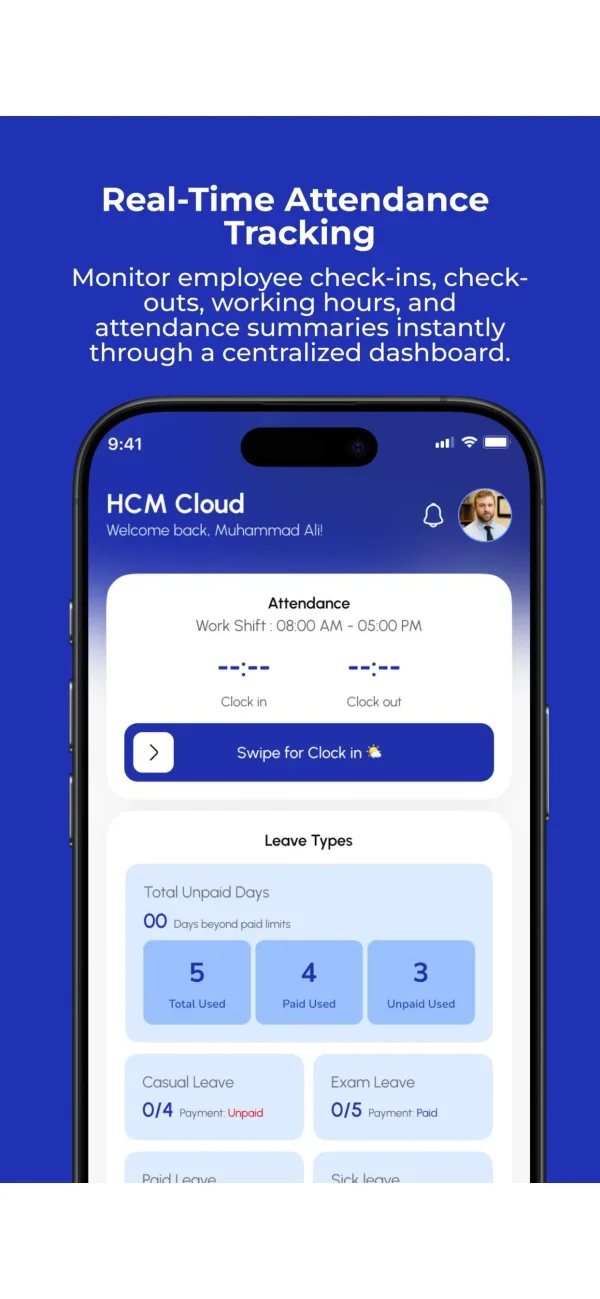
HCM Cloud is a workforce-management app that helps organizations manage employee attendance, leave, working hours, and HR information from a mobile device.
Organizations can get started by submitting their details through the **Get Started** option. Our team will contact the organization to complete the onboarding process. Once an organization is onboarded, employees can access HCM Cloud using credentials provided by their organization.
### Attendance Management
• Clock in and clock out using secure QR code scanning
• Live work timer after check-in
• Swipe-to-clock attendance
• Automatic attendance status restoration
• Support for overnight and night shifts
• View complete attendance history
### Break Management
Available for eligible organizations.
• Start and end work breaks
• Break timer tracking
• Automatic break restoration after reopening the app
### Leave Management
• Submit full-day leave requests
• Apply for partial-day leave
• View leave balances
• Track request status
• Monitor approved, pending, and rejected leave requests
### Work Hours
Available for supported organizations.
• Weekly work summaries
• Bi-weekly work summaries
• Monthly work summaries
• Progress toward working-hour targets
• Overtime calculations
### Attendance History
• Filter attendance by date range
• View check-in and check-out times
• Track overtime
• Review break duration
• View attendance status and working hours
### Employee Profile
• View personal information
• Update profile details
• Change profile photo
• Update contact information
• Secure password management
### Secure Authentication
• Secure employee login
• OTP-based password recovery
• Persistent login session
• Protected employee data
### Key Features
• QR Code Attendance
• Attendance History
• Leave Requests
• Work Hours Tracking
• Employee Profile
• Break Management
• Night Shift Support
• Secure Authentication
• Organization-specific HR Features
### Get Started
New organizations can use the **Get Started** option to submit their organization and contact details. Our team will review the request and contact the organization to complete onboarding and discuss the appropriate service plan.
Employees of onboarded organizations can sign in using credentials provided by their organization.
### Privacy
HCM Cloud respects employee privacy.
The app does not collect continuous GPS or real-time location data.
Employee information is used for attendance management, HR operations, payroll support, authentication, and organizational reporting. Access to employee information is controlled by the organization's authorized HR and administrative personnel. Employee data is not sold.
### Support
Email: [contact@parekhsenterprises.com](mailto:contact@parekhsenterprises.com)
Privacy Policy: https://hrm.gtsolutionsusa.com/App/privacy-policy
Terms & Conditions: https://hrm.gtsolutionsusa.com/App/terms-conditions
What’s new
Version 1.6.0 · Oct 10, 2026
- Improved overall app performance and stability.
- Enhanced attendance filtering for better accuracy and efficiency across multiple time zones.
App privacy
What Khizer Parekh declares on the App Store about how this app handles data.
-
Data linked to you
May be collected and linked to your identity.
- Contact info
- User content
Privacy practices may vary, for example with the features you use or your age.
Information
- Seller
- Khizer Parekh
- Category
- Productivity
- Version
- 1.6.0
- Updated
- Oct 10, 2026
- Released
- Sep 2, 2026
- Size
- 34.9 MB
- Requires
- iOS 15.1 or later
- Age rating
- 9+
- Languages
- English
- Copyright
- © Parekhs Enterprises
You might also like
-
 Suma — Make Hours CountDeep work, together
-
 Task Manager: Daily To-DoReminder, Checklist & Planner
-
 Pure 1Productivity
-
 IntrigmaPhysician and Nurse Scheduling
-
 Ultimate Planner AppWhere Paper Meets Digital
-
 Resistor : electronics toolsEverything resistor
-
 HourSum: Work Hours CalculatorWork days, timesheet & pay log
-
 Time Tracker : TimyLog Daily Work Hours & Routine
-
 Lekh: Diagram & Flowchart AppWhiteboard, Mind Map & Sketch
-
 PDF To PPT AppPDF To PPT Convertor