
IdVault - Secure Documents
Encrypted Vault & OCR Scanner
Designed for iPhone, iPad, iPod touch
In-app purchases
- Age rating4+
- CategoryProductivity
- DeveloperBENEDETTO RIBA
- LanguagesItalian
- Size62.8 MB
Links to the official App Store page
Download.org hosts no file of IdVault - Secure Documents. The button opens its official App Store page, published by BENEDETTO RIBA. Listing last checked on Nov 13, 2026.
Screenshots
About
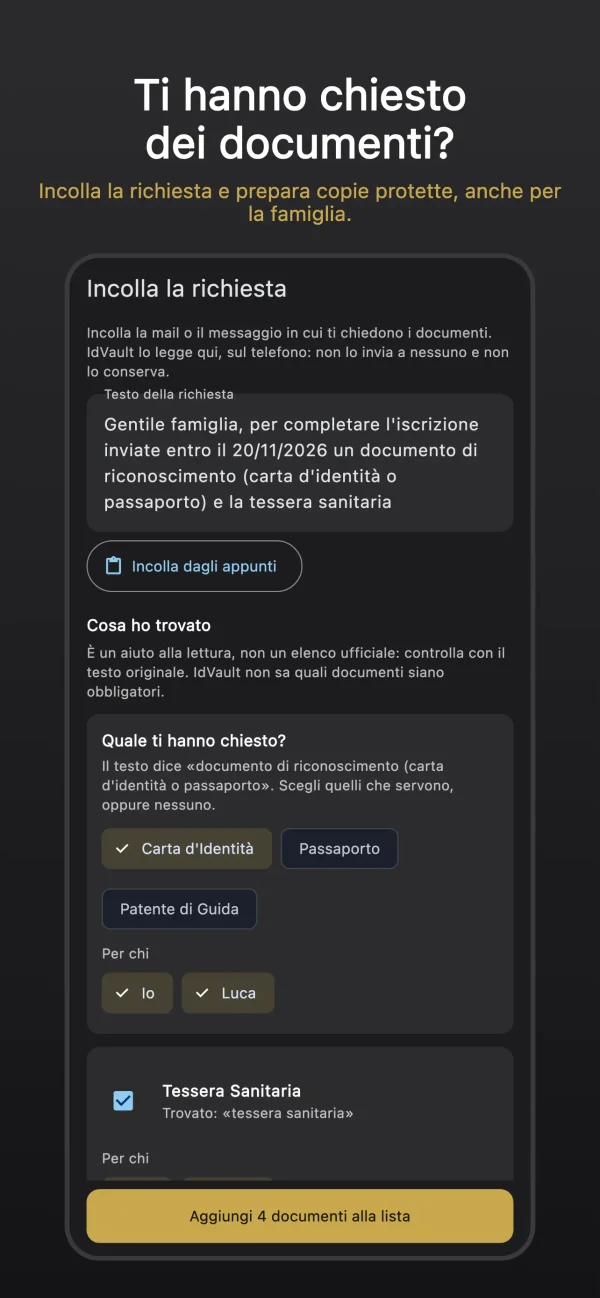
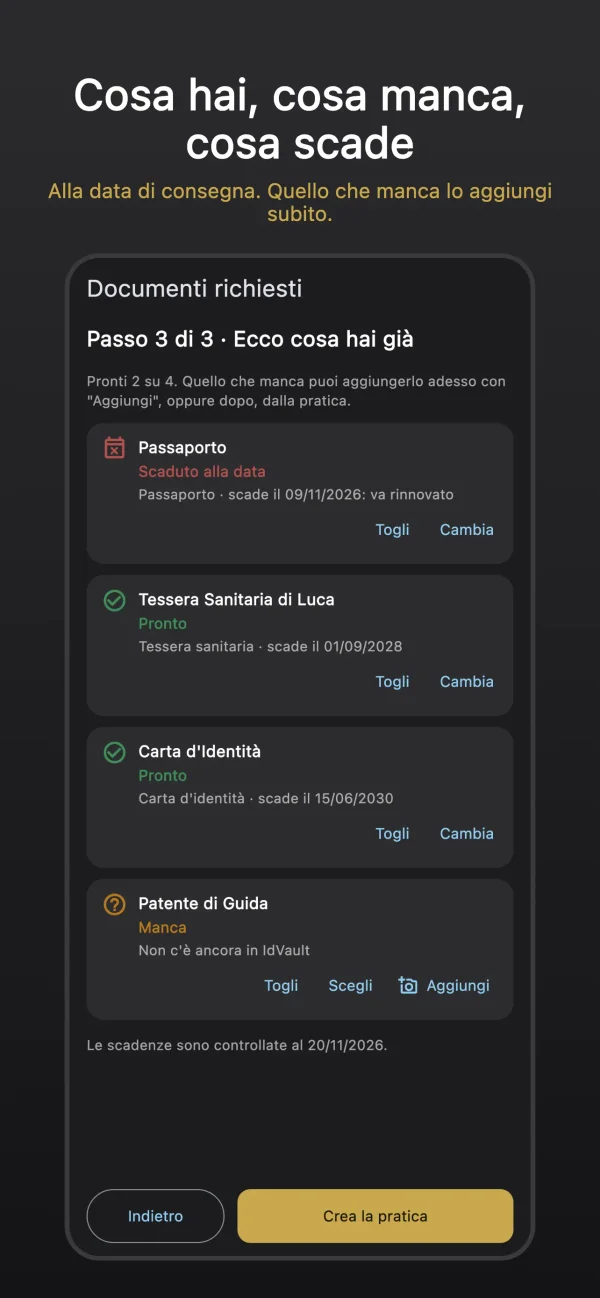
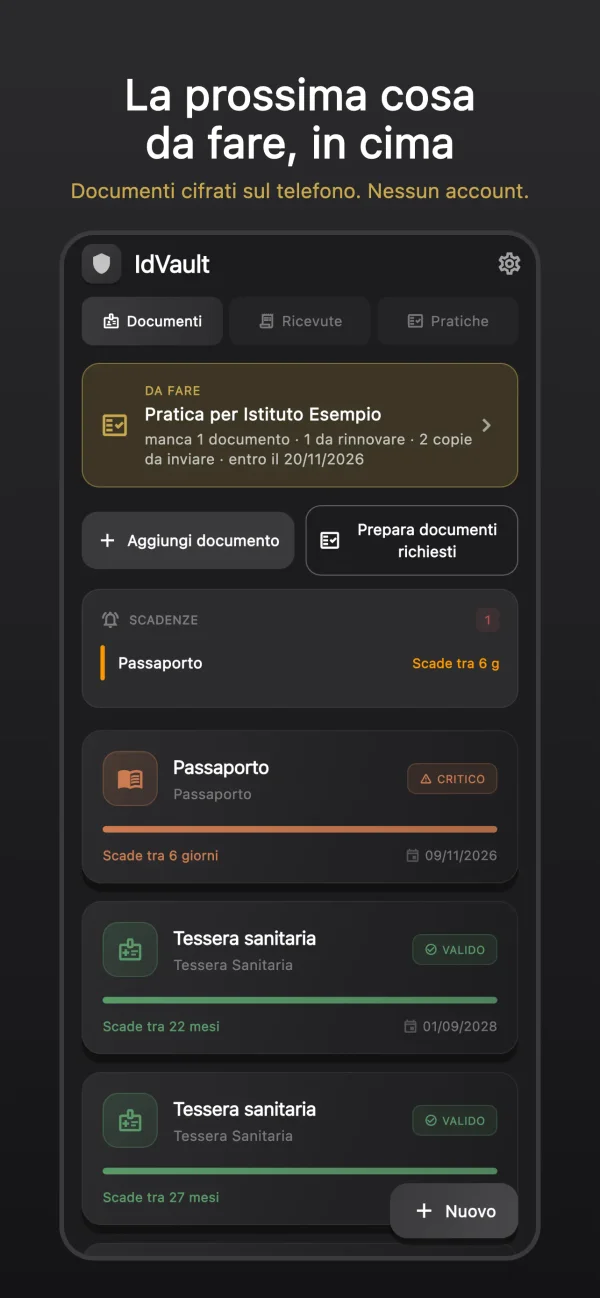
When a school, insurer, agency or office asks for your documents, paste their email into IdVault: the app recognises the documents mentioned, shows which ones you already have, which are missing and which will have expired by the deadline, and helps you send a watermarked copy. All on iPhone, with no account. The app interface is currently in Italian.
PRATICHE (DOCUMENT REQUESTS)
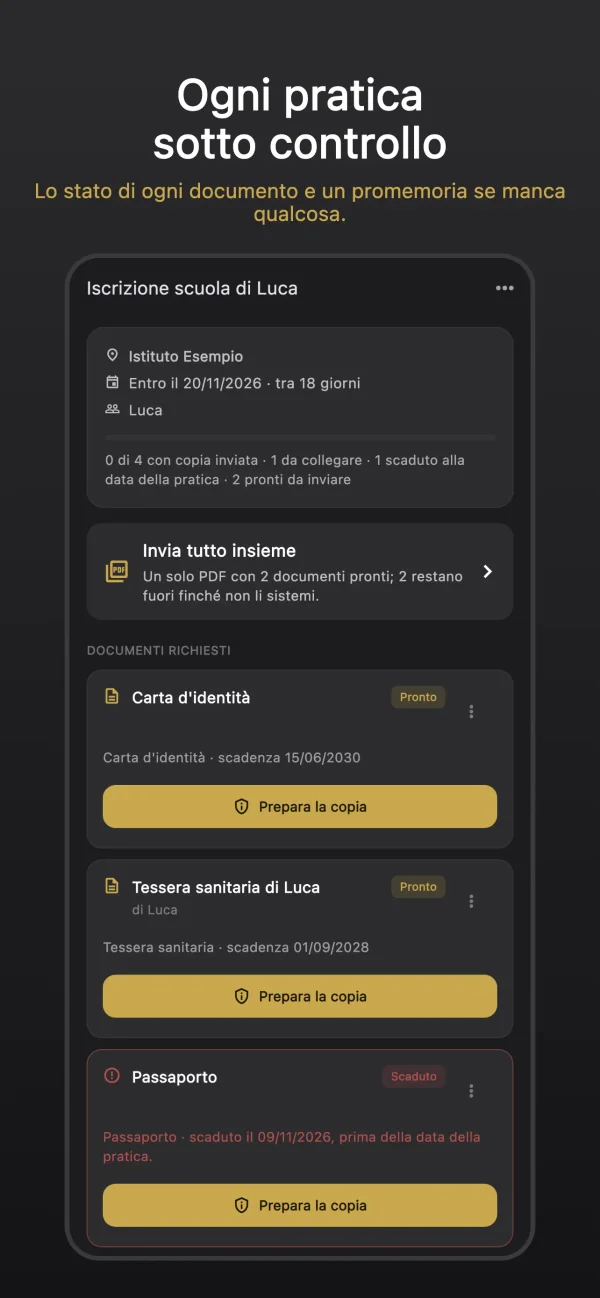
Tap "Prepara documenti richiesti", enter who the documents are for and by when, then paste the text of the request or pick what you were asked for. The text is read on the phone, never sent anywhere or stored, and when the request leaves a choice ("identity card or passport") you decide: it is a reading aid, not a list of requirements. IdVault suggests the documents you already have, for the right family member, and checks they are valid on that date. For each item you see whether the document is ready, missing or expired on the request's date. If it is missing, "Aggiungi" (add) opens the form already set up and links the new document to the item. If you wish, it reminds you two days before and on the day when something is still missing, without showing names or documents on the lock screen. The app warns you when a linked document belongs to another family member or is a different type from the one requested, and explains why. Every copy stays tied to the document version it was prepared from: if you renew the document, the request asks for a new copy.
EXPIRY REMINDERS
Choose how far in advance you are alerted. By default, notifications do not show the document name.
PROTECTED COPY
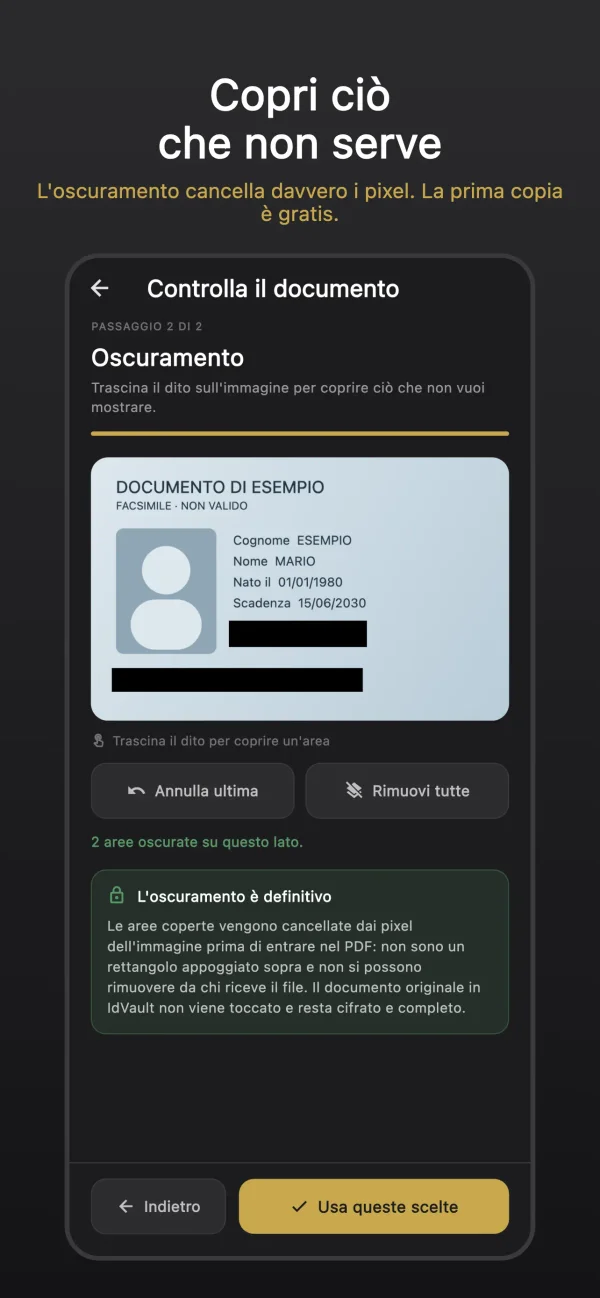
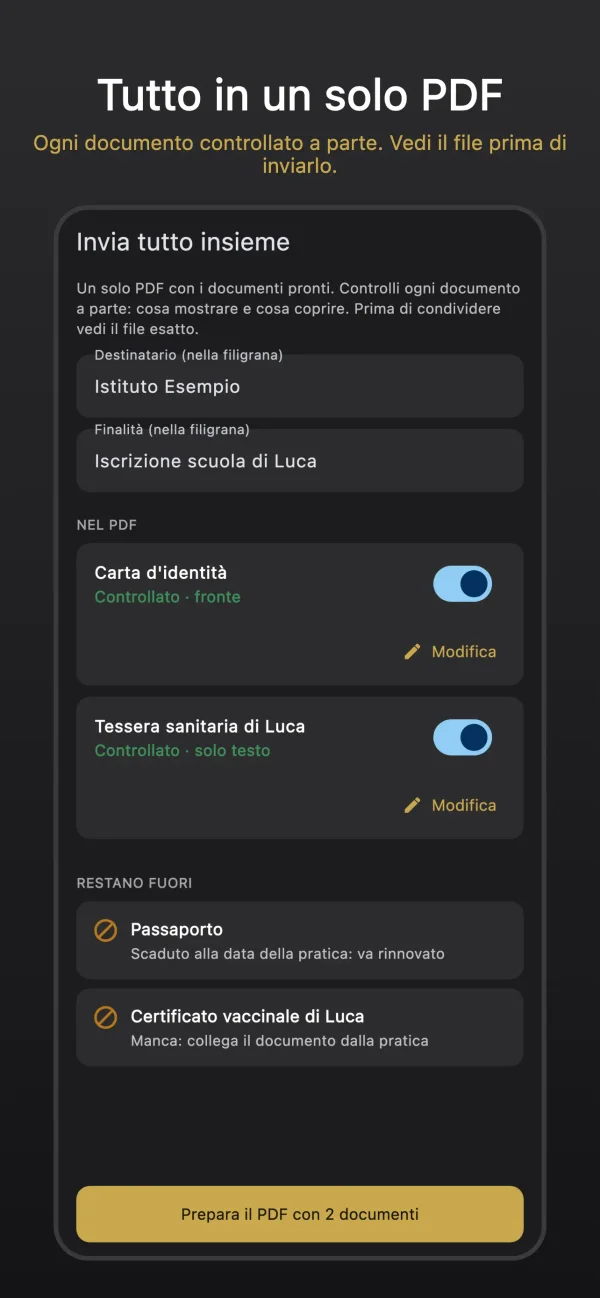
Choose the fields and images to include, redact parts of photos and add a watermark with recipient, purpose and date. Check the PDF before sharing; the original stays unchanged. With "Invia tutto insieme" (send everything together) you put a request's ready documents into a single PDF: each one is checked and redacted separately, and before sharing you see exactly the file that will be sent. In requests the app records when and to whom you sent the copy, but it cannot know whether the recipient received or opened it. A watermark does not prevent copying or forwarding the file.
SCANNING AND FAMILY DOCUMENTS
Frame the document, check and correct the recognised details, then save. Text recognition runs on the device. Keep identity cards, passports, driving licences, health cards and other documents, including your family's, together with receipts and warranties.
PRIVACY
No mandatory account. Your data stays on the device, encrypted with AES-256 and protected by device authentication, until you choose to export or share it. No advertising or analytics SDKs. The key that opens your documents stays on this iPhone: to find them on another phone, create a backup and keep it off the phone, together with its password.
FREE
• Up to 3 documents
• Expiry reminders, receipts and family members
• Your first complete scan: it only counts once you save the document
• Your first protected copy of a document: it only counts once sharing is completed
• One request at a time: delete it and the slot is free again
• Password-protected encrypted backup, saved to Files or another device, and restore: all documents in the backup come back
PRO
• Documents, scans, protected copies and requests without the free plan's limits
• Single send: several documents of a request in one PDF
• Temporary sharing via QR code and document renewal
Choose a monthly subscription or a one-time purchase, at the prices shown by the App Store. The subscription renews automatically unless cancelled in your Apple account settings. If you already bought Pro you keep your rights: use "Ripristina acquisti" (Restore purchases). Saved documents remain accessible when a subscription ends.
The app stores copies of documents and does not replace the originals.
Support: support@benedettoriba.com
Privacy: https://benedetto69.github.io/idvault-privacy/
Terms: https://www.apple.com/legal/internet-services/itunes/dev/stdeula/
What’s new
Version 2.8.1 · Nov 9, 2026
App Store purchases now reach the app.
• An IdVault Pro purchase started from the App Store page now completes in the app, after you unlock it with Face ID
• If you already have Pro, lifetime or monthly, the app tells you and charges nothing
App privacy
What BENEDETTO RIBA declares on the App Store about how this app handles data.
-
Data not collected
The developer does not collect any data from this app.
Privacy practices may vary, for example with the features you use or your age.
Information
- Seller
- BENEDETTO RIBA
- Category
- Productivity
- Version
- 2.8.1
- Updated
- Nov 9, 2026
- Released
- Feb 17, 2026
- Size
- 62.8 MB
- Requires
- iOS 15.5 or later
- Age rating
- 4+
- In-app purchases
- Yes
- Languages
- Italian
- Copyright
- © 2026 Benedetto Riba
You might also like
-
 Life Vault : Digital LegacyFamily Records & Documents
-
 RePlan: Daily Planner & To-DoHabit Tracker, Tasks, Calendar
-
 Copernico FornitoreProductivity
-
 Julia RomaRoma Capitale's official AI
-
 ExcalidrawZWhiteboard & Diagrams
-
 TeamSystem AuthenticatorProductivity
-
 Day Counter widgetBirthday & Event Reminders
-
 Novelist - Write novelsYour novel, anytime, anywhere