iKnowMom
Teen Spending, Parent Approved
Designed for iPhone, iPad
Free · In-app purchases
- Age rating4+
- CategoryFinance
- DeveloperJulian Smiles
- LanguagesEnglish
- Size99.1 MB
Links to the official App Store page
Download.org hosts no file of iKnowMom. The button opens its official App Store page, published by Julian Smiles. Listing last checked on Nov 23, 2026.
Screenshots


About
Being a present parent isn't about control. It's about knowing.
Knowing they got to school. Knowing they're home by curfew. Knowing where their money goes before it becomes a problem. Most parents find out about late nights, risky driving or overspending only after something goes wrong, and by then the talk is reactive and defensive. iKnowMom helps you stay ahead with your teen's consent and full transparency: where they are, how they drive and how they spend, all in one calm app.
FAMILY LOCATION (FREE)
Live family map with everyone's battery level
Saved places like Home and School, with arrival and departure alerts
"Be home by" reminders, plus alerts for low battery or a phone that goes quiet
Family timeline: arrivals, drives and purchases in one list
Lock Screen widget and Live Activity to see your family at a glance
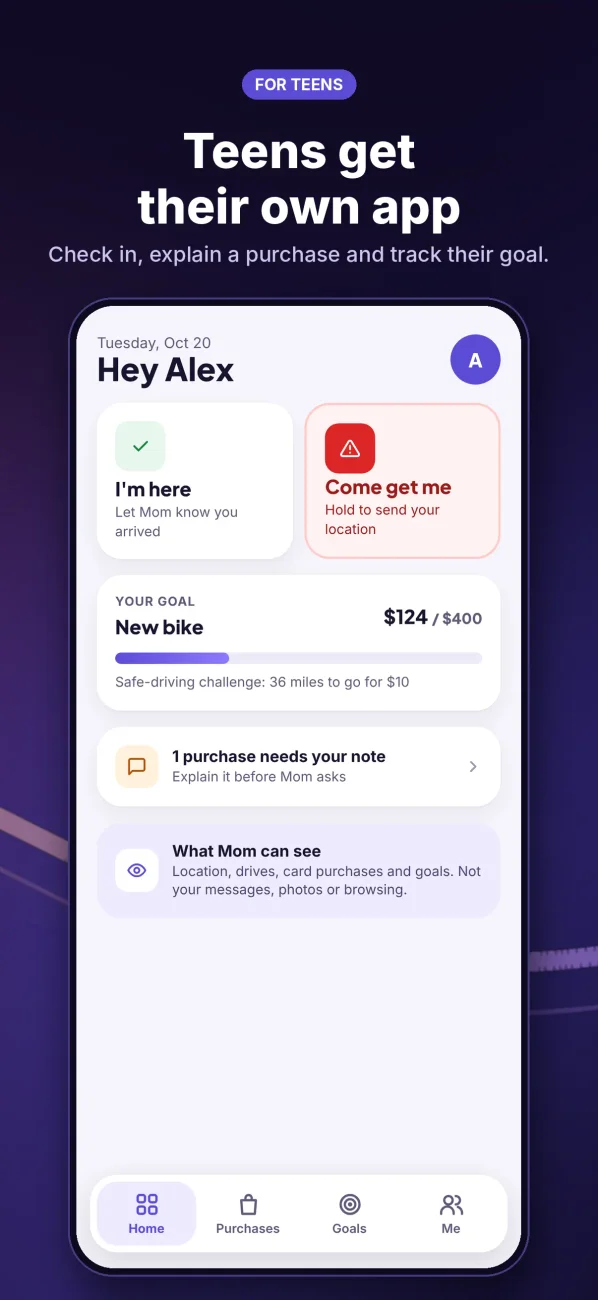
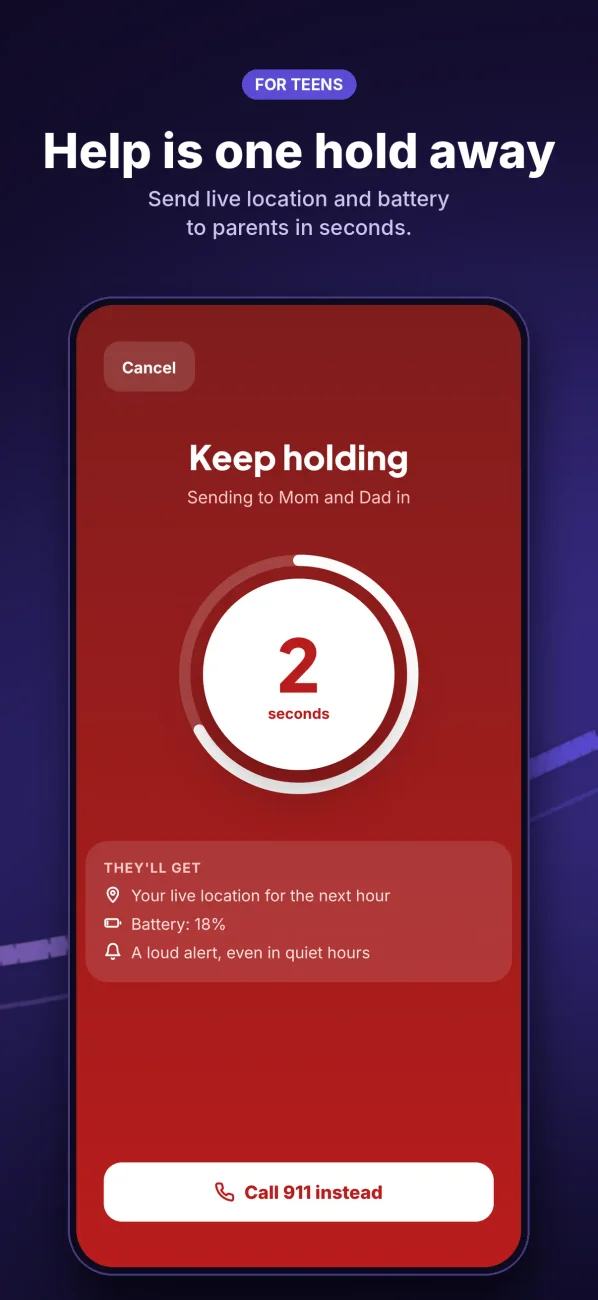
Teens turn sharing on themselves, can pause or stop it anytime, and have a "Come get me" button. You're told when sharing changes
Location history is deleted automatically after 7 days
DRIVING SAFETY (FREE)
Drives are detected automatically from the phone. No extra device needed
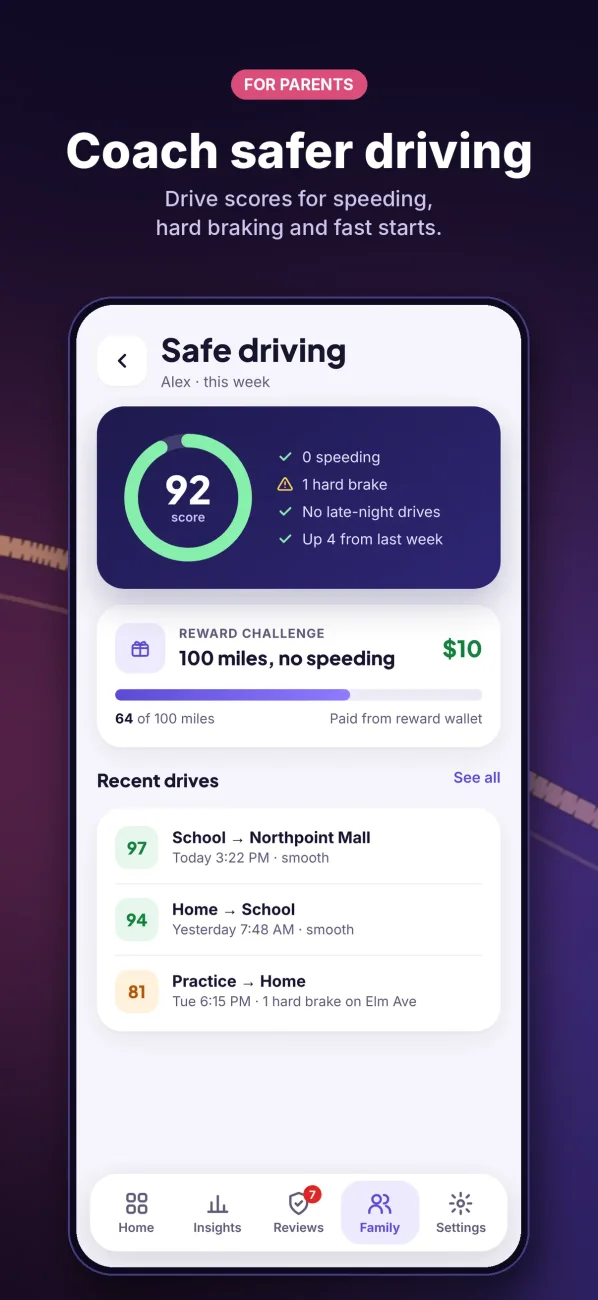
Route, distance, top speed and a safety score for every trip
Alerts for hard braking, rapid acceleration, speeding and late-night driving
Safe-driving challenges: "100 miles, no speeding" earns a reward
Drive history is deleted automatically after 90 days
SPENDING GUIDANCE (PLUS AND FAMILY)
Securely connect your teen's bank accounts, cards and Cash App, Venmo or Zelle through Plaid, so conversations start with understanding, not suspicion.
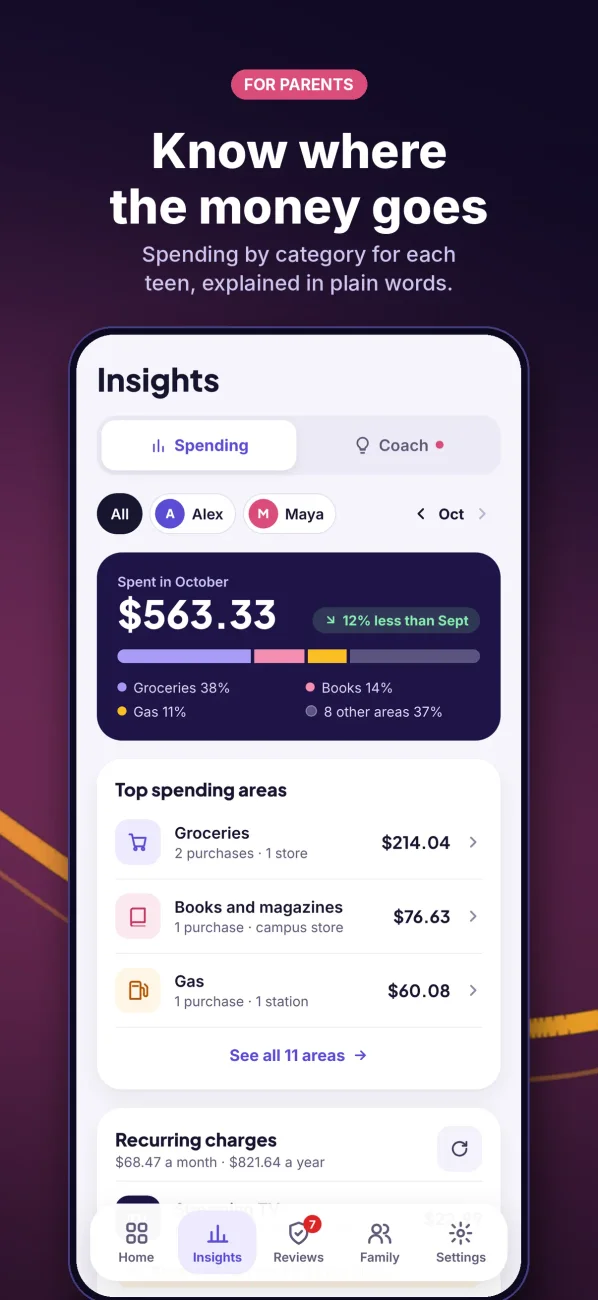
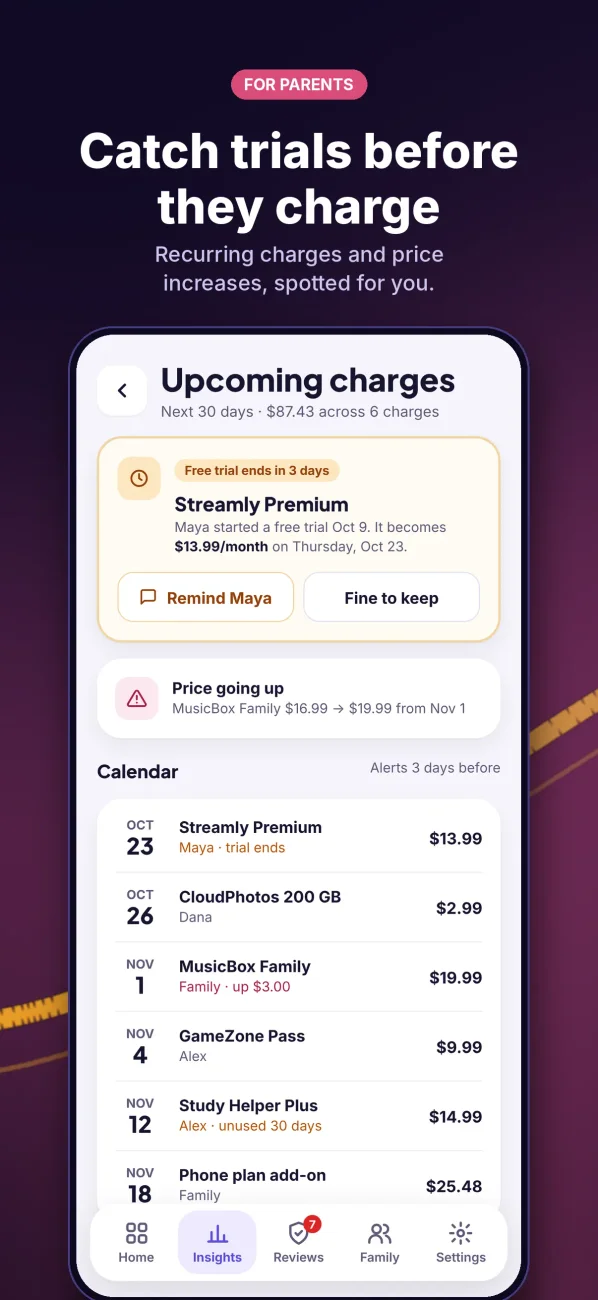
Balances, transactions and recurring charges, with a calendar of what renews next
Alerts for purchases over your limit. Mark them "Looks good" or "Let's talk"
Smart limits that suggest a new limit from the last 8 weeks
A Sunday recap, insights, a Financial Coach and Ask iKnowMom
REWARDS THAT CHANGE BEHAVIOR (FAMILY)
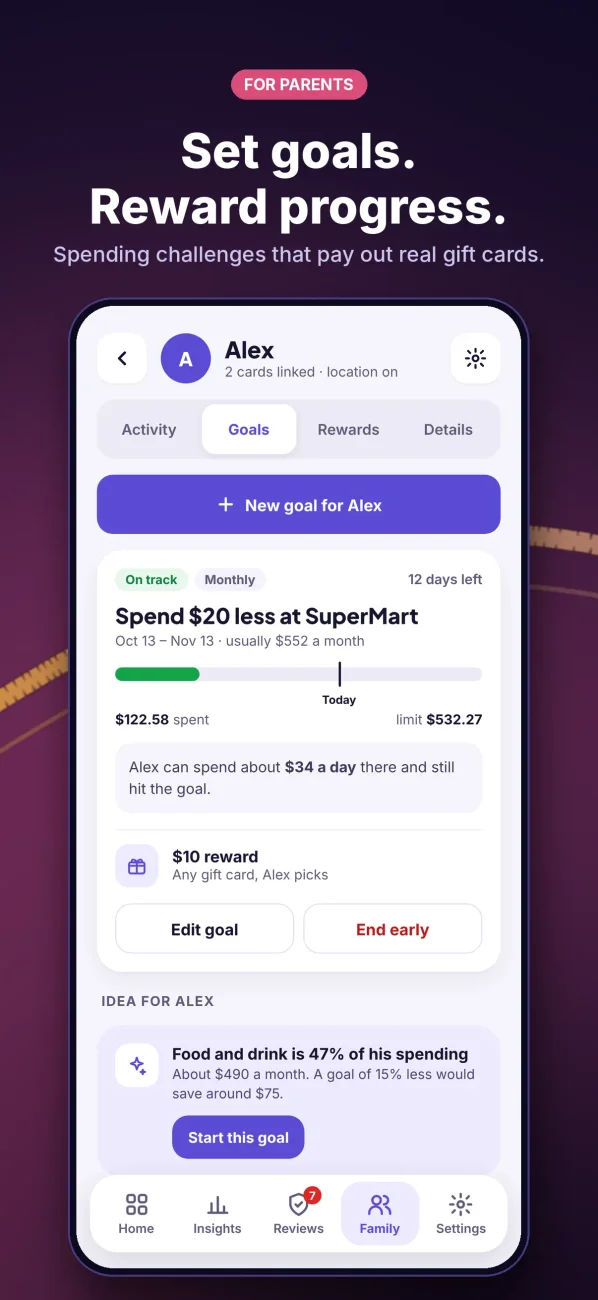
Set a goal, like staying under budget, and reward progress with gift cards from popular brands, sent right in the app. The goal isn't to catch them. It's to raise them.
TWO PARENTS, ONE VIEW
Invite a partner or co-parent. You both see the same family and can review purchases together.
OLDER RELATIVES, WITH THEIR AGREEMENT
They choose what to share. You're told if a day looks clearly different from their routine, and, if they connect their bank, about possible scams like gift cards, wire transfers or large cash withdrawals. You never see the rest of their spending.
PRIVACY AND SECURITY
Location sharing starts only when the person turns it on
Bank connections are read-only. We never store bank logins and can't move money
Your data is never sold, and financial data is never used for ads
Ask iKnowMom sends a short summary of your family's data to an AI service to write its answer
Delete your account and data anytime in Settings
You're not a helicopter parent. You're an intentional one.
PLANS
Free: family location, places, alerts and drive history.
Plus: everything in Free, plus bank and card connections for 1 teen, alerts, subscription tracking, insights, goals and reviews.
Family: everything in Plus for up to 5 teens, plus the rewards wallet and priority support.
New accounts get a 14-day free trial of all features. No credit card needed.
Plus: $2.99/month or $29.99/year
Family: $5.99/month or $59.99/year
Plus and Family are auto-renewing subscriptions billed to your Apple ID at confirmation of purchase. They renew automatically unless cancelled at least 24 hours before the end of the current period, and renewal is charged within the 24 hours before the period ends. Manage or cancel anytime in iPhone Settings > your name > Subscriptions.
Privacy Policy: https://iknowmom.com/privacy
Terms of Use: https://iknowmom.com/terms
What’s new
Version 2.2 · Nov 18, 2026
- Big Fixes and Optimizations for iPhone Duo
A fresh look, and a lot more to help you stay in the loop.
A new design, everywhere
Every screen has been redesigned with a softer, simpler look, a new floating tab bar, and larger buttons that are easier to tap.
For parents
Family timeline. Arrivals, drives and purchases in one list, in the order they happened. A purchase over the limit shows "Let's talk" and "Looks good" right where it happened.
Weekly recap. Every Sunday evening, a short summary of the week: drives, driving scores, spending, goals, and a suggested line to bring up at dinner.
Upcoming charges. See renewals for the next 30 days, remind your teen about a charge that's coming, and spot price increases.
Safety alerts. Choose what you hear about: be-home times, low battery, location gone quiet, new places, and fast driving.
Smart limits. Set a "review above" amount for each spending category, with suggestions based on the last 8 weeks.
Safe-driving rewards. See each teen's driving score and what makes it up, and set a challenge like "100 miles, no speeding = $10."
"Let's talk" starters. When you flag a purchase, get three friendly ways to start the conversation and a 60-second money lesson. Send a note in the app, or talk in person.
Ask iKnowMom. Ask questions about your family, such as "How did Alex do this month?", and get an answer with the key numbers and links to the right screens.
Be home by. Set a time for each teen and get an alert if they aren't home.
Reviews, simplified. Purchases now say why they were flagged. Everyday purchases are grouped into one "All good" tap.
Insights. Recurring charges now show only real subscriptions and bills, with price-increase warnings.
Easier setup. A new step-by-step setup guides you through your profile, adding a teen, connecting a bank and assigning cards. You can go back to any step.
Sign in your way. A new welcome screen, with sign-in by emailed code, text code, Apple or Google.
For teens
A redesigned home with big "I'm here" and "Come get me" buttons.
Come get me. Hold the button to send your location and battery level to your parents, with a "Call 911 instead" button.
Add a note to a purchase before your parent reviews it, and see how past purchases were reviewed.
See what your parents can and can't see, and which alerts are on.
Widgets and more
New Home Screen widgets: family location, purchases to review, and driving score.
More accurate drives. Bad GPS readings, like impossible speeds, are now filtered out.
Notification settings now work as shown, including quiet hours. Safety alerts still come through.
Location and drive history stay free.
Thank you for using iKnowMom. We'd love to hear what you think.
App privacy
What Julian Smiles declares on the App Store about how this app handles data.
-
Data linked to you
May be collected and linked to your identity.
- Purchases
- Financial info
- Location
- Contact info
- Identifiers
-
Data not linked to you
May be collected but is not linked to your identity.
- Contact info
- Usage data
- Diagnostics
Privacy practices may vary, for example with the features you use or your age.
Information
- Seller
- Smiles Ventures, LLC
- Category
- Finance
- Version
- 2.2
- Updated
- Nov 18, 2026
- Released
- Apr 27, 2026
- Size
- 99.1 MB
- Requires
- iOS 16.4 or later
- Age rating
- 4+
- Price
- Free
- In-app purchases
- Yes
- Languages
- English
- Copyright
- © 2026 iKnowMom, LLC. All rights reserved.
You might also like
-
 Split Pay: Get Paid BackEverything stays on-device
-
 FilltoGoColor Your Cause
-
 SplitHome: Roommate Bill SplitExpenses, utilities & IOUs
-
 BillHive: Bill SplittingBills, Checks & Trip Splits
-
 Rooted: Budget & Money CoachSavings advice, no bank link
-
 Payly — Your pay linkOne link, every way to pay you
-
 GigDelivery+: Mileage TrackerGig Delivery Driver Earnings
-
 AI Receipt Scanner TrackerExpenses, Tax Reports & Logs
-
 Receipt Scanner – Tax ExportBusiness expense tracker, CSV
-
 What's Left - Money TrackerFinance