
IPTCPhotoSender
Caption & FTP for press photos
Designed for iPhone, iPad
Free · In-app purchases
- Age rating4+
- CategoryPhoto & Video
- DeveloperYoshiharu Aoki
- LanguagesEnglish+ 1 more
- Size9.4 MB
Links to the official App Store page
Download.org hosts no file of IPTCPhotoSender. The button opens its official App Store page, published by Yoshiharu Aoki. Listing last checked on Nov 18, 2026.
Screenshots





About
[From the Developer]
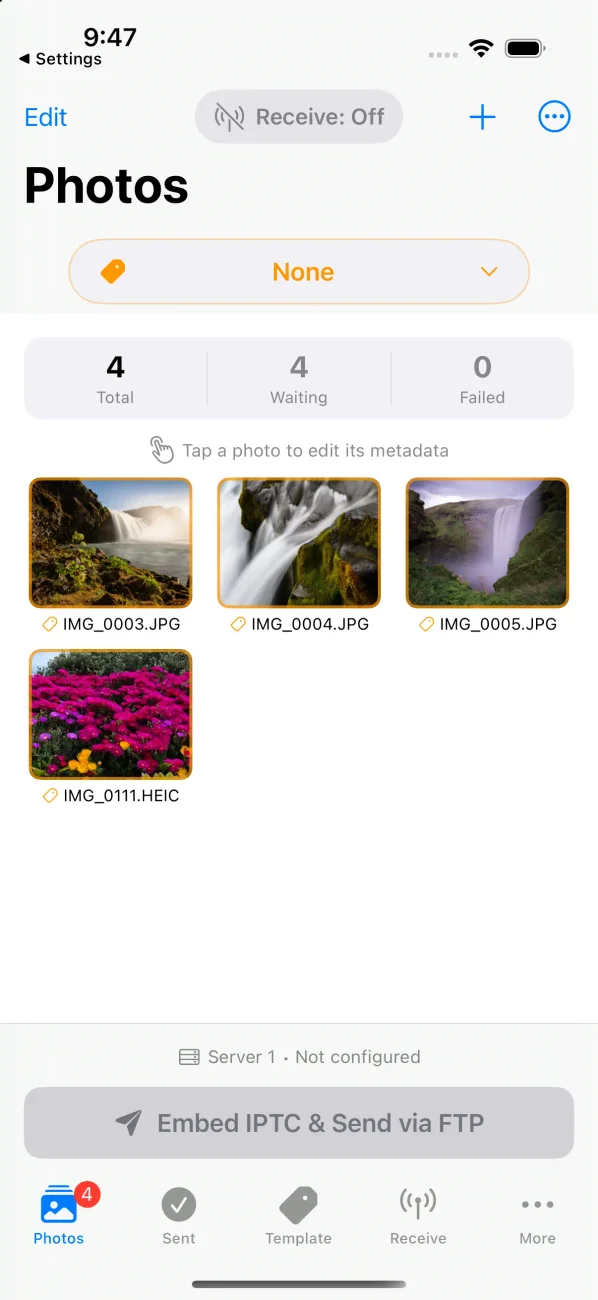
As a news agency photographer, I built this app for my own daily work — to send images to the desk instantly from iPhone or iPad, and help photographers deliver breaking news faster.
Shoot. Caption. Send. Straight from the field, in seconds.
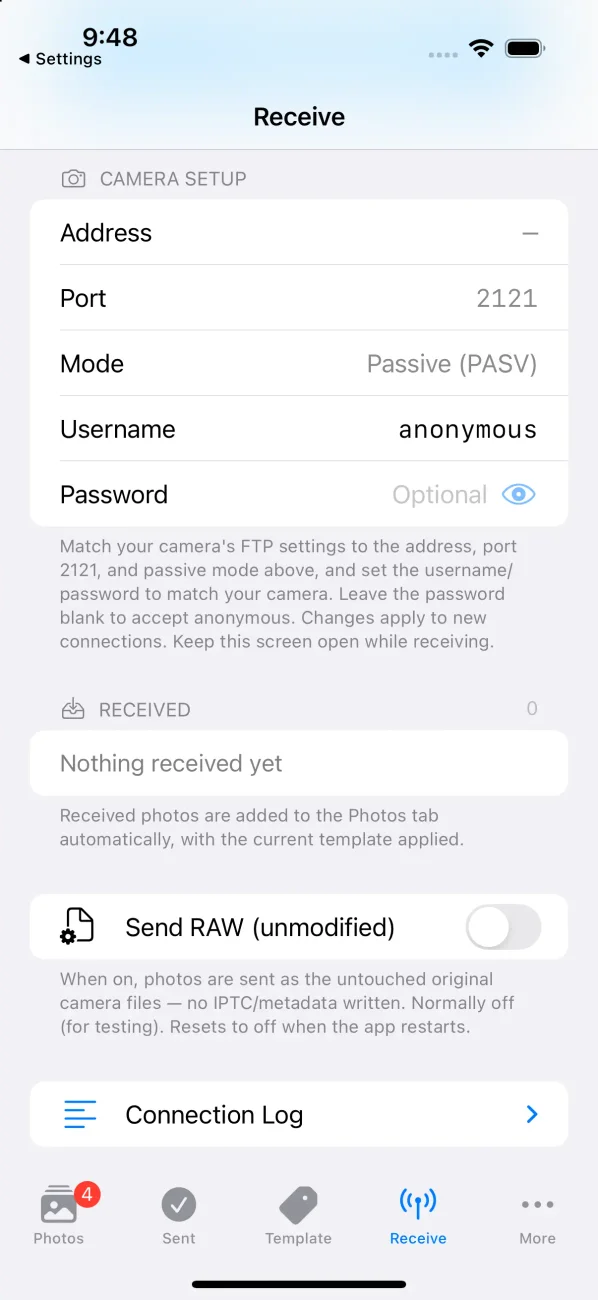
IPTCPhotoSender is the all-in-one wireless workflow for press and sports photographers. With a BUILT-IN FTP SERVER, your camera sends photos straight into the app — no separate receiver app and no computer needed. Add IPTC captions and credits with reusable templates, then transmit to your desk over FTP, all on your iPhone or iPad.
RECEIVE WIRELESSLY
- Built-in FTP server receives photos directly from FTP-capable cameras (Canon, Nikon, Sony, and more).
- No tethering app or PC needed — connect the camera and start shooting.
- Quick-connect to your camera's Wi-Fi from within the app, and save multiple named profiles to switch channels at busy venues with one tap. (Auto-connect is verified on Canon; other cameras with an access-point mode should work too.)
- Free camera connection settings and step-by-step guides on our support site.
VOICE TAGS (AUDIO MEMOS)
- Voice annotations recorded on the camera are received paired with their photos.
- Play them back on the photo editing screen, in both the Photos and Sent tabs.
- On sending, a voice tag stays linked to its photo and is delivered as a pair, so your spoken notes travel with the image.
IPTC METADATA & TEMPLATES
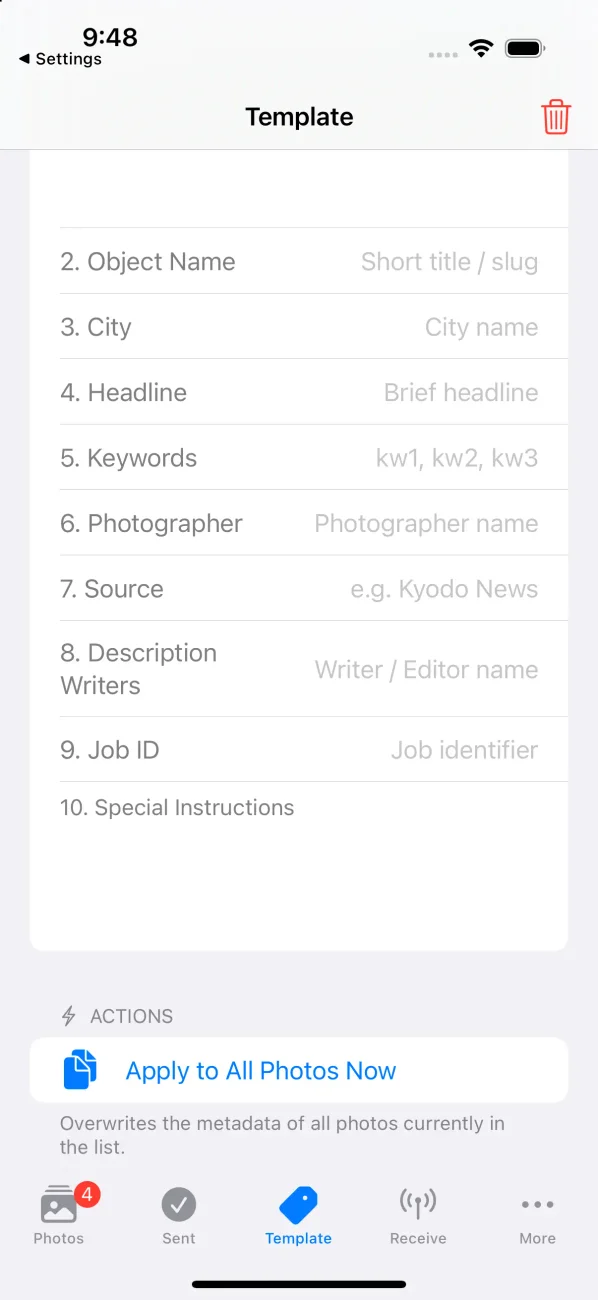
- 20 IPTC fields; choose which are shown and in what order.
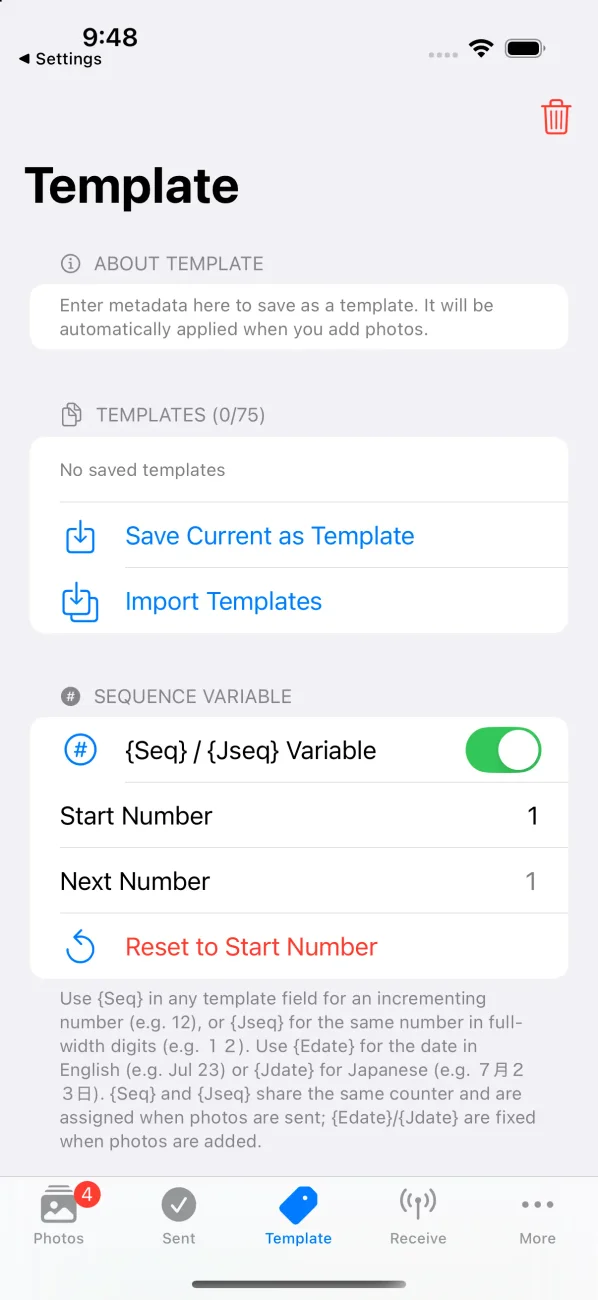
- Save reusable templates and apply them to all, selected, or individual photos.
- Gap-free sequence numbering: {Seq} / {Jseq} are assigned at the MOMENT OF SENDING, in capture-time order, and only to photos you actually transmit — so the last number is your exact sent count. Once assigned, a number stays locked even if you edit and resend. {Edate} / {Jdate} add dates automatically.
- Date/Time Created filled automatically from capture time, with the correct time zone.
- Lossless embedding — EXIF, maker notes, and image quality are preserved (no re-compression).
CODE REPLACEMENTS (Photo Mechanic compatible)
- Import game/event code files, or add your own personal codes in the app.
- Type a short code and it expands to the full text on apply.
- Sample codes are included.
FAST EDITING & REVIEW
- Full-screen preview to recognize shots at a glance.
- Swipe or tap between photos; scroll position is kept, so you can compare the same field across frames.
- Pinch-to-zoom the full image to check focus.
- Crop, voice-tag playback, and per-photo actions.
SEND & SHARE
- Send all, send only the selected photos, or send a single photo — stop any time.
- RAW / original send mode for unprocessed files.
- Share the metadata-embedded photo or the original via AirDrop / Mail / Messages.
- Multiple FTP server profiles.
- Sent list with resend and share.
BUILT FOR THE FIELD
- Screen Guard locks the screen while receiving or sending, so a stray touch won't interrupt a transfer.
- If a server or connection is briefly unstable, sending auto-retries to push through (up to 4 attempts with increasing waits), showing transfer progress and retry status.
- Export / import templates to share with colleagues.
- Fully bilingual: English and Japanese.
[Support]
Downloads, guides, and support:
https://halaoki.github.io/app-support/
Support email: support.iptcphotosender@gmail.com
[Subscription]
A 7-day free trial is available. After the trial, a subscription is required to continue using the app.
- Monthly Plan: $5.99
- Annual Plan: $59.99 (save 17%)
Payment is charged to your Apple ID at confirmation of purchase. The subscription renews automatically unless auto-renew is turned off at least 24 hours before the end of the current period. You can manage or cancel anytime in your Apple ID settings.
Terms of Use (EULA): https://www.apple.com/legal/internet-services/itunes/dev/stdeula/
Privacy Policy: https://halaoki.github.io/iptcphotosender-privacy/
What’s new
Version 3.3 · Nov 6, 2026
You can now save multiple camera connection profiles.
For photographers who switch channels (connection settings) to avoid congested Wi-Fi at stadiums and busy venues: save several named camera Wi-Fi profiles and switch to the best one for the day with a single tap. Add, edit, reorder, and delete them in the Receive tab.
• Save and switch between multiple camera connection profiles
• Minor stability improvements
Note: auto-connect is verified with Canon cameras; other cameras with an access-point mode should work the same.
Thank you for using the app. Please send any requests or issues our way via in-app support.
App privacy
What Yoshiharu Aoki declares on the App Store about how this app handles data.
-
Data not linked to you
May be collected but is not linked to your identity.
- User content
Privacy practices may vary, for example with the features you use or your age.
Information
- Seller
- Yoshiharu Aoki
- Category
- Photo & Video
- Version
- 3.3
- Updated
- Nov 6, 2026
- Released
- Jul 10, 2026
- Size
- 9.4 MB
- Requires
- iOS 17.0 or later
- Age rating
- 4+
- Price
- Free
- In-app purchases
- Yes
- Languages
- English, Japanese
- Copyright
- © 2026 Yoshiharu Aoki
You might also like
-
 Photographer's Pocket KnifeCull, edit and deliver photos
-
 Deadline EditorShoot. Deliver. Repeat.
-
 PressKit - Caption & SendIngest, caption, file to wire
-
 TheEditor photo editorThe Editor
-
 Fast Sports Photo EditorCull, tag & upload sports pics
-
 Shutdesk: Sports Photo FTPNo Laptop on the Sideline
-
 ImagExif 2 - edit exif dataPhoto GPS, Camera Info, EXIF
-
 White Balancer: Photo EditorCorrect color & temperature
-
 iLightningCam AILightning Strike Photography
-
 Photo Manager ProKeep photos organized & safe