
Journey Poster
Turn Photos into Journeys
Designed for iPhone
Free · In-app purchases
- Age rating12+
- CategoryPhoto & Video
- DeveloperShanghai Chongmu E - Commerce Co., Ltd.
- LanguagesEnglish+ 1 more
- Size57.0 MB
Links to the official App Store page
Download.org hosts no file of Journey Poster. The button opens its official App Store page, published by Shanghai Chongmu E - Commerce Co., Ltd. Listing last checked on Nov 21, 2026.
Screenshots



About
Turn photos into travel maps. Turn journeys into memories you can keep.
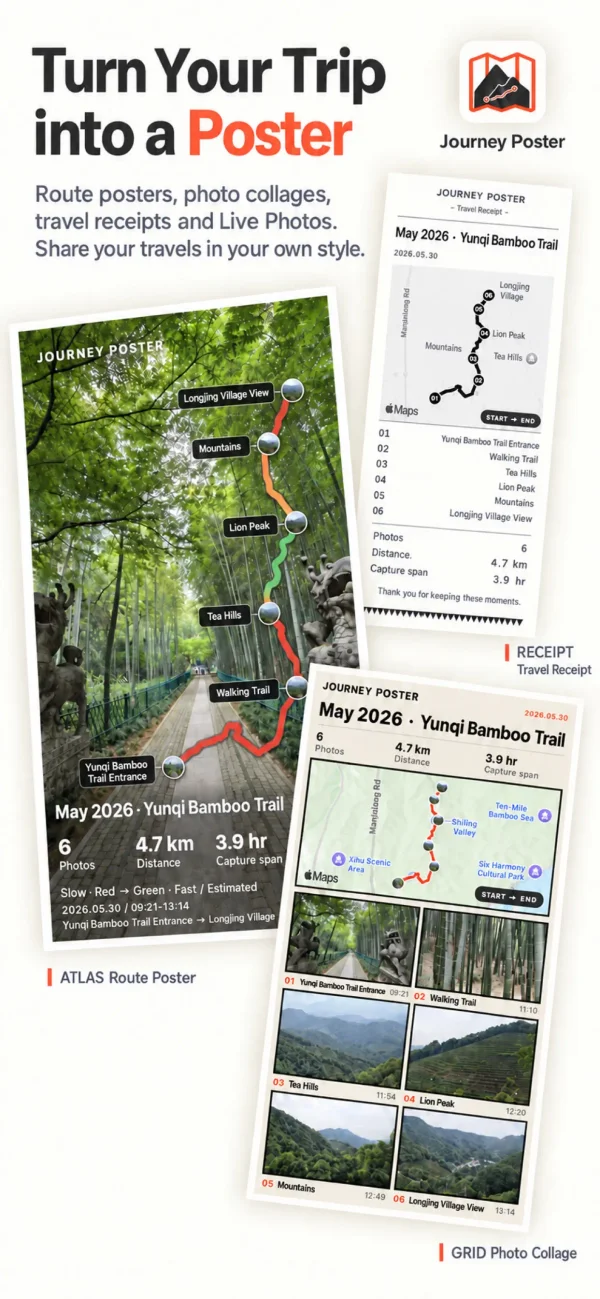
Journey Poster brings your travel photos and routes together as posters, collages, floating islands and silent Live Photos. Start with a recent trip or rediscover an adventure in your camera roll.
ORGANIZE YOUR JOURNEY
• Find your route through photos
Select photos with capture time and location information to connect places in chronological order. No GPS recording during your trip is required.
Photo-based routes connect or plan paths between photo locations and may differ from your actual journey. They are not complete GPS tracks or navigation guidance.
• Match photos to workout routes
Optionally import recorded walks, runs, hikes and rides from Apple Health when a readable GPS route is available.
Quick time selections help you match photos to the workout. Remove a photo from the journey without deleting the original from Photos.
CREATE YOUR ARTWORK
• ISLAND: A landscape of your memories
Combine terrain, satellite imagery, routes and photos into a floating island. Upgraded satellite imagery adds detail to the scenery. Adjust supported views and display options to shape your composition.
• Posters and maps: Tell the story of your route
Pair photos with routes in ATLAS. Arrange photos and maps across supported canvas proportions in GUIDE. Explore different compositions with FIELD, ROUTE and PPT.
• Collages and keepsakes: Find your style
Arrange photos in GRID, build a visual sequence with FILM, or turn places, routes and trip statistics into a RECEIPT keepsake.
Layouts, customization and export formats vary by template.
SAVE AND SHARE
• Still images
Preview your work, then export a single image, an image set or a long poster, depending on the template.
• Memories in motion
Supported templates create silent Live Photos or videos. Save a Live Photo to Photos and press and hold to play it. Playback after sharing depends on the receiving app or platform.
REVISIT YOUR TRAVELS
• Photo wall and timeline
Browse journeys through photos or in chronological order. Revisit the places and moments that belong together.
• Keep creating
Edit journey titles, place names and photo selections, then choose another template to give your memories a new expression.
PRIVACY AND CHOICE
• On-device processing and optional sync
Photo processing and artwork creation take place on your device. Original photos and complete routes are not automatically uploaded to our business servers.
Private iCloud sync is optional for supported ordinary photo journeys. Health-derived content stays in protected local storage, outside the app’s iCloud content sync. Works saved to Photos follow your Apple settings.
• Health access and geographic services
Apple Health access requires permission and is read-only. The app does not write Health data, read heart rate or clinical records, record live workouts or provide medical services.
Map and terrain services receive geographic information needed for their features. Our Privacy Policy and Workout Notice explain processing, limited feature-use analysis and your choices.
FREE EXPORTS AND LIFETIME UNLOCK
• Try it for free
Eligible accounts receive three free exports in total. Editing and previewing do not consume exports.
• Unlock with one purchase
Lifetime Unlock provides unlimited exports and removes the app’s branding footer. It is a one-time purchase, not a subscription, and does not renew. Required third-party credits remain. Restore Purchases is available in the app.
POLICIES AND TERMS
Privacy Policy: https://chongmuec.com/en/legal/privacy/v2.2.5/
Terms of Service: https://chongmuec.com/en/legal/terms/v2.2.1/
Paid Services: https://chongmuec.com/en/legal/paid-services/v2.0.1/
Workout Notice: https://chongmuec.com/en/legal/health-workout/v1.0.5/
Terms of Use (Apple Standard EULA): https://www.apple.com/legal/internet-services/itunes/dev/stdeula/
What’s new
Version 2.3.0 · Nov 13, 2026
1. Upgraded satellite imagery adds detail to floating island artwork.
2. Improved workout photo matching, clearer Apple Health guidance and refined template visuals.
3. Bug fixes and improvements to performance and stability.
App privacy
What Shanghai Chongmu E - Commerce Co., Ltd. declares on the App Store about how this app handles data.
-
Data linked to you
May be collected and linked to your identity.
- Purchases
- Location
- Contact info
- User content
- Identifiers
- Usage data
- Diagnostics
- Other data
-
Data not linked to you
May be collected but is not linked to your identity.
- Location
Privacy practices may vary, for example with the features you use or your age.
Information
- Seller
- Shanghai Chongmu E - Commerce Co., Ltd.
- Category
- Photo & Video
- Version
- 2.3.0
- Updated
- Nov 13, 2026
- Released
- Sep 16, 2026
- Size
- 57.0 MB
- Requires
- iOS 16.4 or later
- Age rating
- 12+
- Price
- Free
- In-app purchases
- Yes
- Languages
- English, Simplified Chinese
- Copyright
- © 2026 Shanghai Chongmu E-Commerce Co., Ltd.
You might also like
-
 Lumo - Smart Photo OrganizerYour smart photo assistant
-
 FLUX FCurate & present your photos
-
 ShutterMapPhoto Geotagging & GPX Tracks
-
 Pear Photos: Cleaner & SorterDuplicate Photo & Storage
-
 AmbleafVisual diary for city walks
-
 Space Travel AtlasPrivate family photo journeys
-
 Lumora · 光境Photo & Video
-
 Cues: Video Editing ReimaginedA revolutionary video editor
-
 PhotoAtlas: Travel MapTrips rebuilt from your photos
-
 图迹 PhotoTrailPhoto & Video