
Khamkui
Style your keys. Chat smarter.
Designed for iPhone
Free · In-app purchases
- Age rating4+
- CategoryProductivity
- DeveloperSupakitpon Samatayamontri
- LanguagesEnglish+ 1 more
- Size26.3 MB
Links to the official App Store page
Download.org hosts no file of Khamkui. The button opens its official App Store page, published by Supakitpon Samatayamontri. Listing last checked on Nov 23, 2026.
Screenshots



About
Khamkui — Style your keys. Chat smarter.
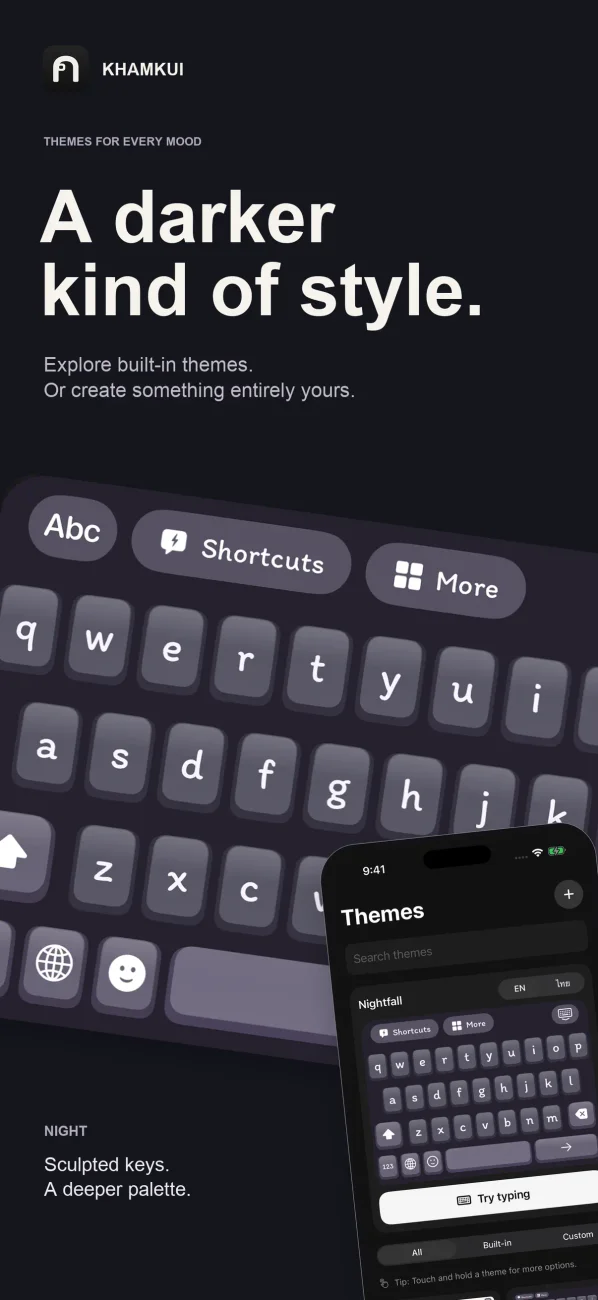
DESIGN EVERY DETAIL
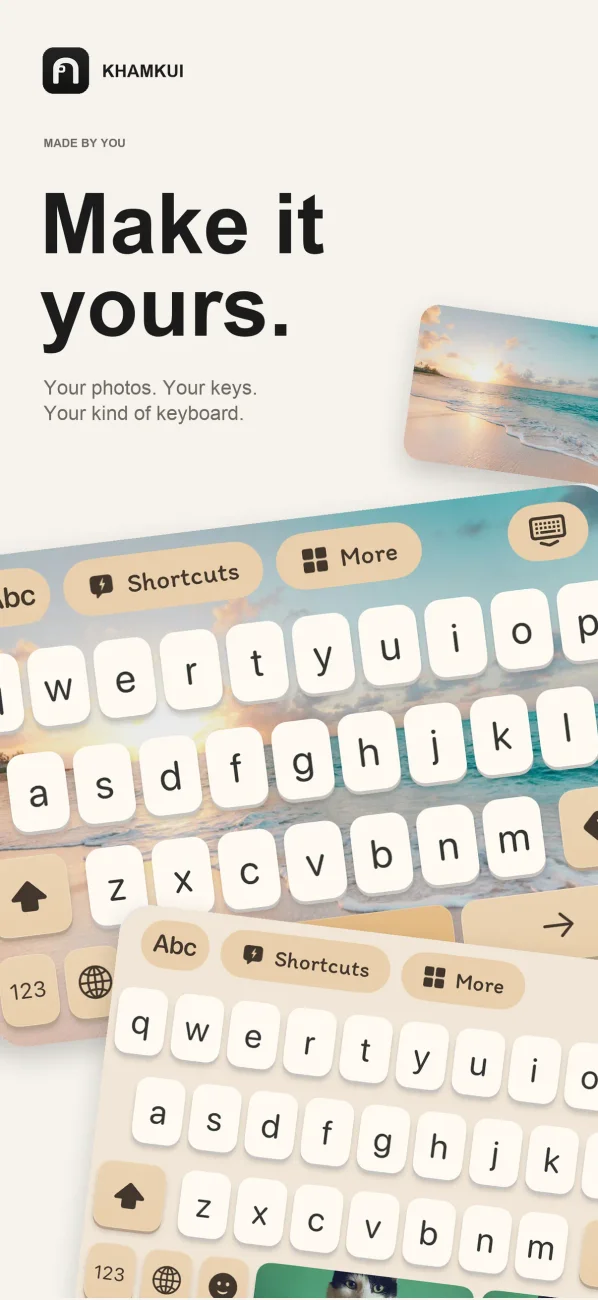
• Add and position photos on the background or individual keys.
• Choose solid colors or gradients, with background blur and dimming.
• Customize key shapes, corners, opacity, borders and depth.
• Change key-label fonts, size, weight and color.
• Style the whole keyboard, groups, rows or individual keys.
• Preview and share designs with custom press effects.
Create, edit and save custom themes for free; applying them requires Premium. Your keyboard keeps its chosen theme; the main app follows system appearance.
QUICK REPLIES THAT ADAPT
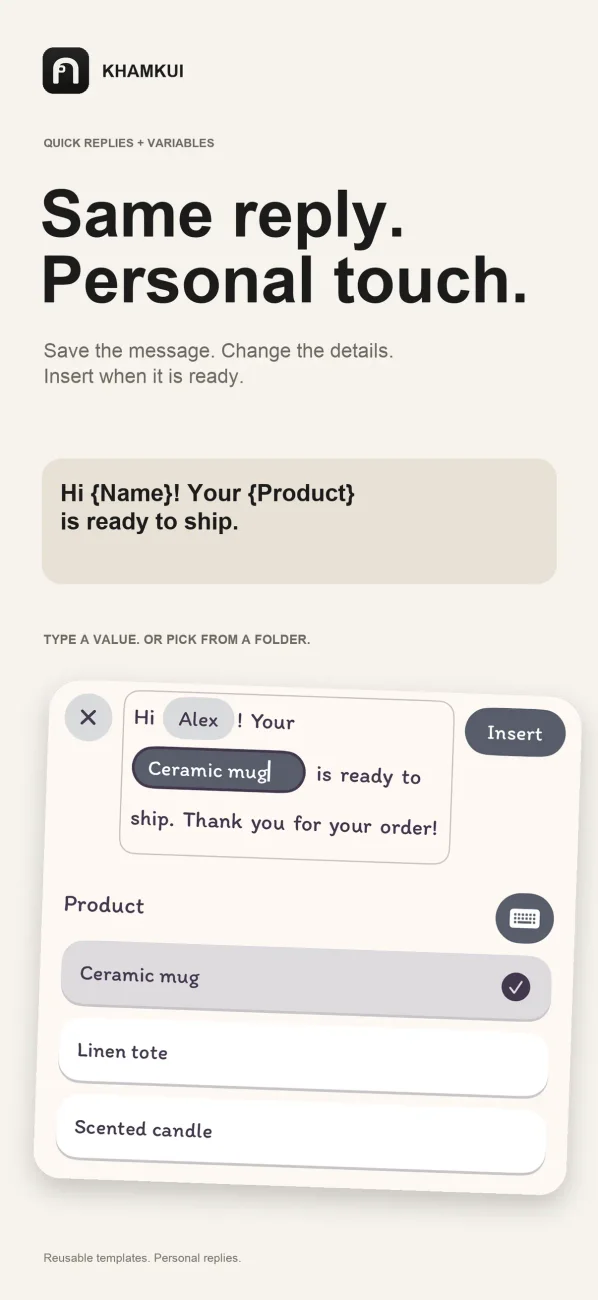
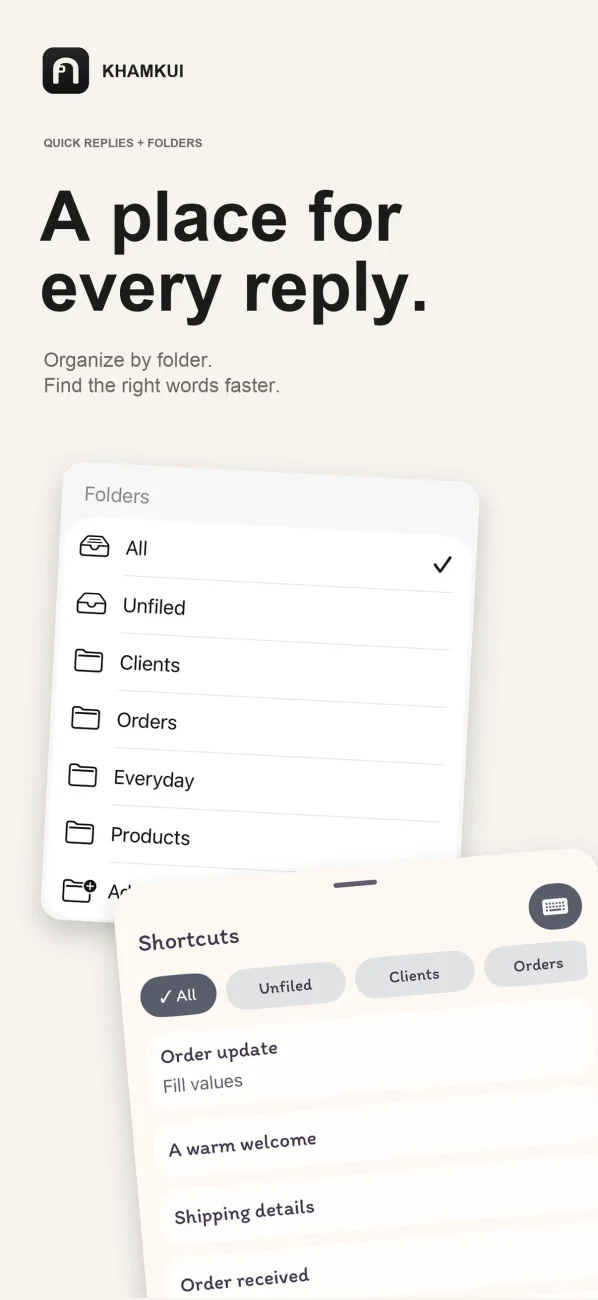
Organize saved replies into searchable folders. Add variables such as “Hi {name}, your total is {price}.” Fill in text or numbers, or choose a saved phrase from all or selected folders before sending.
NOTES AND CHECKLISTS
Read and copy saved notes in the app or keyboard. Premium adds creation and editing, checklists, font size, bold, italic and underline.
TRANSLATE OFFLINE
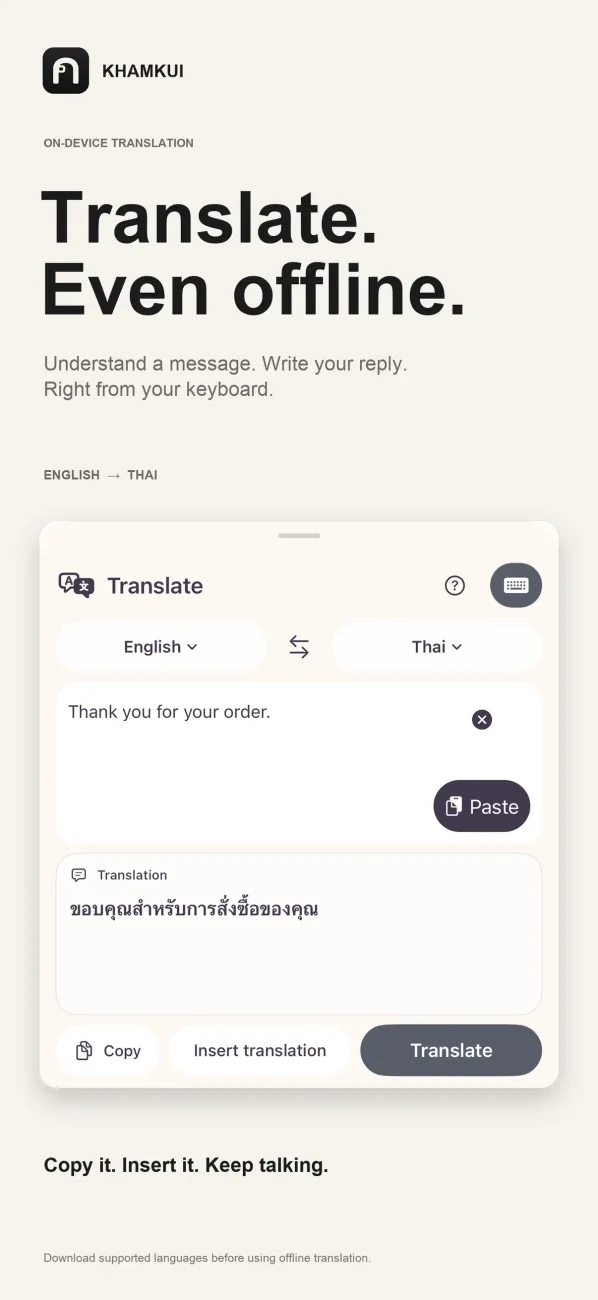
Download supported language packs in the main app, then translate offline on your device. Paste text copied from anywhere or type your own. Swap the source and translation, then copy or insert the result into your current text field.
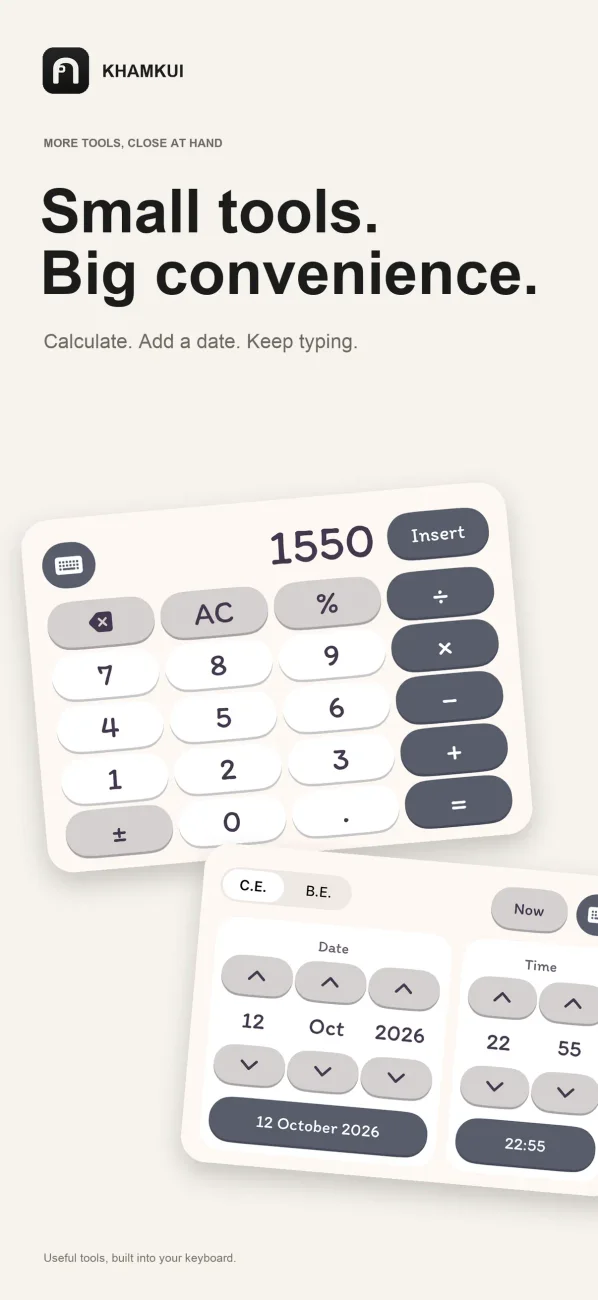
MORE TOOLS ON YOUR KEYBOARD
• Dictation (Premium): prepare in Khamkui, then speak from the keyboard. Requires Full Access, microphone and speech permissions.
• Calculator: calculate and insert the result.
• Numbers, date and time: enter numbers or insert a date and time.
• Decorative text: choose styles for the text you send.
• Symbols and Text Art: add hearts, stars, dividers and character art.
• Delete All: clear text after confirmation.
• Reorder tools and display icons, names or both.
START FREE
• Thai and English typing, with Minimal and Night themes.
• Create, edit and save custom themes.
• Up to 3 quick replies in total, 1 folder and 1 reply with variables.
• Up to 20 Thai–English translations per day.
• Starter decorative text, symbols and Text Art, plus basic tools.
SPECIAL THEMES
Halloween and Singles' Day themes: buy individually or use with Premium access. Theme purchases do not include Premium.
KHAMKUI PREMIUM
Unlock all included themes, apply custom themes, enjoy unlimited quick replies and folders, and access all included decorative text, symbols and Text Art. Translate all languages supported by Apple on your device, without the app's daily quota.
Choose monthly, yearly or one-time Lifetime Premium on iOS. Lifetime does not auto-renew. Prices, eligible offers and terms appear before purchase.
Subscriptions auto-renew; any trial becomes paid. Cancel in Apple subscription settings at least 24 hours before the trial or billing period ends. Deleting the app or buying Lifetime does not cancel a subscription. Lifetime does not refund prior payments; manage subscriptions to avoid renewal.
GET STARTED
Go to iPhone Settings > General > Keyboard > Keyboards > Add New Keyboard and add Khamkui (คำคุย). Hold the globe key in a text field to choose it.
Translation requires iOS 18 or later, Allow Full Access and supported language packs downloaded in the main app. Once prepared, translation runs on your device. Ordinary typing and creative text tools do not require Full Access.
Decorative text uses Unicode. Appearance and support vary by destination app; Latin styles do not change Thai letter shapes. Theme fonts change your keyboard's key labels, not the font used by other apps.
Typed text and notes are not sent to ad services. Typed text is not sent to developer servers. Notes, quick replies, themes and settings stay on-device.
Limited Google ads appear only in the main app, not the keyboard. Google may collect ad and diagnostic data as our privacy policy describes. Premium removes ads; theme purchases do not.
iOS may prevent third-party keyboards in password fields or certain apps.
Apple Standard EULA: https://www.apple.com/legal/internet-services/itunes/dev/stdeula/
What’s new
Version 1.0.13 · Nov 13, 2026
• Add Lifetime Premium: a one-time purchase on iOS with no automatic renewal.
• Eligible returning members can check eligibility and request a discount code by email from the app.
• Fix font selections not updating in themes and previews.
• Improve the loading layout while checking member eligibility.
App privacy
What Supakitpon Samatayamontri declares on the App Store about how this app handles data.
-
Data linked to you
May be collected and linked to your identity.
- Purchases
- Location
- Contact info
- User content
- Identifiers
- Usage data
- Diagnostics
-
Data not linked to you
May be collected but is not linked to your identity.
- Diagnostics
Privacy practices may vary, for example with the features you use or your age.
Information
- Seller
- Supakitpon Samatayamontri
- Category
- Productivity
- Version
- 1.0.13
- Updated
- Nov 13, 2026
- Released
- Oct 12, 2026
- Size
- 26.3 MB
- Requires
- iOS 17.0 or later
- Age rating
- 4+
- Price
- Free
- In-app purchases
- Yes
- Languages
- English, Thai
- Copyright
- © Supakitpon Samatayamontri
You might also like
-
 จดจำ (Jodjam)Productivity
-
 Remimo: Shared RemindersTo Do List, Tasks & Planner
-
 MintioProductivity
-
 XeOS: External Display DesktopPro Full Screen Desktop Mode
-
 EpubCraft: EPUB Editor & OCRCreate, edit & scan to EPUB
-
 Clip Keyboard: Paste SnippetsClipboard Manager, Quick Reply
-
 BrainBox: Daily PlannerADHD Task Manager & To-Do List
-
 MobMai: To Do, Task, Team WorkProject Tracker Daily Planner
-
 Readloom - Convert PDF to EPUBPDF to EPUB Convertor
-
 Nudge: AI Life Inbox & RemindAI summaries & voice reminders