- Age rating4+
- CategoryPhoto & Video
- DeveloperAlejandro Barrera Rojas
- LanguagesEnglish
- Size28.5 MB
Links to the official App Store page
Download.org hosts no file of Lens Labeler. The button opens its official App Store page, published by Alejandro Barrera Rojas. Listing last checked on Nov 26, 2026.
Screenshots


About
Shoot with manual or third-party lenses? Your camera can't tell which one is mounted, so it writes a guess, the lens profile you picked, or nothing at all. Lens Labeler writes the lens you really used into your photos, so Lightroom, Photos and everyone you share with see the right one.
ORIGINALS STAY UNTOUCHED
Lens Labeler never changes your original. It writes a corrected copy in the same format: a DNG stays a DNG, a TIFF a TIFF, a JPEG a JPEG. Nothing is decoded or re-encoded. Only the lens fields change, and the image data is checked byte for byte after every write.
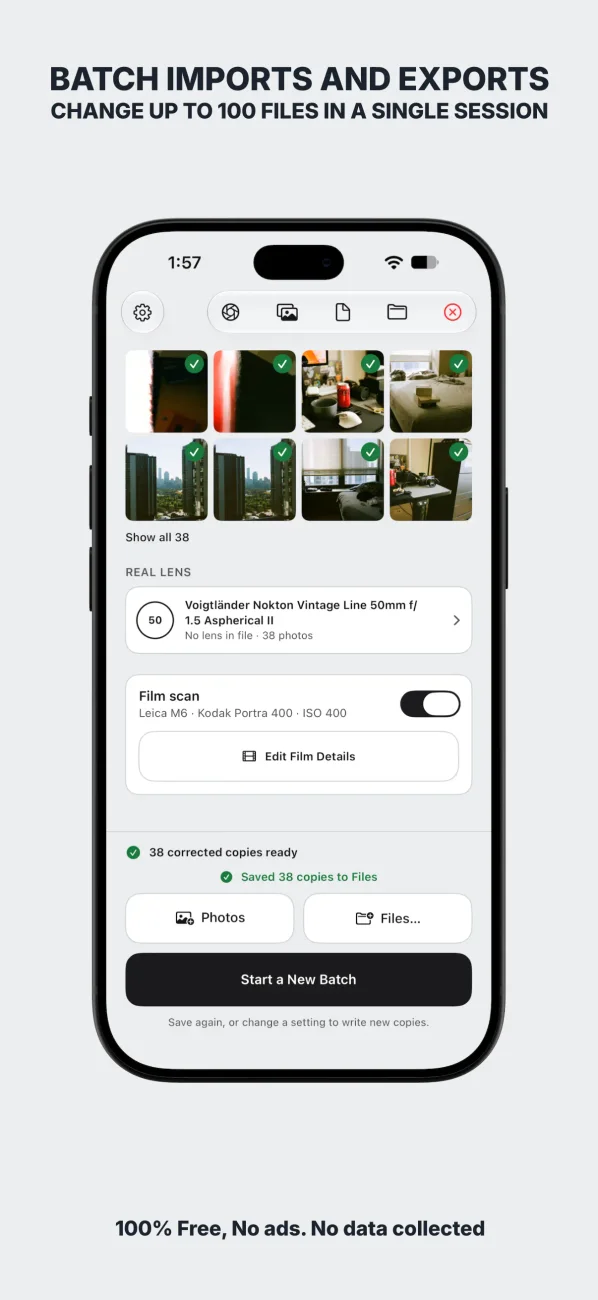
BATCHES, GROUPED BY LENS
Add up to 100 photos from Photos, Files or a whole folder. Photos are grouped by the lens name the camera recorded, so you set the real lens once per group. Save a mapping and it's filled in automatically next time.
A LENS CATALOG
Pick from a built-in catalog of popular third party M-mount lenses, or enter brand, model, focal length and maximum aperture yourself.
FILM SCANS
Scanned a roll with a scanner or a camera? Add the camera, film stock and ISO, plus the date it was shot. Save a setup as a preset and reuse it on the next roll.
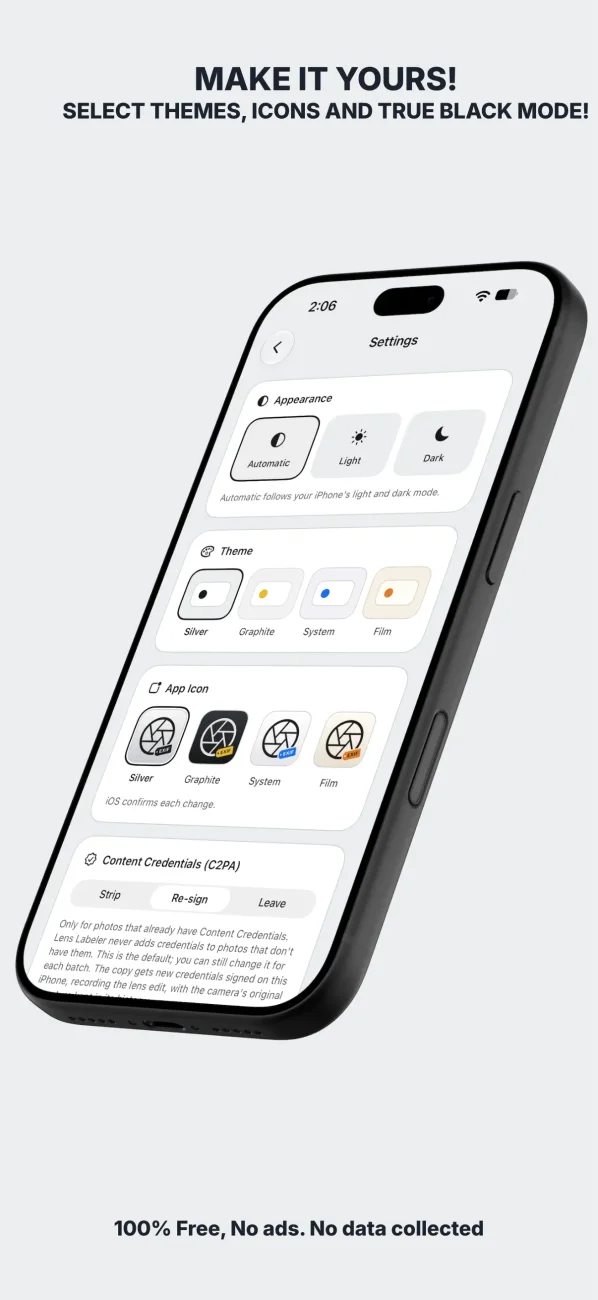
CONTENT CREDENTIALS (C2PA)
For photos that already have Content Credentials, choose to strip them, re-sign the copy on this iPhone (the camera's original signature stays in the history), or leave them. Lens Labeler never adds credentials to photos that don't have them.
PRIVATE BY DESIGN
No account, no analytics, no network calls. Your photos and your lens list stay on your iPhone.
MADE FOR IPHONE, IPAD AND IPHONE DUO
One column on iPhone and on iPad in portrait, photos and settings side by side on iPad in landscape and on iPhone Duo unfolded, and a split layout when half-open.
The catalog includes lenses from Voigtländer, ZEISS, Thypoch, Light Lens Lab and Mandler. All product names are trademarks of their owners; Lens Labeler is not affiliated with them.
What’s new
Version 3.0 · Nov 25, 2026
Roll logs from Light Logger
- Open a roll from Light Logger, our new film meter and shot log, and Lens Labeler matches your scans to its frames by comparing them with each frame's reference photo.
- Each scan gets its frame's lens, aperture, shutter speed, date and place. Rows to check are marked, and you can pick any frame by hand.
- Open the roll before or after adding the scans: it waits until they're in.
A fresh start screen
- Add photos from Photos, Files or a folder in one tap, with lens icons for your saved lenses and film canisters for film stocks.
On the Mac
- Save to Files now lets you create a new folder, and Match Roll uses the height of the window.
Plus layout fixes on iPhone Duo and smaller improvements throughout.
App privacy
What Alejandro Barrera Rojas declares on the App Store about how this app handles data.
-
Data not collected
The developer does not collect any data from this app.
Privacy practices may vary, for example with the features you use or your age.
Information
- Seller
- Alejandro Barrera Rojas
- Category
- Photo & Video
- Version
- 3.0
- Updated
- Nov 25, 2026
- Released
- Nov 12, 2026
- Size
- 28.5 MB
- Requires
- iOS 17.6 or later
- Age rating
- 4+
- Price
- Free
- Languages
- English
- Copyright
- © 2026 Barrera Visuals
You might also like
-
 Jojo-gramA Photo-Journaling App
-
 Luminic Light MeterSpot, Analog & Exposure Meter
-
 PIXLpathProfessional Photo Cataloging
-
 Contact Sheet: AI Photo ReviewTrain your eye, shoot better
-
 myDarkroom: Film DevelopmentFilm & Paper Development
-
 36Exp liteExperience Film Photography
-
 LightEditor RAWOpen-source RAW photo editor
-
 EditMe: Negative ConverterFilm look, grain & darkroom
-
 CullKit: NAS Photo Cull & RateCull RAW from NAS or a folder
-
 Darkroom ToolkitFilm Developing & Formulas