
Lisper - Local Dictation
Private on-device voice typing
Designed for iPhone, Mac
In-app purchases
- Age rating4+
- CategoryProductivity
- DeveloperTiago Guardao
- LanguagesEnglish
- Size213.8 MB
Links to the official App Store page
Download.org hosts no file of Lisper - Local Dictation. The button opens its official App Store page, published by Tiago Guardao. Listing last checked on Nov 24, 2026.
Screenshots


About
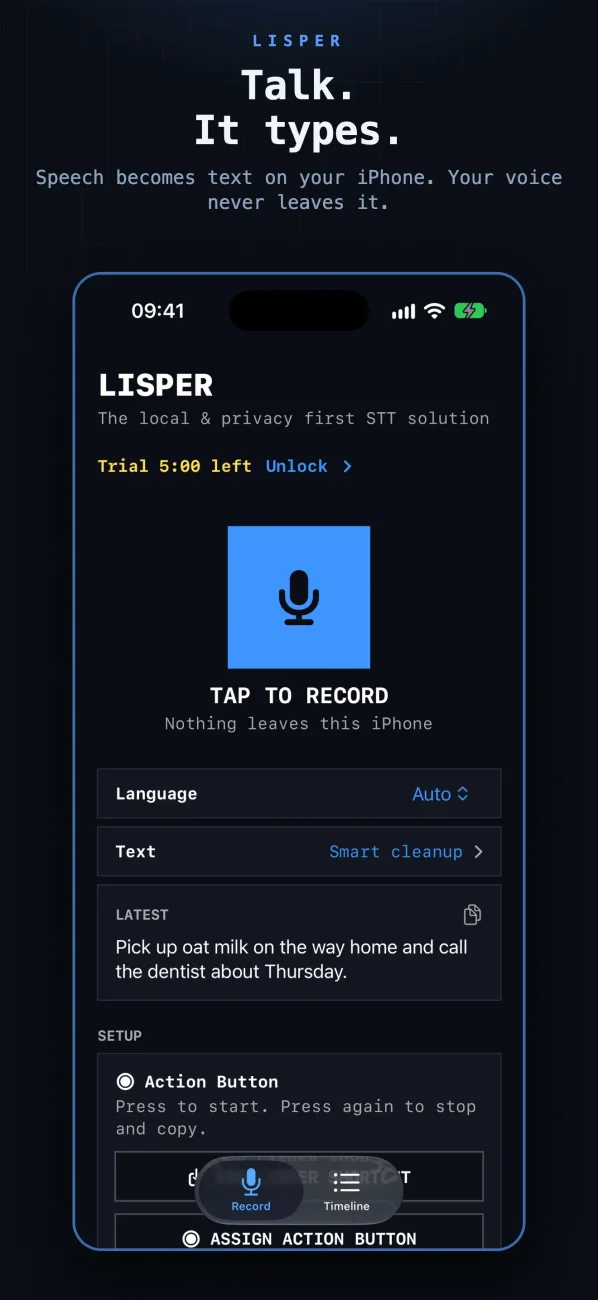
Lisper turns your voice into text entirely on your device. No cloud, no account, no subscription.
Speak. Text appears. Your audio never leaves your Mac or iPhone.
WHY LISPER
• 100% on-device: the Mac app ships its own speech model, and iPhone uses Apple's on-device speech model with a bundled fallback. Transcription works in airplane mode.
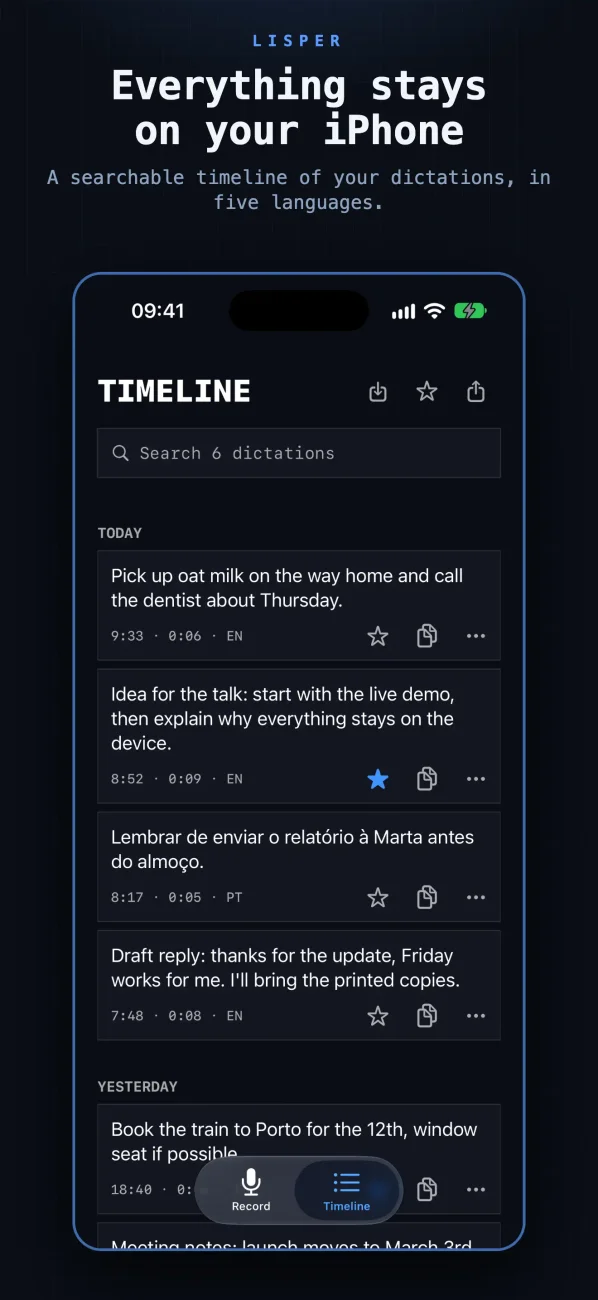
• English, Portuguese, Spanish, French and German, with automatic language detection.
• No analytics or tracking: audio and transcripts stay on your device.
• Pay once: 5 free minutes to try it, then a single one-time unlock covers both Mac and iPhone (Family Sharing supported). No subscription, ever.
CLEAN TEXT, YOUR WORDS
• Personal dictionary: teach Lisper how to write names, brands and jargon. "post gres" becomes "Postgres" in every transcript.
• Remove filler words: drops "um", "uh" and accidental repeats without touching real words.
• Smart cleanup: on devices with Apple Intelligence, also removes false starts and self-corrections, on device. The original is always kept.
TRANSCRIBE FILES
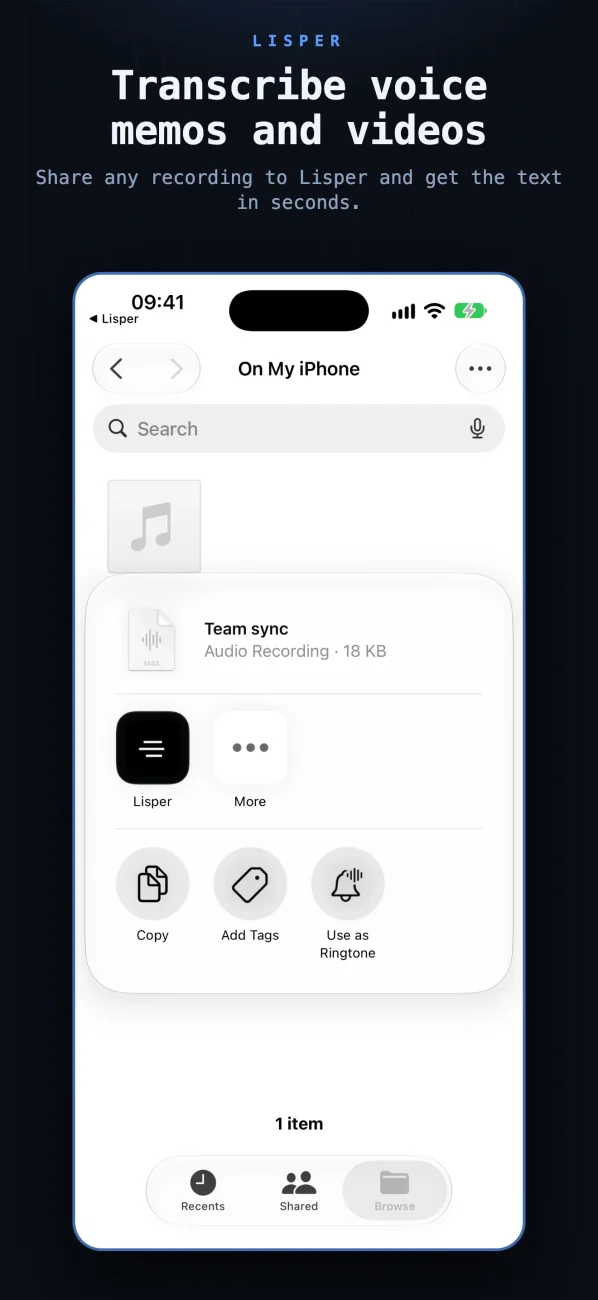
• Share a voice memo, an audio file or a video to Lisper and get the text in seconds.
• On Mac, drop a file on the timeline.
ON MAC
• Hold ⌥ Space anywhere, speak, release. Or tap to start and tap to stop.
• Your words are copied, and Lisper can paste them straight into the app you were typing in.
• Lives quietly in your menu bar with a minimal heads-up display while you speak.
• A searchable timeline keeps your dictation history, stored only on your Mac.
ON IPHONE
• Dictate from the Dynamic Island: press the Action Button to start, press again to stop. The text lands on your clipboard without opening the app.
• Shortcuts support for the Action Button, Back Tap and your own automations.
• A clean, searchable timeline with favorites, export and share.
ON APPLE WATCH
• Add the Lisper button to Control Center, tap and talk. Your iPhone transcribes the recording and saves it to your timeline.
PRIVATE BY ARCHITECTURE
Lisper has no transcription server. Speech is processed on your device and recordings are discarded; transcripts are saved only on your device.
PRICING, PLAINLY
Lisper is free to try for 5 minutes of dictation. One purchase unlocks unlimited dictation on Mac and iPhone. Buy it like a screwdriver, own it forever.
Lisper needs microphone access to hear you (only while dictation is active).
What’s new
Version 1.2 · Nov 23, 2026
What's new in Lisper 1.2:
- Apple's on-device speech model now transcribes on iPhone, with the bundled model as fallback. Auto detects English, Portuguese, Spanish, French and German.
- Personal dictionary: teach Lisper how to spell names, brands and jargon.
- Remove filler words, plus Smart cleanup with Apple Intelligence on supported iPhones.
- Transcribe voice memos, audio files and videos: share them to Lisper or use the import button on the Timeline.
- Clearer Dynamic Island, better support for large text, and a Licenses page.
- The Lisper keyboard is gone: iOS already has dictation built into its keyboard.
Still fully local: no account, no cloud, and your voice never leaves your devices.
App privacy
What Tiago Guardao declares on the App Store about how this app handles data.
-
Data not collected
The developer does not collect any data from this app.
Privacy practices may vary, for example with the features you use or your age.
Information
- Seller
- Tiago Guardao
- Category
- Productivity
- Version
- 1.2
- Updated
- Nov 23, 2026
- Released
- Oct 18, 2026
- Size
- 213.8 MB
- Requires
- iOS 18.0 or later
- Age rating
- 4+
- In-app purchases
- Yes
- Languages
- English
- Copyright
- © 2026 Tiago Guardão
You might also like
-
 FrankenMarkdownPrivate Markdown publishing
-
 Vibe Typer: AI Voice KeyboardDictation & speech to text
-
 NanoVoice: AI Voice KeyboardPrivate on-device dictation
-
 SpeakUp DictationVoice typing, 100% on-device
-
 Whisperer: Local TranscriptionPrivate AI Speech to Text
-
 Speedy Quick KeysQuick-Keys for messaging apps
-
 Diction: Speech to TextAI Dictation & Voice Keyboard
-
 Timeout: App BlockerStay Focus. Limit screen time.
-
 Telos – Focus & Habit TrackerStay Focused and Productive
-
 Screen Time - Break CheckHabit Timers, No App Blocking