
- Age rating12+
- CategoryUtilities
- DeveloperNgai Hang Wong
- LanguagesEnglish
- Size5.3 MB
Links to the official App Store page
Download.org hosts no file of M-G Keyboard. The button opens its official App Store page, published by Ngai Hang Wong. Listing last checked on Nov 10, 2026.
Screenshots


About
English and Traditional Chinese on one keyboard.
M-G Keyboard combines direct English typing with Quick / 速成 Chinese input. Type letters and press Space to keep English, or choose a Chinese candidate to replace the code.
• Optional offline autocorrection on Space, with immediate Backspace undo. Off by default; enable it with the keyboard gear.
• Offline English spelling suggestions: four per page, with tap-to-correct support.
• Cangjie roots on the keys and a clear code/root display.
• Eight Chinese candidates per page, with arrows and swipe paging.
• 53,548 built-in Chinese words and phrases, including the public-domain words.hk word list, available offline from first use.
• Offline personal phrase completions and next-character suggestions from repeated Chinese selections, with six suggestions per row.
• Long-press a suggestion to remove it.
• Automatic capitalization that follows the text field’s settings, with manual Shift and double-tap Caps Lock.
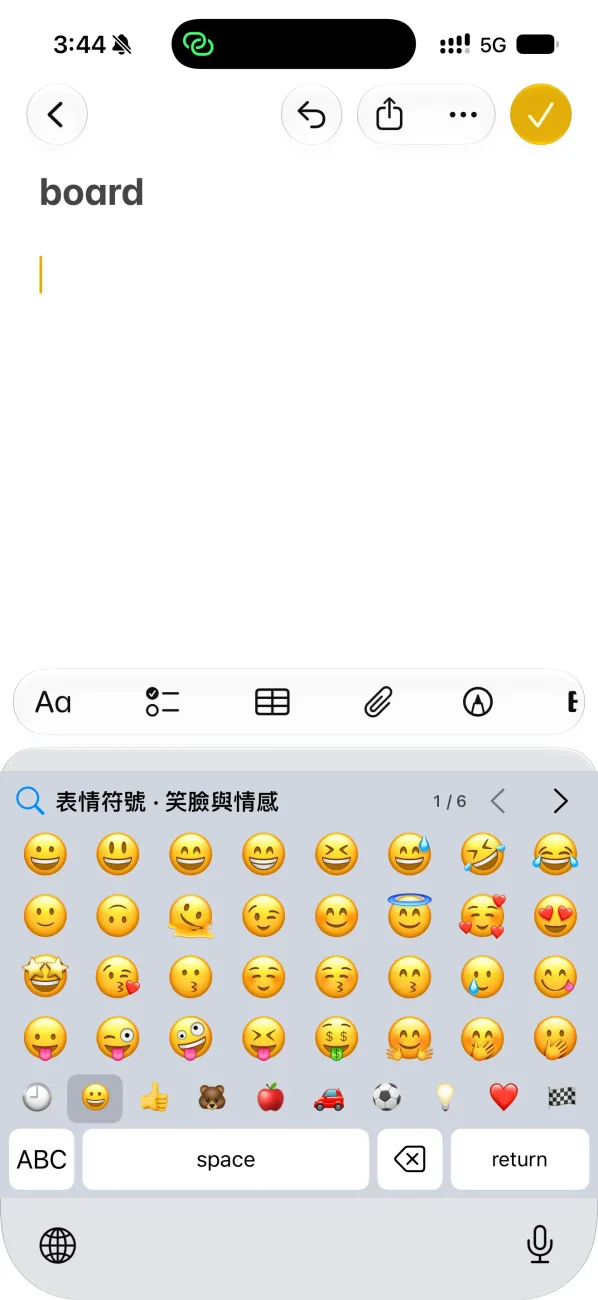
• Tap the heart button for a full offline emoji catalogue supported by your device, with nine categories, skin tones, recent choices and English/Traditional Chinese keyword search. Four rows of eight emoji keep browsing comfortable.
• Compact keys with matching letter/emoji page heights and adaptive light/dimmed-dark appearance.
• Magnified key previews, held Delete and held-Space cursor movement.
• Two English symbol pages and Chinese punctuation, with automatic return to letters after punctuation.
No account. No advertising. No Full Access required.
Built-in suggestions are available immediately after selecting a matching Chinese prefix. Your personal learning starts empty, happens only on your device and takes priority over built-ins. It uses Chinese characters you select through this keyboard; it does not import existing documents. A short Chinese sequence must occur in two completed runs before it becomes a learned suggestion. General English prediction and AI sentence generation are not included.
After installation, enable M-G Keyboard in Settings → General → Keyboard → Keyboards → Add New Keyboard, then use the globe key to select it. Setup instructions in the app are in Traditional Chinese. iOS and individual apps may restrict third-party keyboards in some fields.
Designed for iPhone and iPad running iOS/iPadOS 17 or later. The full-width iPad layout adds a number row, side punctuation, Tab, Caps Lock, two Shift keys and keyboard dismissal; compact layouts remain available at narrow widths.
Support: https://lightupgo.github.io/m-g-keyboard/support.html
Privacy: https://lightupgo.github.io/m-g-keyboard/privacy.html
What’s new
Version 1.1 · Oct 15, 2026
New iPad layout with a number row, side punctuation, Tab, Caps Lock and comfortable portrait/landscape proportions.
Expanded offline emoji catalogue with nine categories, skin-tone selection, remembered choices, Recents and English/Traditional Chinese search.
Improved punctuation-key sizing while preserving existing typing, spelling suggestions and autocorrection undo.
All typing, learning and emoji search remain on your device; no Full Access required.
App privacy
What Ngai Hang Wong declares on the App Store about how this app handles data.
-
Data not collected
The developer does not collect any data from this app.
Privacy practices may vary, for example with the features you use or your age.
Information
- Seller
- Ngai Hang Wong
- Category
- Utilities
- Version
- 1.1
- Updated
- Oct 15, 2026
- Released
- Sep 23, 2026
- Size
- 5.3 MB
- Requires
- iOS 17.0 or later
- Age rating
- 12+
- Languages
- English
- Copyright
- © 2026 M-G Productions
You might also like
-
 Easy Mailer Chinese KeyboardUtilities
-
 MyanmarKeyboardAppUtilities
-
 Virtual LU CardUtilities
-
 ZeroOne KeyboardPinyin · Zhuyin · Shuangpin
-
 PortfoPlusKnow Your Coverage
-
 Linked ChargeEV Charging Zero Carbon Drive
-
 Marsbu EVbnbUtilities
-
 Stock Profit Loss CalculatorCalculate Stock Gains & Losses
-
 充美好EVIVAHong Kong Fastest EV Charger