- Age rating4+
- CategoryMusic
- DeveloperKeisuke Kagoshima
- Size10.6 MB
Links to the official App Store page
Download.org hosts no file of M8FX. The button opens its official App Store page, published by Keisuke Kagoshima. Listing last checked on Nov 20, 2026.
Screenshots
About
【Description】 M8FX is a revolutionary, portable multi-track effects processor app designed specifically for iPhone to turn your Dirtywave M8 Tracker into a powerful, live-performing mixing rig.
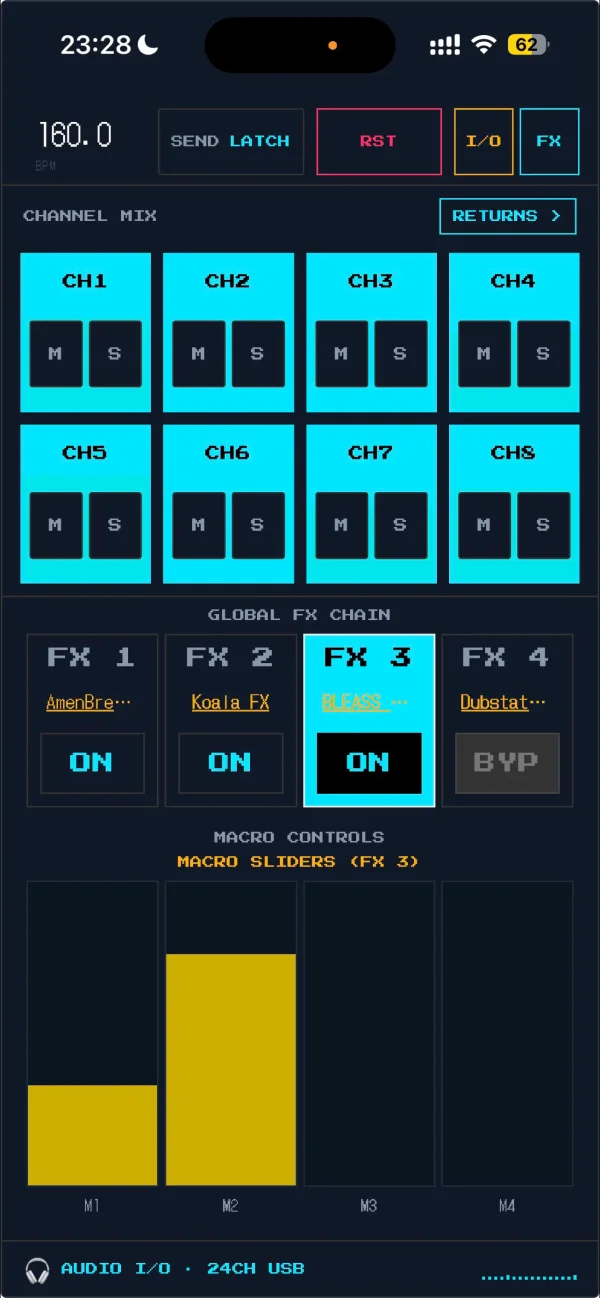
Connect using a single USB-C cable. M8FX hooks up directly to your M8 Tracker (running firmware version 6.0 or higher), allowing you to apply independent effects to each individual channel (CH1–CH8) using your favorite iOS AUv3 plugins with seamless real-time BPM synchronization, and route the processed audio directly back to the M8 hardware.
Optimized for a permanent "Portrait (Vertical)" screen layout on iPhone and built with a hyper-responsive JUCE 8 + React/TypeScript hybrid architecture, M8FX delivers a latency-free, hardware-style experience. Perfect for both deep sound design in the studio and chaotic dub-mixing on stage.
【Key Features】
Clean Single-Cable Connection: No bulky adapters or messy wiring. A single USB-C to USB-C cable is all you need to handle 8-channel bi-directional audio routing and MIDI synchronization.
Per-Channel Insert & Return (v6+ Sync): Seamlessly integrate with M8 Tracker (v6.0+) to process individual tracks through up to four AUv3 effect slots in a chain, routing the polished sound directly back into the M8 master bus.
Flawless BPM Sync & Beat Effects: Live MIDI clock synchronization enables flawless integration of tempo-synced beat effects, rhythmic modulators, and time-based delays that lock perfectly with your M8's groove.
Portrait Multi-Touch Mixing UI: Tailored for effortless one-handed control on iPhone with a compact 4x2 channel grid. Perform dynamic, hardware-style live dubs using responsive Mute, Solo, and toggling between Momentary/Latch send modes.
4 Macro Sliders & Dramatic Drop Controls: Maps vital AUv3 parameters to four thick macro sliders (M1–M4) for fluid hands-on control. Build massive tension by unleashing all sends simultaneously with the "ALL SEL" button, then trigger a clean drop in a split second with the pink "RST" (Reset) button.
【System Requirements】
Supported Hardware: Dirtywave M8 Tracker (Model:01 & Model:02)
Required M8 Firmware: Version 6.0 or higher (for multichannel USB audio sending and return routing)
Compatible Devices: USB-C equipped iPhones (iPhone 15 or later recommended)
Setup Note: Please ensure "Microphone Permission" is allowed upon launch to enable USB-C audio inputs.
App privacy
What Keisuke Kagoshima declares on the App Store about how this app handles data.
-
Data not collected
The developer does not collect any data from this app.
Privacy practices may vary, for example with the features you use or your age.
Information
- Seller
- Keisuke Kagoshima
- Category
- Music
- Version
- 1.0
- Updated
- Aug 23, 2026
- Released
- Aug 23, 2026
- Size
- 10.6 MB
- Requires
- iOS 16.0 or later
- Age rating
- 4+
- Price
- $4.99
- Copyright
- © Ca5
You might also like
-
 Performance Clock: PortaTempoTempo Utility and Setlist Tool
-
 Velvet Vocoderpitch correction & harmony
-
 S-1 EditorEditor para Roland S-1
-
 Prog MetronomeMetronome for complex rhythm.
-
 Ripple Drum SynthMusic
-
 Troubadour - Songs + LyricsWrite your own music and words
-
 RIP DJSpectrogram analyzer for DJs
-
 Tug Boat — Mono SynthAll About That Bass
-
 SinusoidMusic
-
 TwinPathParallel AU Utility