
- Age rating4+
- CategoryNavigation
- DeveloperYuriko Kimura
- LanguagesEnglish+ 1 more
- Size43.0 MB
Links to the official App Store page
Download.org hosts no file of Map Tells...!. The button opens its official App Store page, published by Yuriko Kimura. Listing last checked on Nov 17, 2026.
Screenshots


About
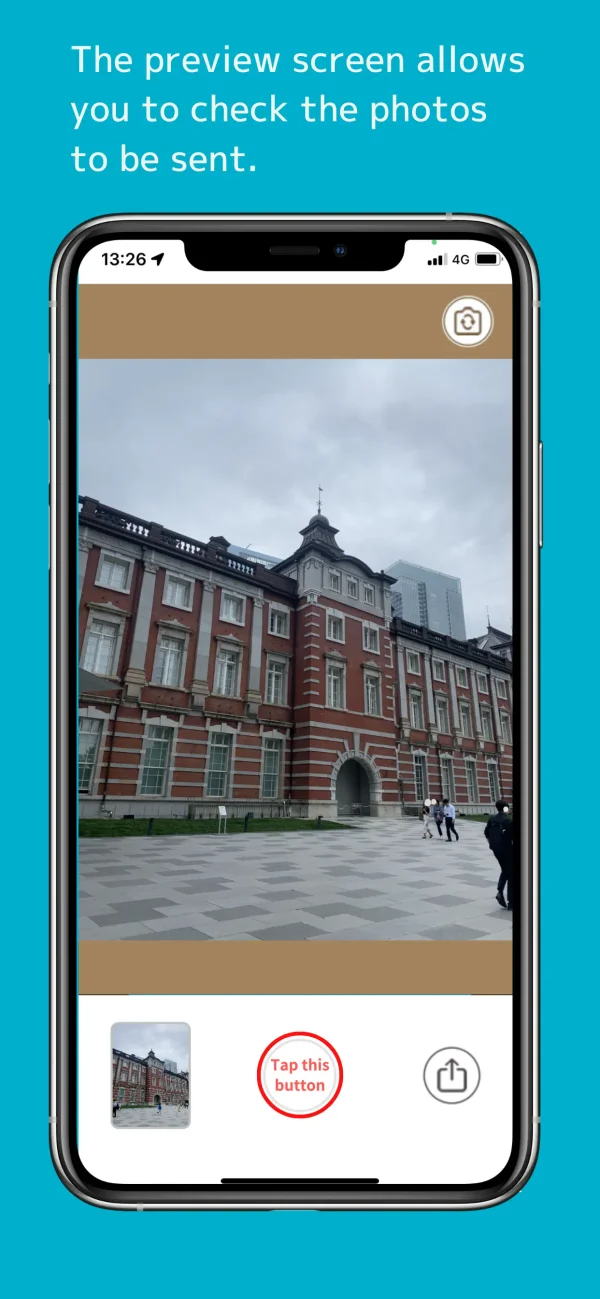
"Map Tells...!” is an app that shares your location with your companion by providing a Google Maps’ link and photo. The mail receiver follows the directions (on the map or through a navigation system) and compares the photo you sent and the scenery that he/she is viewing; then, the app guides your companion to the meeting location successfully.
Using the app is very simple:
-How to send the information to your company
1) After launching the app, take a photo of your location by pushing the photo button on the screen.
2) Press the sharing button on the screen.
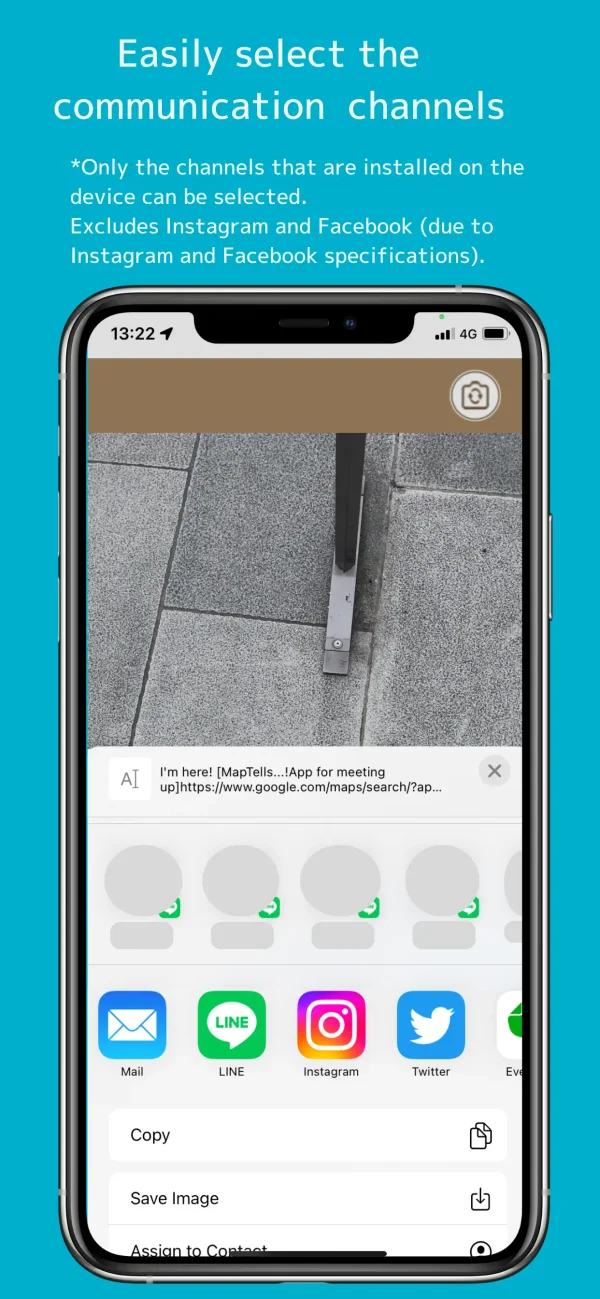
3) After pressing the sharing button, SNS and E-mail icons will show up on your screen. (The SNS options will only include SNS apps that have been installed on your iPhone.)
4) Choose a communication method for sharing.
5) Select the receiver's information to send a message.
6) Send!
-How to choose a horizontal camera orientation
1) Hold your phone horizontally.
-How to choose a front/rear camera orientation
1) Press the switch button.
a. When you hold your iPhone vertically, the button will be in the top right corner.
b. When you hold it horizontally, the button will be in the top left corner.
"NOTE"
The sharing button is available after taking the photo.
Additionally, if you want to retake the photo, just press the cancel button on the SNS screen. You will find the SNS close and camera on the screen. Then, take the photo again.
If the recipient has the Google Maps app on his/her smartphone, it will open automatically and show the relevant location. If your companion does not have the Google Maps app, the hyperlink will open Google Maps’ site in their preferred internet browser.
Keep in mind that "Map Tells...!” asks for permission to use the camera and location functions on your iPhone.
Also, this app may not work on iPad correctly.
What’s new
Version 3.4 · May 22, 2024
Small improvements.
App privacy
What Yuriko Kimura declares on the App Store about how this app handles data.
-
Data used to track you
May be used to track you across apps and websites owned by other companies.
- Usage data
-
Data linked to you
May be collected and linked to your identity.
- Location
- Contacts
- User content
- Usage data
-
Data not linked to you
May be collected but is not linked to your identity.
- Identifiers
- Usage data
- Diagnostics
Privacy practices may vary, for example with the features you use or your age.
Information
- Seller
- Yuriko Kimura
- Category
- Navigation
- Version
- 3.4
- Updated
- May 22, 2024
- Released
- Feb 16, 2019
- Size
- 43.0 MB
- Requires
- iOS 12.0 or later
- Age rating
- 4+
- Price
- Free
- Languages
- English, Japanese
- Copyright
- © 2018-2023 Yuriko Kimura
You might also like
-
 Pitto - Parking Memo & NavParking Memo & Find My Car
-
 Imadoko: Meet Up with FriendsDirection, distance and PiP
-
 Visit Ravni kotariBecome a part of our story
-
 isimangalisoWetland Park Travel Guide
-
 I am here!!Track and Share Journeys
-
 たびのしおり - 旅行計画アプリTravel
-
 ココにいるよ!!/近くにいるけど会えない友達との待ち合わせにNavigation
-
 ナビエディットNavigation
-
 どこだっけAR - 目的地に案内するARアプリNavigation
-
 Compass X: Precise PositioningAltimeter, Barometer & MGRS