
MarginNote 3
E-reader Redefine your Study
Designed for iPhone, iPad, iPod touch
Free · In-app purchases
- Age rating17+
- CategoryProductivity
- DeveloperBeijing Yunsi Software Technology Co., Ltd
- LanguagesEnglish+ 3 more
- Size392.4 MB
Links to the official App Store page
Download.org hosts no file of MarginNote 3. The button opens its official App Store page, published by Beijing Yunsi Software Technology Co., Ltd. Listing last checked on Nov 17, 2026.
Screenshots



About
MarginNote 3, all brand new e-reader to better study and digest your books
Integrating powerful tools for book annotation, mindmapping, flashcards and more, to build up your reading notes as never before.
============================================
Welcome to MarginNote. This is a highly powerful reading and study software and is applicable to Mac, iPad, and iPhone. By integrating the PDF/EPUB reader and multiple powerful study tools, MarginNote will enable learners to reorganize and connect knowledge from different aspects, then memorize and grasp it accordingly.
Whatever your profession, such as student, educator, researcher, lawyer, or life-long learner, you may annotate and take notes through MarginNote, organize notes via Mindmap and Outline, connect knowledge horizontally via Hashtag and raise memory effect via the Flashcards.
You will discover what MarginNote does is not to simply integrate these tools. Instead, it combines them deeply and skillfully, which makes it easier for users to toggle between different tools.
What's New in MarginNote 3
* New and Clean UI Completely redesigned.
* Improved performance and Running more smoothly
* Support both Document Reading mode & Study Reading mode.
* Excerpts & Note-taking
* Enhanced Handwriting & apple-pencil support.
* Support TextBox on PDF.
* Support direct text-typing & sketching when editing note cards.
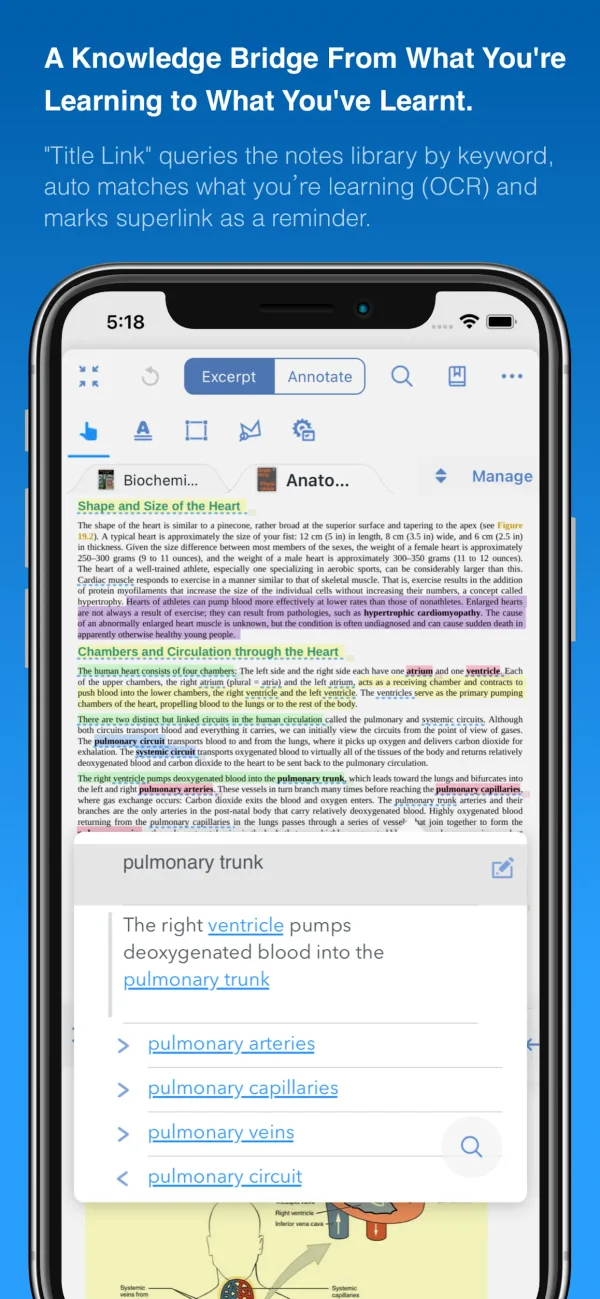
* Support Auto OCR when excerpting on scanned PDFs.
* Emphasis & Cloze
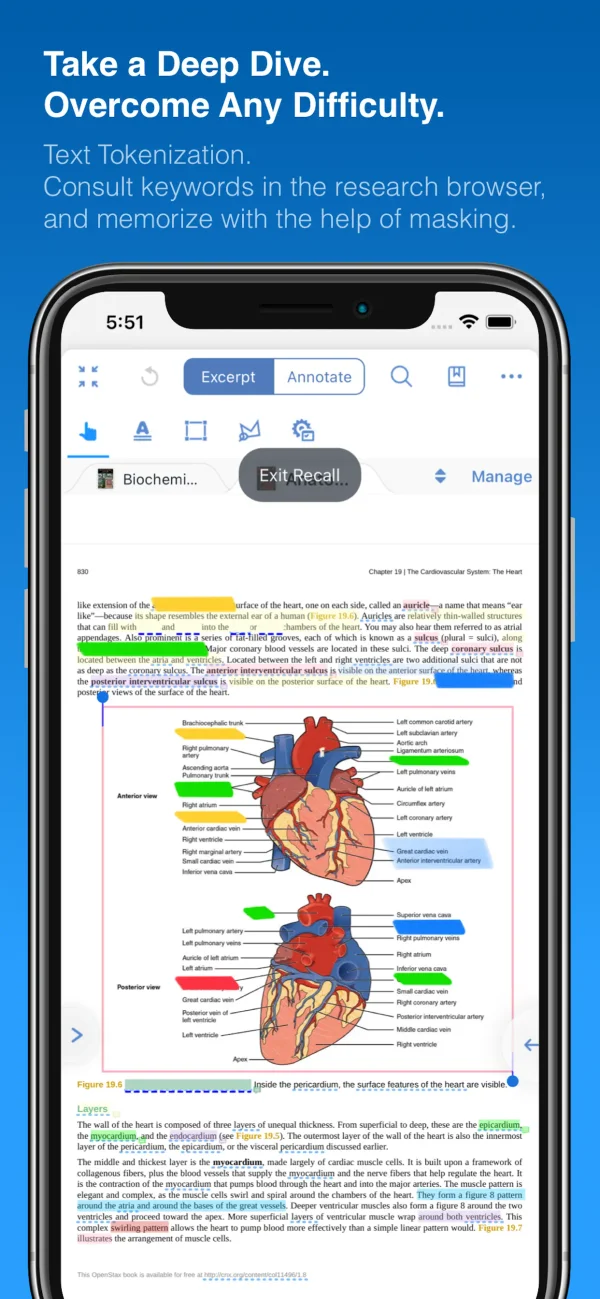
* Support direct emphasis in powerful Emphasis mode both on PDF or Outline.
* Support auto convert emphasis to Cloze in CardDeck.
* Support creating Image-Occlusion flashcards.
* Multi-Documents
* Support both document tabs & split views to switch between documents.
* MindMap
* Auto grouping new excerpts by Document Table of Contents.
* Support new brach display mode: Framework.
* Swipe/Drag gestures to slide in/out Outline & Documents in Study mode.
* Enhanced grouped cut/paste, drag to merge,.. etc.
* Outline
* Improved search and displaying keywords in results.
* Improved styles.
* CardDeck:
* View Flashcards in MindMap mode and Document mode.
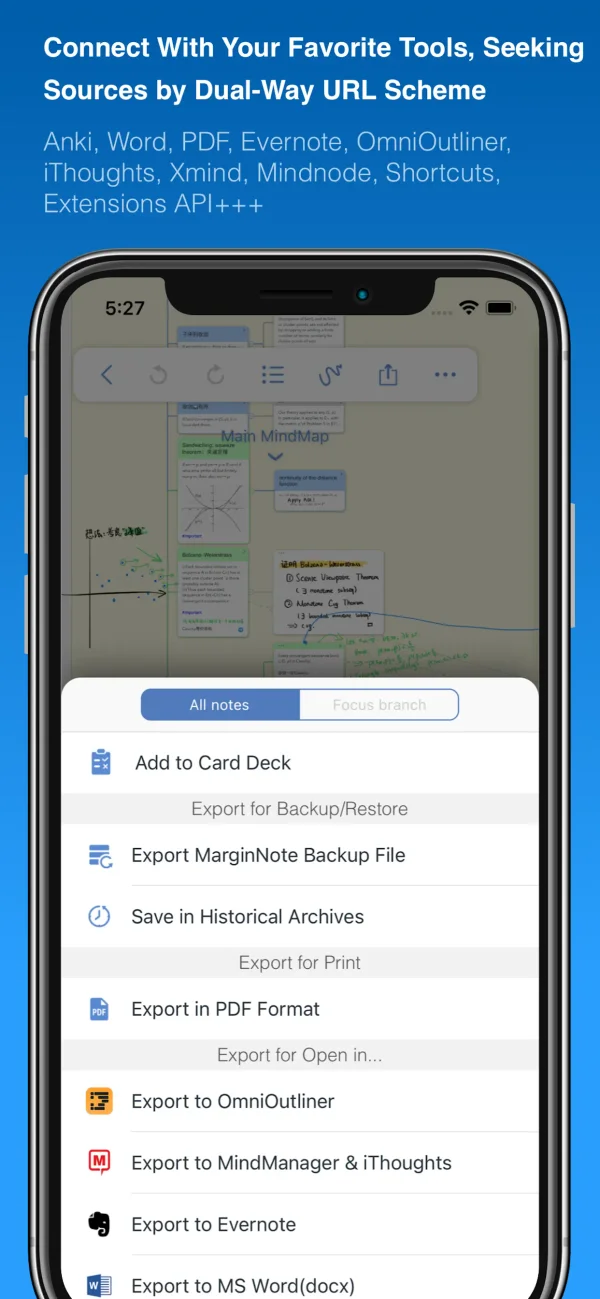
* Enhanced Anki Export: Card styles, Image occlusions, Cloze
* Enhanced Research web browser.
* iCloud Sync
* Fixed several design issue in previous versions.
* More stable & improved performance.
* Categories
* Separate categories for Document, Study and Review.
* Trash
* Recover data from Trash and make data more safe.
* Trial
* 14-days free trial.
MarginNote 2 features:
Reading:
- Support PDF and EPUB format;
Annotating and NoteTaking:
- Support text highlight and rectangular highlight;
- Add notes directly at the page margin; the note editing area will not overlap with the book content at all;
- Text, voice, picture, sketching and many other forms of comments in note;
- Add hashtags to notes to facilitate the connection of notes;
Outline and Mindmap:
- Outline and Mindmap in one view;
- Create Outline tree by swipe gestures;
- Multi-selection editing such as group, merge, clone, etc;
- Quick searching and filtering according to colors, hashtags, books.
Flashcard:
- Highlights and notes can be automatically turned into flashcards for review;
- Spaced repetition adopting the Anki-based algorithm;
- Switch to the linking book page at any time;
iPad Pro & Apple pencil:
- Split View of multiple tasks;
- High-precision drawing by Apple pencil;
- Fine tuned for Apple pencil;
- Keyboard shortcuts;
Import, Export and Sync:
- Import webpages and notes from Evernote;
- Export flashcards to Anki;
- Export Outline to OmniOutliner;
- Export Mindmap to iThoughts or MindManager;
- Export to Evernote;
- Export all the margin notes, MindManager, Outline and Pages to a printable PDF;
- Sync books & notes with iCloud;
Terms of Use:
https://www.marginnote.com/press/marginnote-3-term-of-use
Privacy Policy:
https://www.iubenda.com/privacy-policy/92678020
What’s new
Version 3.7.32 · Nov 29, 2025
Fixed the issue with promotional upgrade to MN4
App privacy
What Beijing Yunsi Software Technology Co., Ltd declares on the App Store about how this app handles data.
-
Data not linked to you
May be collected but is not linked to your identity.
- Identifiers
- Usage data
- Diagnostics
Privacy practices may vary, for example with the features you use or your age.
Information
- Seller
- Beijing Yunsi Software Technology Co., Ltd
- Category
- Productivity
- Version
- 3.7.32
- Updated
- Nov 29, 2025
- Released
- Aug 4, 2018
- Size
- 392.4 MB
- Requires
- iOS 11.2 or later
- Age rating
- 17+
- Price
- Free
- In-app purchases
- Yes
- Languages
- English, Japanese, Simplified Chinese, Traditional Chinese
- Copyright
- Copyright © 2020 Beijing YunSi Software Technology Co., Ltd. All rights reserved.
You might also like
-
 LiquidTextAnnotate & review documents
-
 Flexcil Note & Good PDF ReaderProductivity
-
 BoardNotes: Notes, PDF, DocsNote taking,Whiteboard,Mindmap
-
 幕布 - AI大纲笔记&思维导图Productivity
-
 Prodrafts - AI Infinite NotesHandwriting, PDF & Mind Maps
-
 Notes Writer: PDF, Quiz, DocsFlashcards, Voice Recorder, AI
-
 Highlights: PDF Reader & NotesEdit Research Documents/Books
-
 GUGA-HyperboardNotebook + Board + Card = GUGA
-
 ZoomNotes LiteNotetake, Sketch, PDF, Present
-
 Cubox: AI Read-It-Later AppSave Once. Know Forever.