Meeting Intelligence: AI Notes
Live AI help in your meetings
Designed for iPhone, iPad, Mac
Free · In-app purchases
- Age rating4+
- CategoryProductivity
- DeveloperEdgepoint Solutions LLC
- LanguagesEnglish
- Size10.8 MB
Links to the official App Store page
Download.org hosts no file of Meeting Intelligence: AI Notes. The button opens its official App Store page, published by Edgepoint Solutions LLC. Listing last checked on Nov 23, 2026.
Screenshots


About
Live AI Meeting Assistant
Free to start: 2 AI meetings every month.
Meeting Intelligence is the advisor that shows up before your meeting, guides you through it, and remembers everything after. Live transcription and AI guidance while you talk — plus a meeting history you can talk to.
YOUR NEXT MEETING, READY WHEN YOU ARE
Connect your calendar and your next meeting is waiting: a countdown to the minute, and prep built from your past meetings — what happened last time, which decisions are still open, and the questions worth walking in with. One tap starts recording with the meeting's attendees and agenda already loaded. On iPhone, add a countdown to your Lock Screen and Dynamic Island, and a Lock Screen widget shows what's next. Your calendar events stay on your device; a meeting's attendees, title, and notes are shared for analysis only when you choose to record that meeting.
LIVE MEETING INTELLIGENCE
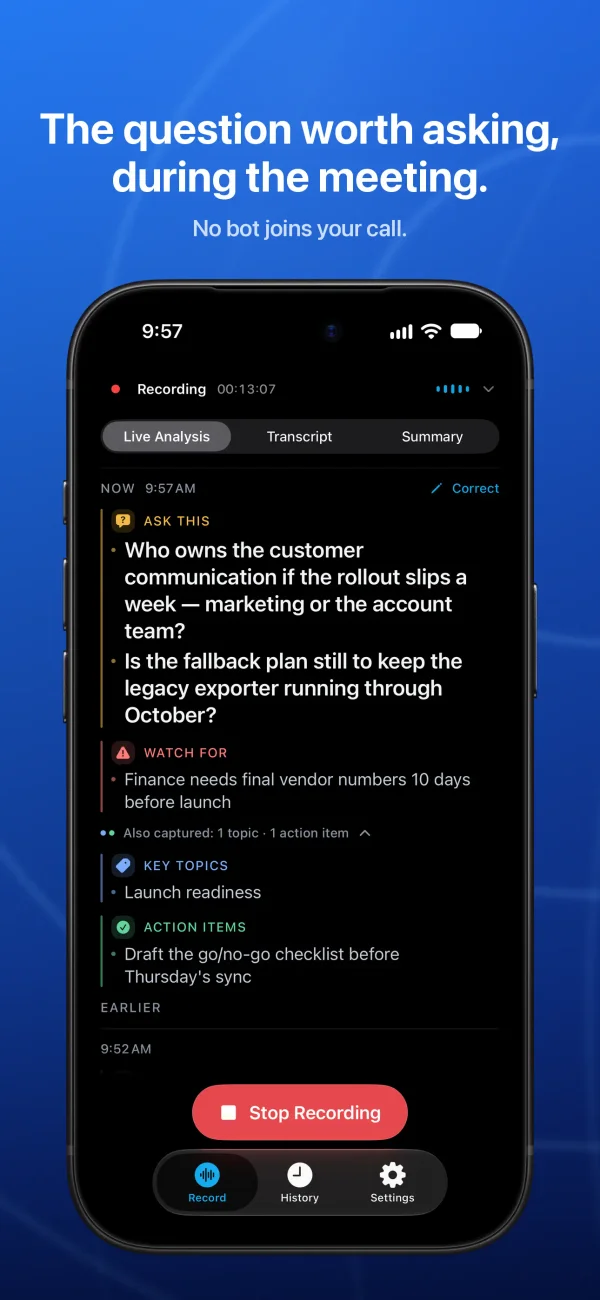
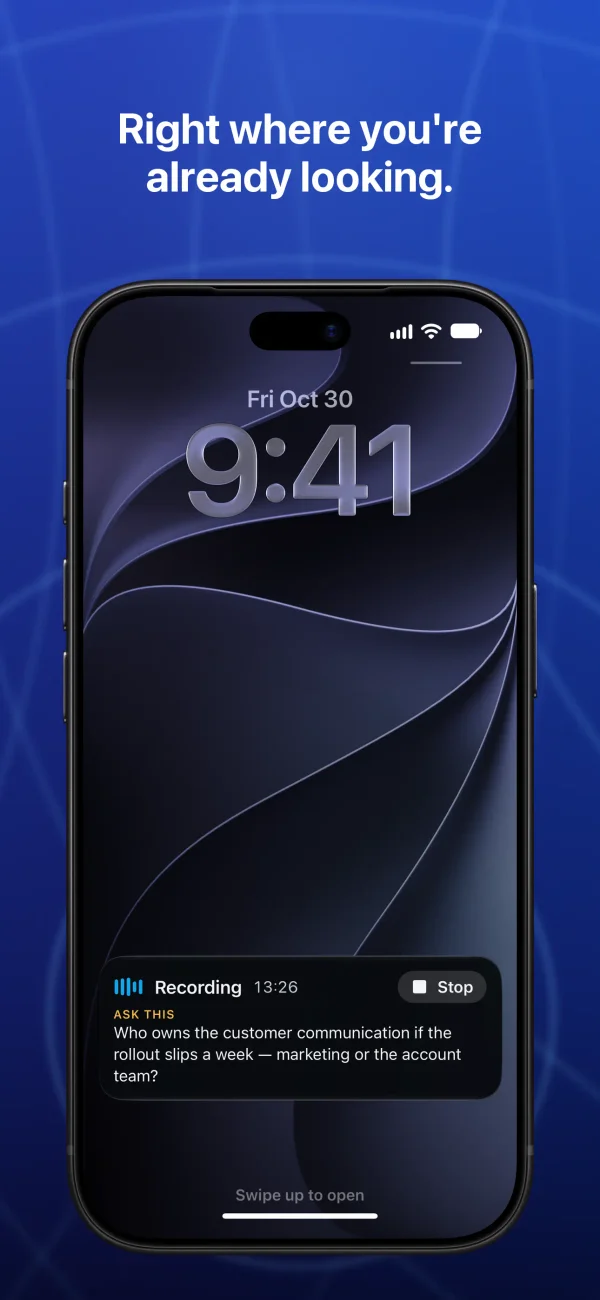
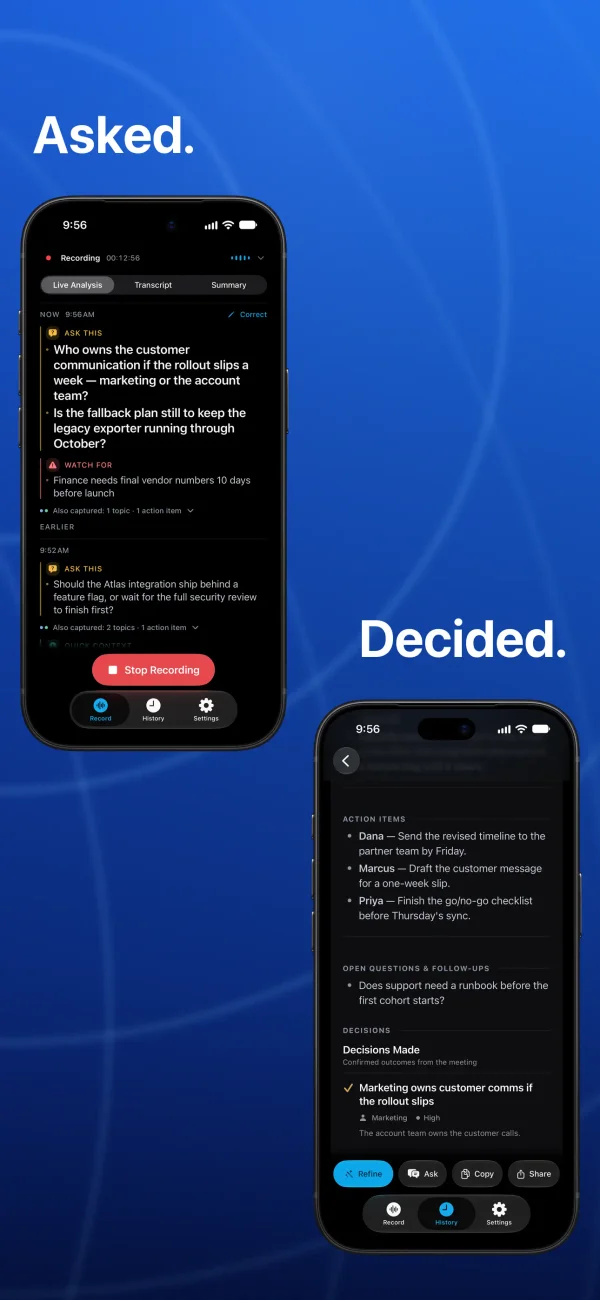
As your meeting unfolds, Meeting Intelligence surfaces the questions worth asking, the risks worth clarifying, and the decisions hiding inside the conversation. It connects an earlier point to what's happening now and responds sooner when a decision or risk comes up — so you speak up while it still matters. Lock your iPhone and the question worth asking is right on your Lock Screen.
ASK DURING THE MEETING, WITH PRO
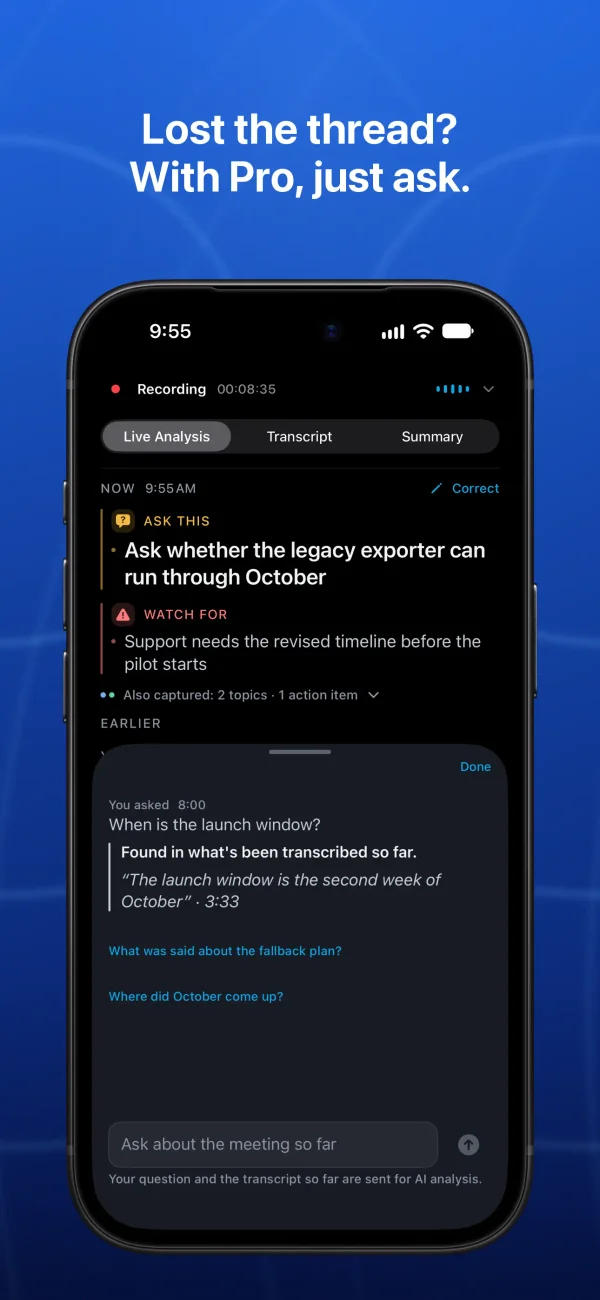
Lost the thread? Type a question while you record. If it came up, you see the transcript's own lines and their times. If it can't find it in what's been transcribed so far, it says so. Your question and the transcript so far are sent for AI analysis. Each result is saved with its question in the meeting's summary.
EXECUTIVE SUMMARIES, SHARED BEAUTIFULLY
When your meeting ends, the lights come up on your summary — a clean document with discussion points, decisions, action items, open questions, and next steps. Lock your iPhone after you stop: if the summary finishes while you're away, your Lock Screen says "Summary ready." Share it as a PDF, clean text for chat, or rich formatting for notes.
ASK MY MEETINGS — ONE MEETING, OR ALL OF THEM
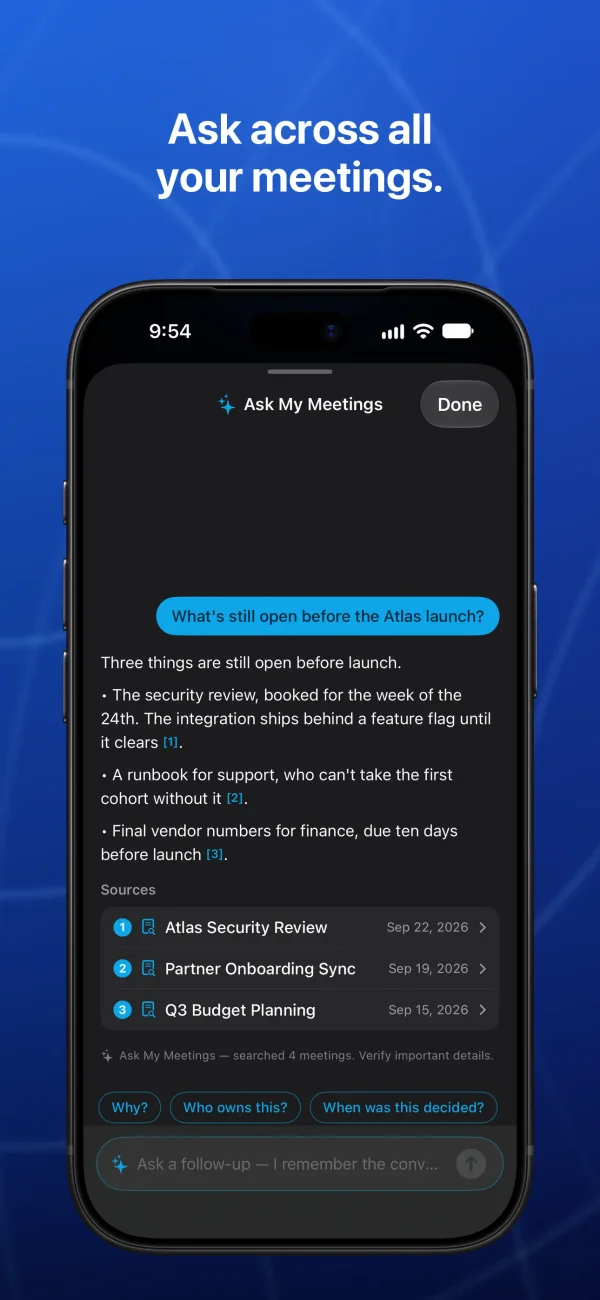
Open a meeting and ask about just that one: "What did we decide?" Or ask across everything you've recorded — "Who owns the security review?" Follow-ups understand the thread, and answers link back to the meeting. Search finds meetings by meaning, not just keywords, and its index stays on your device.
EVERY DEVICE, IN SYNC
Record on your iPhone, review on your Mac, ask on your iPad. Meetings, Meeting Memory, and profiles stay identical across your devices through your private iCloud — never our servers, and we can't read it. Pro, on by default, off in one switch.
YOUR WORDS, RECOGNIZED
Your participants' names, your corrections, and your Meeting Memory terms guide transcription — so names, projects, and jargon are far more likely to come out right from the first word. Fix a misheard name or term mid-meeting and the rest of the meeting gets it right too.
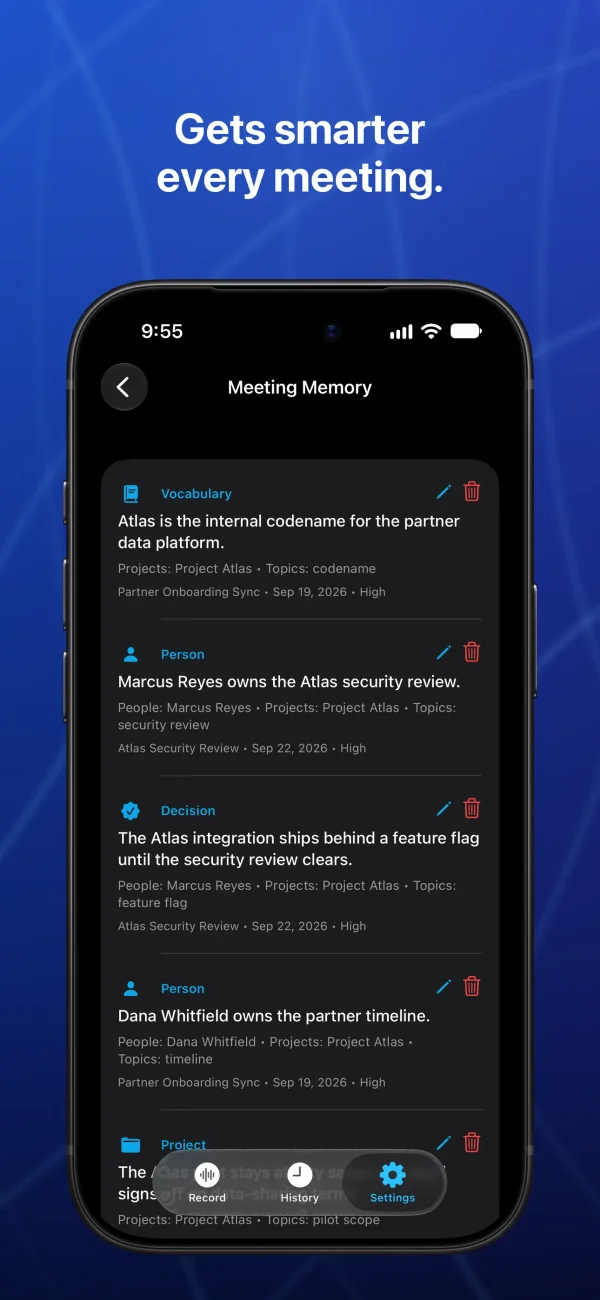
MEETING MEMORY
Meeting Intelligence gets more useful the longer you use it. Your AI meetings build a private memory layer from prior summaries, corrections, project names, and recurring topics — so future meetings get sharper questions and summaries, surfacing only when relevant.
PRIVATE BY ARCHITECTURE
No bot joins your call. Always follow your local recording-consent laws. Audio is never sent to Meeting Intelligence or any AI provider; transcription uses Apple's speech service under Apple's privacy terms.
Transcription is free for every meeting. Pro: AI meetings without the 2-a-month limit (counted on each device), plus Ask During the Meeting, Ask My Meetings and Refine. The free plan may change.
Terms of Use: https://edgepointsolutions.co/terms
Privacy Policy: https://edgepointsolutions.co/privacy
What’s new
Version 5.1.1 · Nov 22, 2026
Steadier transcription, from Start to Stop.
Meeting Intelligence 5.1.1 keeps transcription going when you lock your iPhone or switch apps, and gives the live analysis more room when a meeting starts.
NEW IN THIS UPDATE
- STEADIER WHEN YOU LOCK OR SWITCH APPS. Lock your iPhone mid-meeting, or step out to the Home Screen or an app that isn't using the microphone, and transcription keeps going, quiet moments included.
- MORE ROOM FOR THE LIVE ANALYSIS. When a recording starts, the Meeting Context box now starts closed, so the live analysis gets the screen. One tap opens it.
- A CLEANER AGENDA. Agenda Items now shows only the bulleted or numbered lines from your invite or prep notes. Other lines, like a greeting or a sign-off, show under Prep Notes, where they still inform the live analysis and your summary.
- EASIER TO READ. Long meeting titles now get two lines in History, so more of each title shows. On narrower iPhone screens, the summary's title is a size smaller. And a meeting's length reads one way in History and in your summary: 42:10, or 1:02:05 for a meeting of an hour or more.
RECENTLY ADDED
- ASK DURING THE MEETING, WITH PRO. Tap Ask while you record and type a question about the meeting so far. If it came up, you see the transcript's own lines and their times. If it can't find it in what's been transcribed so far, it says so.
Pro: Ask During the Meeting, Ask My Meetings and Refine, and AI meetings without the 2-a-month limit.
App privacy
What Edgepoint Solutions LLC declares on the App Store about how this app handles data.
-
Data linked to you
May be collected and linked to your identity.
- Purchases
- Identifiers
- Usage data
-
Data not linked to you
May be collected but is not linked to your identity.
- User content
- Usage data
Privacy practices may vary, for example with the features you use or your age.
Information
- Seller
- Edgepoint Solutions LLC
- Category
- Productivity
- Version
- 5.1.1
- Updated
- Nov 22, 2026
- Released
- Feb 13, 2026
- Size
- 10.8 MB
- Requires
- iOS 17.0 or later
- Age rating
- 4+
- Price
- Free
- In-app purchases
- Yes
- Languages
- English
- Copyright
- © 2026 Edgepoint Solutions LLC
You might also like
-
 TellMeMo: AI Meeting AssistantGet Answers During Meetings
-
 Modus: AI Meeting AssistantProductivity
-
 MeetMi: AI Meeting NotesLive transcription and advice
-
 OLVA:Live AI Meeting AssistantAI Notetaker, Coach & Recap
-
 Shoulder Surf: Meeting AICopilot, No Bots, No Install
-
 minitiAI speech coach
-
 Alark FocusFocus music & daily streaks
-
 Blocks – HTML Viewer & LibraryYour own files, one tap away
-
 Outshine: Meeting NotesFocus mode & career coach
-
 EchoVault - AI Meeting NotesImport Audio. Get AI Minutes.