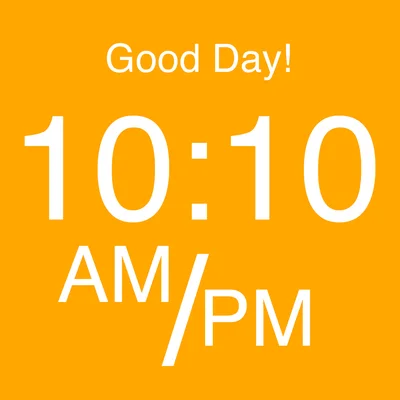
Mini Chroma Clock
A simple color desktop clock
Designed for iPhone, iPad, Mac
Free
- Age rating4+
- CategoryUtilities
- DeveloperDavid Mickey
- LanguagesEnglish
- Size517.0 KB
Links to the official App Store page
Download.org hosts no file of Mini Chroma Clock. The button opens its official App Store page, published by David Mickey. Listing last checked on Nov 17, 2026.
Screenshots


About
ChromaClock — a color‑coded clock for the rhythm of your day.
ChromaClock turns the time on your phone into something you can feel at a glance. Instead of just numbers, the entire screen shifts color throughout the day based on time windows you define — morning yellow, lunchtime green, afternoon blue, evening red, or whatever fits your life.
It's a beautifully simple bedside clock, desk companion, kitchen timer reference, and gentle daily rhythm — all in one.
HOW IT WORKS
• Set up to four time slots, each with a custom start time, end time, message, and background color.
• When the clock enters a slot, the background and greeting change automatically.
• Outside of any scheduled slot, a default "in‑between" color takes over.
• That's it — no accounts, no setup beyond your slots.
WHAT YOU SEE
• Big, easy‑to‑read time in a rounded display
• The full date — day of the week, month, day, year
• A friendly greeting you write yourself ("Good Morning", "Time to focus", "Wind down")
• Current weather for your location, right in the corner
WEATHER, WITHOUT THE FUSS
Tap the weather chip to see live conditions and temperature for where you are. Tap again to refresh. Weather data comes from the free, open Open‑Meteo service — no accounts, no tracking, just the forecast.
PERFECT FOR
• A bedside clock that signals morning vs. late evening at a glance
• A desk clock that reminds you when it's lunchtime or time to log off
• A kitchen or family clock with messages everyone in the house can read across the room
• Kids learning the rhythm of a school day, before they can read a clock
• Anyone who wants a calmer, more colorful way to keep time
THOUGHTFULLY MADE
• Built entirely in modern SwiftUI for iOS
• Big, accessible type with high‑contrast color backgrounds
• Landscape support — great when propped on a stand or dock
• Dark, screen‑friendly design
• No ads. No tracking. No accounts. Your settings stay on your device.
Set it once, prop it up, and let your day take on a little color.
What’s new
Version 2.0 · Jun 3, 2026
A fresh, modern rebuild of ChromaClock from the ground up:
• Brand‑new SwiftUI interface with a larger, easier‑to‑read clock
• Redesigned Settings — edit each time slot's message, hours, and color in one place
• New weather chip showing current conditions and temperature for your location
• Improved color palette and smooth background transitions between time slots
• New in‑app Help screen explaining time slots, colors, and weather
• Your existing time slots, messages, and colors carry over automatically
App privacy
What David Mickey declares on the App Store about how this app handles data.
-
Data not collected
The developer does not collect any data from this app.
Privacy practices may vary, for example with the features you use or your age.
Information
- Seller
- David Mickey
- Category
- Utilities
- Version
- 2.0
- Updated
- Jun 3, 2026
- Released
- Dec 6, 2021
- Size
- 517.0 KB
- Requires
- iOS 26.0 or later
- Age rating
- 4+
- Price
- Free
- Languages
- English
- Copyright
- © 2026 Mickey
You might also like
-
 ZenClock: Minimal ClockCalm Minimalist Desk Clock
-
 ZoneSync - World Clock WidgetTime Zone Converter & Planner
-
 Shiba QR Code Reader & ScannerNo Ads, Barcode Scan & History
-
 Flip Clock - Desk Clock WidgetDesk Clock, Widget & StandBy
-
 meloClockTime to music. Train your ear
-
 ASG Clock - AutostereogramAutostereogram Clock
-
 DigiFLUX Sleep Focus, PomodoroClock, Timer, Counters & Noise
-
 Text Clock WidgetUtilities
-
 Numby:Beautiful CalculatorUtilities
-
 Eternal ClockAlways On. No Ads. Just Time.