Mobile Screen Recorder
Private local screen capture
Designed for iPhone, iPad, iPod touch
Free · In-app purchases
- Age rating4+
- CategoryUtilities
- DeveloperDERITCH TECHNOLOGIES LLP
- LanguagesEnglish
- Size23.5 MB
Links to the official App Store page
Download.org hosts no file of Mobile Screen Recorder. The button opens its official App Store page, published by DERITCH TECHNOLOGIES LLP. Listing last checked on Nov 17, 2026.
Screenshots
About
Capture what matters—then keep it on your device.
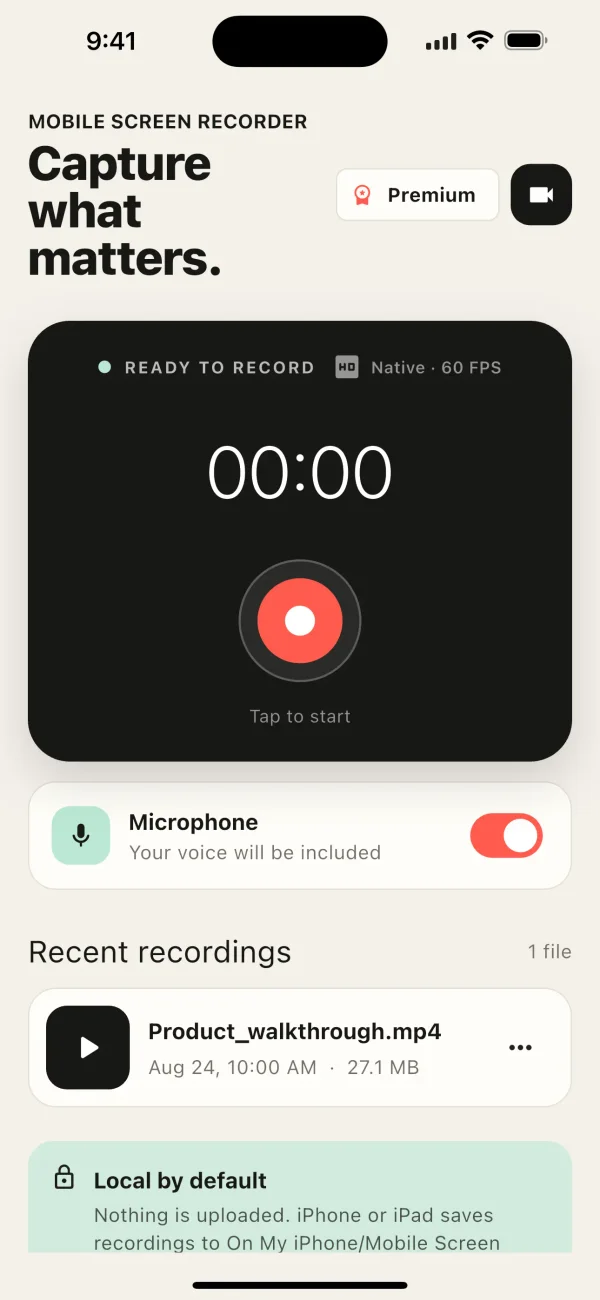
Mobile Screen Recorder is a focused screen-recording utility for iPhone and iPad. Start a ReplayKit broadcast through familiar Apple system controls, choose whether to include microphone audio, and find finished recordings in Files.
SIMPLE RECORDING CONTROLS
• Start capture through Apple’s system broadcast interface
• Include microphone audio only when you choose
• See recording quality and status at a glance
• Keep finished recordings in On My iPhone/Mobile Screen Recorder/Recordings
• Open, share, or delete recordings from your local library
LOCAL BY DEFAULT
Your screen recordings, microphone audio, filenames, and video contents are not uploaded to our servers. Mobile Screen Recorder does not require an account and is not a cloud-backup service. Network access is used for advertising consent, ads on the Free plan, purchase verification, and support pages.
QUALITY OPTIONS
• Free: up to 720p at 30 FPS with advertising
• Standard: up to 1080p at 30 FPS with no ads
• Premium: native resolution up to 4K and up to 60 FPS with no ads, where supported by the device
• Remove Ads Forever: removes ads while keeping Free-plan recording quality
Standard and Premium are available as auto-renewing monthly or annual subscriptions. Payment is charged to your Apple ID after confirmation. Subscriptions renew automatically unless canceled at least 24 hours before the end of the current period. Manage or cancel subscriptions from your App Store account.
IMPORTANT
Recording availability depends on Apple system permissions, device capabilities, storage, and the content being recorded. Protected or DRM-controlled content may appear blank or may not be recordable. You are responsible for obtaining any consent required before recording screens, conversations, meetings, or copyrighted material.
Subscriptions renew automatically unless cancelled through Apple. Restore a
completed purchase from the Plans screen.
Terms of Use (EULA):
https://www.apple.com/legal/internet-services/itunes/dev/stdeula
Privacy Policy: https://screenrecorder.deritchtech.com/privacy
Terms of Use: https://screenrecorder.deritchtech.com/terms
App privacy
What DERITCH TECHNOLOGIES LLP declares on the App Store about how this app handles data.
-
Data not collected
The developer does not collect any data from this app.
Privacy practices may vary, for example with the features you use or your age.
Information
- Seller
- DERITCH TECHNOLOGIES LLP
- Category
- Utilities
- Version
- 1.0.15
- Updated
- Sep 17, 2026
- Released
- Sep 17, 2026
- Size
- 23.5 MB
- Requires
- iOS 15.0 or later
- Age rating
- 4+
- Price
- Free
- In-app purchases
- Yes
- Languages
- English
- Copyright
- © 2026 DERITCH TECHNOLOGIES LLP
You might also like
-
 The InformantReal-Time AI Fact Checker
-
 ServiceTestsUtilities
-
 dB PulseMeasure, record & export dB
-
 Volmy : Volume & Soundboardresets, sounds & sleep fade
-
 Puppy GrinderUtilities
-
 Beacon (Flare)Say it without saying it.
-
 CA PRO DSPUtilities
-
 Anonymizer Ad BlockerUtilities
-
 Screen Recorder・V Record 4KEasy VRecorder with Face Cam
-
 JamPod Onboard APPJamPod Setup