
Multi Explorer - File Manager
Tabs, NAS, cloud and media
Designed for iPhone, iPad, iPod touch
Free
- Age rating4+
- CategoryUtilities
- DeveloperYassine Hedfi
- LanguagesEnglish+ 23 more
- Size129.0 MB
Links to the official App Store page
Download.org hosts no file of Multi Explorer - File Manager. The button opens its official App Store page, published by Yassine Hedfi. Listing last checked on Nov 13, 2026.
Screenshots
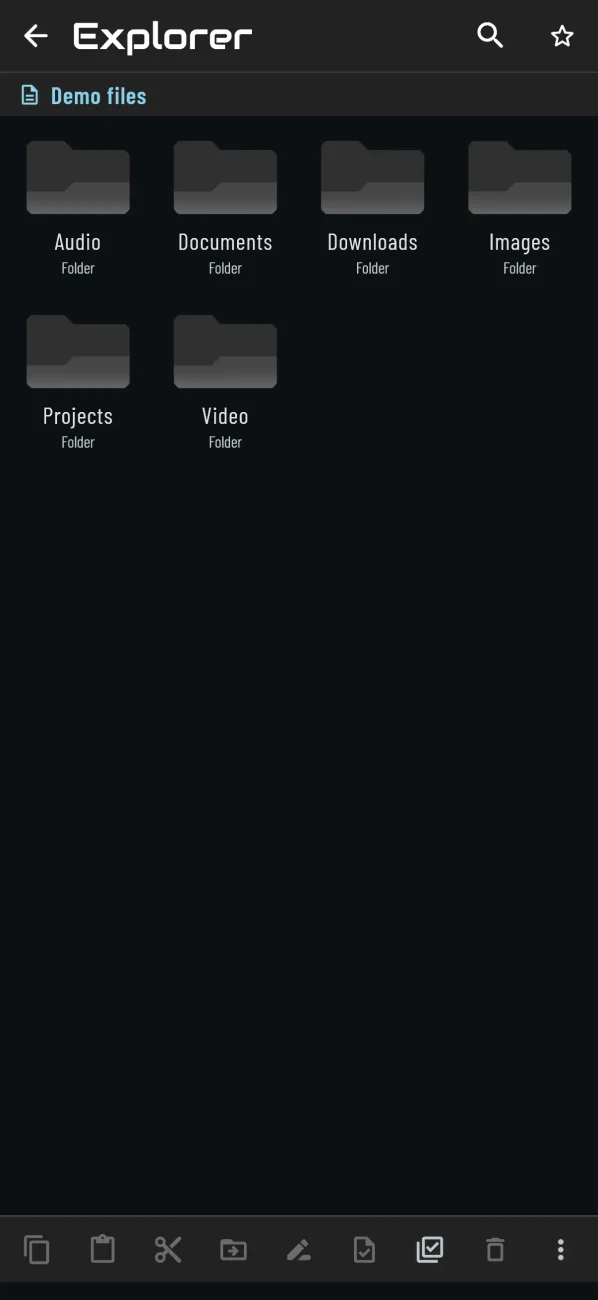
About
Multi Explorer – formerly REISE Explorer.
Multi Explorer combines file management on iPhone and iPad with access to NAS, network drives and supported cloud storage.
New Carbon design with coordinated colors and shadows.
Archive and manage Google Photos (Take-out) locally through Google Drive.
Request the export yourself in Google Takeout and have it delivered to Google Drive. After you confirm the download, Multi Explorer can download and extract the available archive locally. The archive does not sync with Google Photos in real time.
MULTIPLE TABS – SWITCH QUICKLY
Open several folders and storage locations in separate tabs.
MANAGE FILES AND FOLDERS
• Copy, move, rename and delete files
• Create folders, search, sort and use list or grid view
• Browse photos, videos, music, documents and downloads
• Create favorites and shortcuts within Multi Explorer
• Open and extract archives
NAS, NETWORK DRIVES AND CLOUD
Connect NAS, PC shares and servers using SMB, FTP, SFTP or WebDAV. Find devices on your local network or enter a server address. Save connections for next time.
Connect Microsoft OneDrive and Dropbox. Browse cloud folders, transfer files, create folders, and rename or delete items according to your access rights.
Google Drive is also integrated. Google's approval for general access is still under review, so sign-in and access may be restricted.
TRANSFER FILES AND SHARE FOLDERS
Send and receive files between compatible Multi Explorer devices over Wi-Fi or a hotspot, including without Internet on a local network. Keep track of transfer progress.
Share selected folders with read-only or write access. Manage and remove shares centrally. Multi Explorer PC can group these folders under one drive letter.
PHOTOS AND VIDEOS ON THE MAP
Explore photos and videos on a map using their saved capture locations. The source is the photo library you allow the app to access.
Open media groups on the map and long-press to select items for copying, moving or sharing. Only media with readable location data appear; not every photo or video contains this information.
DOCUMENTS, MEDIA AND VAULT
Read PDFs and search existing text layers. Scanned pages require separate text recognition first.
Edit photos and videos, trim clips and audio tracks, and add your own elements. Play your own media and playlists. Keep selected files in an encrypted, password-protected vault.
USE IT IN PEACE
No advertising interruptions, advertising pop-ups or animated ads. Sponsors support our development. Their static logos are updated only through app updates.
CONTROL YOUR ACCESS
Local file management and NAS and cloud access are part of the free base version. No Multi Explorer account is needed for them. You set up cloud accounts and device connections yourself. Local access covers app storage and folders you connect; photo access requires your permission.
PRO AND PARTNER-PRO
Multi Explorer device connections, additional photo, video and PDF tools, archive creation and playlist editing require Pro. Buy Pro and restore purchases directly through the App Store, without Multi Explorer registration. Pro is available as an annual subscription that renews automatically until cancelled, or a one-time purchase without a subscription. Features and final prices are shown in the app.
Pro covers one buyer device and one additional partner device. Activate Partner-Pro through nearby device discovery; the partner confirms on their device. Both devices need Internet and Bluetooth for this.
The buyer can revoke partner access without another confirmation from the partner. Revocation takes effect at the next online check; a valid authorization remains usable offline for no more than 24 hours. Manage subscriptions through the App Store.
Help: https://reise-engine.com/explorer/support/
Privacy: https://reise-engine.com/explorer/datenschutz/
Terms of Use (EULA): https://www.apple.com/legal/internet-services/itunes/dev/stdeula/
App privacy
What Yassine Hedfi declares on the App Store about how this app handles data.
-
Data linked to you
May be collected and linked to your identity.
- Purchases
- Location
- Contact info
- User content
- Identifiers
- Usage data
- Diagnostics
-
Data not linked to you
May be collected but is not linked to your identity.
- Diagnostics
- Other data
Privacy practices may vary, for example with the features you use or your age.
Information
- Seller
- Yassine Hedfi
- Category
- Utilities
- Version
- 1.6.10
- Updated
- Nov 11, 2026
- Released
- Nov 11, 2026
- Size
- 129.0 MB
- Requires
- iOS 15.0 or later
- Age rating
- 4+
- Price
- Free
- Languages
- English, Arabic, Danish, Dutch, Finnish, French, German, Hindi, Icelandic, Indonesian, Italian, Japanese + 12 more
- Copyright
- © 2026 Yassine Hedfi / REISE-Engine
You might also like
-
 OBD2+Vehicle Status & Log Recording
-
 Exo - File UploaderTemporarily upload files.
-
 Camera Translator: Photo TransTranslator of Camera or photos
-
 File Manager: File Finder ProManage Files, Music & Movies
-
 iBroweUtilities
-
 GPS Map Camera & CompassTravel Photo Location Stamp
-
 Smart Printer: Smart PrintAir Scanner Wireless Copier
-
 File Explorer-File Manager ZipDocuments,Photo Browser,Player
-
 闪灵AI - AI视频生成、短剧&漫剧创作、自媒体广告创作Utilities
-
 Gps Emulator Tool: Any Go TrakSimulate & record GPS routes