- Age rating4+
- CategoryPhoto & Video
- DeveloperChih-Hao Chen
- LanguagesEnglish+ 1 more
- Size21.1 MB
Links to the official App Store page
Download.org hosts no file of MuseCam. The button opens its official App Store page, published by Chih-Hao Chen. Listing last checked on Nov 17, 2026.
Screenshots
About
Let every capture begin with inspiration.
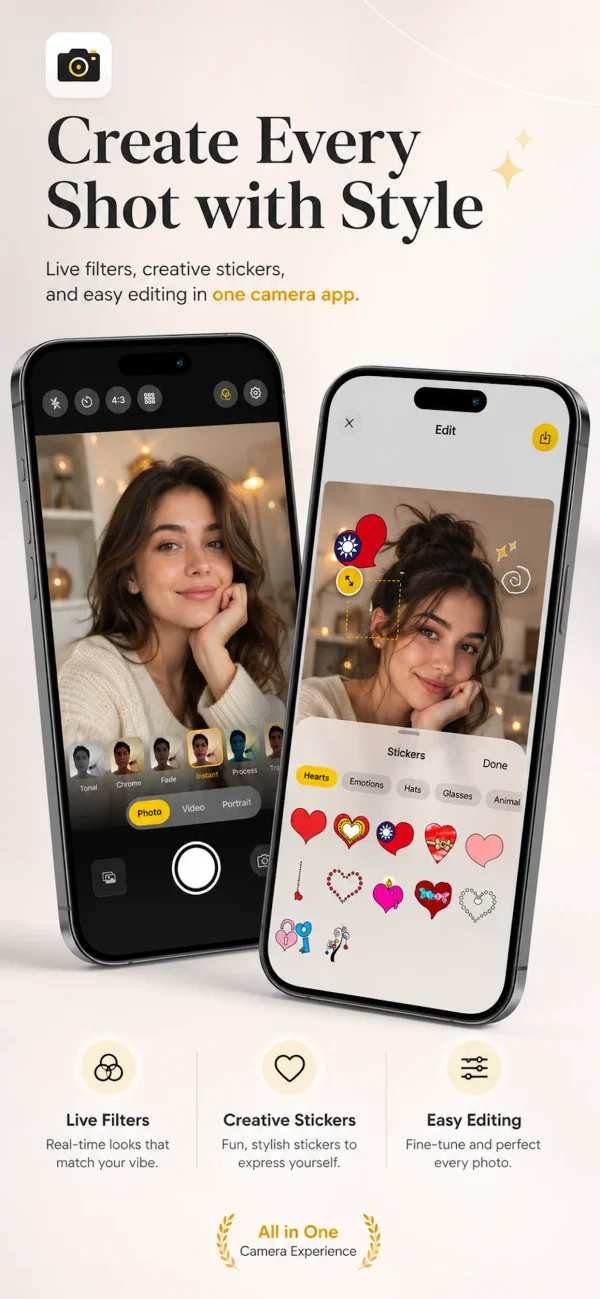
MuseCam is a creative camera that brings together photography, video recording, live filters, portrait effects, and photo editing.
Whether you are capturing everyday moments, taking portraits, documenting a trip, or creating something more expressive, MuseCam lets you preview effects while shooting and quickly turn your ideas into finished images and videos.
Live Filters
Preview different visual styles before you take the shot.
Choose from natural tones, black-and-white looks, cinematic filters, and creative animated effects. Swipe through the filter collection and instantly find the right mood for every scene.
Photo and Video
MuseCam supports multiple capture modes:
Standard photos
Square photos
Video recording
Portrait and background effects
See the final look while shooting without repeatedly switching to a separate editing screen.
Portrait and Background Effects
MuseCam can separate people from the background so each layer can be enhanced independently.
Keep your subject clear while applying filters, blur, replacement backgrounds, or creative visual effects behind them.
Subject Extraction
Quickly isolate a person or main subject from a photo and export it with a transparent background.
Use extracted subjects to create stickers, social media graphics, greeting cards, collages, and other visual projects.
Practical Camera Tools
MuseCam includes intuitive controls for more precise shooting:
Front and rear camera switching
Flash controls
Self-timer
Tap to focus and expose
Pinch to zoom
Exposure adjustment
Grid and level guides
Multiple aspect ratios
Compose your shots confidently in a wide range of situations.
Post-Capture Editing
Continue creating after the photo is taken by adding:
Text
Stickers
Frames
Drawings
Location and date stamps
Additional filter effects
Move, resize, and rotate each element freely.
Save and Share
Save completed photos and videos to your library or share them directly with friends and your favorite social platforms.
Privacy First
Image processing is primarily performed on your device. MuseCam does not require an account and does not make your private photos public when you use filters or portrait effects.
Capture light, preserve moments, and turn inspiration into imagery.
What’s new
Version 2.0 · Jul 22, 2026
fix issues
App privacy
What Chih-Hao Chen declares on the App Store about how this app handles data.
-
Data not collected
The developer does not collect any data from this app.
Privacy practices may vary, for example with the features you use or your age.
Information
- Seller
- Chih-Hao Chen
- Category
- Photo & Video
- Version
- 2.0
- Updated
- Jul 22, 2026
- Released
- Dec 18, 2018
- Size
- 21.1 MB
- Requires
- iOS 26.0 or later
- Age rating
- 4+
- Price
- Free
- Languages
- English, Traditional Chinese
- Copyright
- © Frank
You might also like
-
 Muse: Your AI Art PartnerTurn Photos into Art & Cards
-
 Sun 600Retro Instant Camera
-
 ANGLE Camera DuoShoot Freely with Two iPhones
-
 Better AngleAI that helps you take photos
-
 fractur: Aesthetic CameraShoot. Select. Make it yours.
-
 SCENE:Cinematic Film Recipe Editor
-
 Art-OnePhoto & Video
-
 Phorus WiggleStereo photos, film look
-
 OMIRA: Pose ReferencePose reference for photos
-
 Tumble: Vintage Photo EditorRetro Film Camera & Filters