- Age rating4+
- CategoryProductivity
- Developerkazuhiro aonuma
- LanguagesEnglish+ 1 more
- Size12.9 MB
Links to the official App Store page
Download.org hosts no file of My Message. The button opens its official App Store page, published by kazuhiro aonuma. Listing last checked on Nov 20, 2026.
Screenshots

About
Send a message to your future self.
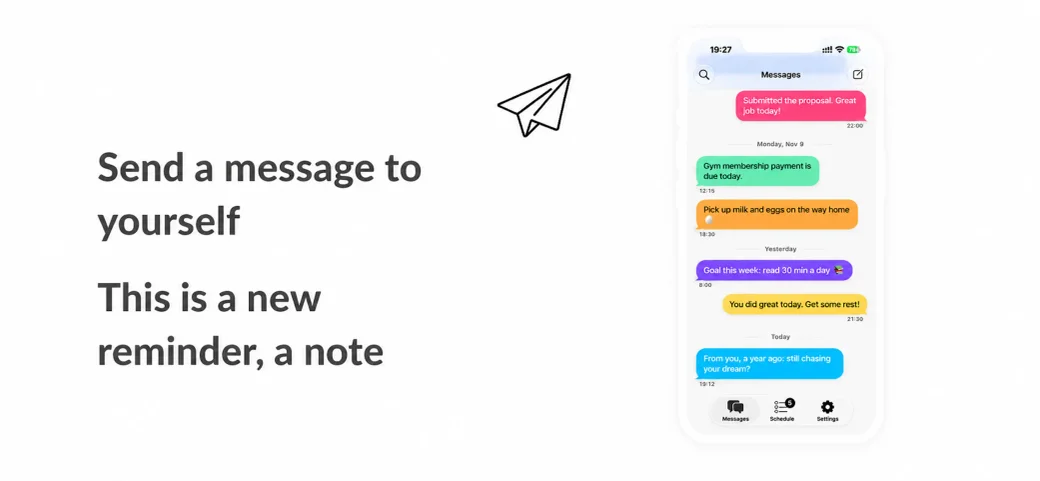
MyMessage lets you write messages to yourself and have them delivered at any date and time you choose.
When the time comes, your message arrives as a notification. You can read it right on your Lock Screen or in Notification Center without opening the app.
Delivered messages appear in chat-style bubbles, so you can look back on them anytime.
"Things to remember tomorrow morning"
"A letter to myself one year from now"
"My goals to read every Monday morning"
"A few kind words after a hard day"
Use it as a reminder, a note, a journal, or a letter. It's up to you.
■ Features
- Schedule messages for any date and time
Just pick a date and time to schedule a message
- Get your messages as notifications
At the time you set, your message arrives with a notification sound. The full message is shown in the notification, so you
can read it at a glance without opening the app.
- Repeating messages
Have the same message delivered daily, weekly (on the days you choose), or monthly (on the date you choose). Great for
building habits and regular check-ins.
- Chat-style bubbles
Delivered messages are shown in speech bubbles. Choose any bubble color, and show bubbles on the right if you like. Looking
back feels like a conversation with your past sel
- View and edit scheduled messages
Messages that haven't arrived yet are listed under "Scheduled," where you can change their text or delivery time.
- Search and filter by date
Find past messages quickly with keyword search, Days, Last 30 Days, This Year, or a custom range.
- iCloud backup
Back up your messages to iCloud and restore them on a new device.
- Copy and delete
Copy delivered messages to paste into other apps
■ Great for people who
- Tend to forget tasks and plans
- Want a reminder notification at a set time
- Want to write a letter to their future self
- Want to be reminded of goals or meaningful words at the right moment
- Want to capture today's feelings and look back
No account needed. Send your first message to you
* Notifications must be allowed to receive your m
What’s new
Version 2.0.0 · Nov 14, 2026
MyMessage has been completely redesigned!
- Fresh new design
A cleaner, easier-to-use look, with Dark Mode support.
- Repeating messages
Have the same message delivered daily, weekly (on the days you choose), or monthly (on the date you choose).
- Search your messages
Find past messages by keyword or date range (Today, Last 7 Days, Last 30 Days, This Year, or a custom range).
- iCloud backup
Back up your messages to iCloud and restore them on a new device.
- Customize your bubbles
Show bubbles on the right side, and choose from new white and black bubble colors.
All your existing messages and scheduled messages are carried over automatically.
App privacy
What kazuhiro aonuma declares on the App Store about how this app handles data.
-
Data used to track you
May be used to track you across apps and websites owned by other companies.
- Identifiers
-
Data linked to you
May be collected and linked to your identity.
- Identifiers
Privacy practices may vary, for example with the features you use or your age.
Information
- Seller
- kazuhiro aonuma
- Category
- Productivity
- Version
- 2.0.0
- Updated
- Nov 14, 2026
- Released
- Aug 10, 2020
- Size
- 12.9 MB
- Requires
- iOS 17.0 or later
- Age rating
- 4+
- Price
- Free
- Languages
- English, Japanese
- Copyright
- © 2026
You might also like
-
 Chat Memo - Simple Note AppWidget support with no ads.
-
 Remind your TasksA simple task reminder app
-
 通知ほしいProductivity
-
 Chat memo. Memo app like tweetYour own memo app.
-
 Routine Reminder - Planner AppProductivity
-
 monolist - simple checklistTo-Do app with only one list
-
 InstantTODO: Never Forget TaskUnmissable Alerts for To-Dos
-
 Target Setting MachineAutomatic Deadline Setting
-
 RiverTodo - Simple To-Do ListDaily Planner & Task Manager
-
 Reminders 3: Snooze Until DonePersistent Nag Alarms & To Do