Notelit
Draw, write & organize notes
Designed for iPhone, iPad, Mac
In-app purchases
- Age rating4+
- CategoryProductivity
- DeveloperAli Alraeesi
- LanguagesEnglish+ 1 more
- Size16.6 MB
Links to the official App Store page
Download.org hosts no file of Notelit. The button opens its official App Store page, published by Ali Alraeesi. Listing last checked on Nov 11, 2026.
Screenshots


About
Notelit is your notebook on the Mac — the same notebooks, pages and handwriting as on your iPhone and iPad, now on a big screen with a keyboard.
YOUR FILES, ALWAYS TO HAND
• Every subject in a sidebar, with the open file right beside it
• Quick Notes and Recordings at the top, then My Files with its own search
• Pin your favourite files and notes to the top
• One search finds files, notes, and the words written on your pages
CLICK AND TYPE
• Click anywhere on a page and start typing right there
• Fonts, sizes, colours, bold, italic and underline for your words
• Blank, ruled or grid paper, page by page
• Add shapes, stickers and pictures, then move, resize and turn them
YOUR HANDWRITING, ON THE MAC
• Pages written with Apple Pencil on iPad or iPhone open just as they were
• Every note keeps its own paper, so its layout is the same on every device
• Circle ink or words with the lasso to move, resize or delete them
SYNCED EVERYWHERE
• Sign in with Apple and your notes stay in step on Mac, iPad and iPhone — changes arrive moments after you make them
• Share a note with a friend who uses Notelit, recordings and all
• Share pages to Messages, Mail and other apps, or save them as PDF
RECORDINGS
• Every recording from your notes in one place
• Play them, rename them, and move one into any note
MADE FOR LATE NIGHTS
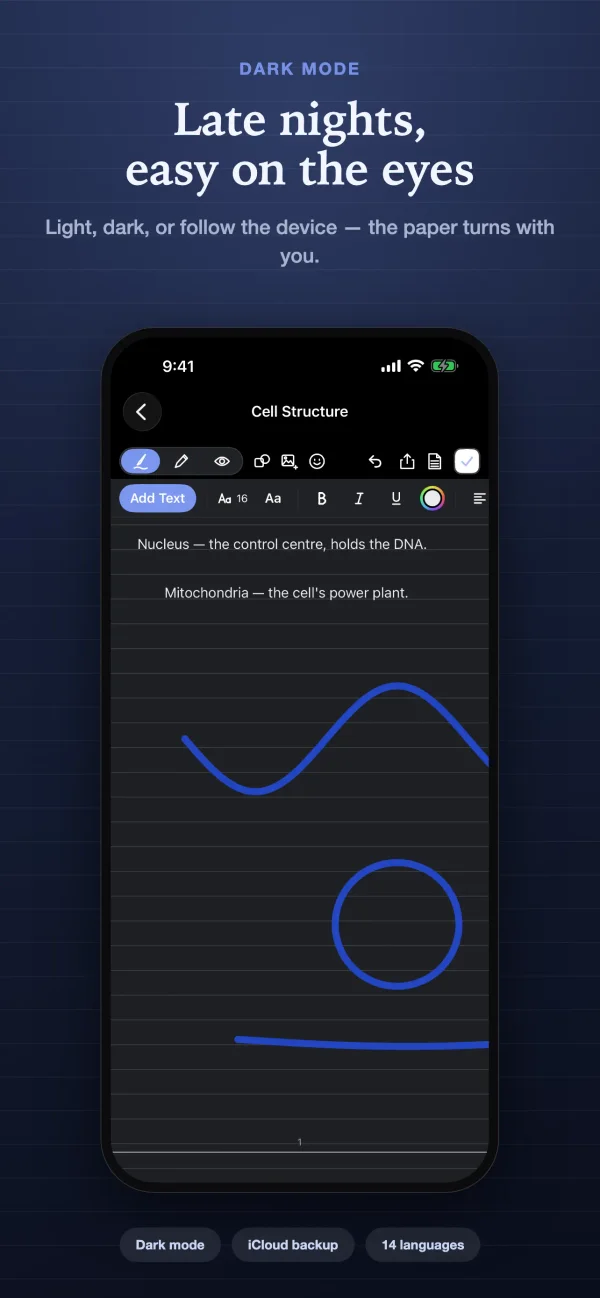
• Light and dark mode, with dark pages that export as real paper
• Available in 14 languages, including Arabic
PLANS
Notelit is free to start, with no account needed.
• Lite adds all fonts, every sticker pack, the Notelit widgets and Save to iCloud
• Pro adds everything in Lite, plus page templates, whole-file PDF export, custom app icons and up to six pins
Subscriptions renew automatically unless cancelled at least 24 hours before the end of the current period. Manage or cancel them any time in your Apple Account settings.
Terms of Use (EULA): https://www.apple.com/legal/internet-services/itunes/dev/stdeula/
What’s new
Version 0.2.60 · Oct 23, 2026
Meet the Marketplace
• Over 330 Notelit Originals and pages shared by other note-takers, all free to browse
• Like your favourites, publish your own pages, and use any template with Pro
• Live updates: new pages and likes show up within seconds
• Your likes and published pages come back with your iCloud account, even after a reinstall
Read text from your pages
• Circle printed words on a PDF or photo with the Select tool, then copy them, hear them read aloud, or add them to the page as text
Writing and drawing
• New sticker packs for page design, planners, computer science and economics, with your recent stickers one tap away
• Pen and eraser options open right under their buttons, with a line showing each pen's colour and size
• A laser pointer in the draw bar
• Links in your notes open inside Notelit, so your page is right there when you come back
• Sharper handwriting on iPad, Mac and when zoomed in
Plans and profile
• Page templates now come with Lite
• A profile with your picture and birthday, and Notelit Pro free all day on your birthday
• A little celebration when you join Lite or Pro
Everywhere
• Fully translated in all 14 languages, with right-to-left Arabic and Urdu laid out correctly
• Bug fixes and performance improvements
App privacy
What Ali Alraeesi declares on the App Store about how this app handles data.
-
Data not collected
The developer does not collect any data from this app.
Privacy practices may vary, for example with the features you use or your age.
Information
- Seller
- Ali Alraeesi
- Category
- Productivity
- Version
- 0.2.60
- Updated
- Oct 23, 2026
- Released
- Sep 10, 2026
- Size
- 16.6 MB
- Requires
- iOS 18.0 or later
- Age rating
- 4+
- In-app purchases
- Yes
- Languages
- English, Arabic
- Copyright
- © Aioratec 2026
You might also like
-
 Margin Web NotesHandwrite on the web
-
 Warqa - notebookProductivity
-
 Pagora – AI Notebook & PlannerJournal, diary & AI assistant
-
 Img to PDF: Image ConverterConvert PNG & JPEG Photos
-
 Inkwell: Audio Sync NotesHandwriting synced with audio
-
 NoteDive: Infinite CanvasNotes, Study & Sketch Notebook
-
 Chartula: Handwriting CalendarWrite, don't type
-
 Inkpage: Notes & PDF MarkupHandwriting, study & planner
-
 Notelet: Handwritten NotesDigital paper notebook & diary
-
 Text to Handwriting: Hand NoteQuick Note Handwritten Convert