OBD Trip
OBD2 scan, trip & car health
Designed for iPhone, iPad
Free · In-app purchases
- Age rating4+
- CategoryUtilities
- DeveloperImpossiblePossible Limited
- LanguagesEnglish
- Size13.8 MB
Links to the official App Store page
Download.org hosts no file of OBD Trip. The button opens its official App Store page, published by ImpossiblePossible Limited. Listing last checked on Nov 16, 2026.
Screenshots


About
Your car's own flight recorder. Plug a Bluetooth OBD-II adapter into your car, set OBDTrip up once, and every journey records itself: engine, road and route. It's all worked out on your iPhone and kept on your own devices.
RECORDS ITSELF
• Automatic – No Start button. OBDTrip reconnects in the background and is recording before you pull away.
• Knows each car by its VIN – Every vehicle keeps its own history, with no setup between cars.
• Learns your car – It asks your engine what it can report and only requests those readings.
WHILE YOU DRIVE
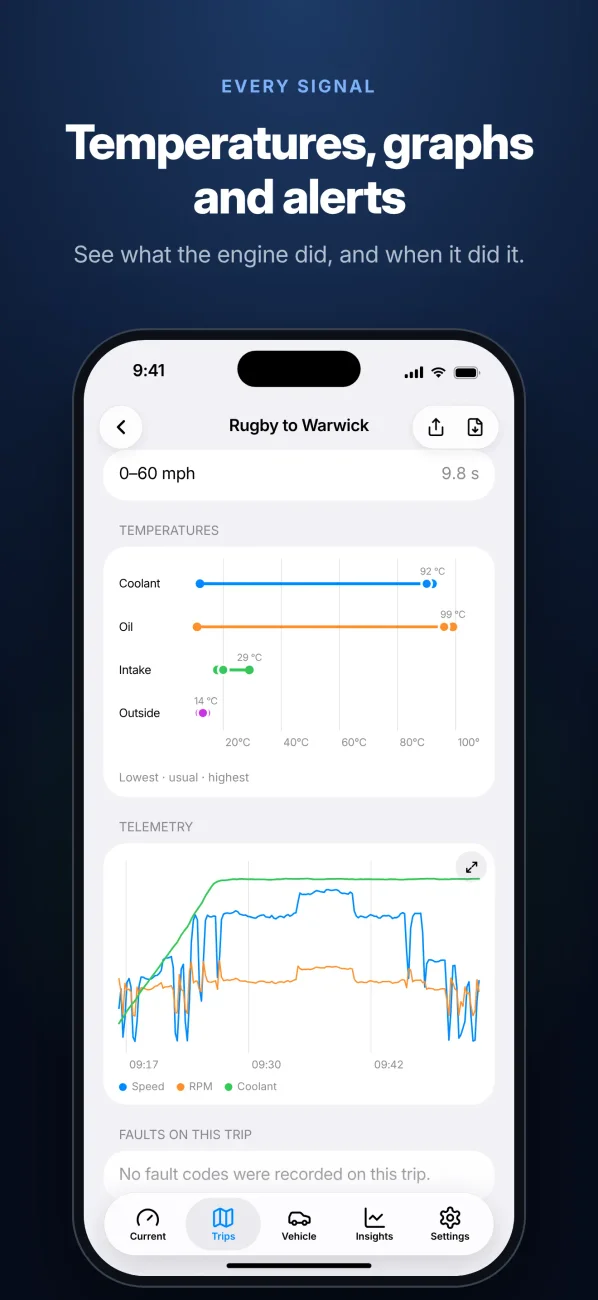
• Live dashboard – Speed, RPM, temperatures, fuel and more as numbers, dials, graphs or bars.
• CarPlay – Live readings on your car's screen.
• Lock Screen and Dynamic Island – Your chosen readings live while you drive.
• In-car mode – Turn the phone sideways for a glanceable dashboard and map.
• Mark a moment – One tap pins it on the route.
EVERY TRIP, KEPT
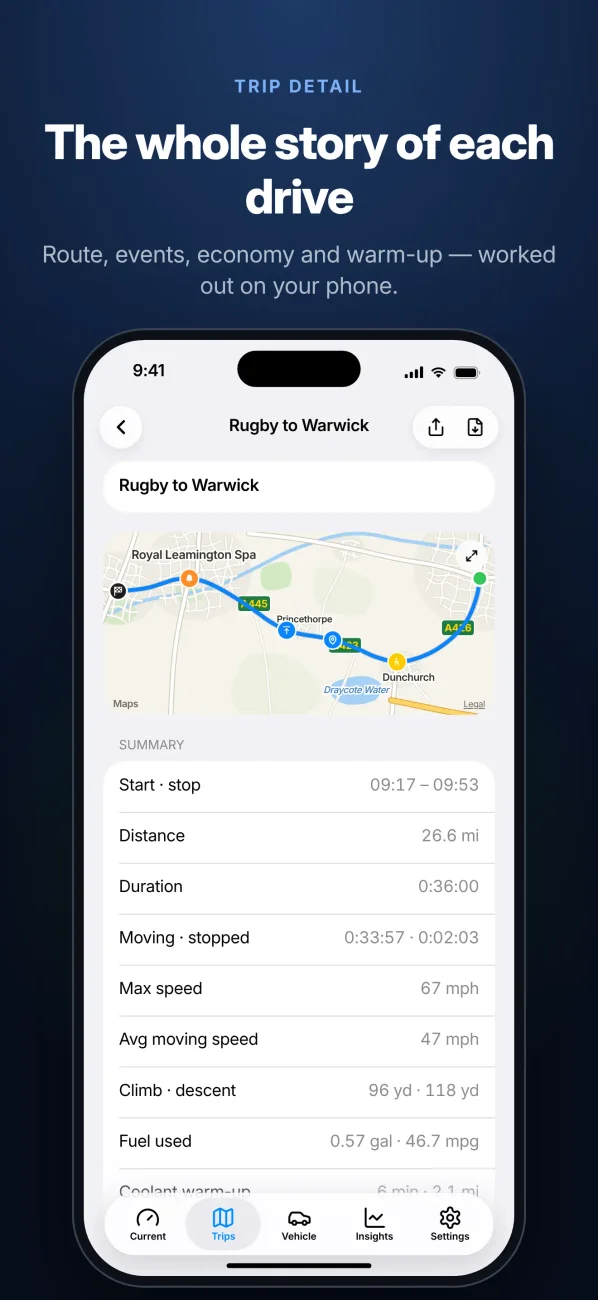
• Named trips – For example "Rugby to Warwick", with faults, alerts and laps flagged.
• Route map – Start, finish and key moments pinned where they happened.
• The numbers – Distance, speeds, fuel used and mpg, warm-up time, and 0–60 and 0–100 km/h times.
• Custom trips – Turn a weekend away or a track day into one journey.
FOR ENTHUSIASTS
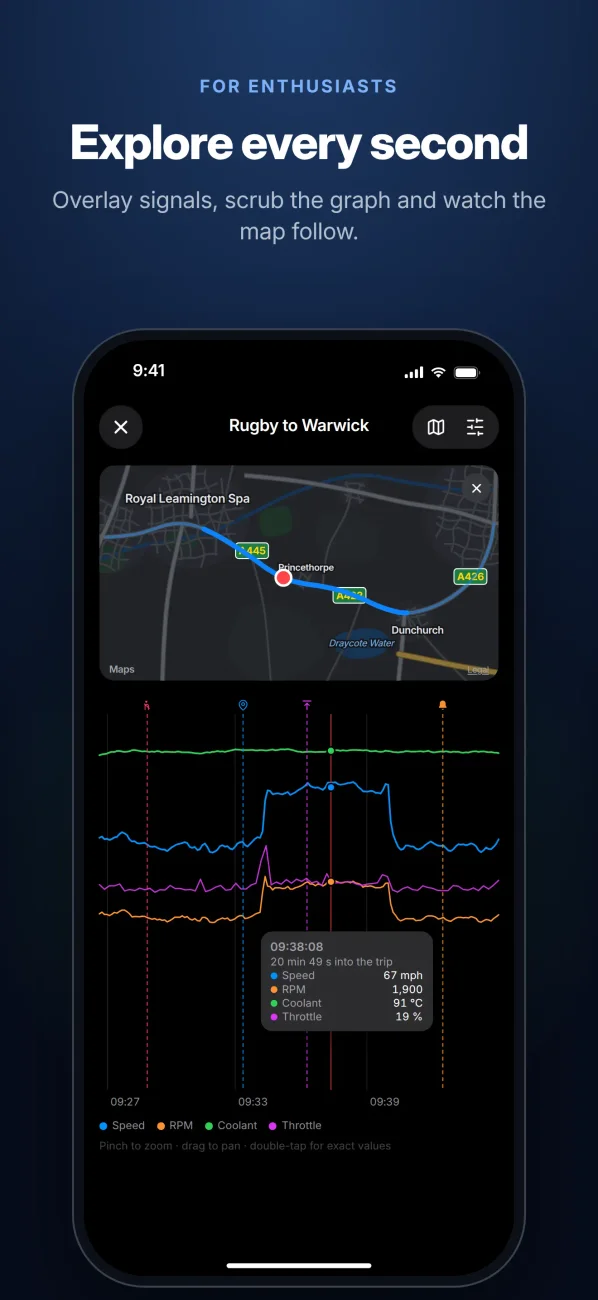
• Graph explorer – Overlay up to ten readings, zoom in and tap for exact values while the map follows.
• Automatic lap timing – Circuits detected from your route, every lap timed, your best highlighted.
VEHICLE HEALTH
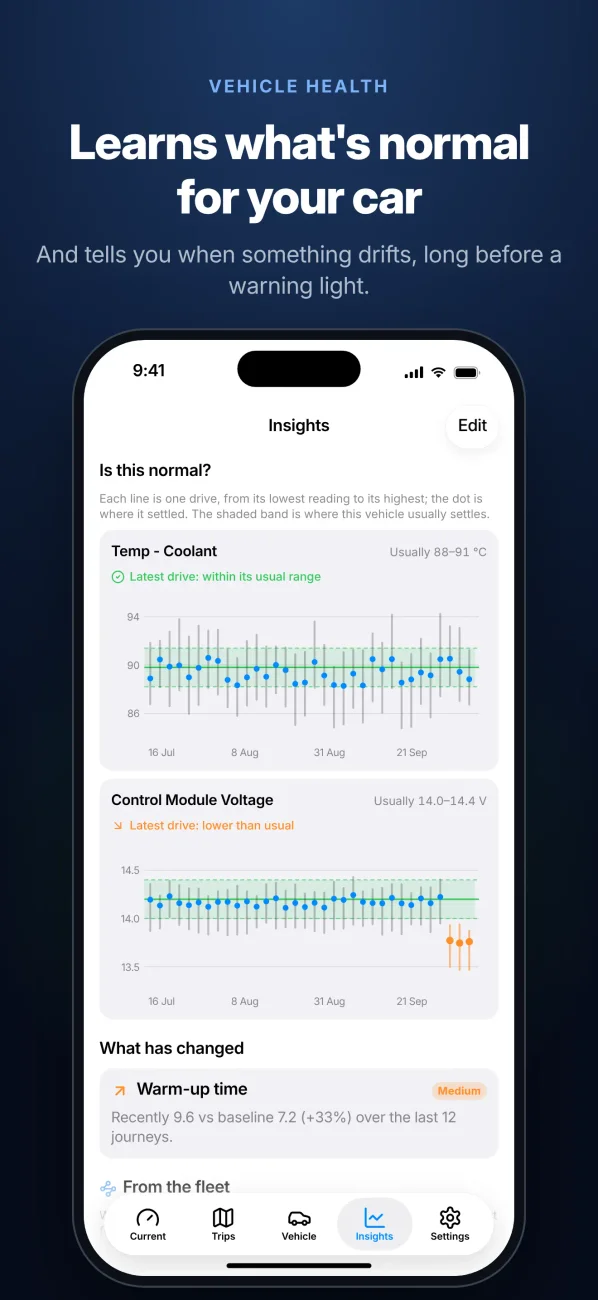
• Checked after every drive – Coolant, charging, fuel correction and more, against your car's normal.
• "Is this normal?" – See each drive against the ranges your car usually keeps to.
• Trends – Spots slow changes, like a longer warm-up, before a warning light does.
• Quiet by default – Alerts only for what matters: overheating, low fuel, new faults, real trends.
FAULT CODES: READ AND CLEAR
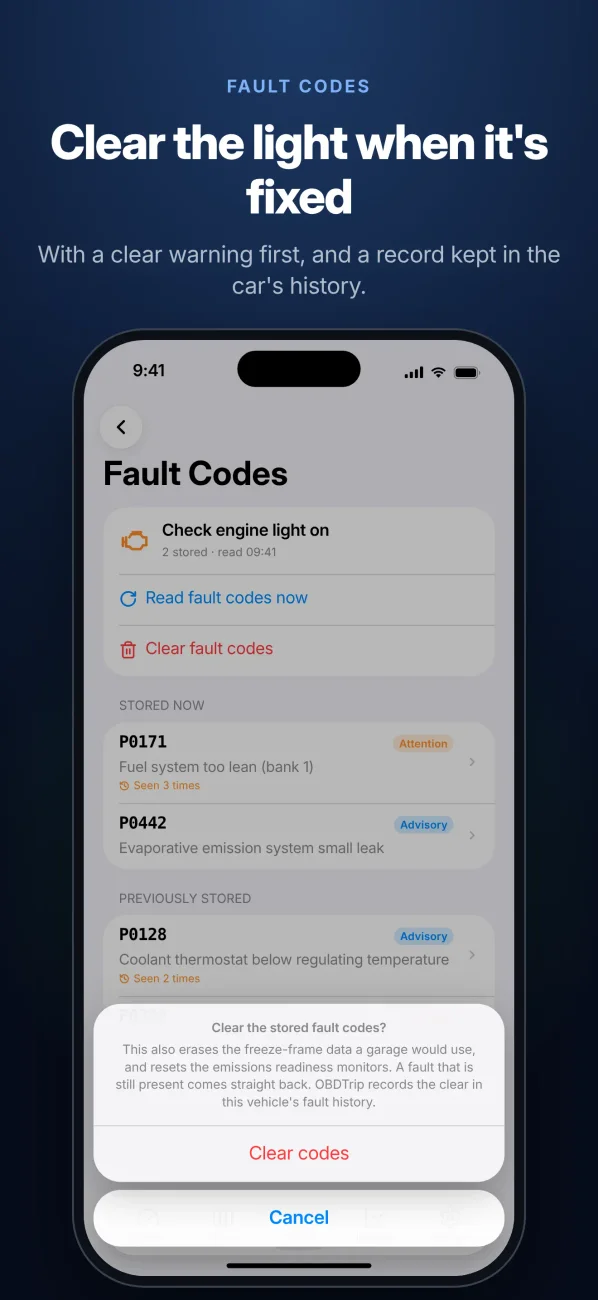
• Clear fault codes – Fixed the problem? Clear the codes and turn off the check engine light, with a warning first.
• Plain English – What each code means, how serious it is, and whether to keep driving.
• Causes and checks – Likely causes, symptoms, and what a garage will look at first.
• History – When and where a code appeared, and how often it comes back.
INSIGHTS
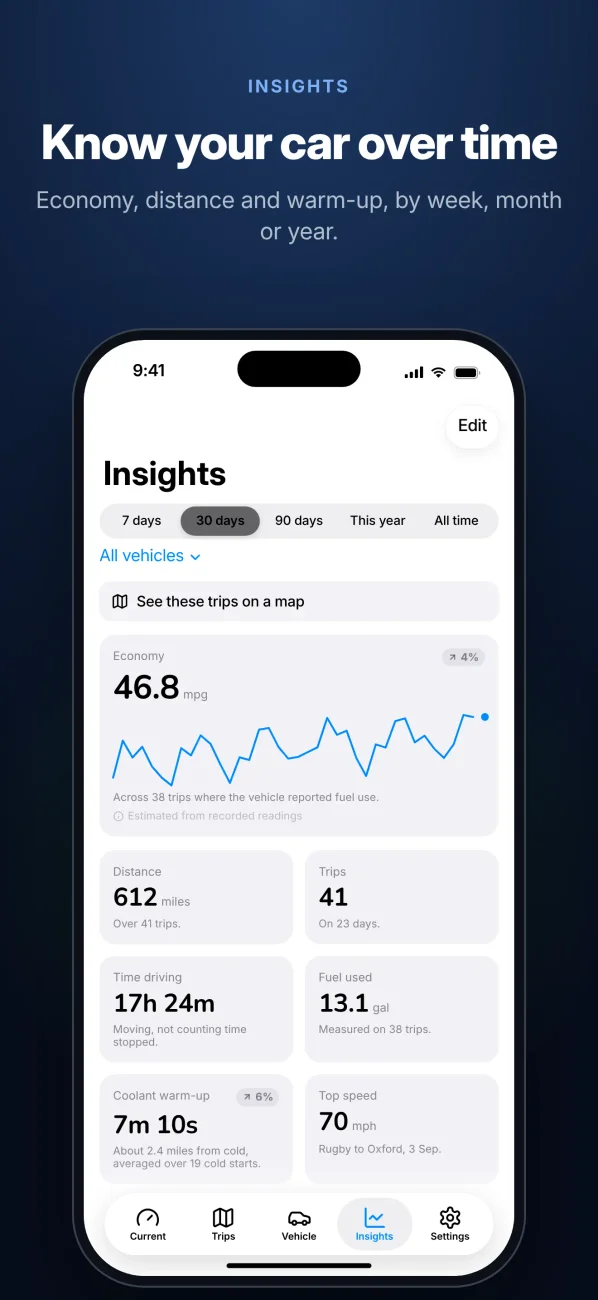
• Your driving in numbers – Economy, fuel, CO2, distance, time driving, warm-up and battery health.
• Any period, any car – The last 7, 30 or 90 days, this year or all time.
• Everywhere you've been – All your trips on one map.
SHARING
• Share a trip as a link – You choose the map detail, the readings and how long the link lasts.
• Save a copy – Export a whole trip as a file and open it on any device.
PRIVATE BY DESIGN
• No account – No sign-up, email address or password.
• Stays yours – Your VIN, routes and raw readings stay on your devices and in your private iCloud.
• No tracking – No ads, no analytics trackers, and your data is never sold.
WHAT YOU NEED
A Bluetooth BLE OBD-II adapter. OBDTrip is tested with the Vgate iCar Pro Bluetooth 4.0 (BLE). Other Classic Bluetooth adapters, and Wi-Fi adapters, are not supported.
SUBSCRIPTION
Free, OBDTrip recognises every journey and shows speed and RPM live. A subscription records every trip in full (route, telemetry, events, laps, trends and sharing) and lets you read and clear fault codes. Monthly or annual. Payment is charged to your Apple Account and renews automatically unless cancelled at least 24 hours before the end of the current period. Manage or cancel in your App Store account settings.
Terms of use: https://obdtrip.com/terms/
Privacy policy: https://obdtrip.com/privacy/
What’s new
Version 1.2.3 · Nov 8, 2026
- A slicker 'first run' experience.
- New 'End trip' on the Lock Screen/live activity.
- iPhone Duo: open it up and your trips and vehicles sit beside the page you're reading, the trip graph and vehicle capabilities split along the fold, Settings opens into two columns on its side, and the in-car dashboard spreads out with the map alongside.
- iPad: trips and vehicles sit beside the page you're reading, and the in-car dashboard fills the screen with more readings across, a bigger map and the live graph alongside.
- Subscribers can now message us straight from Settings › Support.
App privacy
What ImpossiblePossible Limited declares on the App Store about how this app handles data.
-
Data not collected
The developer does not collect any data from this app.
Privacy practices may vary, for example with the features you use or your age.
Information
- Seller
- ImpossiblePossible Limited
- Category
- Utilities
- Version
- 1.2.3
- Updated
- Nov 8, 2026
- Released
- Oct 21, 2026
- Size
- 13.8 MB
- Requires
- iOS 26.0 or later
- Age rating
- 4+
- Price
- Free
- In-app purchases
- Yes
- Languages
- English
- Copyright
- © 2026 ImpossiblePossible
You might also like
-
 The Calculator - Notes & UnitsMinimalist Currency Converter
-
 Property CheckerGet Instant Property Insights
-
 OpenOBD: OBD2 Car ScannerCheck Engine Light Code Reader
-
 WrenchTime: Car MaintenanceFuel, Mileage & OBD2 Scanner
-
 EV CALCEV charge range cost estimator
-
 Smart RTSP: IP Camera ViewerONVIF CCTV Recorder
-
 Rolec ConnectUtilities
-
 TruTrak ProLive Vehicle Tracking Provider
-
 Esso fleetcardUtilities
-
 Froling ConnectUtilities