
Occam SI
Personal SI Research Assistant
Designed for iPhone, iPad, Mac
Free · In-app purchases
- Age rating17+
- CategoryProductivity
- DeveloperDakota Bullard
- LanguagesEnglish+ 17 more
- Size47.1 MB
Links to the official App Store page
Download.org hosts no file of Occam SI. The button opens its official App Store page, published by Dakota Bullard. Listing last checked on Nov 18, 2026.
Screenshots



About
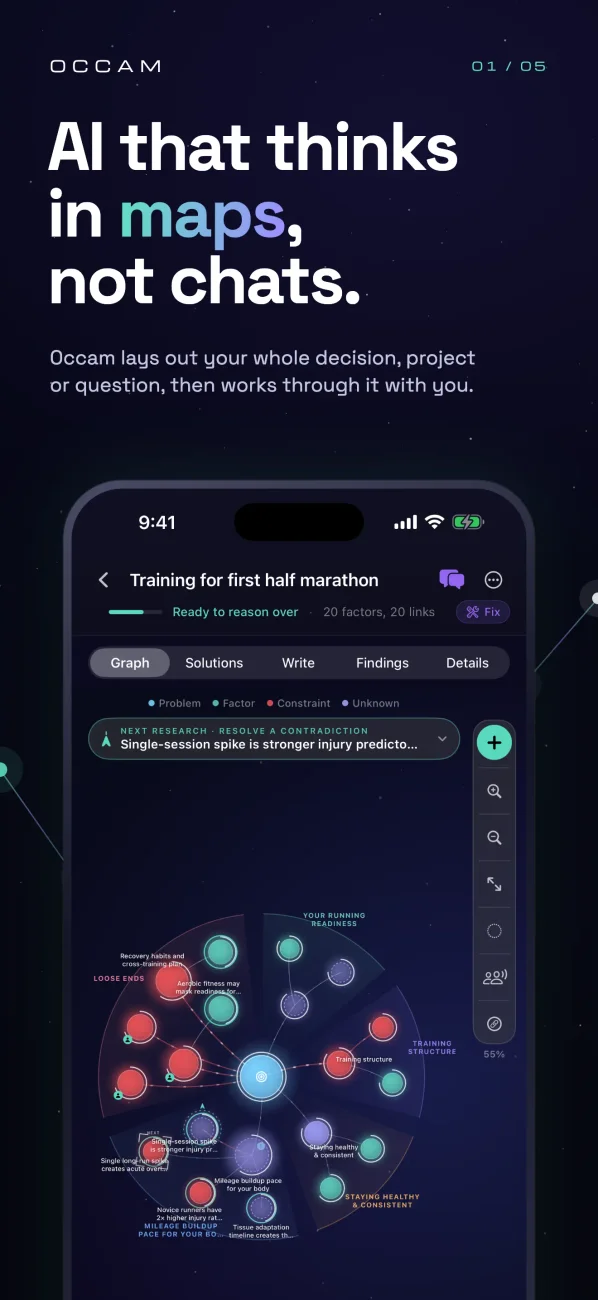
Make sense of a difficult question with Occam's Razor. Build an AI-assisted mind map, examine the assumptions behind it, and decide what to investigate next.
Use it to plan a project, compare options, explore a research question, or structure what you are learning.
SEE HOW IT WORKS
Explore a prepared example before signing in. Tap through the factors behind a release decision, challenge an assumption, and see a practical next step. The example works without a cloud request.
MAP YOUR QUESTION
Start with a rough sentence. Organize factors, constraints, unknowns, and relationships in a connected graph. Open individual nodes to explore the details or add your own notes.
TEST YOUR THINKING
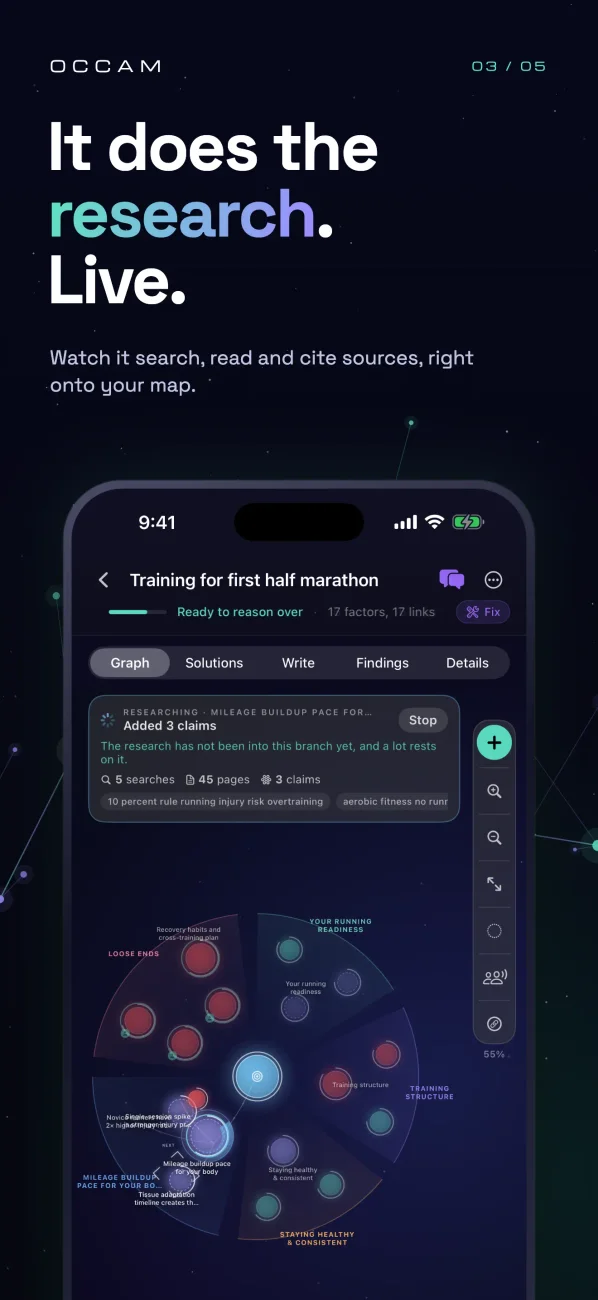
Look for weak assumptions, missing information, and cases that could change your conclusion. Import source material and keep track of what has actually been tested. AI suggestions are not verified evidence.
ASK ABOUT YOUR STUDY
Chat with AI using the context of your map. Review proposed additions before adding them to the graph.
TURN INSIGHT INTO ACTION
Develop possible solutions, research tests, small experiments, or a written draft. Share your work and keep building on it.
START FREE
Sign in with Apple or Google to create and back up your studies. Free accounts receive 5 cloud run credits per month. Optional Pro, Advanced, and Commercial subscriptions provide larger allowances and additional cloud reasoning capabilities. Deeper requests can use multiple credits; usage limits apply. Prices appear in the app before purchase. Subscriptions renew monthly until cancelled in your Apple Account settings.
Cloud AI sends study context to our service and AI provider. Signed-in study backup uses cloud storage.
Privacy: https://agentscix.com/occam/privacy
Terms: https://www.apple.com/legal/internet-services/itunes/dev/stdeula/
What’s new
Version 1.1 · Oct 12, 2026
Occam is now a personal research assistant that works through your question with you.
- Your map is organized into clear categories, each in its own slice
- Occam works out what each part needs: your input, a decision, or research, and asks you first
- Tell Occam what matters, what doesn't, or point its focus by dragging the center of the map
- Answer by voice anywhere, and hear Occam in its natural voice. One tap turns all sound off
- Findings answers its own questions in place, and the plan writes itself when the map is ready
- Light and dark mode, a redesigned New Study screen, and a guided tour
- Subscriptions: Pro monthly or yearly, Advanced and Commercial
App privacy
What Dakota Bullard declares on the App Store about how this app handles data.
-
Data linked to you
May be collected and linked to your identity.
- Contact info
Privacy practices may vary, for example with the features you use or your age.
Information
- Seller
- Dakota Bullard
- Category
- Productivity
- Version
- 1.1
- Updated
- Oct 12, 2026
- Released
- Aug 26, 2026
- Size
- 47.1 MB
- Requires
- iOS 26.0 or later
- Age rating
- 17+
- Price
- Free
- In-app purchases
- Yes
- Languages
- English, Arabic, French, German, Hebrew, Hindi, Indonesian, Italian, Japanese, Korean, Norwegian Bokmål, Portuguese + 6 more
- Copyright
- © 2026 Dakota Bullard - Agent Science and Research
You might also like
-
 Polymath - Think. Plan. Do.Orchestrate your life
-
 Quantum Programming CompilerLearn & execute quantum codes
-
 Berkeley MobileProductivity
-
 Upshift: #1 Productivity AppHabit Tracker & App Blocker
-
 FirstSeed NotesMarkdown + AI Transcription
-
 CodeaCreative coding
-
 Claude IntuneAI assistant for life and work
-
 Bots - AI Chatbot & AssistantPhoto Editor & Video Generator
-
 Merlin AI: AI Chat AssistantWith ChatGPT, Gemini & Claude
-
 Julius AI: Data & Math HelperGraph Maker & Calculus Solver