Offhand - Local AI Voice Notes
Local AI voice notes
Designed for iPhone
In-app purchases
- Age rating4+
- CategoryProductivity
- Developer志平 李
- LanguagesEnglish+ 1 more
- Size24.6 MB
Links to the official App Store page
Download.org hosts no file of Offhand - Local AI Voice Notes. The button opens its official App Store page, published by 志平 李. Listing last checked on Nov 21, 2026.
Screenshots

About
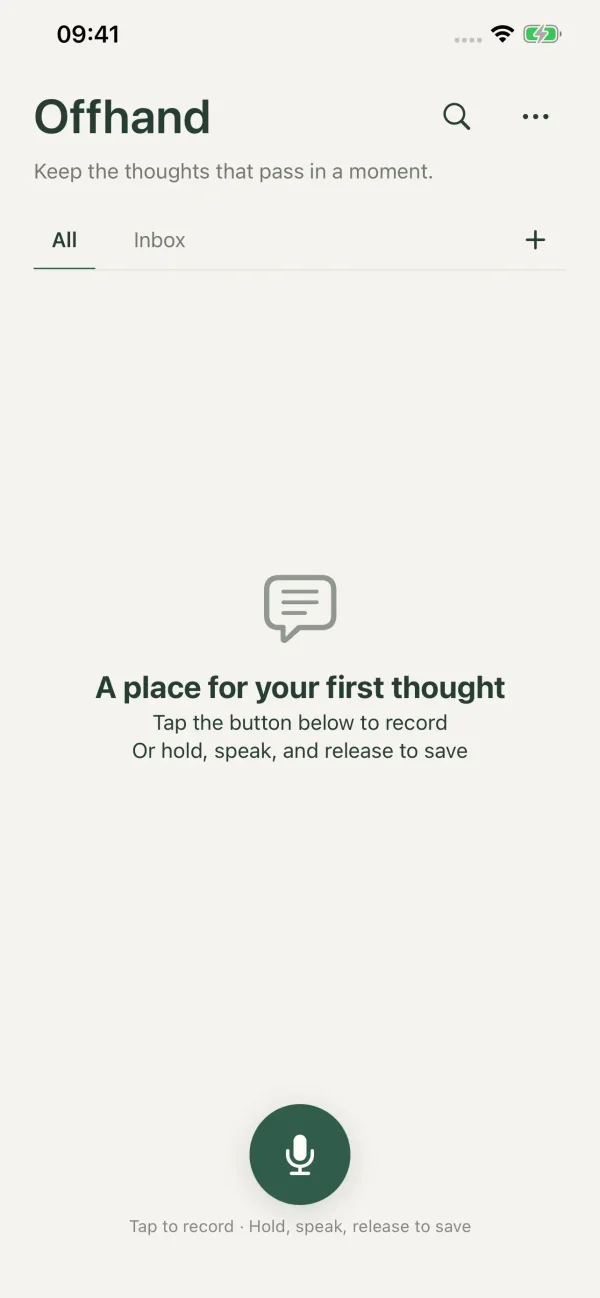
Say it while it is fresh. Offhand turns spoken thoughts into notes you can revisit, edit, and build on.
CAPTURE AND FIND
Tap to record, or hold to speak and release to save. Keep the original audio and transcript, with Mandarin and English transcription. Find notes through categories and search, or add a follow-up recording to an existing note.
MAKE IT YOURS
Choose from three writing levels and multiple templates. Edit titles, notes, or transcripts, then organize the text again. New AI suggestions do not silently overwrite your own edits. Revisit the week's entries with a weekly review.
FOLLOW THROUGH
Confirm a task and its time before adding it to Apple Reminders, or add an event to Calendar. Access to these services is requested when you use the relevant feature.
KEEP YOUR CONTENT LOCAL
No account, ads, or behavioral analytics. Download the default AI model from Apple, then organize notes offline on your iPhone. Recordings and text are not uploaded for cloud AI processing. Copy, share, or export your notes, and recover accidentally deleted entries from Trash.
FREE EXPERIENCE AND PRO
Try AI organization for 20 notes, with recordings up to 5 minutes each. Recording and transcripts remain available after the free allowance is used. A one-time Pro purchase lets you continue using AI organization and record up to 60 minutes per note. No subscription. Local pricing is shown on the purchase screen, and Restore Purchases is available.
DEVICE REQUIREMENTS
iOS 26 or later is required. Default local AI requires compatible hardware: Apple GPU family 9 or later and approximately 8 GB of memory. The app checks compatibility; Pro does not unlock unsupported hardware capabilities. An internet connection is needed for the initial Qwen model download; the system may also need to download speech-language resources. Once prepared, recording, transcription, and local AI work offline. Background processing depends on device capabilities and system scheduling; return to the app to resume when needed. AI can make mistakes, so check important facts and reminder times.
What’s new
Version 1.1.0 · Sep 28, 2026
What's new:
• Download the local AI model on demand from Apple for a smaller initial app download. Record and read transcripts first, then organize notes when the model is ready.
• Delete or download the model again with clear confirmation, and see improved model status during startup.
• Retrying unfinished note processing now shows progress, results, and reasons when processing cannot finish.
• Improved feedback while purchasing or restoring Pro.
• Corrected the English App Store name and improved the English experience. Added the App ICP registration number and lookup link in Settings.
Upgrading from an earlier version may require downloading the model again. Your existing recordings and notes are retained.
App privacy
What 志平 李 declares on the App Store about how this app handles data.
-
Data linked to you
May be collected and linked to your identity.
- Contact info
- User content
- Diagnostics
-
Data not linked to you
May be collected but is not linked to your identity.
- Other data
Privacy practices may vary, for example with the features you use or your age.
Information
- Seller
- 志平 李
- Category
- Productivity
- Version
- 1.1.0
- Updated
- Sep 28, 2026
- Released
- Sep 22, 2026
- Size
- 24.6 MB
- Requires
- iOS 26.0 or later
- Age rating
- 4+
- In-app purchases
- Yes
- Languages
- English, Simplified Chinese
- Copyright
- © 2026 Icy Li
You might also like
-
 记住了么AI 帮你记住每一件事
-
 叨叨记 - 语音处理待办清单·AI响应一切操作Productivity
-
 You Speak, I JournalTalk. Your day, neatly kept.
-
 Todo Alarm - Task ReminderSpoken alerts for routines
-
 Watermelist: Voice To-Do ListAI Sticky Notes & Task Planner
-
 How Many Times CounterCount & Track anything
-
 SnapNote - Cross-Platform SyncPrivate Data Storage
-
 Notes - Notepad Free Note AppSimple Memo Pad & Taking Notes
-
 TellDoneVoice notes to tasks & events
-
 小提醒 - 日程计划健康喝水提醒助手Productivity