
Our Homework Log
Track homework with a tap
Designed for iPhone, iPad, iPod touch
In-app purchases
- Age rating4+
- CategoryEducation
- DeveloperTakeshi IIDA
- LanguagesJapanese+ 3 more
- Size33.5 MB
Links to the official App Store page
Download.org hosts no file of Our Homework Log. The button opens its official App Store page, published by Takeshi IIDA. Listing last checked on Nov 8, 2026.
Screenshots




About
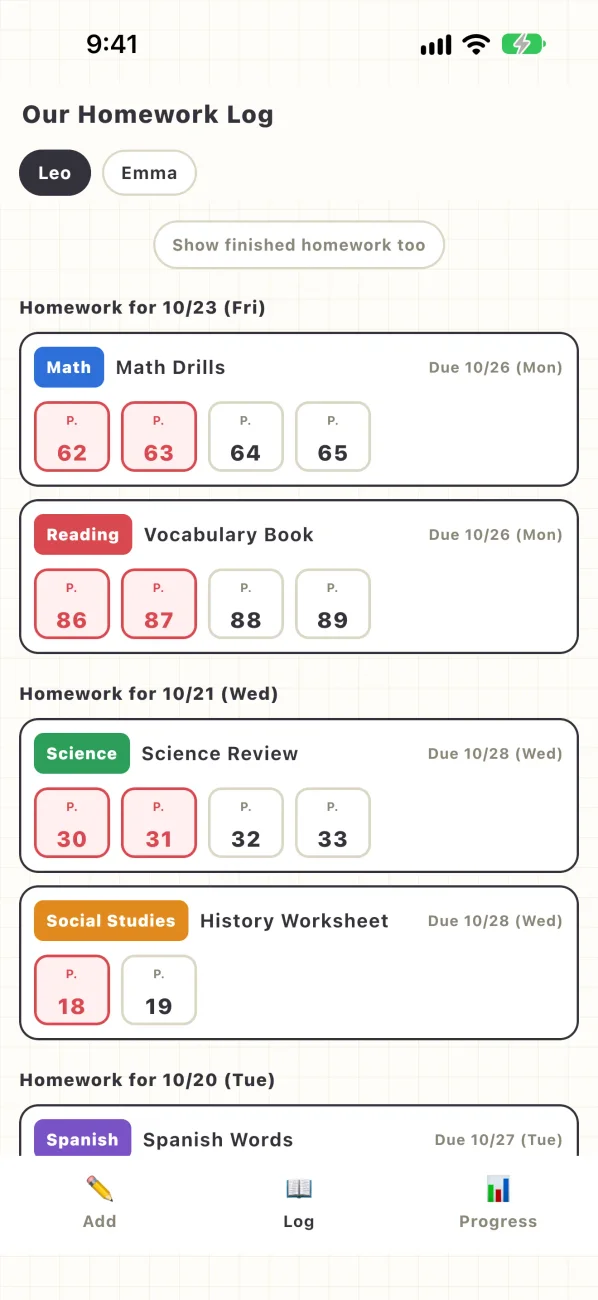
"Our Homework Log" is a homework tracker and checklist for families. Parents add homework from school, tutoring, or after-school classes. Kids tap to mark it done.
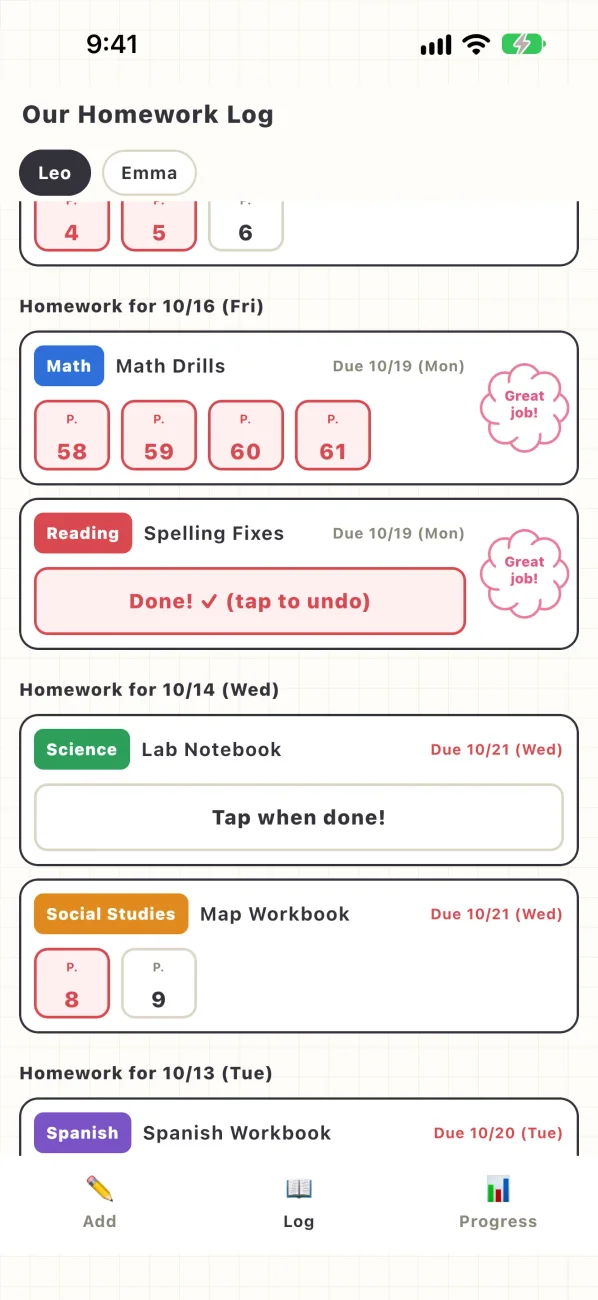
When workbook names and page numbers are scattered across handouts, it's hard to see what's left. Add the week's homework in one go, like a simple homework planner. Your child's screen shows only what to do, on big cards. Tap when done, and a "Great job!" flower stamp pops up.
■ 3 screens
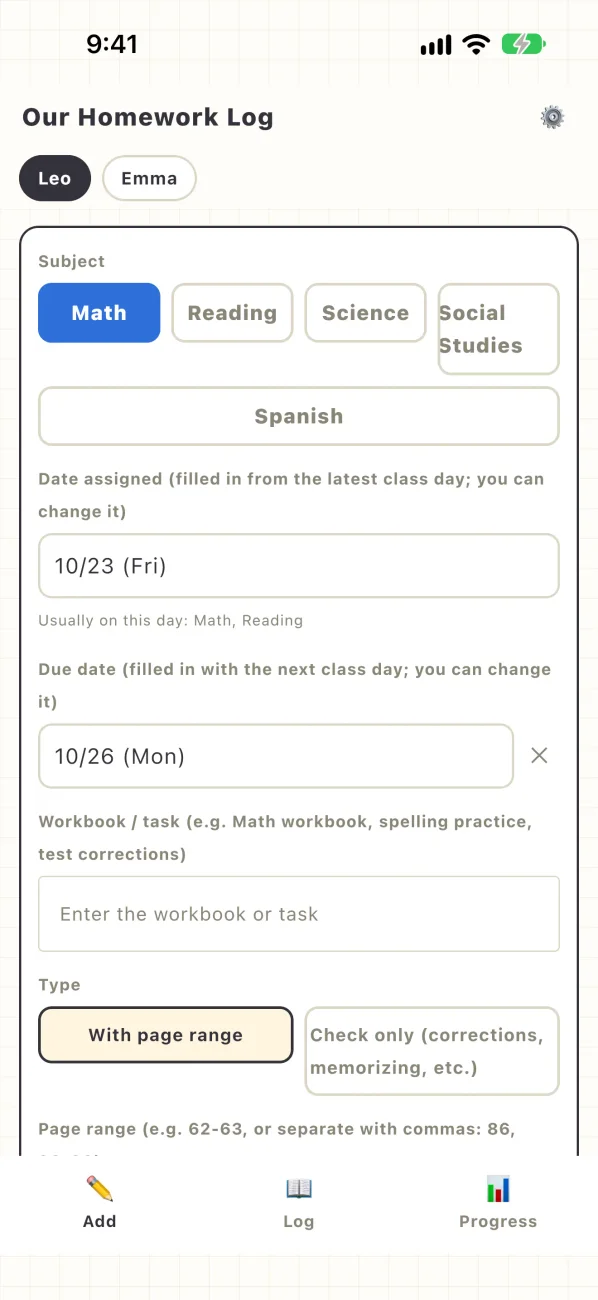
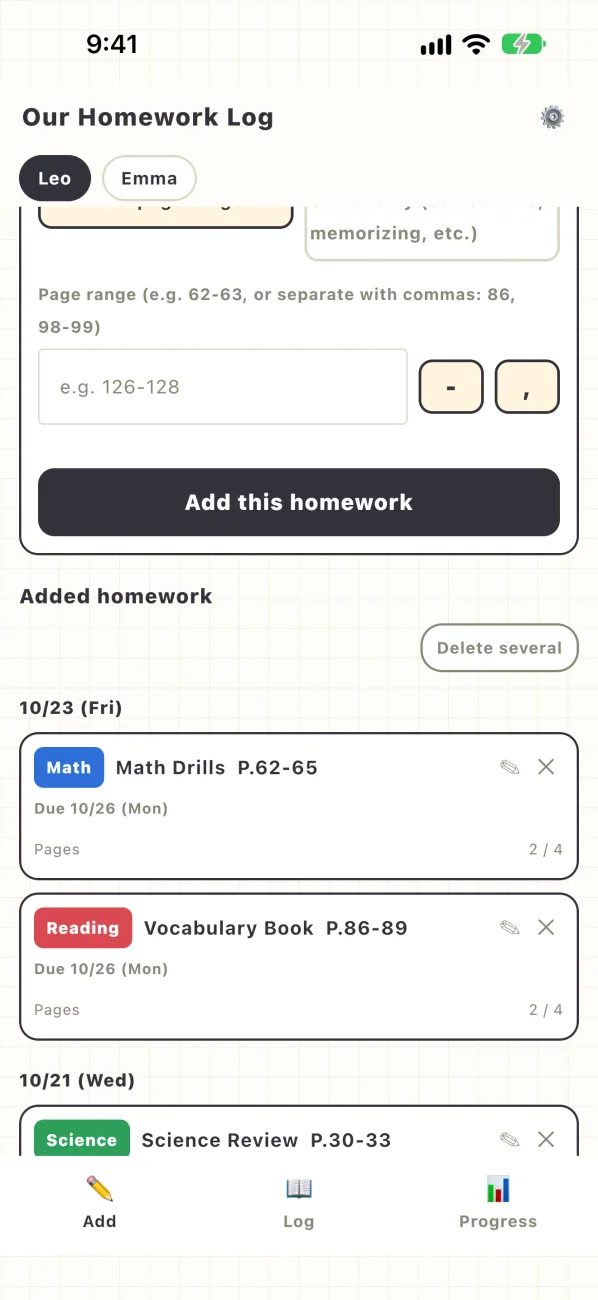
- Add (for parents): Enter the workbook or task and the pages (e.g. 62-63, or 86, 98-99). Homework without pages, like corrections or memorizing, can be "Check only." Add a due date if you like.
- Log (for kids): Big cards for each thing to do. Tap when done. Homework with pages moves forward page by page.
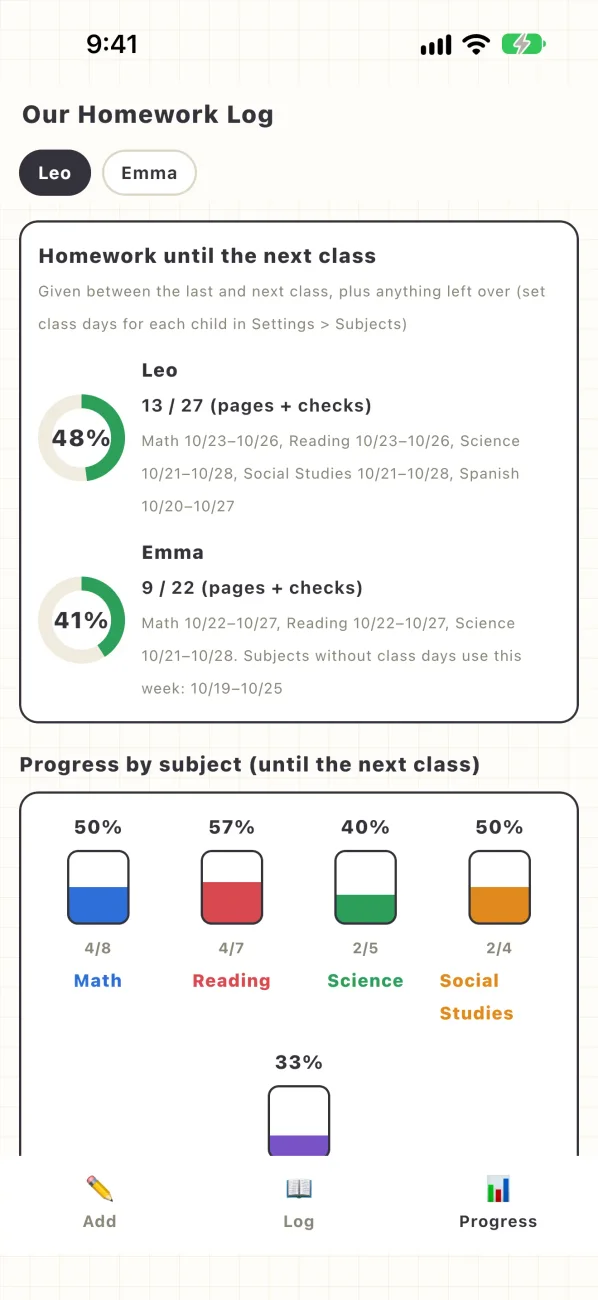
- Progress (for the family): "Homework until the next class" as a donut chart for each child, plus progress by subject and by date. Finished past homework is folded away.
■ Counts each page that's done
Progress goes up page by page, so your child can see how far they've come, even when homework takes more than one sitting.
■ Based on class days
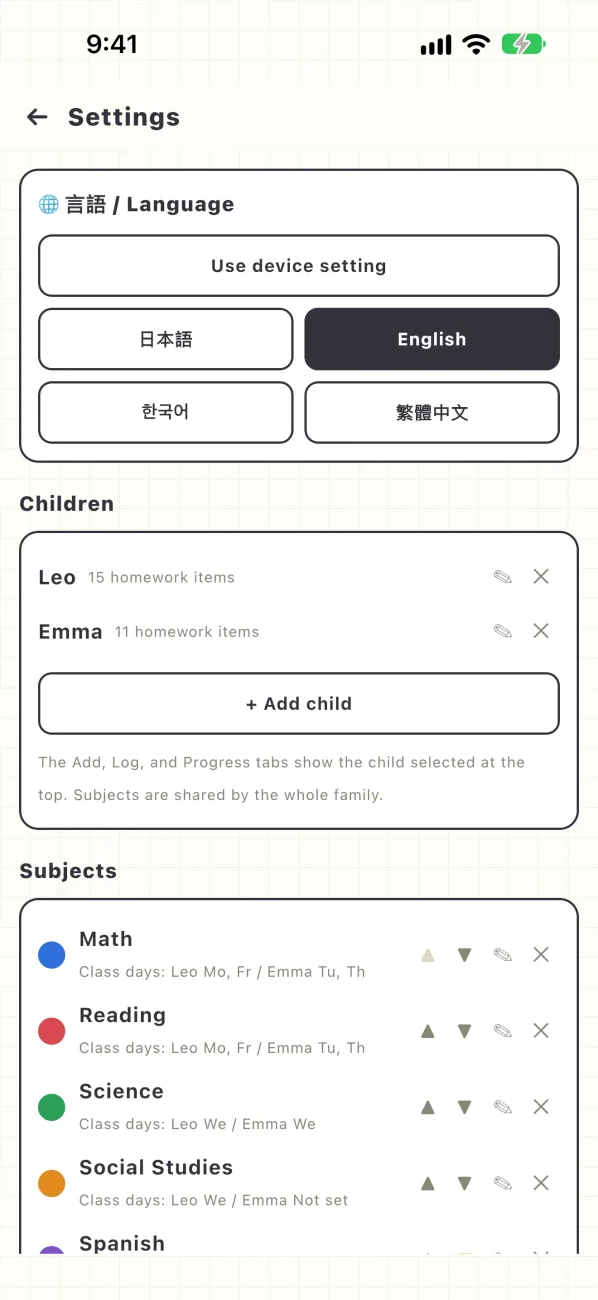
Set the days each subject has class, for each child. Progress then shows the homework given since the last class, plus anything left over, so you know what to finish before the next class. When you add homework, the dates are filled in from the class days (you can change them).
■ Share with your family (Premium Pack)
Put one record file in iCloud Drive, Google Drive, or Dropbox to share the same homework on your family's devices. For example, a parent adds homework on an iPhone, and the child logs it on an iPad. No account for this app is needed. Just choose where to keep the file once, in the Files app. Sync goes through your own cloud storage, and nothing is sent to the developer's servers.
■ Free on one device
On one device, all the basic features are free: adding homework, logging it, and checking progress.
The one-time "Premium Pack" purchase unlocks:
- Cloud sync across your family's devices
- More than one child profile (keep siblings' homework separate)
- Features added in future updates
One purchase works on up to 5 family devices that join the same sync, and it also supports Family Sharing. No monthly fee.
■ Private and safe
- Records are saved on your device and never sent to the developer's servers
- Cloud sync is optional and only uses the cloud file you choose
- No sign-up, no ads
- A nickname is fine for your child's name
■ Tips
- Make your own subjects, with any name and color
- Pull down on the screen to sync right away (with cloud sync)
- Save your data to a file to back it up or move it to a new phone
- Choose the display language at the top of Settings under "言語 / Language": 日本語, English, 한국어, or 繁體中文 (by default, the app follows your device's language)
■ FAQ
Q. Does it cost anything?
A. The app and its basic features are free. Cloud sync and more than one child profile come with the one-time Premium Pack. No monthly fees, no ads.
Q. Where is my data saved?
A. On your device. With optional cloud sync, also in the cloud file you chose, such as in iCloud Drive. It's never sent to the developer's servers.
Q. How do I share with my family?
A. With the Premium Pack, go to Settings > Advanced > Cloud sync and choose where to keep the file. Up to 5 devices can join, and you can remove ones you no longer use.
Q. Changes from another device don't show up right away.
A. It can take a few seconds to a few minutes, depending on your cloud storage app. Pull down on the screen to sync now.
Q. Can I use it without tutoring?
A. Yes. It works for school homework, workbooks, and home study, too.
Q. Which devices are supported?
A. iPhone and iPad with iOS / iPadOS 15.0 or later.
Make "What's left?" easy to see, and make the daily homework talk a little lighter.
What’s new
Version 1.6 · Nov 6, 2026
- The Premium Pack description now mentions that it includes profiles for more than one child.
- The cloud sync description now mentions iCloud Drive.
App privacy
What Takeshi IIDA declares on the App Store about how this app handles data.
-
Data not collected
The developer does not collect any data from this app.
Privacy practices may vary, for example with the features you use or your age.
Information
- Seller
- Takeshi IIDA
- Category
- Education
- Version
- 1.6
- Updated
- Nov 6, 2026
- Released
- Sep 10, 2026
- Size
- 33.5 MB
- Requires
- iOS 15.0 or later
- Age rating
- 4+
- In-app purchases
- Yes
- Languages
- Japanese, Traditional Chinese, English, Korean
- Copyright
- © 2026 Takeshi IIDA
You might also like
-
 ホメノバ褒めて伸ばす親子タスク管理。お手伝い・宿題の習慣化アプリ。
-
 じゅくまる|塾の宿題を回ごと・教材ごとに管理Education
-
 Study FukuEducation
-
 MeDoEducation
-
 おうちで学習プリントEducation
-
 学習きろく|小学生の学習計画・勉強時間ランキングEducation
-
 楽しく親子で学ぶ習慣化アプリ:スタディクエストEducation
-
 SPFamilyEducation
-
 Chinese Xie Zi -中文寫字板寫漢字,繁簡體,筆順,英文釋義與拼音發音 9000+
-
 Recite Karuta: Hyakunin-isshuLet's enjoy Japanese karuta!