Our Homework Log
Track homework with a tap
Được thiết kế cho iPhone, iPad, iPod touch
Miễn phí · Mua hàng trong ứng dụng
- Độ tuổi4+
- Danh mụcGiáo Dục
- Nhà phát triểnTakeshi IIDA
- Ngôn ngữTiếng Nhật+ 3 ngôn ngữ khác
- Kích thước33,5 MB
Liên kết đến trang App Store chính thức
Download.org không lưu trữ tệp nào của Our Homework Log. Nút này mở trang ứng dụng trên App Store, nơi Takeshi IIDA phát hành ứng dụng. Trang được kiểm tra lần cuối: 08/11/2026.
Ảnh chụp màn hình




Giới thiệu
Nhà phát triển chưa cung cấp nội dung này bằng ngôn ngữ của bạn.
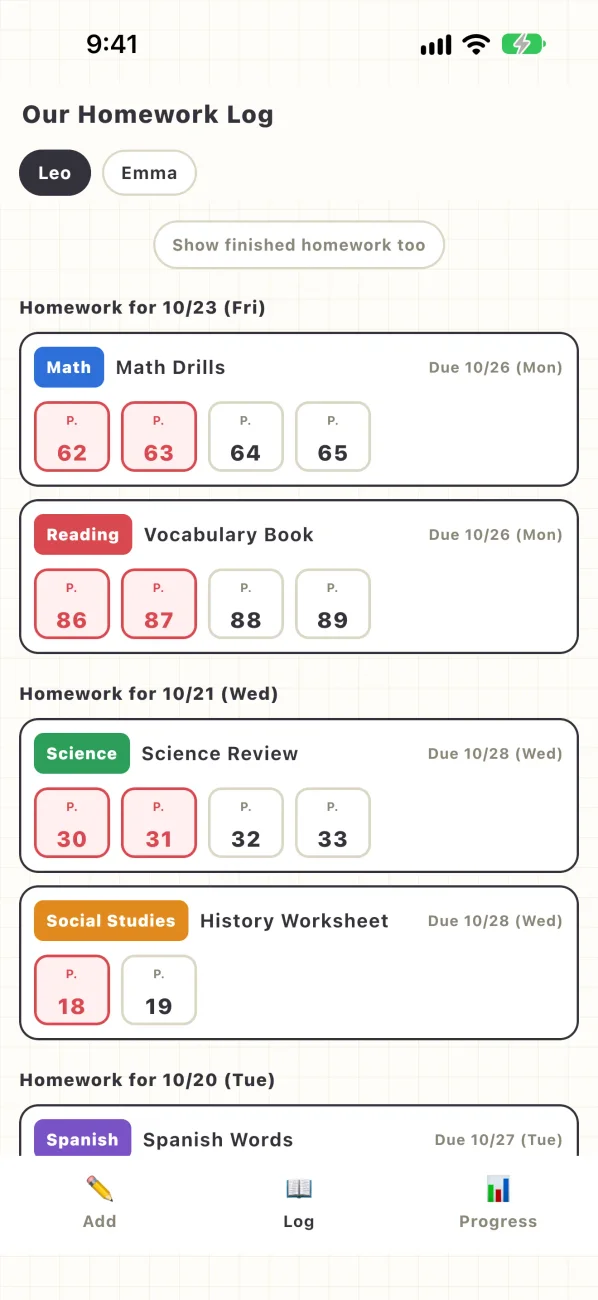
"Our Homework Log" is a homework tracker and checklist for families. Parents add homework from school, tutoring, or after-school classes. Kids tap to mark it done.
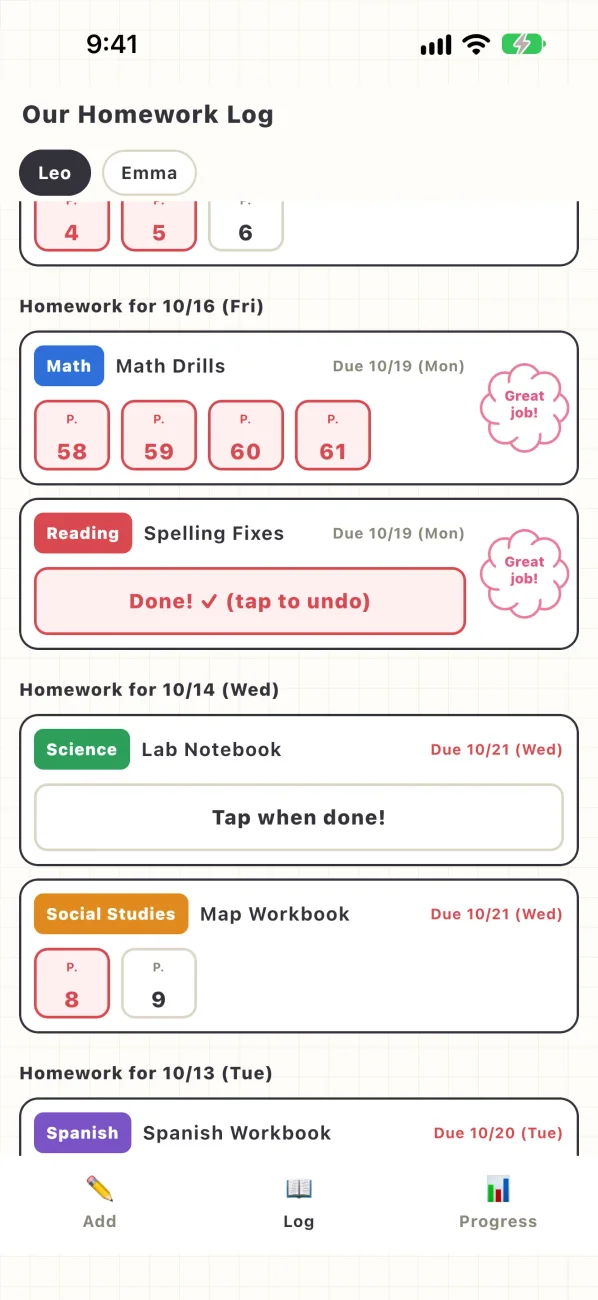
When workbook names and page numbers are scattered across handouts, it's hard to see what's left. Add the week's homework in one go, like a simple homework planner. Your child's screen shows only what to do, on big cards. Tap when done, and a "Great job!" flower stamp pops up.
■ 3 screens
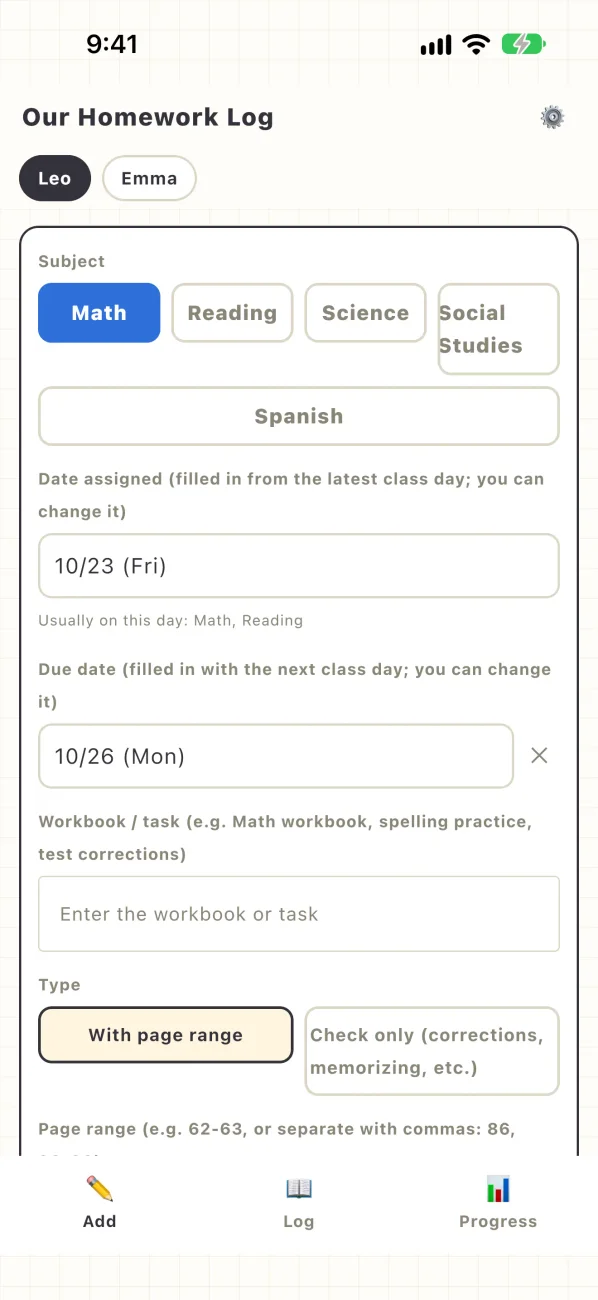
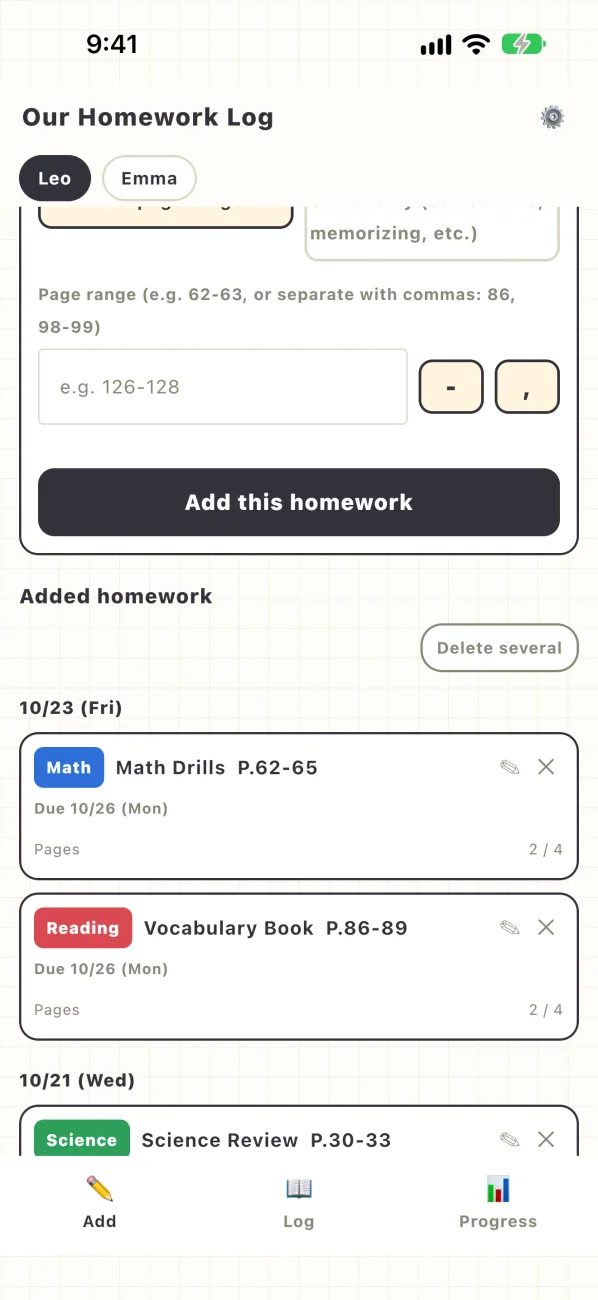
- Add (for parents): Enter the workbook or task and the pages (e.g. 62-63, or 86, 98-99). Homework without pages, like corrections or memorizing, can be "Check only." Add a due date if you like.
- Log (for kids): Big cards for each thing to do. Tap when done. Homework with pages moves forward page by page.
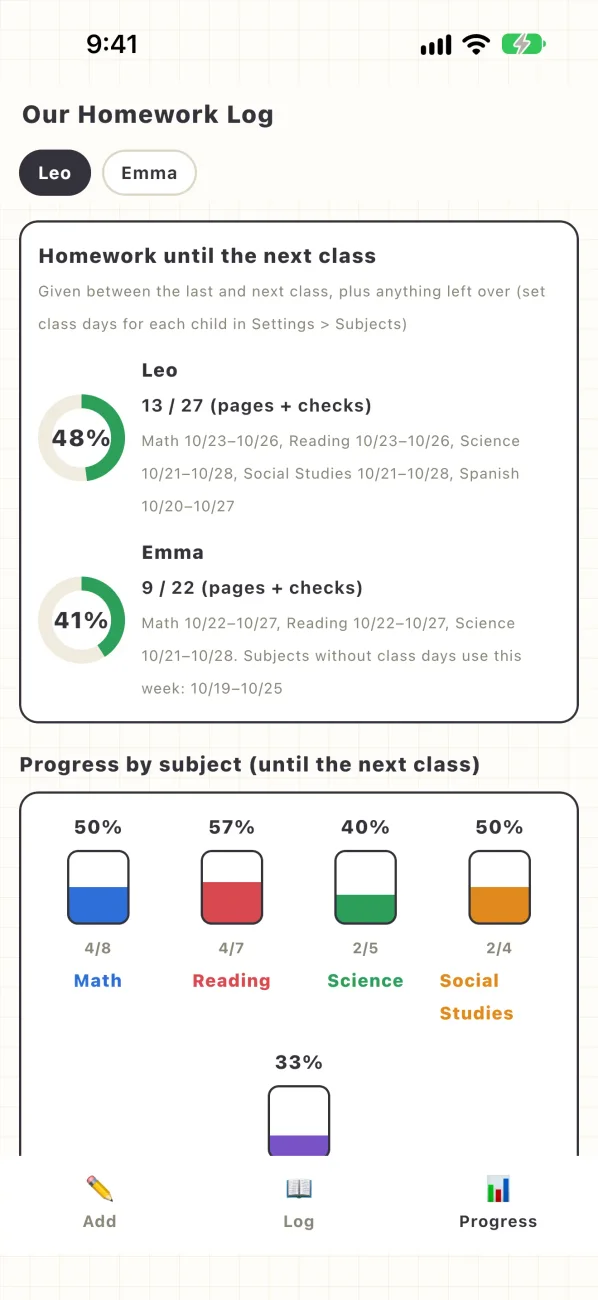
- Progress (for the family): "Homework until the next class" as a donut chart for each child, plus progress by subject and by date. Finished past homework is folded away.
■ Counts each page that's done
Progress goes up page by page, so your child can see how far they've come, even when homework takes more than one sitting.
■ Based on class days
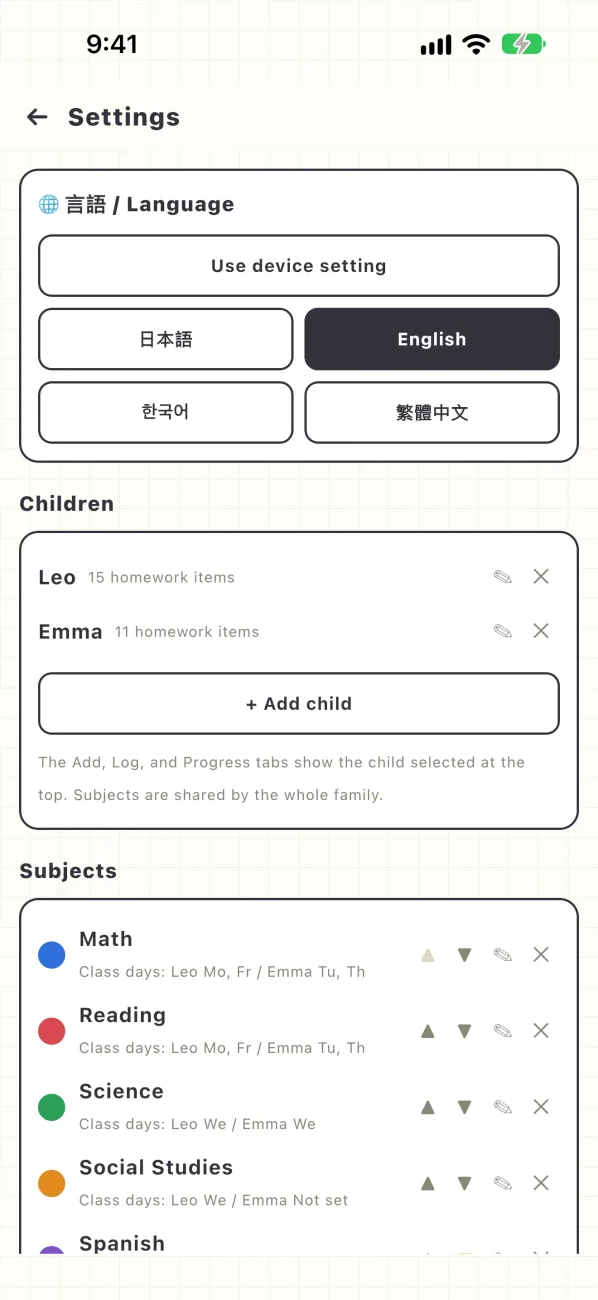
Set the days each subject has class, for each child. Progress then shows the homework given since the last class, plus anything left over, so you know what to finish before the next class. When you add homework, the dates are filled in from the class days (you can change them).
■ Share with your family (Premium Pack)
Put one record file in iCloud Drive, Google Drive, or Dropbox to share the same homework on your family's devices. For example, a parent adds homework on an iPhone, and the child logs it on an iPad. No account for this app is needed. Just choose where to keep the file once, in the Files app. Sync goes through your own cloud storage, and nothing is sent to the developer's servers.
■ Free on one device
On one device, all the basic features are free: adding homework, logging it, and checking progress.
The one-time "Premium Pack" purchase unlocks:
- Cloud sync across your family's devices
- More than one child profile (keep siblings' homework separate)
- Features added in future updates
One purchase works on up to 5 family devices that join the same sync, and it also supports Family Sharing. No monthly fee.
■ Private and safe
- Records are saved on your device and never sent to the developer's servers
- Cloud sync is optional and only uses the cloud file you choose
- No sign-up, no ads
- A nickname is fine for your child's name
■ Tips
- Make your own subjects, with any name and color
- Pull down on the screen to sync right away (with cloud sync)
- Save your data to a file to back it up or move it to a new phone
- Choose the display language at the top of Settings under "言語 / Language": 日本語, English, 한국어, or 繁體中文 (by default, the app follows your device's language)
■ FAQ
Q. Does it cost anything?
A. The app and its basic features are free. Cloud sync and more than one child profile come with the one-time Premium Pack. No monthly fees, no ads.
Q. Where is my data saved?
A. On your device. With optional cloud sync, also in the cloud file you chose, such as in iCloud Drive. It's never sent to the developer's servers.
Q. How do I share with my family?
A. With the Premium Pack, go to Settings > Advanced > Cloud sync and choose where to keep the file. Up to 5 devices can join, and you can remove ones you no longer use.
Q. Changes from another device don't show up right away.
A. It can take a few seconds to a few minutes, depending on your cloud storage app. Pull down on the screen to sync now.
Q. Can I use it without tutoring?
A. Yes. It works for school homework, workbooks, and home study, too.
Q. Which devices are supported?
A. iPhone and iPad with iOS / iPadOS 15.0 or later.
Make "What's left?" easy to see, and make the daily homework talk a little lighter.
Có gì mới
Phiên bản 1.6 · 06/11/2026
- The Premium Pack description now mentions that it includes profiles for more than one child.
- The cloud sync description now mentions iCloud Drive.
Quyền riêng tư của ứng dụng
Những gì Takeshi IIDA khai báo trên App Store về cách ứng dụng này xử lý dữ liệu.
-
Dữ liệu không được thu thập
Nhà phát triển không thu thập bất kỳ dữ liệu nào từ ứng dụng này.
Phương thức đảm bảo quyền riêng tư có thể khác nhau, chẳng hạn như tuỳ theo các tính năng bạn sử dụng hoặc độ tuổi của bạn.
Thông tin
- Người bán
- Takeshi IIDA
- Danh mục
- Giáo Dục
- Phiên bản
- 1.6
- Cập nhật
- 06/11/2026
- Phát hành
- 10/09/2026
- Kích thước
- 33,5 MB
- Yêu cầu
- iOS 15.0 trở lên
- Độ tuổi
- 4+
- Giá
- Miễn phí
- Mua hàng trong ứng dụng
- Có
- Ngôn ngữ
- Tiếng Nhật, Tiếng Trung Phồn thể, Tiếng Anh, Tiếng Hàn
- Bản quyền
- © 2026 Takeshi IIDA