PageNote
Lecture PDFs into study notes
Designed for iPhone, iPad
Free · In-app purchases
- Age rating4+
- CategoryEducation
- DeveloperTiancheng Gao
- LanguagesEnglish+ 1 more
- Size39.4 MB
Links to the official App Store page
Download.org hosts no file of PageNote. The button opens its official App Store page, published by Tiancheng Gao. Listing last checked on Nov 17, 2026.
Screenshots

About
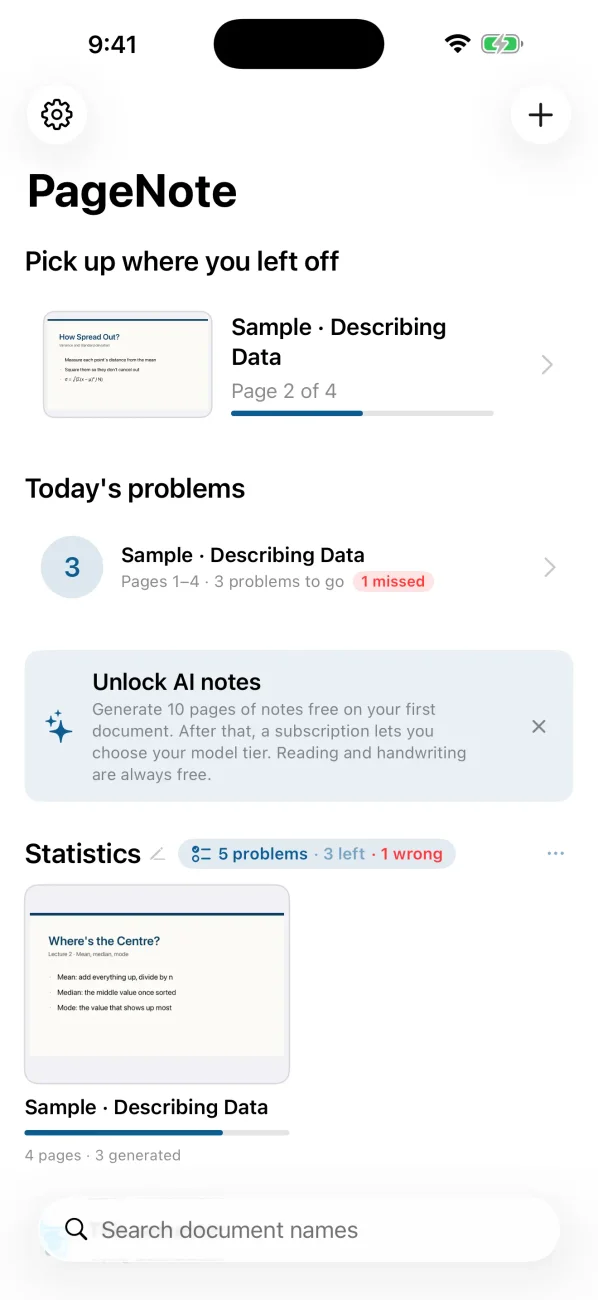
PageNote turns the lecture PDFs you already have into per-page study notes,
and lines your problem sets up with how far your course has actually got.
WHAT IT DOES
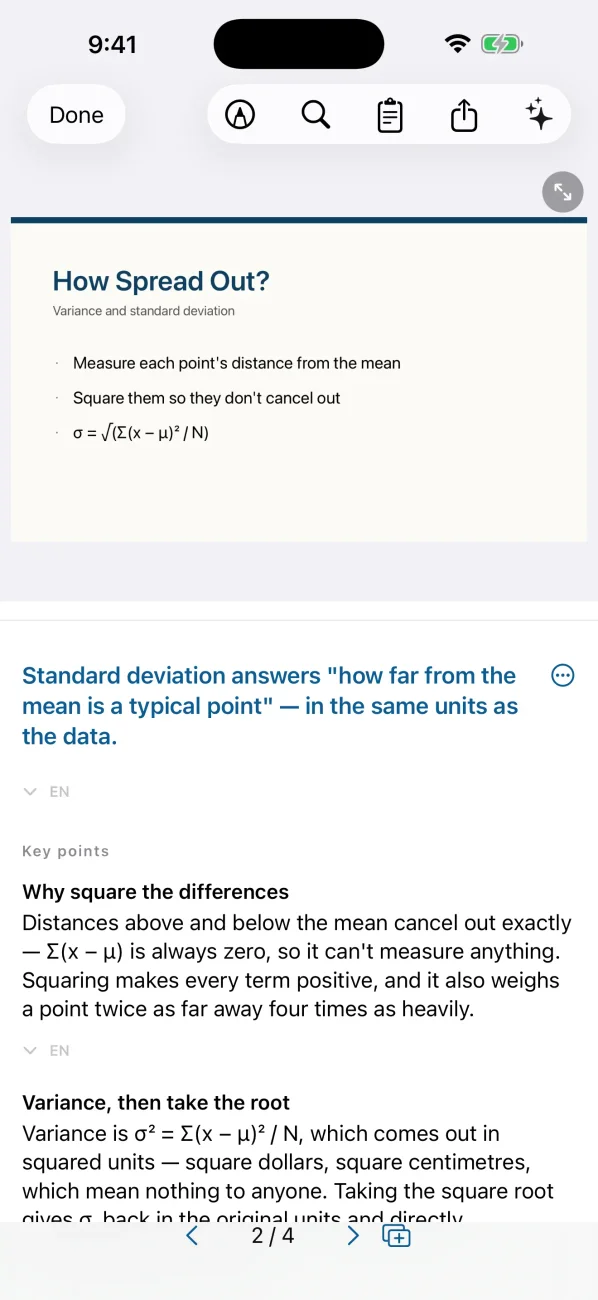
• Per-page notes — open a lecture PDF and get a one-line summary, the key
points, the terms that matter, and "how it's tested" for the page you're
on. Not a summary of the whole deck: page by page, following your reading.
• Problem sets that follow your progress — import a problem set and PageNote
maps each question to the pages that teach it. Tell it how far today's
lecture got — just the page number — and it pulls out the problems you can
actually do now.
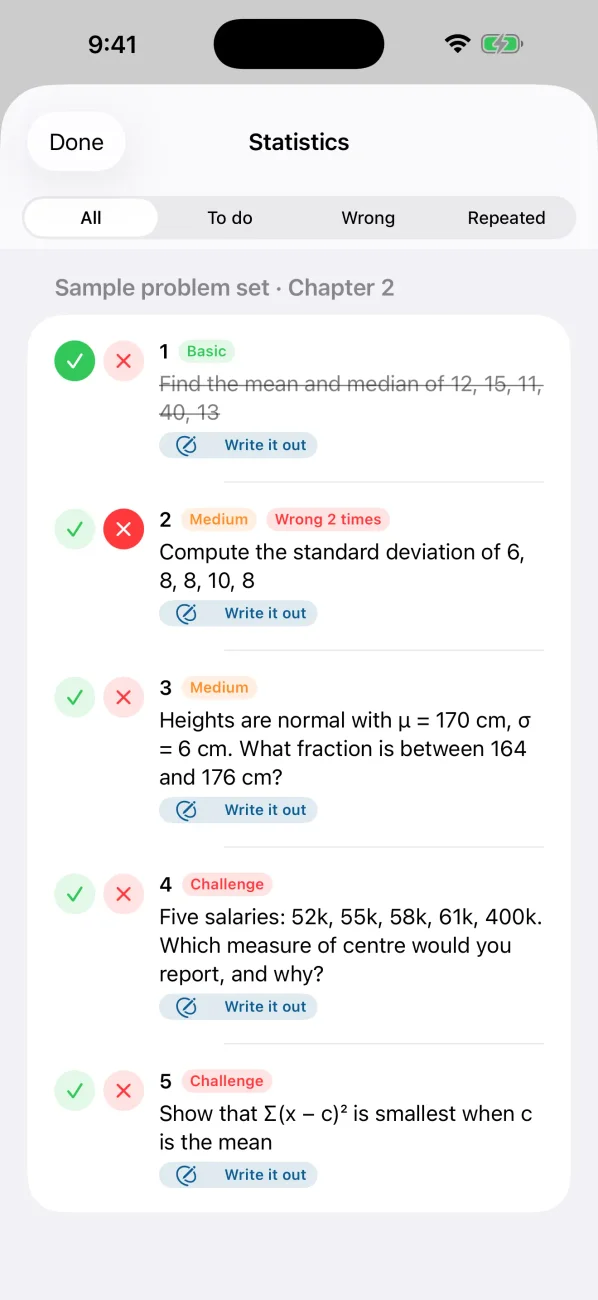
• Write it out, then get it marked — do one problem per sheet with Apple
Pencil, then ask for marking. It reads your working, says which step went
wrong, and keeps what you missed in a mistake book.
• Every problem, by subject — all of them in one place, filtered by To do,
Wrong or Repeated.
• Handwriting on the slides — annotate with Apple Pencil and export a PDF
that combines the original slides with your handwriting.
• Review — wrong answers and terms you keep forgetting go into one queue,
spaced 1 / 3 / 7 / 14 / 30 days. One card at a time: think first, then flip.
• Mock exam — before a test, pull a set of questions from a page range, with
an optional timer. Mark yourself at the end; anything wrong goes into the
mistake book.
• Exam reminders and a Home Screen widget — set an exam date and get one
reminder 7 days before and one the day before; the widget keeps the
countdown and today's workload in front of you.
FREE, AND WHAT COSTS MONEY
Reading, Apple Pencil annotation and PDF export are free forever. Generate 10
pages of AI notes free on your first document — no key, no signup. After that a
subscription covers the AI, you pick which model runs, and you can cancel any
time in Settings.
SUBSCRIPTION DETAILS
• PageNote Standard — monthly, or one semester (6 months), auto-renewing
• PageNote Advanced — monthly, or one semester (6 months), auto-renewing
• PageNote Pro — monthly, or one semester (6 months), auto-renewing
In mainland China, Hong Kong and Macau there are two tiers only (Standard and
Advanced): fewer AI providers are reachable there, so both tiers run the same
set of models and differ in monthly credits, and they are priced lower than
elsewhere. Everywhere else there are three tiers, each unlocking a further
class of model.
Standard comes with a 7-day free trial, once per Apple ID within the
subscription group; Advanced and Pro have no trial. When the trial ends it
converts automatically into a paid Standard subscription, charged at the
Standard price for your region. To avoid being charged, cancel in your Apple ID
account settings at least 24 hours before the trial ends.
Prices differ by region and may change over time. The exact price and period
for your region are shown in the In-App Purchases list on this App Store page,
and on the subscription screen inside the app, before you confirm.
Payment is charged to your Apple ID at confirmation of purchase. The
subscription renews automatically unless it is cancelled at least 24 hours
before the end of the current period; your account is charged for renewal
within 24 hours before the period ends. You can manage or cancel a
subscription in your Apple ID account settings after purchase. Any unused
part of a free trial, if offered, is forfeited when you buy a subscription.
Terms of Use (EULA): https://terryg907.github.io/pagenote-legal/terms.html
Privacy Policy: https://terryg907.github.io/pagenote-legal/privacy.html
ANCHORED TO YOUR PAGE, NOT A CHAT
You can tap a suggested question or type your own, but every answer is about
the page you are on — nothing else. No conversation thread, no history between
questions, and off-topic questions are declined. Each answer is saved as an
annotation on that page, not as a chat log.
AI can be wrong. Check anything that matters against your lecturer's material.
What’s new
Version 1.5 · Nov 16, 2026
New: Cheat sheet. Put a course's formulas, definitions and exam points on one printable sheet, front and back, for exams that allow one. Adding your own items, starring, pinning, resizing and exporting a PDF to print are free. With a subscription, AI collects items from your slides and notes, PageNote checks each formula and definition against the pages it cites and marks any it can't match "To check", and an imported past paper shows which points were examined most. The AI parts are not yet available in mainland China, Hong Kong or Macau.
Also new: PageNote runs on Macs with Apple silicon. Press ⌘O to import slides and use the arrow keys to turn pages; handwriting needs an iPad with Apple Pencil.
App privacy
What Tiancheng Gao declares on the App Store about how this app handles data.
-
Data linked to you
May be collected and linked to your identity.
- Purchases
- User content
- Identifiers
- Usage data
- Diagnostics
Privacy practices may vary, for example with the features you use or your age.
Information
- Seller
- Tiancheng Gao
- Category
- Education
- Version
- 1.5
- Updated
- Nov 16, 2026
- Released
- Sep 3, 2026
- Size
- 39.4 MB
- Requires
- iOS 17.0 or later
- Age rating
- 4+
- Price
- Free
- In-app purchases
- Yes
- Languages
- English, Simplified Chinese
- Copyright
- © 2026 Tiancheng Gao
You might also like
-
 LituraContext, roots, repeat
-
 翎菘汉字笔顺Education
-
 Write Cyrillic AlphabetHandwriting & Letter Tracing
-
 PTE WFD: Write From DictationOffline listening practice app
-
 法寻Reference
-
 FayJuno-Learn FrenchFrench Words, Radio & Speaking
-
 DDUP - Type & LearnChinese typing. English words.
-
 LearnNestFlashcards: Study & Vocabulary
-
 Loro - Shadowing LeaningRepeat Listening and Speaking