- Age rating4+
- CategoryUtilities
- DeveloperTZUYUAN YIN
- LanguagesTraditional Chinese+ 2 more
- Size192.7 MB
Links to the official App Store page
Download.org hosts no file of Panda Zhuyin. The button opens its official App Store page, published by TZUYUAN YIN. Listing last checked on Nov 27, 2026.
Screenshots



About
Panda Zhuyin — steady Zhuyin (Bopomofo) and Taiwanese typing.
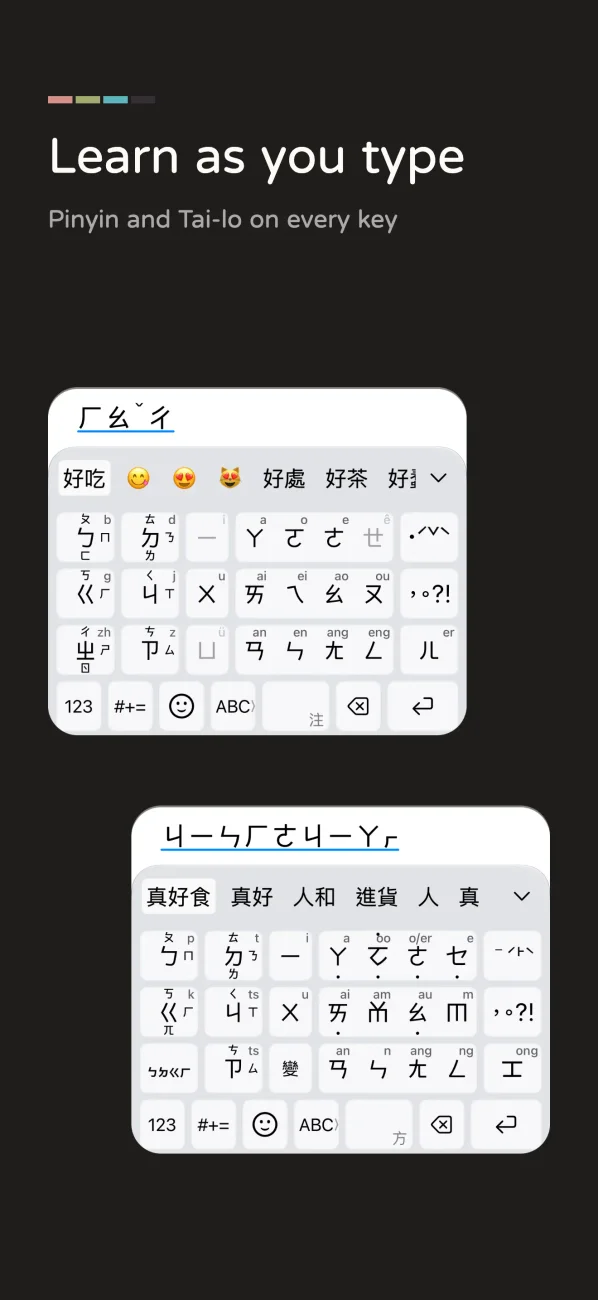
Mandarin and Taiwanese are both written in Zhuyin. Panda Zhuyin packs the symbols into a few large keys you won't miss: tap for the center symbol, flick for the ones around it, and every tap or flick gives one definite result. Impossible combinations are grayed out.
Four keyboard layouts, switch any time
· Rime Bars: flick for initials; rimes sit in three bars, one per cell, following the Bopomofo chart
· Flick Keys: every key flicks, like Japanese and Korean 10-key keyboards
· 10-Key (experimental): several symbols per key; just tap. Columns, Feature Phone, or Panda Style
· Standard Keyboard (experimental): iPhone and computer key positions; split in landscape and on iPad
Experimental Features (in Settings)
· Readings List: pick another reading; hold one to set its tone
· Tone Key Switches Language: when not typing, the 10-Key tone key switches languages
· On iPad, 10-Key sits Left, Center, Full Width, or Right; Full Width has one symbol per key
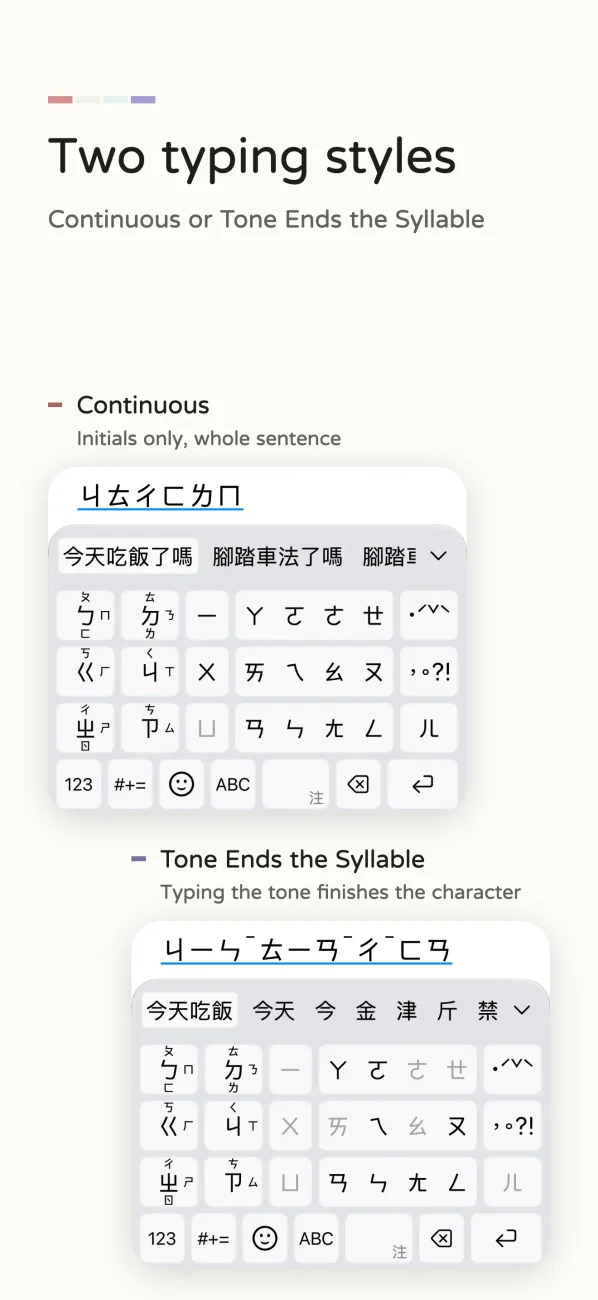
Two typing styles, your habit
· Continuous: keep typing, tones optional, even initials only; the keyboard works out where each character ends
· Auto-Add Medials: find words even when you skip a medial
· Tone Ends the Syllable: a character ends when you type its tone; keys that cannot follow turn gray
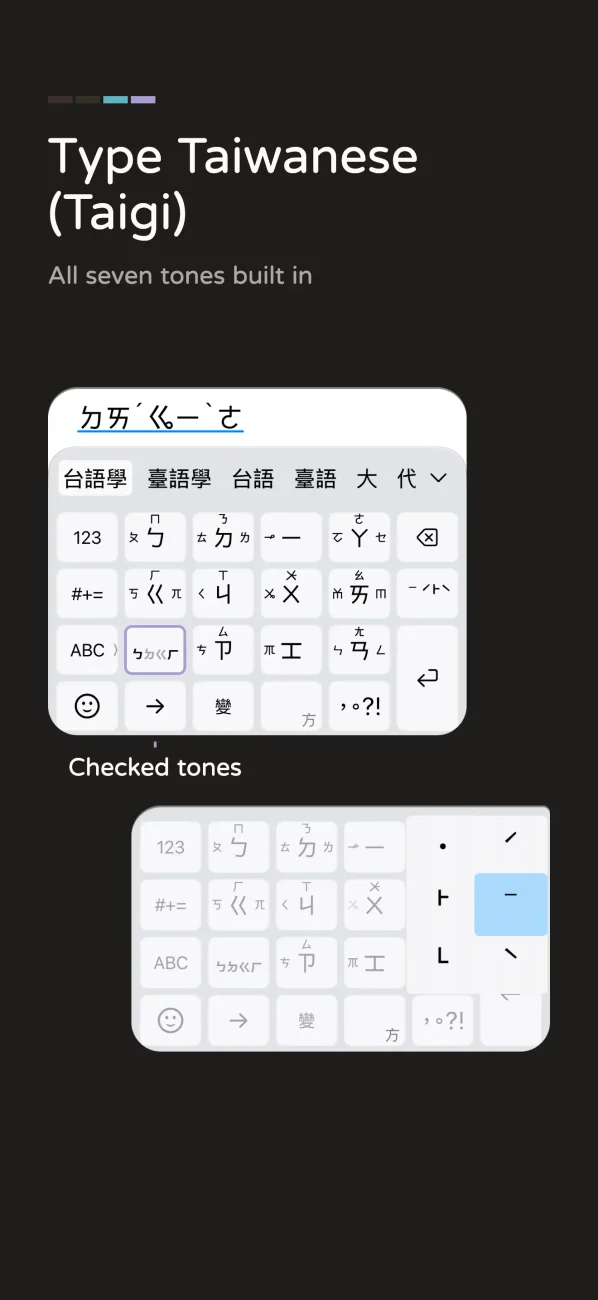
Taiwanese (Taigi) keyboard
· Bopomofo Extended with all seven tones, checked tones, and nasal rimes, plus a Transform Key for voiced and nasal variants
· Lexicon cross-checked from four public sources, including the Ministry of Education dictionary
· Romanization lookup between Bopomofo Extended, Tai-lo, and POJ; key labels can show the romanization as you type
English, numbers, symbols, and emoji
· Emoji key: a full panel with categories, Recents, color filters, and skin tones
· Selecting a symbol shows its Unicode code point
· English: Standard QWERTY; Flick Keys and 10-Key also offer two letters per key or a Phone Keypad
· Calculator panel; press = for the result
· Rime Bars, Flick Keys, and 10-Key share one symbols page; full-width with halfwidth too
Help and Setup Assistant
· Every feature shown on a real keyboard, plus Find a Symbol and a setup checklist; the FAQ and manual are on the website
· Setup Assistant in Settings picks your layout, typing style, and languages
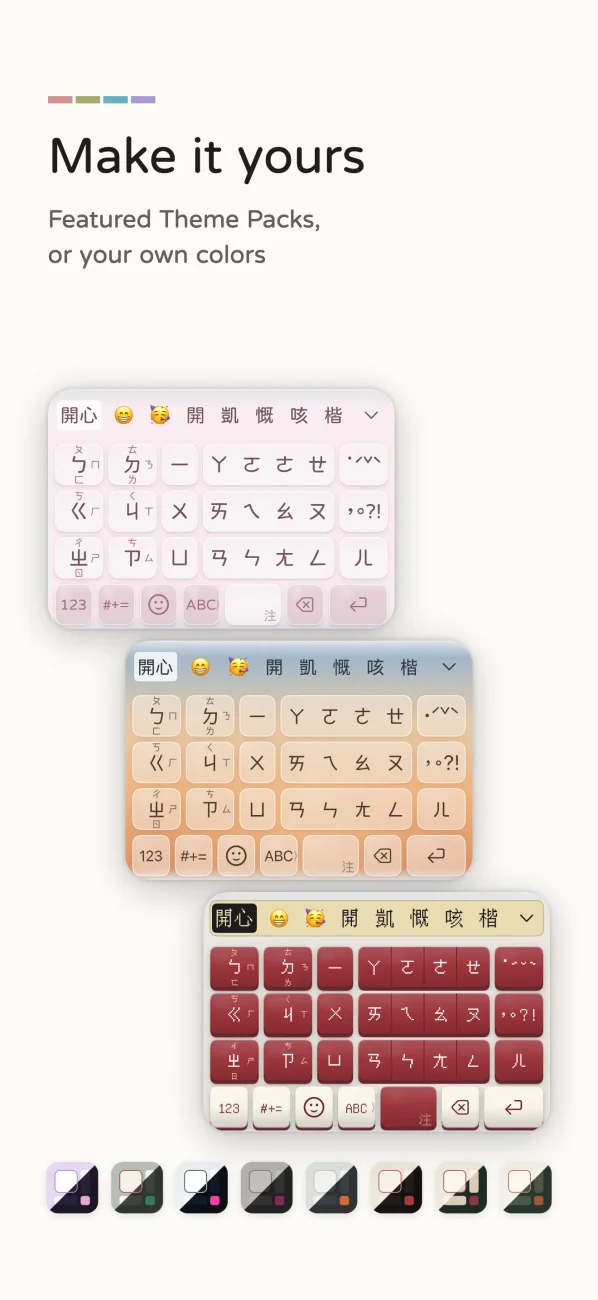
Make the keyboard yours
· Theme editor: colors, corners, borders, and backgrounds (solid, gradient, or photo); basic editing is always free
· Five built-in fonts; glass finish tuned for light and dark
Features
· Open-source Homa composer that takes the previous word into account
· Hold Space for a trackpad; Edit Tools to move, select, cut, copy, and paste
· Custom Vocabulary and learning from what you pick; hold a candidate to forget it
· Separate learning data for Mandarin and Taiwanese; opt-in iCloud Sync to your own iCloud only
· Candidate tabs, emoji suggestions, Chinese numerals and dates, one-handed mode, landscape, and VoiceOver
Privacy
· The keyboard never connects to the internet; your input and learning data stay on your device
· "Allow Full Access" is used for haptics and sounds, the clipboard (paste, cut, copy), and opening the app (an Apple requirement); all of it stays on your device
· Anonymous Product Survey: opt-in, off by default, with nothing you type and no identifiers
About the subscription (Panda Supporter)
Core typing is free forever, with three featured themes. Supporter is an auto-renewable subscription for appearance extras: featured theme packs, font switching, glass finish effects, background gradients, and more custom punctuation slots. Cancel anytime in Manage Subscriptions; what you made stays.
Terms: https://panda-zhuyin.erikyin.net/terms.html
Privacy: https://panda-zhuyin.erikyin.net/privacy.html
Who this is not for (honestly)
· You type comfortably on the built-in Zhuyin keyboard
· You want cloud AI prediction; Gboard or SwiftKey fits better
· You don't type Zhuyin or Taiwanese
Requires iOS 18 or later.
What’s new
Version 3.6.1 · Nov 25, 2026
Candidates
· Sentences take nearby words into account better, for example 沒有人看過神
· 得 and 的 are chosen from the surrounding words, for example 他唱得不好
· Measure words after numbers are ranked more accurately, for example 十支筆 and 四張全票
· When 再/在, 哪/那, or 得/的 can't be told apart, the other character is shown as the second candidate
· Sentence-final particles are more likely to come first
· Without tones, sentences also try splitting readings apart, so 是我的 can now be composed
· In the Readings List, the reading you already chose comes first
· The dictionary now uses Taiwan's standard characters (吸菸, 戒菸, 無須) and drops misspelled words such as 甘籃菜, 前途無亮, and 真得
10-Key
· The 123, #+=, language, emoji, and punctuation keys in the left column can now be moved, swapping with keys in the right column or bottom row
· More accurate sentences, for example 一時想不起來 is no longer composed wrong. When typing without ending syllables, 一次 and 一時 are more often kept as two characters
Standard Keyboard (Experimental)
· Pressing a Zhuyin key now shows a key preview. Keys with two symbols show both side by side; slide left or right to switch to that symbol
· More accurate sentences, for example 我們在吃晚餐 is no longer composed wrong
· When typing characters such as 月 and 學, hitting the neighboring key by mistake still composes them
Settings
· Function Key Positions and the bottom row order are now set by dragging a key onto another spot in the preview to swap the two
Display
· In portrait, candidates sit lower, matching the spacing to the keys on the built-in iPhone keyboard
App privacy
What TZUYUAN YIN declares on the App Store about how this app handles data.
-
Data not linked to you
May be collected but is not linked to your identity.
- Other data
Privacy practices may vary, for example with the features you use or your age.
Information
- Seller
- TZUYUAN YIN
- Category
- Utilities
- Version
- 3.6.1
- Updated
- Nov 25, 2026
- Released
- Apr 15, 2026
- Size
- 192.7 MB
- Requires
- iOS 18.0 or later
- Age rating
- 4+
- In-app purchases
- Yes
- Languages
- Traditional Chinese, Japanese, English
- Copyright
- © 2026 殷慈遠