Papyrus: Research Library
Native research workspace
Designed for iPhone, iPad, Mac
Free
- Age rating4+
- CategoryProductivity
- DeveloperZhenda Fu
- LanguagesEnglish+ 3 more
- Size35.3 MB
Links to the official App Store page
Download.org hosts no file of Papyrus: Research Library. The button opens its official App Store page, published by Zhenda Fu. Listing last checked on Nov 23, 2026.
Screenshots




About
Papyrus is a native research workspace for reading, annotating, organizing, and citing PDFs — built for iPad, iPhone, and Mac.
READ AND ANNOTATE
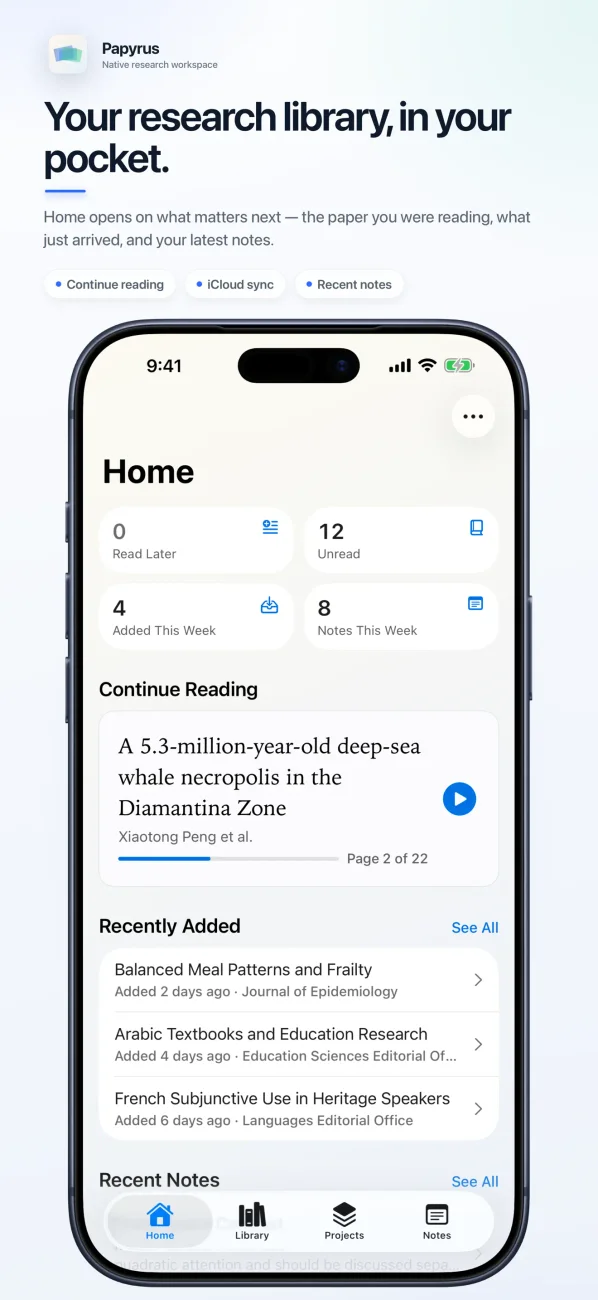
Open a paper in a fast built-in reader. Highlight, underline, and mark up pages, and every highlight stays searchable and linked back to its source. Bookmark a page as you go, and pick the paper up later from a Reading card that remembers where you stopped. On iPad, a References tab looks up the open paper's reference list and related work, so you can follow a citation trail and add what matters to your library without leaving the page.
WRITE ON THE PAGE WITH APPLE PENCIL
Mark up a PDF directly on iPad — annotate a proof, sketch beside a figure, work a derivation out in the margin. Your ink belongs to the paper and travels with it, encrypted, to your other devices.
NOTES BESIDE THE SOURCE
Keep Markdown notes next to each paper: headings, tables, code blocks, LaTeX math, and [[note]] cross-references. Notes stay with the paper and export as PDF when you need to share them.
NOTEBOOKS
Gather notes from across your library onto themed shelves — a topic, a chapter you're drafting, a reading group. Filing a note copies nothing and moves nothing: it still belongs to its paper, still says which paper that is, and one tap takes you there and back. A note can sit on several shelves at once. Fill a new shelf from what you've already written, search it by a note's text or by the paper behind it, order it four ways — including oldest paper first, which reads your own notes forward through the literature — and export a whole shelf as one Markdown document. All Notes lists everything you've written in one place, filed or not.
ORGANIZE THE WAY YOU THINK
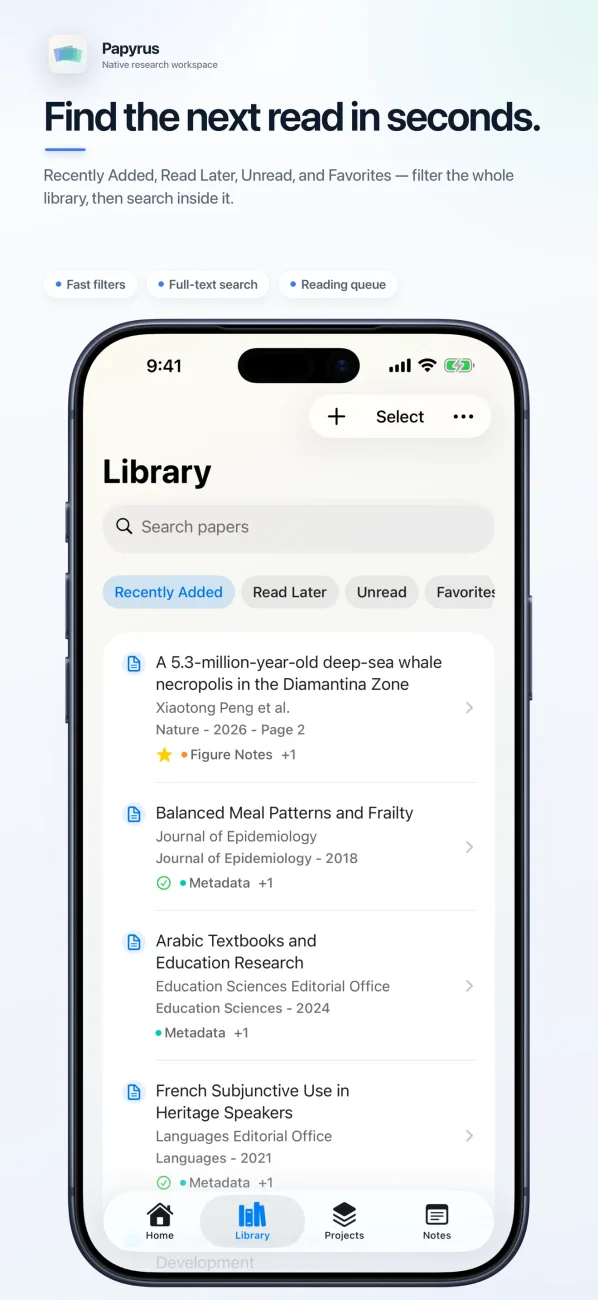
Folders — a paper can live in several — plus tags, star ratings, and seven colored flags you can name yourself, each with its own shape so they stay tellable apart at a glance. Smart Collections keep themselves current from rules you set, including flag rules. Review Duplicates finds look-alike papers and merges each set after you confirm, combining tags, folders, projects, notes, and highlights.
FIND ANYTHING
Search titles, authors, notes, and highlights — or the full text inside your PDFs.
TURN READING INTO WRITING
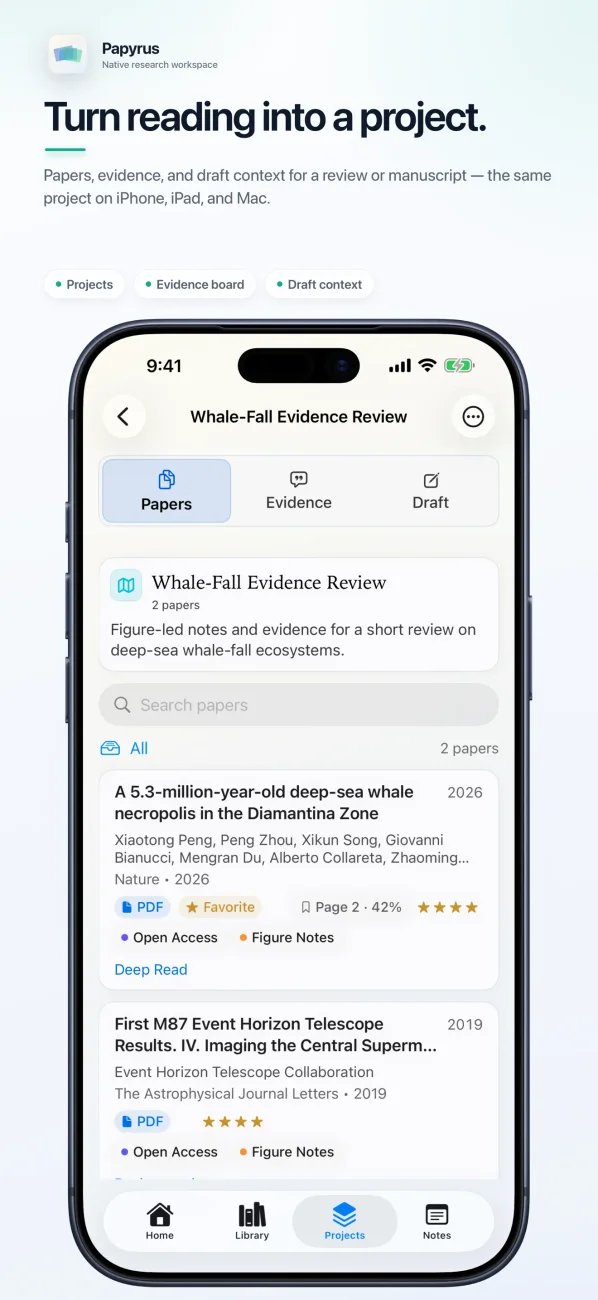
Projects are where a reading pile becomes a manuscript. Group the papers behind a chapter or article, give each one a role, and capture evidence — claims, quotes, and your own interpretation — tied back to the source paper and page. Write the project note from a template (related work, method comparison, experiment plan, thesis chapter, reviewer response), keep its revision history, and run a preflight that catches missing citation keys and metadata gaps before you export. Export a bundle with Markdown, a BibTeX bibliography, and the PDFs.
IMPORT AND CITE
Bring in PDFs, whole folders, or BibTeX and RIS files — including libraries exported from Mendeley and Zotero. Papyrus looks up metadata by DOI or arXiv ID and fills in the details. Save papers straight from Safari with the included extension. Copy citations in the style you write in, and export BibTeX or RIS whenever you need them.
READ ANYWHERE
Paste an arXiv link, a DOI, or a PDF URL and Papyrus imports it, looks up the details, and fetches the PDF. Add a paper to Read Later and its PDF downloads ahead of time, so a flight or a commute doesn't need a signal. Ask Siri, or search from the Home Screen, to pick up the paper you were last reading on the page you left it.
YOUR LIBRARY, YOUR DEVICES
Your library syncs over iCloud across iPad, iPhone, and Mac. No account to create, no tracking, no ads.
Free to download and use — every feature included, no in-app purchases, no subscription.
What’s new
Version 2.4 · Nov 21, 2026
Widgets
• Continue Reading: the paper you were reading, with your page and progress, on the Home Screen or under the Lock Screen clock. Tap it to open the paper on the page you left.
• Read Later: the papers you have lined up, in three sizes. Settings > General > Widgets shows how to add them.
Act on the text you select
• Extensions: select text in a PDF, a note or an abstract, and actions appear under Extensions: Copy, Add to Note, Ask This Paper, Search in Library, Define, Translate, Google Scholar, Semantic Scholar, Wikipedia, Copy as Citation, Remove Line Breaks, and Open DOI, arXiv or Link.
• Settings > Extensions turns actions on or off, reorders them, and lets you write your own: a website search, a Shortcut, a text transform or a small script that runs with no network or file access. Share them as .papyrusext files; every install lists exactly what the extension does.
Your choice of AI
• Bring your own OpenAI or Anthropic API key: Settings > Advanced > AI Provider can switch Ask This Paper, Digest, summaries and Explain Figure from Apple Intelligence to ChatGPT or Claude. Papyrus shows what is sent and asks first; papers you keep on device stay on device, and your key stays on this device.
New on iOS 27 and iPadOS 27
• Ask My Library: ask a question across all your papers and notes, on device. Spotlight also finds your notes and the start of each PDF’s text.
• Scanned PDFs: Ask This Paper, metadata and Explain Figure can read pages that have no text layer.
• Think Harder: ask again with deeper reasoning on Private Cloud Compute, where it is offered.
• Siri and Shortcuts work on the papers you selected: add them to a project or Read Later, summarize them, or import PDFs and BibTeX or RIS files.
• Grammar checking in notes that skips links, citation keys, LaTeX and code.
• Handwriting to text: lasso handwriting in the iPad reader to convert it or add it to the paper’s note.
• Edits from your other devices appear live in the open reader and note editor.
Also improved
• Report a problem by email from Settings > Advanced.
• More reliable BibTeX and Zotero imports, and better metadata matching.
• Updated Help and translations.
App privacy
What Zhenda Fu declares on the App Store about how this app handles data.
-
Data not collected
The developer does not collect any data from this app.
Privacy practices may vary, for example with the features you use or your age.
Information
- Seller
- Zhenda Fu
- Category
- Productivity
- Version
- 2.4
- Updated
- Nov 21, 2026
- Released
- May 22, 2026
- Size
- 35.3 MB
- Requires
- iOS 17.0 or later
- Age rating
- 4+
- Price
- Free
- Languages
- English, French, Japanese, Simplified Chinese
- Copyright
- Copyright © 2026 ZendaX. All rights reserved.
You might also like
-
 Offprint: Web to PDF & EPUBSafari Clipper: Read Offline
-
 WikovaAI-Generated Wikipedia
-
 Maho NotesBeautiful Markdown note-taking
-
 MemNote: Context-Aware MemoryCapture notes, improve recall
-
 Wisen: AI Notes & KnowledgeNotes that think back at you
-
 Mindverse: Private AI NotesAI Notes, No Token Fees
-
 Libreta: A NoteBook AppYour notes, as real books
-
 Wiki LLMYour own linked knowledge wiki
-
 Meron Mail: Email & RSSUnified Inbox & Kanban Boards
-
 Plotted: Planner & To Do ListVisual Day Planner & Tracker