PDF Combi/Splitter
Combine, split, share PDFs
Designed for iPhone, iPad, iPod touch
In-app purchases
- Age rating4+
- CategoryUtilities
- DeveloperMarkus De Freitas
- LanguagesEnglish
- Size32.0 MB
Links to the official App Store page
Download.org hosts no file of PDF Combi/Splitter. The button opens its official App Store page, published by Markus De Freitas. Listing last checked on Nov 15, 2026.
Screenshots


About
**PDF Editor - Your Complete PDF Management Solution**
Take control of your PDF documents with PDF Editor. Whether you're a student, professional, or anyone who works with PDFs, this app makes editing simple and efficient.
**KEY FEATURES:**
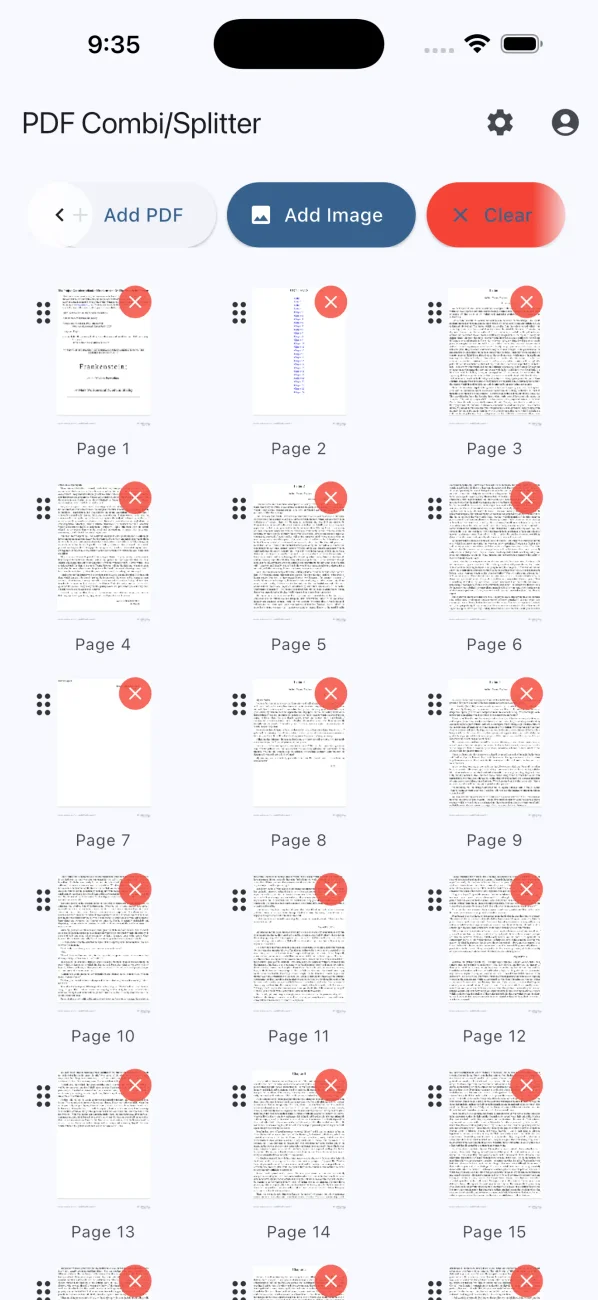
**Merge Multiple PDFs**
Combine multiple PDF documents into one seamless file. Perfect for consolidating reports or organizing your files.
**Reorder Pages**
Intuitive drag-and-drop interface lets you rearrange pages effortlessly. Simply long-press and drag to reorder.
**Remove Pages**
Select and delete unwanted pages. Clean up your documents quickly.
**Save & Share**
Export your edited PDFs with a single tap. Share to other apps, email, cloud storage, or save to your device.
**Add Images as PDF Pages** (Premium)
Convert images from your gallery or camera into PDF pages. Perfect for adding signatures or combining images with existing PDFs.
**Smart Compression**
Optimize file sizes with customizable image compression. Adjust quality and DPI settings to balance file size and image quality.
**FREE FEATURES:**
- Merge multiple PDFs
- Reorder pages (drag-and-drop)
- Remove pages
- Save and share PDFs
- Image compression settings
**PREMIUM FEATURES:**
- Add images as PDF pages
- Ad-free experience
**WHY CHOOSE PDF EDITOR?**
Simple and intuitive interface with no learning curve. Fast and reliable performance optimized for all devices. Works seamlessly on iPhone and iPad. All processing happens on your device for complete privacy.
Perfect for students organizing study materials, professionals managing business documents, teachers creating educational materials, or anyone who needs to edit PDFs on the go.
Download PDF Combi/Splitter now and start managing your PDF documents. Try our free features, and upgrade to Premium for advanced capabilities and an ad-free experience.
https://www.apple.com/legal/internet-services/itunes/dev/stdeula/
What’s new
Version 1.0.1 · Nov 25, 2025
- resolved a drag-drop issue with images
- improved PDF compression on conversion
App privacy
What Markus De Freitas declares on the App Store about how this app handles data.
-
Data not collected
The developer does not collect any data from this app.
Privacy practices may vary, for example with the features you use or your age.
Information
- Seller
- Markus De Freitas
- Category
- Utilities
- Version
- 1.0.1
- Updated
- Nov 25, 2025
- Released
- Nov 23, 2025
- Size
- 32.0 MB
- Requires
- iOS 13.0 or later
- Age rating
- 4+
- In-app purchases
- Yes
- Languages
- English
- Copyright
- © 2025 Mark De Freitas
You might also like
-
 PDF Pages EditorExtract and Reorder PDF pages
-
 DocReady Pro: PDF Editor MergeSign, Scan Image to PDF ZIP
-
 PDFPager - Reorder Combine PDFOrganize, merge & reorder PDFs
-
 PDF Merger & Splitter: CombinePhotos to PDF, Extract Pages
-
 Merge PDF: Combine PDF & SplitMerge & Combine PDF Files
-
 PDF Offline - Local-Only toolsMerge Split Convert PDF files
-
 Split PDF EasyPDF Splitter for Manga & Scan
-
 Neat - PDF OrganizerMerge, Split & Edit PDFs Fast
-
 pdfxpresspdf express
-
 Merge PDFs: Combine and SplitLocal PDF tools for Files