- Age rating4+
- CategoryPhoto & Video
- DeveloperWillem de Jonge
- LanguagesEnglish
- Size1.0 MB
Links to the official App Store page
Download.org hosts no file of PhotoPacker. The button opens its official App Store page, published by Willem de Jonge. Listing last checked on Nov 17, 2026.
Screenshots

About
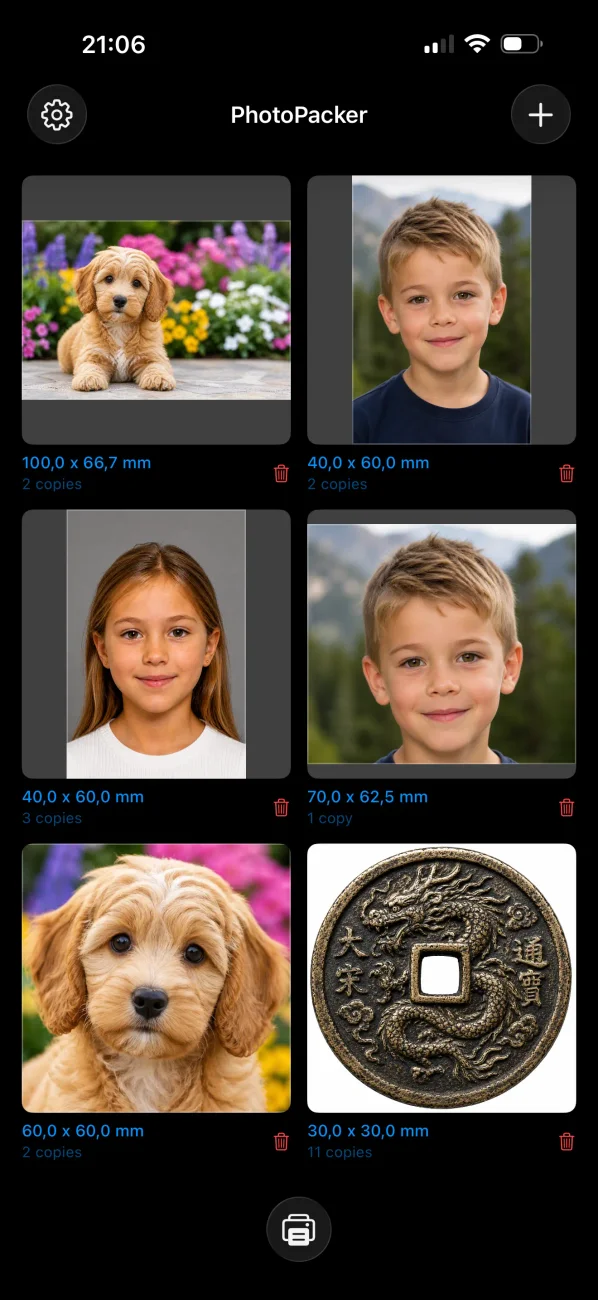
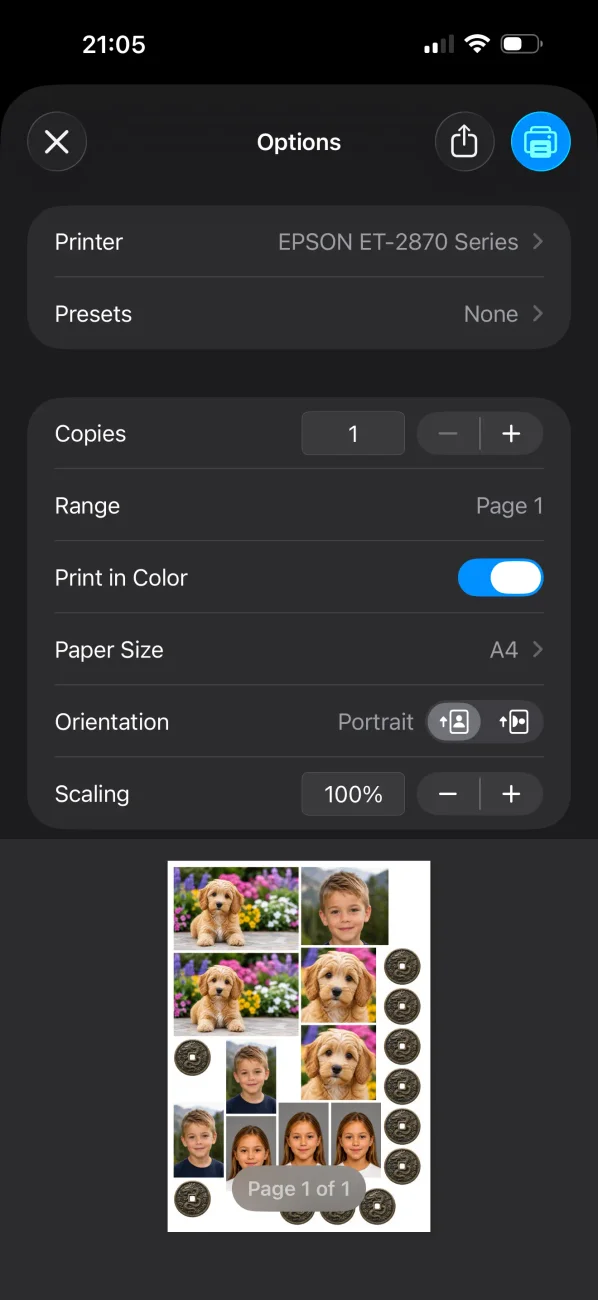
Print your photos efficiently with PhotoPacker. Select multiple images from your library, set each photo’s print size in mm, cm, or inches, and choose how many copies you need. PhotoPacker automatically arranges images across one or more pages to use as little paper as possible.
Key features:
• Select multiple photos for batch printing
• Set custom print sizes per photo
• Choose copy counts for each image
• Automatic page layout to maximize paper usage
• Easy photo adjustment with zoom and position editing
• Crop tool with draggable handles — trim a photo and its print size updates to match
• Works across multiple pages when needed
• Optional crop marks make prints easy to cut out
• Optional photo borders in a custom colour and width (inset or outset)
• Optional automatic size — print every photo as large as possible, all sharing the same area (each keeping its own aspect ratio and crop), filling up to a chosen number of pages
• Optional layout area — pack photos into a custom-sized rectangle, centred and printed with crop marks for cutting; combine it with automatic size to fill the rectangle with the largest possible prints
• One free print with no photo or copy limits, so you can finish a real page before deciding whether to buy
Perfect for creating proof sheets, photo layouts, and print-ready pages with minimal effort.
PhotoPacker is free to use, with a one-time Pro purchase — no subscription — that lifts the photo and copy limits and unlocks custom margins and gaps, 90° rotation, photo borders, automatic sizing, and custom layout areas.
What’s new
Version 1.4 · Aug 22, 2026
Try it properly first, and tell me how it went.
• One free print, no limits — new to PhotoPacker? Lift the photo and copy limits once, for a single print job, so you can finish a real page before deciding whether to buy.
• A direct line to the developer — after a print finishes, PhotoPacker now asks how it turned out. There's also a new Send feedback option in Settings. Feedback mails arrive prefilled with your app version and layout settings so problems are quicker to track down, and you can read and edit all of it before sending.
• Redeem a code — Settings now accepts App Store offer codes.
• Launch offer — PhotoPacker Pro is discounted for a limited time.
The Pro screen now also lists photo borders and custom layout areas, which it had been leaving out.
App privacy
What Willem de Jonge declares on the App Store about how this app handles data.
-
Data not collected
The developer does not collect any data from this app.
Privacy practices may vary, for example with the features you use or your age.
Information
- Seller
- Willem de Jonge
- Category
- Photo & Video
- Version
- 1.4
- Updated
- Aug 22, 2026
- Released
- May 21, 2026
- Size
- 1.0 MB
- Requires
- iOS 26.0 or later
- Age rating
- 4+
- Price
- Free
- In-app purchases
- Yes
- Languages
- English
- Copyright
- © 2026 Willem de Jonge
You might also like
-
 Print Photo StudioPrint Photos at the Exact Size
-
 PrintlyraPrint photos at exact sizes
-
 Print Photos Exact SizePhoto Printer & AirPrinter
-
 Photo Print: Size & Layout4x6, Passport & ID Photos
-
 PhotoPack ShareZip Photos & Videos Share Fast
-
 Photoautomat: Photo BoothVintage retro photo strips
-
 Resize Studio: Photo & PrintPhoto Resizer & Print Layouts
-
 Photo Layout Editor-Collage-A4Polaroid|Layout|Add Text
-
 Photo Printer: Print to SizeAirPrint 4x6 5x7 passport PDF
-
 Grid Pics: Photo Collage MakerSeamless Carousel & Templates