- 対象年齢4+
- カテゴリ写真/ビデオ
- 開発元Willem de Jonge
- 言語英語
- サイズ1.0 MB
App Storeの公式ページにリンクしています
Download.orgはPhotoPackerのファイルを一切ホストしていません。ボタンを押すと、Willem de Jongeが公開しているApp Storeのアプリページが開きます。ページの最終確認:2026/11/17。
スクリーンショット


概要
開発元はこのテキストをお使いの言語で提供していません。
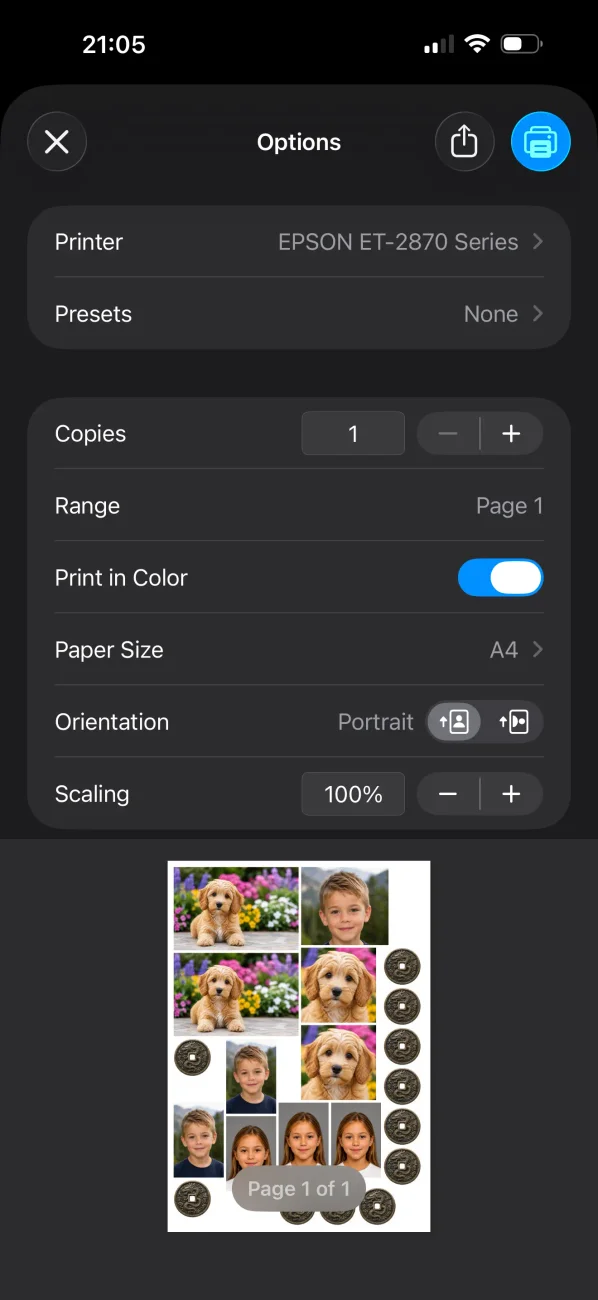
Print your photos efficiently with PhotoPacker. Select multiple images from your library, set each photo’s print size in mm, cm, or inches, and choose how many copies you need. PhotoPacker automatically arranges images across one or more pages to use as little paper as possible.
Key features:
• Select multiple photos for batch printing
• Set custom print sizes per photo
• Choose copy counts for each image
• Automatic page layout to maximize paper usage
• Easy photo adjustment with zoom and position editing
• Crop tool with draggable handles — trim a photo and its print size updates to match
• Works across multiple pages when needed
• Optional crop marks make prints easy to cut out
• Optional photo borders in a custom colour and width (inset or outset)
• Optional automatic size — print every photo as large as possible, all sharing the same area (each keeping its own aspect ratio and crop), filling up to a chosen number of pages
• Optional layout area — pack photos into a custom-sized rectangle, centred and printed with crop marks for cutting; combine it with automatic size to fill the rectangle with the largest possible prints
• One free print with no photo or copy limits, so you can finish a real page before deciding whether to buy
Perfect for creating proof sheets, photo layouts, and print-ready pages with minimal effort.
PhotoPacker is free to use, with a one-time Pro purchase — no subscription — that lifts the photo and copy limits and unlocks custom margins and gaps, 90° rotation, photo borders, automatic sizing, and custom layout areas.
新機能
バージョン 1.4 · 2026/8/22
Try it properly first, and tell me how it went.
• One free print, no limits — new to PhotoPacker? Lift the photo and copy limits once, for a single print job, so you can finish a real page before deciding whether to buy.
• A direct line to the developer — after a print finishes, PhotoPacker now asks how it turned out. There's also a new Send feedback option in Settings. Feedback mails arrive prefilled with your app version and layout settings so problems are quicker to track down, and you can read and edit all of it before sending.
• Redeem a code — Settings now accepts App Store offer codes.
• Launch offer — PhotoPacker Pro is discounted for a limited time.
The Pro screen now also lists photo borders and custom layout areas, which it had been leaving out.
アプリのプライバシー
このアプリのデータの取り扱いについて、Willem de JongeがApp Storeで申告している内容です。
-
データの収集なし
開発元はこのアプリからデータを収集しません。
プライバシーの取り扱いは、ご利用の機能やお客様の年齢などに応じて異なる場合があります。
情報
- 販売元
- Willem de Jonge
- カテゴリ
- 写真/ビデオ
- バージョン
- 1.4
- 更新日
- 2026/8/22
- リリース
- 2026/5/21
- サイズ
- 1.0 MB
- 必要条件
- iOS 26.0以降
- 対象年齢
- 4+
- 価格
- 無料
- アプリ内課金
- あり
- 言語
- 英語
- 著作権
- © 2026 Willem de Jonge
こちらもおすすめ
-
 Print Photo Studio写真/ビデオ
-
 Printlyra写真/ビデオ
-
 Print Photos Exact Size写真/ビデオ
-
 Photo Print: Size & Layout写真/ビデオ
-
 PhotoPack Share写真/ビデオ
-
 Photoautomat: Photo Booth写真/ビデオ
-
 Resize Studio: Photo & Print写真/ビデオ
-
 写真編集・レイアウト - スナスナポラロイド風|写真効果|自動配置|文字入れ
-
 写真プリント 印刷サイズ指定AirPrint L判 2L判 ワイド PDF
-
 Grid Pics:写真コラージュカルーセル・ストーリー作成