Phraseboard - Paste Keyboard
Custom Shortcut Text & Fonts
Designed for iPhone, iPad, iPod touch
Free · In-app purchases
- Age rating4+
- CategoryUtilities
- DeveloperDaniel Soffer
- LanguagesEnglish+ 10 more
- Size103.4 MB
Links to the official App Store page
Download.org hosts no file of Phraseboard - Paste Keyboard. The button opens its official App Store page, published by Daniel Soffer. Listing last checked on Nov 22, 2026.
Screenshots

About
Phraseboard Keyboard Lite is a free custom keyboard app that helps users easily fill template text directly from their keyboard without having to switch to any other app to automatically paste text or photos.
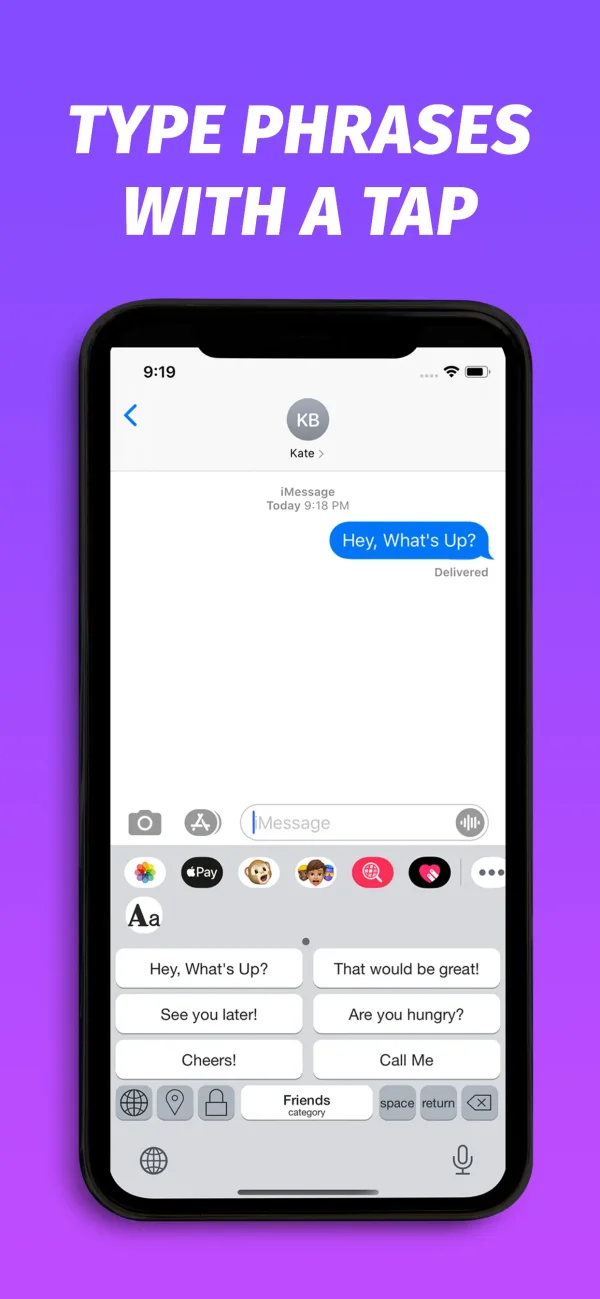
If you find yourself struggling with typing similar text multiple times like email, address, phone number and customer responses, then this free auto paste keyboard app is perfect for you to save your time. Simply go to the categories menu to prepare several phrase templates that you use frequently. When you need to fill those sentences just tap on the keyboard icon to switch to Phraseboard Keyboard Lite to fill them easy and fast.
Tired of typing the same response over and over all the time? Phraseboard customizes and categorizes your keyboard with easy to access phrases.
Add a category and a few common phrases and immediately use the in any app like Facebook, Twitter, Instagram or simply send by email, LINE or as SMS.
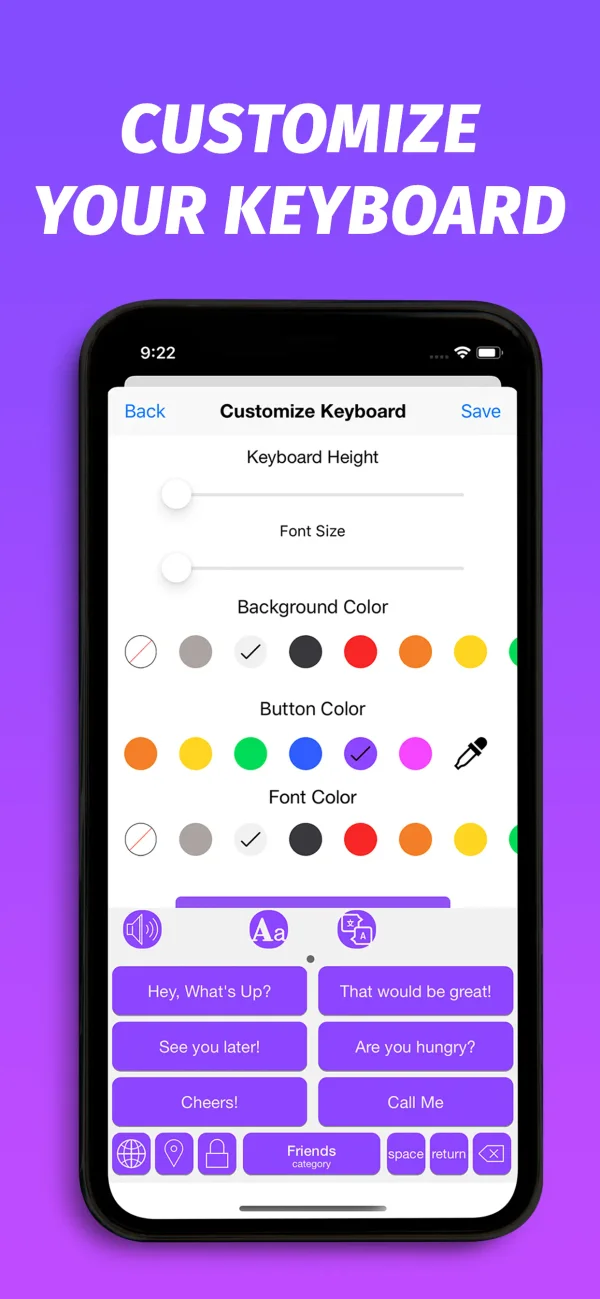
Customize your phrases and keyboard with unique fonts and colors!
100+ Creative fonts to choose from!
If you have used apps like gboard keyboard or swift key keyboard you will love our app!
Download the ultimate quick response personal keyboard app now for free!
Features:
• Full keyboard with creative fonts.
• Swap quickly between phrase keyboard and full keyboard.
• Create your most common phrases and sort them by categories.
• Use your phrases in any App right in your keyboard.
• Change the font of phrases to match the look and feel of your choice.*
• Design your keyboard styles including button and background colors.*
• Set custom photos as keyboard background.
• Save your styles and pick from curated themes in the styles manager.
• Choose which fonts are enabled and manage their order.
• Change keyboard and button size
• Use all types of Emojis to express your creativity.
• Simply tap a button to send off a quick reply.
• Great tool for business professionals and social media creators!
Also:
• Send GIFs and images in any app.
• Share your location with a single tap.
• Switch between various fonts without changing phrases.*
• Choose from a large collection of fonts.*
• Customize font size.*
• Customize font color.*
• Protect your phrases using the Secure category.
• Add phrases directly from Notification Center using the Phraseboard Widget.
• Sync you’re phrases in all your devices using iCloud.
• Use directly inside your favorite social media app like Instagram, Facebook or Twitter.
• Use directly in iMessage, SMS or Apps.
• Create auto reply text that helps with quick and easy typing.
• Communicate with confidence using phrase shortcuts.
• Easily auto paste and copy paste text and images directly in your keyboard.
(*) Requires an active subscription
REMEMBER: In order to show your phrases on the keyboard and use the media features you must allow OPEN ACCESS. To allow it please go to Settings > Keyboard, click on Phraseboard and turn the switch ON.
( Phraseboard ONLY needs open access to be able to show your custom phrases on the keyboard. We never save or log any of your keystrokes).
Phraseboard Premium Subscription Information
Joining Phraseboard Premium enables a 3-day free trail followed by a monthly membership fee.
• Subscription automatically renews unless auto-renew is turned off at least 24-hours before the end of the current period.
• Account will be charged for renewal within 24-hours prior to the end of the current period.
• Subscriptions may be managed by the user and auto-renewal may be turned off by going to the user's Account Settings after purchase.
• Any unused portion of a free trial period, if offered, will be forfeited when the user purchases a subscription, where applicable.
Get up to 5 phrases for free or upgrade to Pro to get unlimited phrases, unlock over 100 fonts and share your phrases.
Privacy Policy : https://phraseboard.wixsite.com/phraseboard/untitled-c82w
Terms of Service : https://phraseboard.wixsite.com/phraseboard/terms
What’s new
Version 1.6 · Dec 25, 2023
Minor Bug Fixes
App privacy
What Daniel Soffer declares on the App Store about how this app handles data.
-
Data not linked to you
May be collected but is not linked to your identity.
- Usage data
- Diagnostics
Privacy practices may vary, for example with the features you use or your age.
Information
- Seller
- Daniel Soffer
- Category
- Utilities
- Version
- 1.6
- Updated
- Dec 25, 2023
- Released
- May 27, 2021
- Size
- 103.4 MB
- Requires
- iOS 13.0 or later
- Age rating
- 4+
- Price
- Free
- In-app purchases
- Yes
- Languages
- English, French, German, Hebrew, Italian, Japanese, Portuguese, Simplified Chinese, Spanish, Thai, Traditional Chinese
- Copyright
- © Daniel Soffer
You might also like
-
 LazyBoard: Text ExpanderQuick Reply & Paste Keyboard
-
 Multi Copy and Paste KeyboardAutoSnap Auto Paste for iPhone
-
 Background Keyboards - NikaCool Cursive & Handwriting
-
 Quick Replies - Paste KeyboardAuto Copy & Text Expander Fast
-
 Keyboard Extension - SnipKeyThe best keyboard extension
-
 Fast Reply: Saved RepliesAuto Reply & Text Shortcuts
-
 Paste Keyboard : Text ShortcutAuto Copy Paste fast clipboard
-
 PasteKey: Auto Paste KeyboardOne tap to paste keyboard.
-
 KeyboardKitCustomizable Keyboard
-
 AI Keyboard・ReplyAssistantTranslate, Grammar Spell Check