- Age rating4+
- CategoryProductivity
- DeveloperJunhong Chen
- LanguagesEnglish
- Size5.2 MB
Links to the official App Store page
Download.org hosts no file of Prompt365. The button opens its official App Store page, published by Junhong Chen. Listing last checked on Nov 15, 2026.
Screenshots



About
The developer has not provided this text in your language.
Prompt365 是 AI 重度使用者每天都用得上的 Prompt 工具。
每天都在使用 AI 工具,那你一定遇過這些問題:
* Prompt 不知道怎麼寫
* 每次都要重新打
* 好用指令散落在備忘錄、文件與聊天室
* 想用 AI,卻先卡在怎麼問
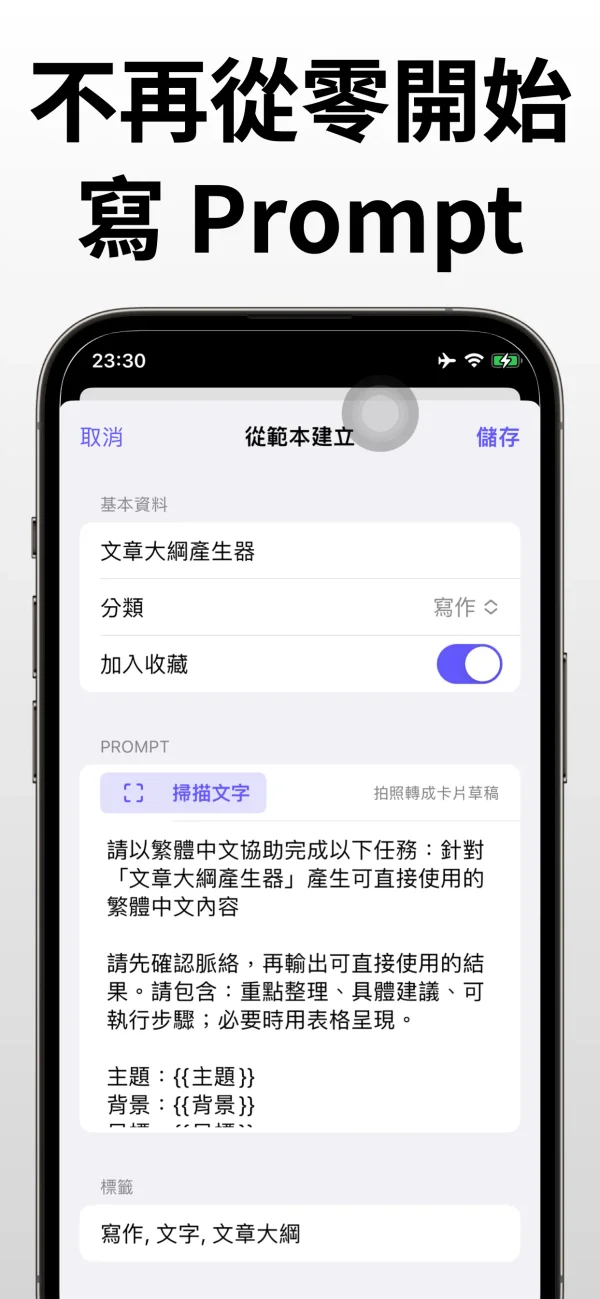
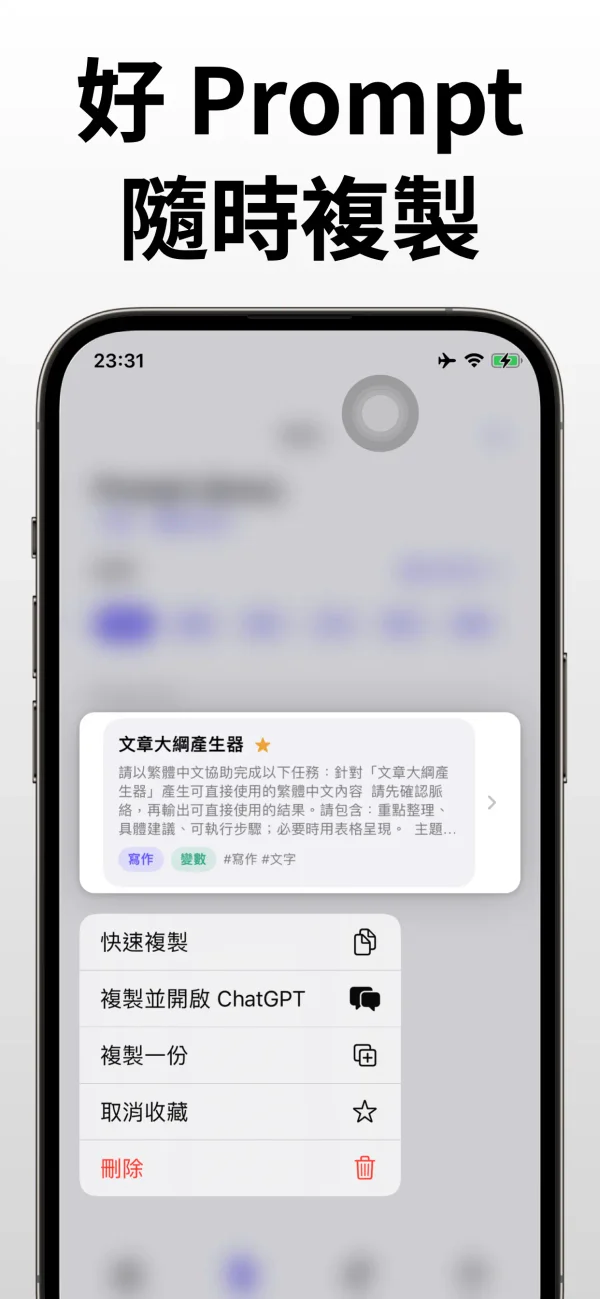
Prompt365 幫你把常用 Prompt 整理成一張張卡片。打開 App,選擇任務,套用變數,一秒複製。
* 少打字,快一步
* 不再從零開始寫 Prompt
* 不再苦惱 Prompt 有沒有效
* 不再把時間浪費在重複輸入上
《主要功能》
1. 400 個精選 Prompt 卡片:
內建多種任務情境,讓你快速開始 AI 對話。
2. 八大類 Prompt 範本:
覆蓋寫作、工作、程式、教學、行銷、商務、學習與對話場景。
3. 變數快速套用:
只要填入關鍵內容,就能快速產生可用 Prompt。
4. 一秒複製與分享:
寫好 Prompt 立即複製,也能快速分享給其他人。
5. 開啟 AI App 更順手:
從 Prompt 到 AI 對話,減少切換與整理成本。
6. 掃描文字建立卡片草稿:
可將紙本筆記、講義或白板文字掃描成 Prompt 卡片草稿,方便整理與再利用。
《適合誰使用?》
* AI 重度使用者
* 內容創作者
* 行銷企劃
* 學生與研究者
* 工程師
* 產品經理
* 教學工作者
* 每天需要寫作、整理、分析資料的人
《推薦原因》
* Prompt365 是你的 Prompt 卡片盒
* 把好用 Prompt 收好
* 把重複打字省下來
* 把 AI 工作流變快
Terms of Use:
https://aimining.io/prompt365/terms.html
Privacy Policy:
https://aimining.io/prompt365/privacy.html
App privacy
What Junhong Chen declares on the App Store about how this app handles data.
-
Data not collected
The developer does not collect any data from this app.
Privacy practices may vary, for example with the features you use or your age.
Information
- Seller
- Junhong Chen
- Category
- Productivity
- Version
- 1.0
- Updated
- May 1, 2026
- Released
- May 1, 2026
- Size
- 5.2 MB
- Requires
- iOS 16.6 or later
- Age rating
- 4+
- In-app purchases
- Yes
- Languages
- English
- Copyright
- © 2026 Moko365, Inc.
You might also like
-
 Simply Scanner - PDF Docs ScanScan Share Document Easy Edit
-
 Shimau: Save Now, Find LaterSticky note to-dos & AI saves
-
 yescan—PDF OCR ScannerFree OCR Scan & PDF Converter
-
 Mangonote: AI Note TakerVoice Recorder & Transcription
-
 LazyMeow: Inventory & LedgerExpiry, budget & family sync
-
 Voice Recorder - TranscriptVoice Memos & Audio Editor
-
 iTimely - Timeline & Milestonesimple life,beautiful timeline
-
 賣貨便賣家版Productivity
-
 Bloomnote - Notes & JournalTrack Mood, Fitness, Countdown
-
 AI Note Taker & Voice RecorderTranscribe Speech to Text Memo