RayStatus | Phone Diagnostics
Battery, Network & Hardware
Designed for iPhone, iPad
In-app purchases
- Age rating4+
- CategoryUtilities
- DeveloperRUEI HUNG SHIU
- LanguagesEnglish+ 1 more
- Size18.4 MB
Links to the official App Store page
Download.org hosts no file of RayStatus | Phone Diagnostics. The button opens its official App Store page, published by RUEI HUNG SHIU. Listing last checked on Nov 8, 2026.
Screenshots
About
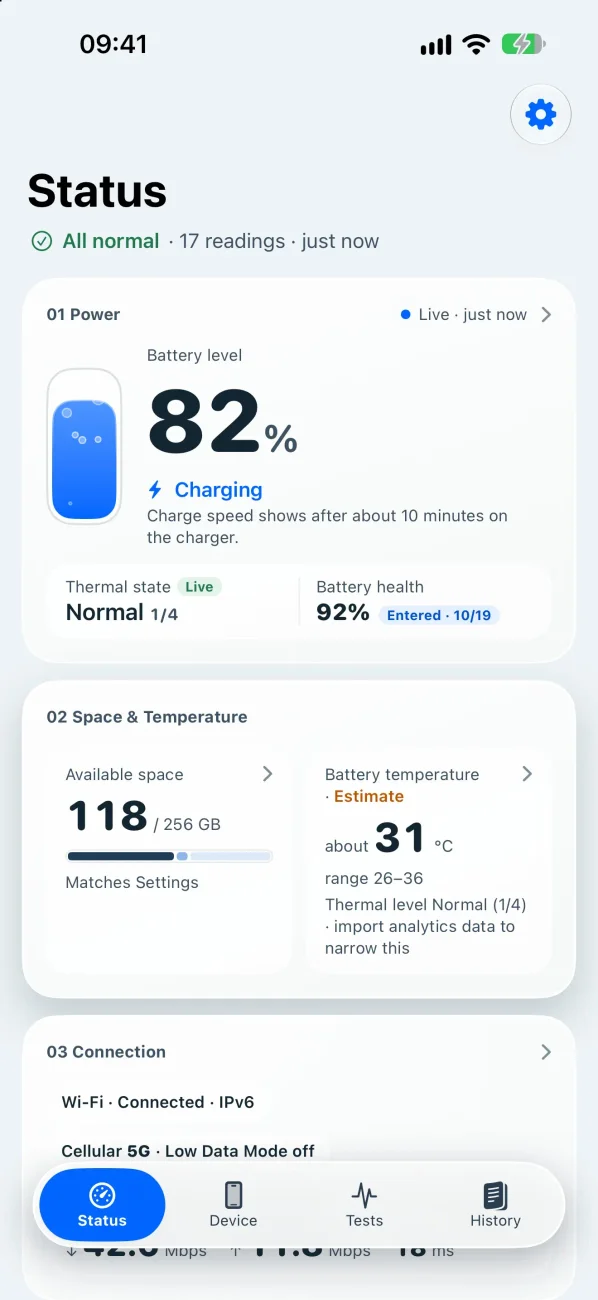
RayStatus turns what iPhone lets apps read into a set of clear, easy-to-read cards. Every number says where it came from: Live is a reading from iOS right now, Imported carries its date, and Estimate is exactly that. No made-up numbers dressed up as precise.
STATUS: IS MY PHONE OK RIGHT NOW?
• Battery level and an estimated charging speed, plus free space that matches Settings
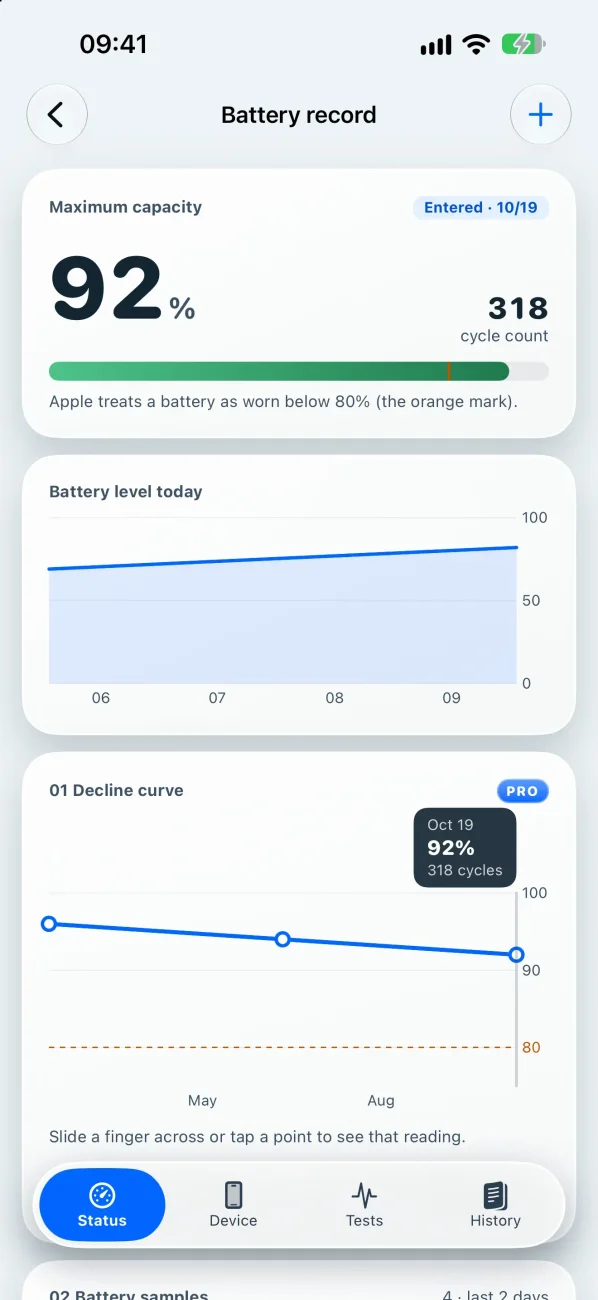
• A battery temperature range, always labelled Estimate, refined by imported temperature history
• Connection status and your latest speed test
• Choose which cards to show and in what order
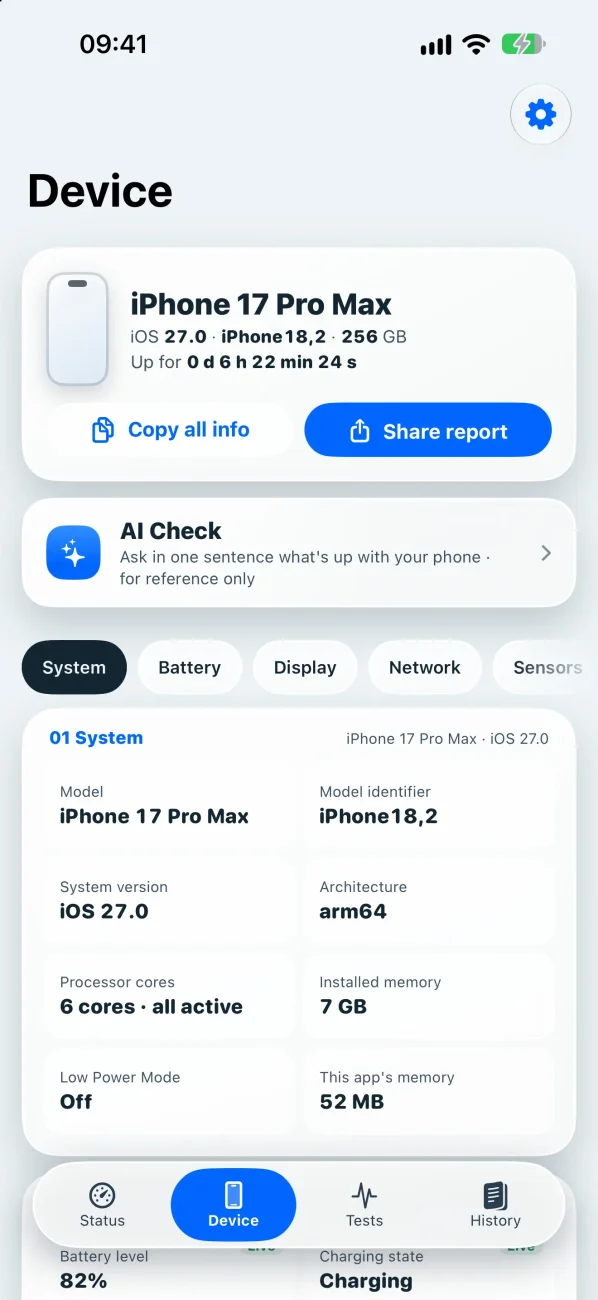
DEVICE: WHAT IS THIS IPHONE?
• Model, iOS version, processor, memory, display, cameras and sensors
• Copy it all, or turn it into a share card for Stories and posts. Serial number and IMEI can't be read by apps, so they never appear
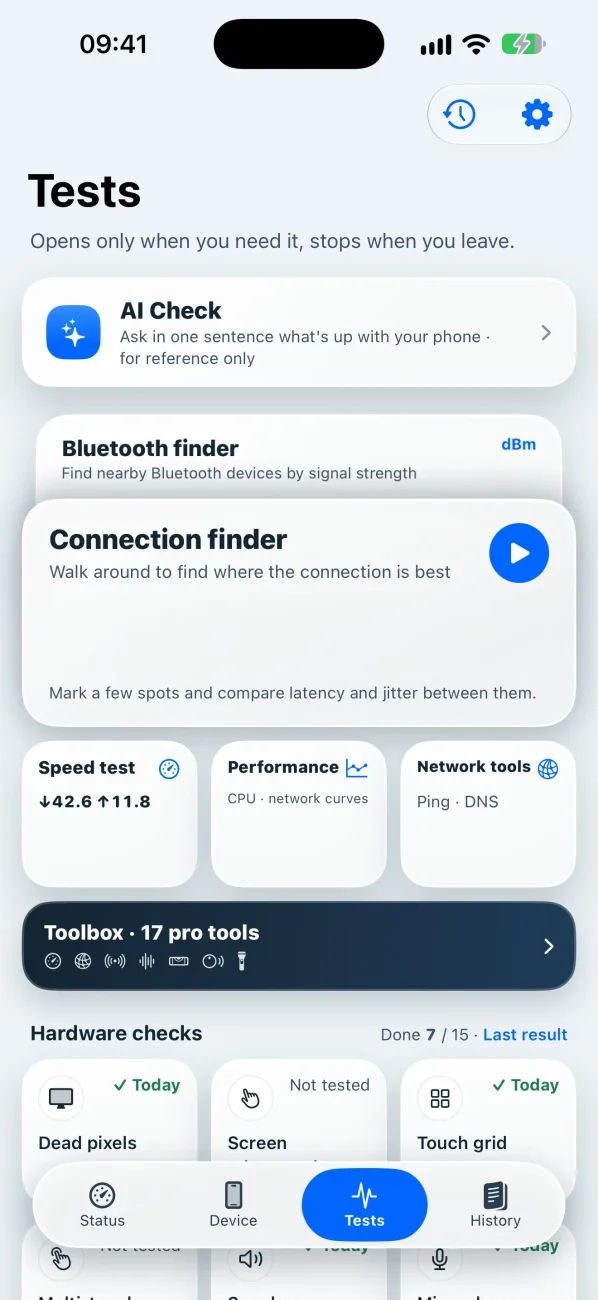
TESTS: 15 HARDWARE CHECKS
• Dead pixels, screen edges and touch, multi-touch, speaker and earpiece, microphones, camera and flash, vibration, volume buttons, Face ID, charging port, motion sensors, compass and barometer, proximity sensor, location accuracy
• "Run every check in order" walks you through them and ends with a single result
NETWORK TOOLS
• Speed test over Wi‑Fi or cellular: download, upload, and latency at idle and under load
• Ping, DNS lookup, route trace, local devices, IP info, port scan, Whois, website response and streaming quality
• Connection finder: walk around and compare which spot is smoothest
• Bluetooth finder with a direction radar to locate nearby devices
TOOLBOX
• Sound level meter, level and protractor, NFC read test, flashlight and screen fill light, haptics
AI CHECK
• Ask in one sentence, like "Why is my battery draining faster lately?" The AI on this iPhone answers from the readings RayStatus has, and nothing is uploaded
• 3 free questions a day; after that, each question needs one ad watched to the end. Pro is unlimited
• For reference only, not a professional diagnosis. Appears only on supported iPhone models
HISTORY
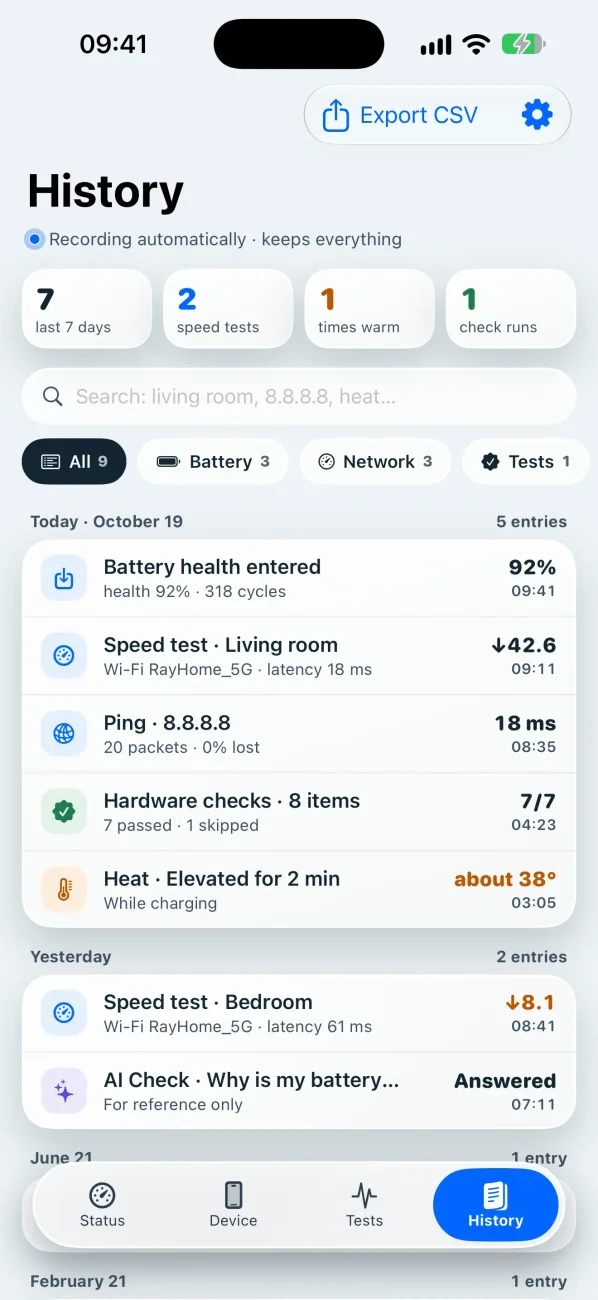
• Speed tests, checks, warm spells and low battery are saved to one searchable timeline
WIDGETS, LIVE ACTIVITY AND SIRI
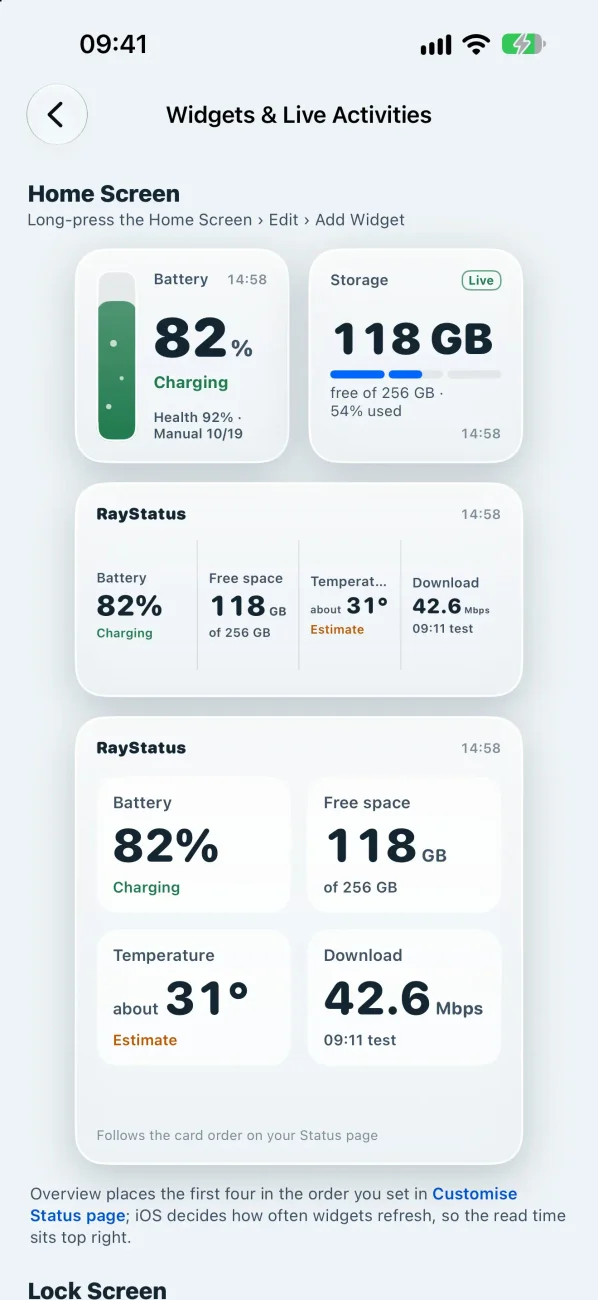
• Small and medium Home Screen widgets are free; large and Lock Screen widgets come with Pro
• A charging Live Activity and Dynamic Island (Pro)
• A Control Center speed test button, and Siri: "Test network speed with RayStatus" or "How's my battery in RayStatus"
HONEST ABOUT WHAT IOS ALLOWS
iOS does not let third-party apps read the actual battery or processor temperature, Wi‑Fi signal strength, or charging wattage. RayStatus shows temperature only as a labelled estimate, and judges Wi‑Fi by latency, loss and speed instead.
YOUR DATA STAYS ON YOUR DEVICE
• No sign-up, no RayStatus account and no developer-operated server
• Readings, history and imported battery data are stored on your iPhone
• The app reaches a network test service only when you start a speed test or a network tool
• The free tier includes ads; RayStatus Pro removes them
RAYSTATUS PRO
RayStatus Pro is available only as a monthly or yearly subscription. There is no lifetime purchase. An active subscription unlocks:
• No ads
• Unlimited history and CSV export
• Battery decline curve and health trends
• Unlimited AI Check with no ads
• Large and Lock Screen widgets and the charging Live Activity
Subscriptions renew automatically and can be managed or cancelled in your Apple Account. After cancellation, Pro remains active until the end of the current billing period. Current pricing is shown by the App Store purchase confirmation.
Terms of Use: https://www.apple.com/legal/internet-services/itunes/dev/stdeula/
Privacy Policy: https://israynotarray.dev/app/raystatus-privacy.html
What’s new
Version 2.0.0 · Oct 20, 2026
RayStatus 2.0 is a complete redesign.
• A new look: Status, Device, Tests and History tabs, with cards you read straight down the page and every number labelled by source
• New: 15 hardware checks, a speed test and a full set of network tools
• New: AI Check — ask your phone what's up in one sentence (supported iPhone models)
• New: a toolbox with a decibel meter, level, NFC read test and more
• New: share cards, a Control Center speed test and Siri shortcuts
App privacy
What RUEI HUNG SHIU declares on the App Store about how this app handles data.
-
Data used to track you
May be used to track you across apps and websites owned by other companies.
- Identifiers
-
Data linked to you
May be collected and linked to your identity.
- Purchases
- Location
- Identifiers
- Usage data
-
Data not linked to you
May be collected but is not linked to your identity.
- Usage data
- Diagnostics
Privacy practices may vary, for example with the features you use or your age.
Information
- Seller
- RUEI HUNG SHIU
- Category
- Utilities
- Version
- 2.0.0
- Updated
- Oct 20, 2026
- Released
- Aug 13, 2026
- Size
- 18.4 MB
- Requires
- iOS 18.0 or later
- Age rating
- 4+
- In-app purchases
- Yes
- Languages
- English, Traditional Chinese
- Copyright
- © 2026 是 Ray 不是 Array
You might also like
-
 Net Diagnostic ToolboxPing, DNS, Speed Test, Wi-Fi
-
 CellLog: LiPo Battery TrackerCycle count, IR, retire signal
-
 Jamroom Audio EditorKeep the gold, cut the filler
-
 Nom: Screenshot & File CleanerDelete downloads, free space
-
 Power Center ProBattery Health Monitor
-
 PowerDiagUtilities
-
 WhyMyPhone: Phone DiagnosticsHeat, battery & storage check
-
 Security Audit and PrivacyWi‑Fi, devices, trackers & IP
-
 Used Phone InspectorCheck IMEI + 15 Hardware Tests
-
 Phone Check: DiagnosticsHardware Test, Battery Health