Remote Shutter
Camera connect
Designed for iPhone, iPad, iPod touch
Free · In-app purchases
- Age rating4+
- CategoryPhoto & Video
- DeveloperAgzamov Daniyar
- LanguagesEnglish+ 10 more
- Size72.4 MB
Links to the official App Store page
Download.org hosts no file of Remote Shutter. The button opens its official App Store page, published by Agzamov Daniyar. Listing last checked on Nov 23, 2026.
Screenshots



About
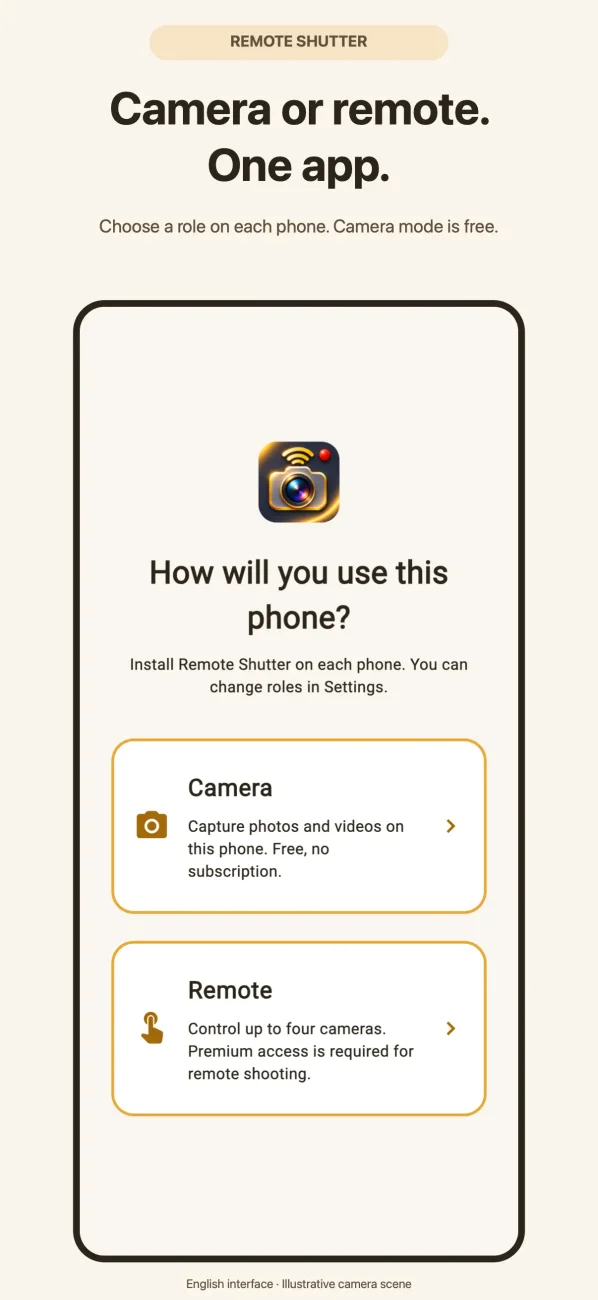
Turn your phones into a flexible camera setup. Remote Shutter combines Camera and Remote in one app: choose each device’s role, pair by QR and see what you are shooting. Any device can work together.
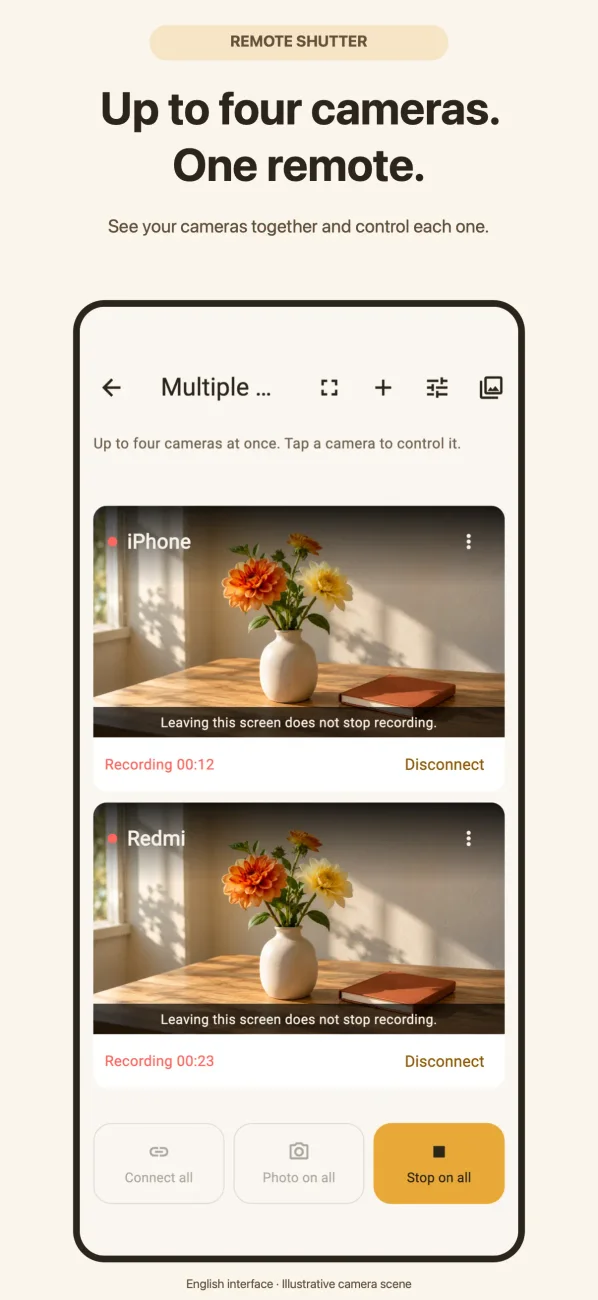
UP TO FOUR CAMERAS
See multiple live previews, swipe between cameras or automatically cycle through them. Open one camera or the overview full screen. Name and reorder cameras so you know which view you are controlling. Capture photos or start and stop video from the remote; available controls depend on the camera device.
APPLE WATCH REMOTE
Use your watch to control the camera on your paired iPhone or a remote camera connected through that iPhone. View previews, switch cameras, use automatic cycling and see detector event images. Tap the preview to expand it. Keep the companion iPhone app open and connected for remote camera control.
SMART CAPTURE ON THE CAMERA
Set up on-device detectors, choose supported object categories or motion, define a detection area and give each rule its own schedule, capture action and cooldown. Capture photos or clips when a rule matches. Detection works with the camera app open without a connected remote or a live stream. Supported categories and accuracy vary by platform, device, lighting and scene.
OPTIONAL CLOUD HISTORY
Cloud includes Premium and AI access for up to four linked cameras, 20 GB per account and event history for up to 14 days, with clips up to 30 seconds. Upload selected files or configured detector events, resume interrupted uploads, browse your private gallery, download originals and share expiring links. Event notifications identify the camera and detector. Cloud requires an account and internet access. Files expire according to retention settings; save copies you want to keep.
SHOOT NEARBY OR OVER THE INTERNET
Use the same Wi-Fi network or a phone hotspot for local shooting without internet. Internet mode connects phones on different networks. An online check is needed for account and paid-access verification. Keep each camera app open while shooting or detecting events.
CAMERA CONTROLS AND ORIGINALS
Live framing, photo timer, zoom, focus, exposure and supported manual controls help you get the shot. Video up to 4K and available photo/video formats depend on the hardware. Originals stay on the camera phone; optional copies can be delivered to the remote and saved to Photos. The dark battery-saving theme is one switch away.
GET STARTED
1. Install Remote Shutter on both phones.
2. Choose Remote on the phone you hold and Camera on the shooting phone.
3. Show the remote’s QR to the camera. Add more cameras from Settings.
No separate camera app is required. This app controls phone cameras, not DSLR or action cameras.
SUBSCRIPTIONS
The basic camera role is free. Premium unlocks paid remote and AI features; Cloud adds storage and includes Premium. Plans, local prices and any eligible trial are shown before purchase. Subscriptions renew automatically unless cancelled. Manage or cancel in your App Store account settings; Restore Purchases is available in the app. An app account links supported purchases across devices.
Privacy: https://cloud.remotecamapp.watchwms.com/privacy
Terms: https://www.apple.com/legal/internet-services/itunes/dev/stdeula/
What’s new
Version 1.10.1 · Nov 21, 2026
When connecting a camera, some new users can choose weekly Premium or lifetime access with a single purchase. Both options start without a free trial.
App privacy
What Agzamov Daniyar declares on the App Store about how this app handles data.
-
Data linked to you
May be collected and linked to your identity.
- Purchases
- Location
- Contact info
- User content
- Identifiers
-
Data not linked to you
May be collected but is not linked to your identity.
- Diagnostics
Privacy practices may vary, for example with the features you use or your age.
Information
- Seller
- Agzamov Daniyar
- Category
- Photo & Video
- Version
- 1.10.1
- Updated
- Nov 21, 2026
- Released
- Jun 15, 2022
- Size
- 72.4 MB
- Requires
- iOS 15.0 or later
- Age rating
- 4+
- Price
- Free
- In-app purchases
- Yes
- Languages
- English, Filipino, French, German, Hindi, Indonesian, Portuguese, Russian, Simplified Chinese, Spanish, Vietnamese
- Copyright
- © Daniiar Agzamov
You might also like
-
 Phone Camera Remote ControllerWireless Camera Control
-
 Remote Shutter: camera connectSelfie remote & camera timer
-
 SayCheese - Camera RemoteTwo iPhones, Wireless Shutter
-
 Remote Camera Control via AirManual camera settings
-
 Camera Remote: Photos TogetherGroup selfies, both in frame
-
 MoviePro: Pro Video CameraCinematic Filmmaking Recorder
-
 Shutter+ Sony Camera RemotePhoto transfer, remote control
-
 Camo Studio – Stream & RecordMulticam livestreams & scenes
-
 Camera Connect & ControlConnect a wifi camera or DSLR
-
 Filmic Pro-Video CameraCinema Quality Video Capture