- Age rating4+
- CategoryMusic
- DeveloperFernando Lanner Cardoso
- LanguagesEnglish
- Size3.1 MB
Links to the official App Store page
Download.org hosts no file of RiffAlly Loop. The button opens its official App Store page, published by Fernando Lanner Cardoso. Listing last checked on Nov 14, 2026.
Screenshots



About
Your playing. On repeat.
Turn your own playing into a backing loop you can play along with. RiffAlly Loop brings a pedal-inspired recording workflow to your iPhone—no foot pedal required.
PLAY FIRST. KEEP THE BARS YOU WANT.
Choose Record & Select, set or tap your tempo, and pick a time signature. Listen to one bar of count-in, then start playing.
Finish your phrase and tap Stop & select during the following bar. Loop initially selects bar 1 through the last complete bar, leaving out the unfinished final bar. If the selection is right, tap Use & Play once to start looping.
Want a different section? Adjust the start and end on the pedal's waveform, preview if you like, then Use & Play. Change selection lets you revisit the original take. Made a mistake? New loop leaves an unaccepted take in one tap. When editing an accepted loop, Back to loop keeps your previous selection.
OR LET LOOP STOP FOR YOU.
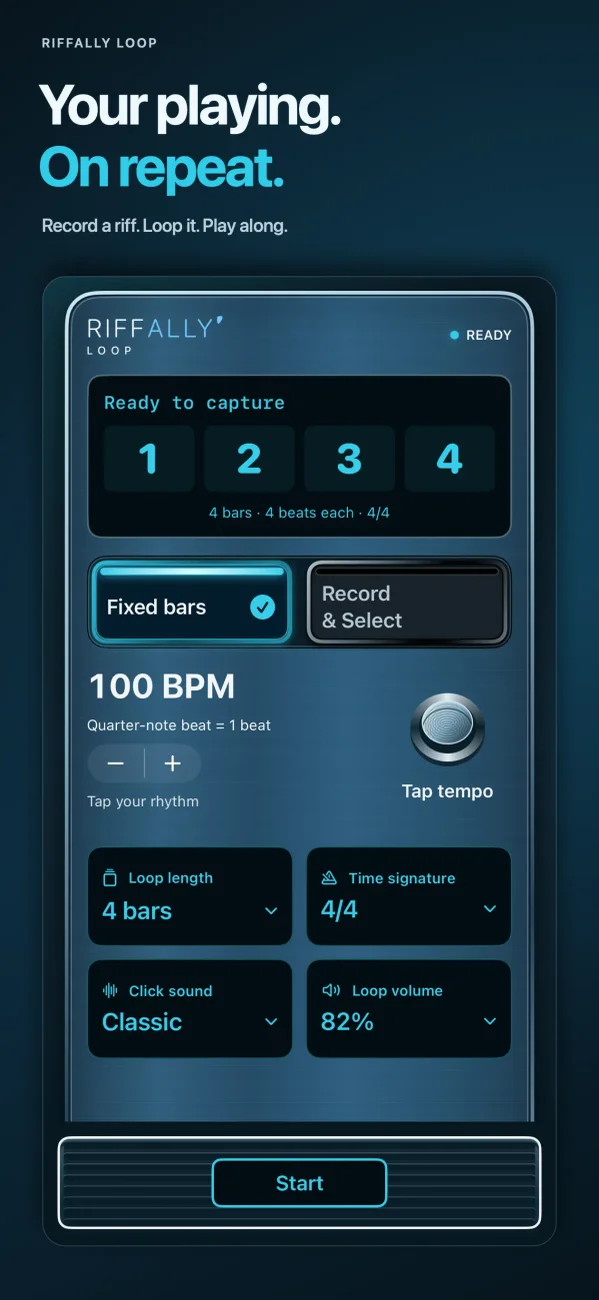
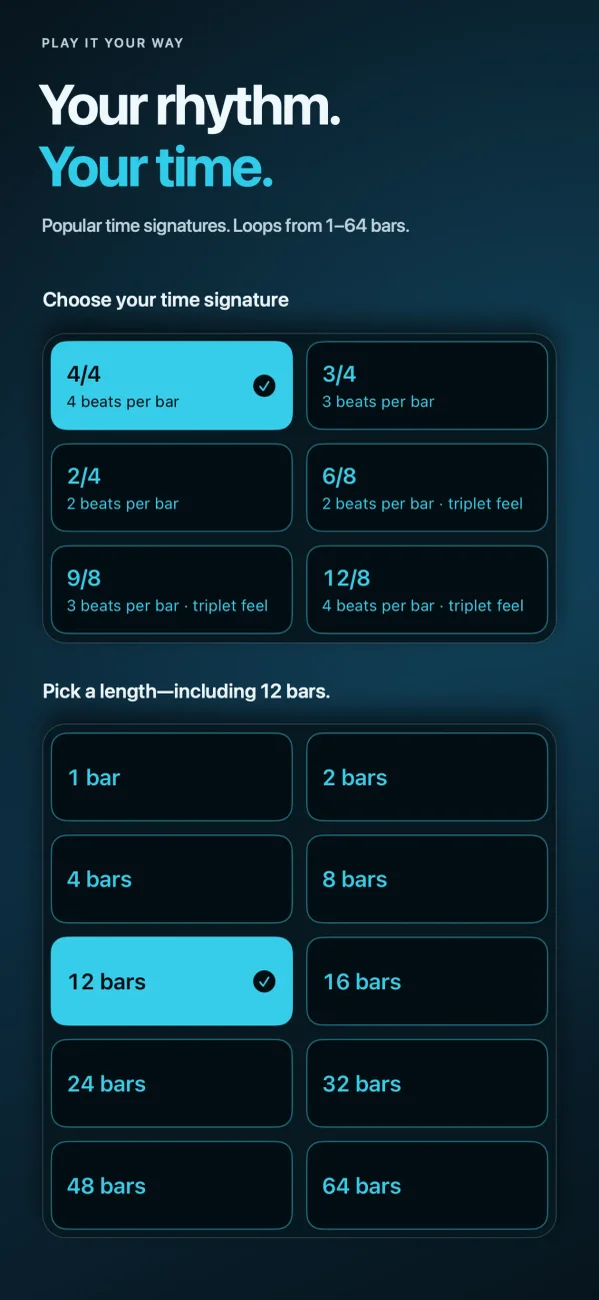
In Fixed bars, choose 1–64 bars before you start. Loop counts you in, records the chosen length, and starts playback automatically. Quick choices include 4, 8 and 12 bars for familiar practice lengths.
MAKE THE PEDAL YOURS.
• Set 40–240 BPM or tap your tempo.
• Choose 4/4, 3/4, 2/4, 6/8, 9/8 or 12/8, separately from loop length.
• Follow audible clicks and a prominent beat-and-bar counter.
• Pick from ten recording-click sounds, with a distinct count-in cue.
• Pause, then restart from the beginning of your loop.
• Adjust loop volume and personalize the pedal finish and display.
• Find practical instructions and troubleshooting in Help.
RECORD ON IPHONE. PLAY ALONG.
Count-in and recording use the built-in iPhone microphone and speaker. Recording clicks may become part of your loop. Completed loops can play through the iPhone or a selected compatible Bluetooth media speaker. Bluetooth is not used for live guidance or microphone input. Isolated headphone clicks, wired-headphone playback and AirPlay are not supported.
Loop uses your chosen tempo and time signature to place bar boundaries; it does not analyze notes or correct your timing. Silence and sustained notes within the selected bars are preserved. Tap the main beats: quarter notes in /4 meters, dotted-quarter notes in compound /8 meters.
Keep Loop in the foreground while practicing. Record & Select has no preset bar cap, but storage and interruptions limit recording. It retains the current finalized original and selection on your iPhone, including an undismissed draft—not a multi-loop library. Fixed bars loops are session-only. Clearing or replacing a take removes its retained copy. There is no export, overdubbing or background recording. RiffAlly does not upload your recordings.
No RiffAlly account is required. Optional one-time tips support development and unlock no features.
What’s new
Version 2.0.2 · Oct 3, 2026
Small details that make Loop feel more like your pedal.
• New loop is easier to find, with a dedicated button, red accent and clear restart icon.
• Try the new Smoked Oak pedal finish. Original Blue remains the default, and your saved appearance stays yours.
• A brief, silent RiffAlly opening welcomes you into the app.
Your recording, bar selection and loop playback work just as before.
App privacy
What Fernando Lanner Cardoso declares on the App Store about how this app handles data.
-
Data not collected
The developer does not collect any data from this app.
Privacy practices may vary, for example with the features you use or your age.
Information
- Seller
- Fernando Lanner Cardoso
- Category
- Music
- Version
- 2.0.2
- Updated
- Oct 3, 2026
- Released
- Sep 15, 2026
- Size
- 3.1 MB
- Requires
- iOS 17.0 or later
- Age rating
- 4+
- In-app purchases
- Yes
- Languages
- English
- Copyright
- © 2026 F.L.Cardoso
You might also like
-
 ScoreStudio — Sheet MusicRead, hear and practice scores
-
 SUS4 Loop Builder: Loop PedalLayer up to 8 tracks, overdub
-
 SM-1: Semi-modular synthSemi-Modular East Coast Synth
-
 Skitter: Guitar TrainerGuitar & Bass Practice Trainer
-
 Cantus - Voicing LabChord voicing explorer
-
 Jam Mate: AI Backing TracksPlay Along Band for Guitar
-
 Guitar Practice CompanionMaster Guitar Scales & Speed
-
 ItalizerDub Siren
-
 Drum Jam - Beats & LoopsDrum Kits and Drum Patterns.
-
 Time Machine AUv3 PluginVinyl and Tube Amp Simulator