
Rocko: Climbing Video Camera
Auto-follow bouldering editor
Designed for iPhone
Free
- Age rating4+
- CategoryPhoto & Video
- DeveloperYU LU
- LanguagesEnglish+ 1 more
- Size165.0 MB
Links to the official App Store page
Download.org hosts no file of Rocko: Climbing Video Camera. The button opens its official App Store page, published by YU LU. Listing last checked on Nov 26, 2026.
Screenshots


About
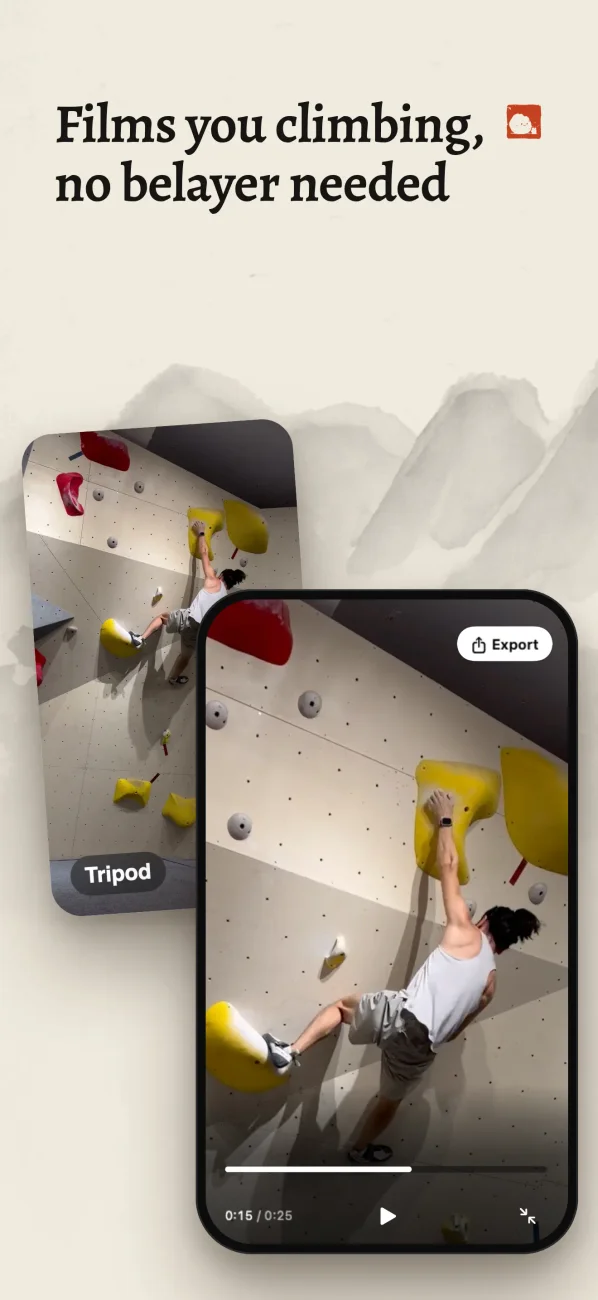
Rocko is a camera app for climbers. Put your iPhone on the ground or a tripod at the bottom of the wall, tap record, and climb. You don't need anyone to film you.
SHARP, WITHOUT LOSING YOU OFF THE EDGE
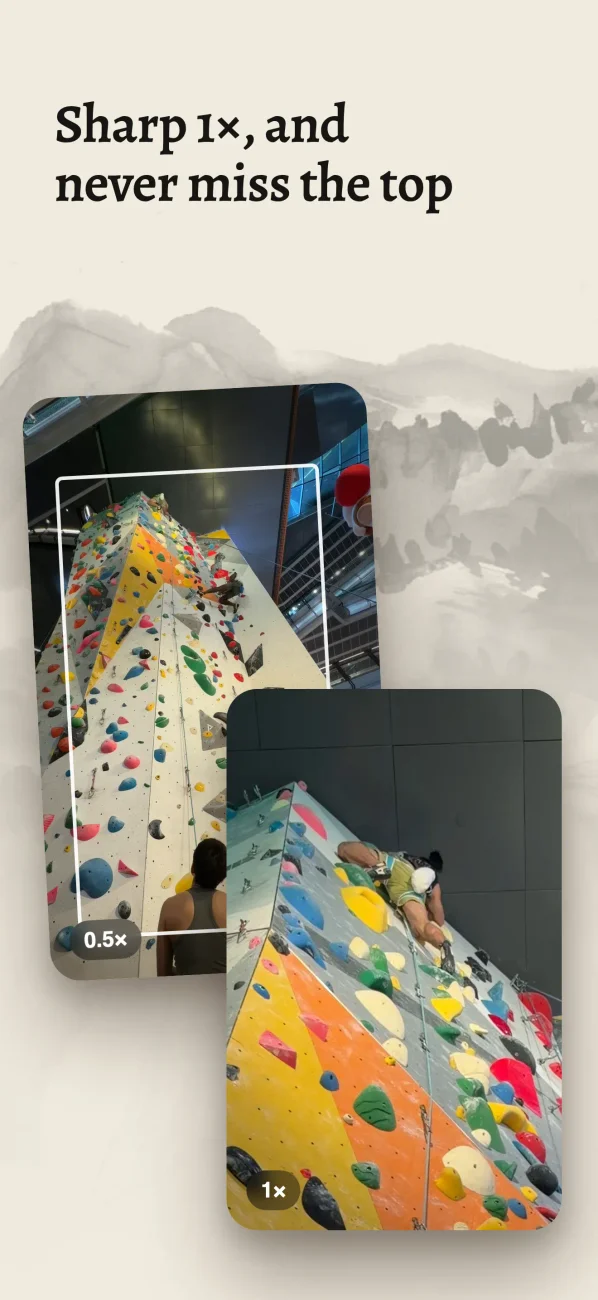
The normal 1× camera gives a sharp picture, but you leave the frame as soon as you climb high or make a big move. The 0.5× ultra wide sees the whole wall, but you end up small and soft. In Dual Lens mode, Rocko records with both at the same time:
- While you're inside the 1× view, the video uses the sharp 1× picture, so you can see every hand and foot.
- When you get near the edge of the 1× view, it switches to the 0.5× picture, with colours and positions matched so the switch doesn't show.
- You don't pick a lens before you climb, and you never miss the top. When you edit, you can still choose the whole wall or the close-up.
IT FOLLOWS YOU, EVEN ON A BUSY WALL
After you climb, Rocko finds you in the video and keeps you in the middle of the frame, moving smoothly in close as you go up. It ignores your belayer and the people climbing next to you. To tell it which climber is you, raise your hand before you start, or tap yourself on the screen. If it follows the wrong person for a moment, you can fix just that part.
IT SPEEDS UP YOUR RESTS FOR YOU
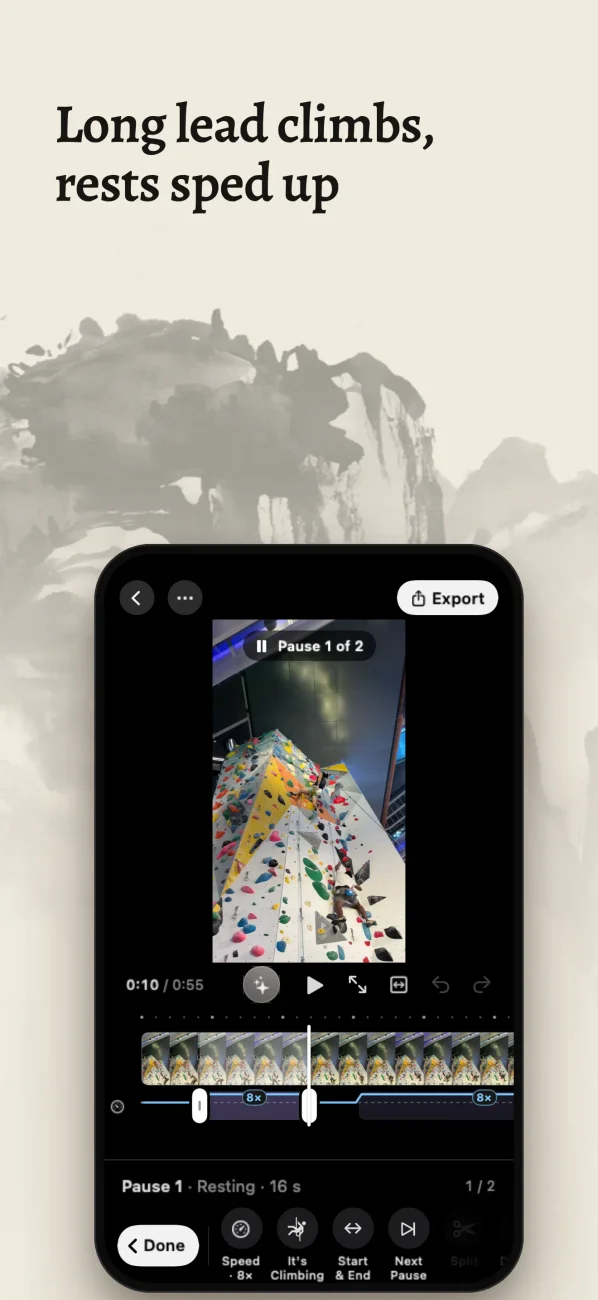
Rocko finds the times you stop to rest or shake out and plays them faster, so your video is mostly climbing. You don't have to scrub through the video to cut them yourself.
IT ADDS YOUR HEART RATE, GYM AND BOARD TO THE VIDEO
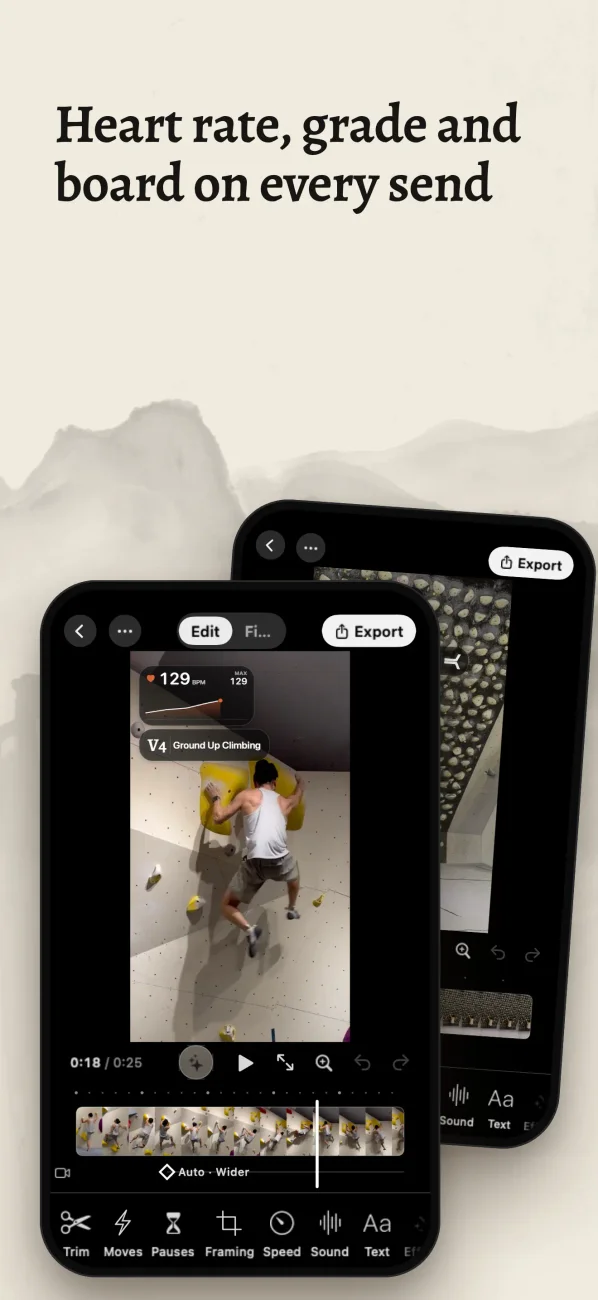
If you wear an Apple Watch, your heart rate is shown on the video. Rocko also fills in the gym you're at and, on a Kilter or other LED board, the problem you lit up. You can add the grade and music yourself with a tap, and Cut to Music makes the climb end with the song. You can also put several climbs together into one video.
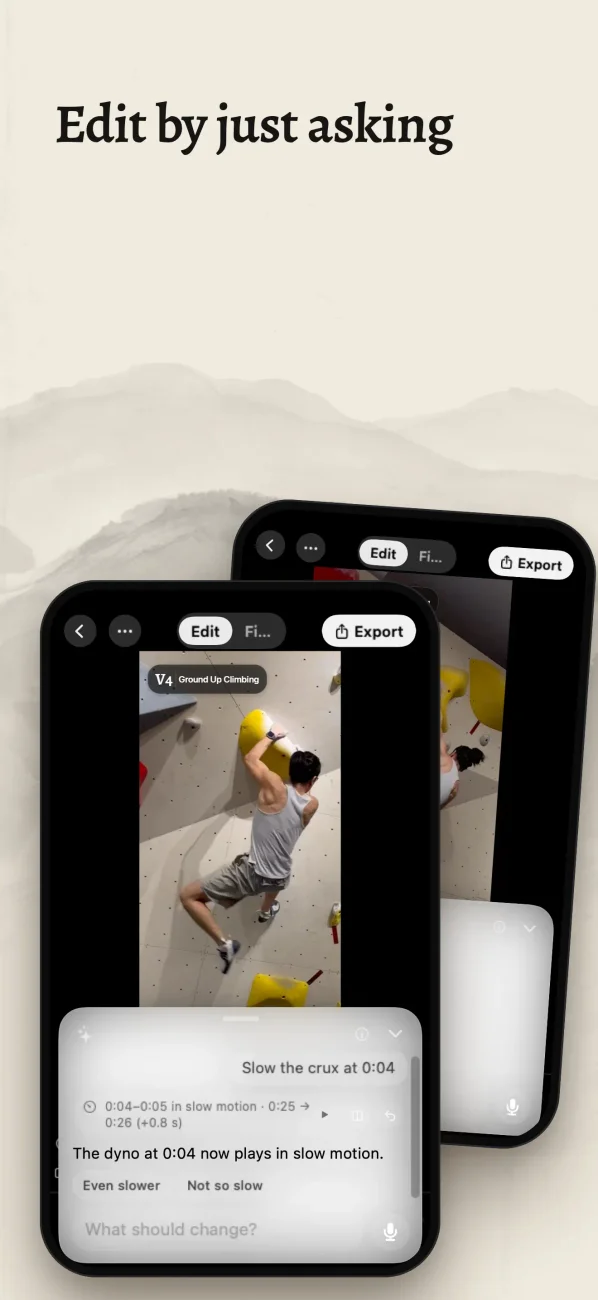
EDIT BY ASKING
Tap the bubble in the editor and say or type what you want: cut the start, slow down the crux, add a calm song. Rocko makes the edit with the editor's own tools, shows you what changed, and Undo puts it back. Pick from 25 free songs or your own music, and 16 text styles for titles.
IT WORKS WITH YOUR APPLE WATCH
Start and stop filming from your wrist. Each session is saved as a workout, and your climbs are drawn as peaks, one for every climb.
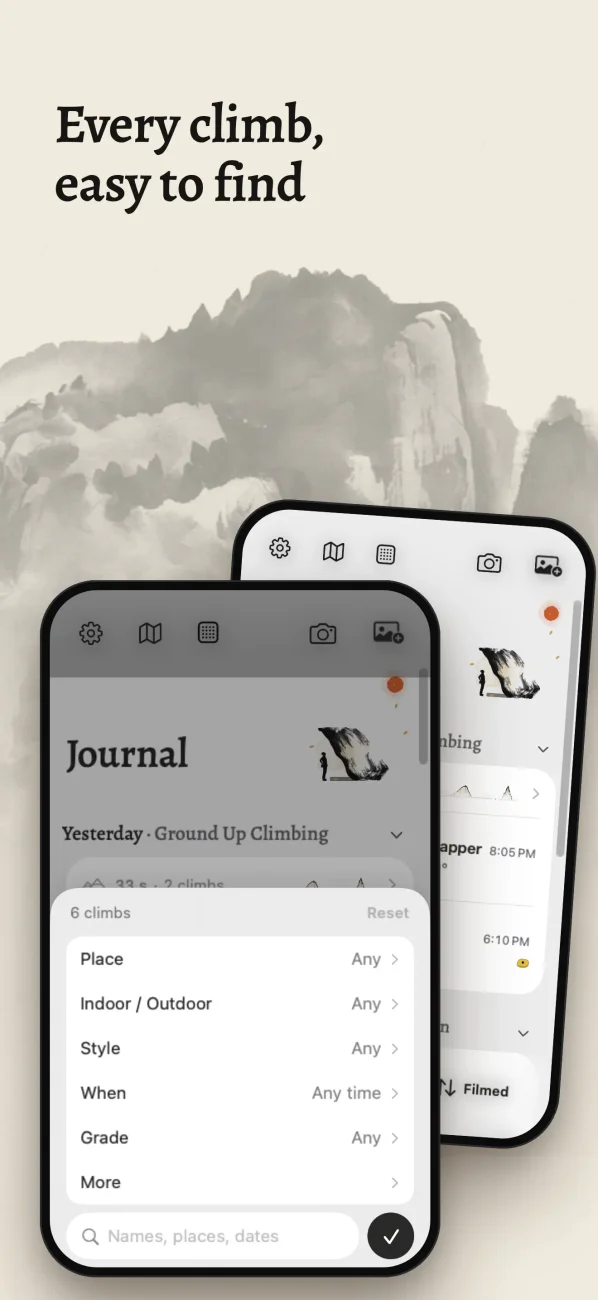
IT KEEPS A LOG OF EVERY CLIMB
Every climb you film is saved with the gym, the style and the wall angle. You can filter by gym, grade, style or board to find any climb quickly. You can also bring in climbing videos that are already in your Photos, and see a map of every gym and crag you've climbed.
YOUR VIDEOS STAY ON YOUR PHONE
Tracking happens on your iPhone. Rocko plays your videos straight from Photos, so it doesn't make a second copy.
What’s new
Version 1.10 · Nov 25, 2026
• Find a board problem from a photo: on a board page, By Holds reads a photo or video of the lit holds and lists the closest problems. Works with Kilter (including 16 × 12 and 12 × 14), MoonBoard, Tension and Grasshopper.
• Opening Title: start your video with the climb's name, place and hold colour, in Dark, Shadow, Light or Glass.
• Holds Intro: open with the problem's holds ringed or coloured in on a clean shot of the wall.
• Find Climbs: search and every filter in one tray at the bottom of the journal.
• Calmer Climb Details, Export and Settings screens.
• Safer storage: originals are only deleted when it's safe, and climbs you keep compressed show Original Kept.
• A bigger free music library, with over 700 songs.
• Shared videos no longer carry your location.
• Bug fixes and improvements, including the Watch workout lasting through long takes.
App privacy
What YU LU declares on the App Store about how this app handles data.
-
Data not linked to you
May be collected but is not linked to your identity.
- Location
- User content
- Identifiers
- Usage data
- Diagnostics
Privacy practices may vary, for example with the features you use or your age.
Information
- Seller
- YU LU
- Category
- Photo & Video
- Version
- 1.10
- Updated
- Nov 25, 2026
- Released
- Nov 6, 2026
- Size
- 165.0 MB
- Requires
- iOS 18.0 or later
- Age rating
- 4+
- Price
- Free
- Languages
- English, Simplified Chinese
- Copyright
- © 2026 Yu Lu
You might also like
-
 FramePro AIYour Pocket Photography Mentor
-
 FramelightTake perfect photos easily
-
 GR Viewer for GR2 & GR3RAW Image Sync for Ricoh GR2/3
-
 AI Climb Video Editor: CruxCutOn-Device Follow-Cam Edits
-
 Ai 3d model for freecadFreecad: 3d printing
-
 Small CornerProfessional image corner tool
-
 RitchieCam — Filter CameraEasy, no-edit filters
-
 Limi Cam - Retro film CameraClassic roll filters, one shot
-
 Blur ID - Hide Chat ScreenshotAuto blur face, avatar & text
-
 Smoothrase - AI erase on photoRemove anything for retouch