- Age rating4+
- CategoryProductivity
- DeveloperRAWATTECH CONSULTING & SOLUTIONS PRIVATE LIMITED
- LanguagesEnglish
- Size64.5 MB
Links to the official App Store page
Download.org hosts no file of SAYANA OCR. The button opens its official App Store page, published by RAWATTECH CONSULTING & SOLUTIONS PRIVATE LIMITED. Listing last checked on Nov 12, 2026.
Screenshots




About
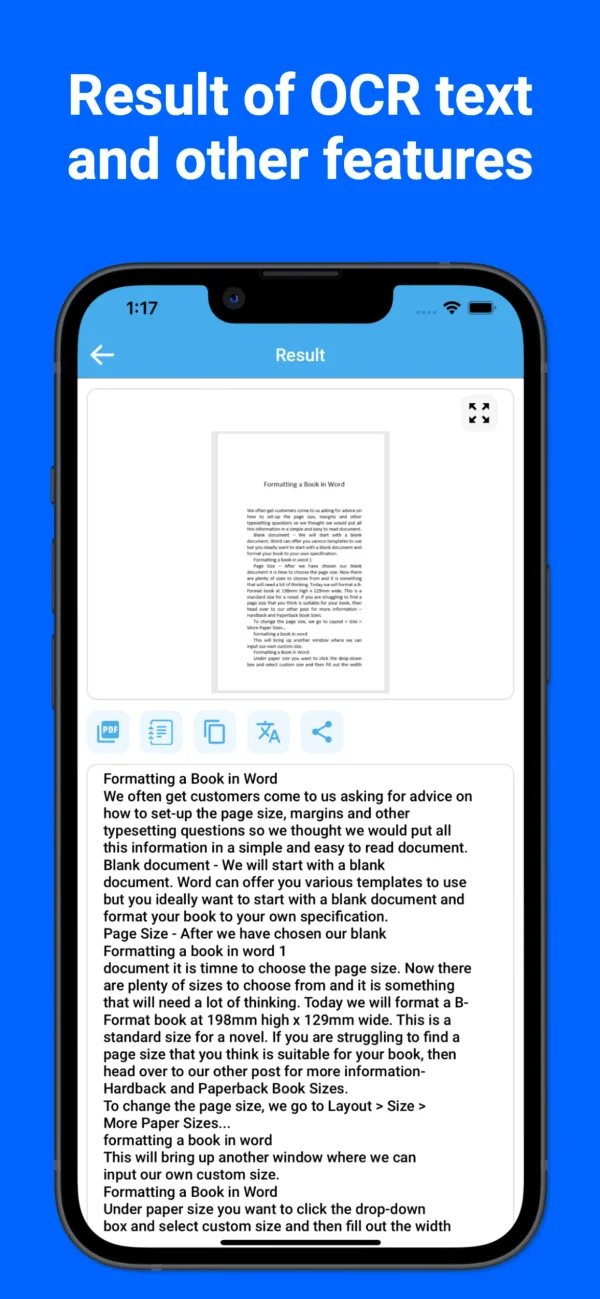
SAYANA OCR is handwriting to text OCR app converting scanned handwritten notes or paragraph into digital text. This app enables you to perform OCR (Optical character recognition) on your mobile and allows you to easily scan text from images.
With easy to use interface of this application to scan, recognize and convert handwritten documents into digital text. Handwritten documents like notes, letters, class notes, meeting minutes, shopping lists etc can now be scanned and converted, by our OCR engine, into text that can be edited and stored on the device with share feature.
The handwriting recogniton platform used by SAYANA OCR is designed to convert Japanese and English handwriting to text. It extracts handwritten lines or words or characters from scanned documents and converts into digital editable text string.
Recognizing the handwritten text is most powerful feature of SAYANA OCR application.
SAYANA OCR application is seamless in usage, fast and easy to use.
This is a perfect solution for students and professionals, to convert their handwritten class notes, meeting notes.
Kind Attention: The quality of results of the handwritten text recognition is dependent on the quality of your scan. For best results scan your document in a well lighted area, make sure the paper is straightened.
Key Features:
1. Image Text Extraction: Extracts text accurately from images, supporting both handwritten and printed text recognition with high precision.
2. Multi-language Support: Recognizes and processes text in multiple languages, enabling users to extract and translate content in diverse linguistic contexts.
3. Handwritten Text Recognition: Capable of identifying and transcribing handwritten text from images or documents, enhancing versatility in text extraction.
4. Translation Capabilities: Provides seamless text translation functionality, allowing users to translate the extracted text into various languages for broader accessibility and comprehension.
5. Output Formats: Enables users to save extracted text as PDF, DOC, or in other preferred formats for convenient storage and sharing purposes.
6. Batch OCR Processing: Supports batch processing, allowing users to extract text from multiple images simultaneously, improving efficiency and productivity.
7. User-friendly Interface: Intuitive interface for effortless navigation and easy text extraction, translation, and document saving/sharing functionalities.
8. OCR Accuracy: Utilizes advanced optical character recognition (OCR) algorithms to ensure high accuracy in text extraction, even from complex images or documents.
9. Sharing Functionality: Facilitates easy sharing of extracted text across various platforms and applications, enhancing collaboration and communication.
10. Offline Mode for Printed Text: Offers the capability to perform OCR tasks even without an internet connection, ensuring functionality in diverse environments.
We welcome all feedbacks and always happy to hear from our users.
While using SAYANA OCR application if you face any issue, please contact us at info@sayana-ai.com, so our team can provide you assistance and support.
For more information, visit our website: https://sayana-ai.com/
Download SAYANA OCR now, and start converting your paragraph text or handwritten notes to digital text!
What’s new
Version 1.7 · Feb 5, 2024
Bug fixes.
App privacy
What RAWATTECH CONSULTING & SOLUTIONS PRIVATE LIMITED declares on the App Store about how this app handles data.
-
Data linked to you
May be collected and linked to your identity.
- Contact info
- User content
- Identifiers
-
Data not linked to you
May be collected but is not linked to your identity.
- Identifiers
- Usage data
- Diagnostics
Privacy practices may vary, for example with the features you use or your age.
Information
- Seller
- RAWATTECH CONSULTING & SOLUTIONS PRIVATE LIMITED
- Category
- Productivity
- Version
- 1.7
- Updated
- Feb 5, 2024
- Released
- Feb 15, 2023
- Size
- 64.5 MB
- Requires
- iOS 13.0 or later
- Age rating
- 4+
- Languages
- English
- Copyright
- © SAYANA AI
You might also like
-
 PDF Editor ConverterPDF Toolbox
-
 MDacrobatThe complete Markdown app
-
 ScanNest: PDF Scanner & OCRSmart PDF Scanner & OCR Tool
-
 Ai Scan Lite - PDF Scannercrop enhance and clean as pdf
-
 yapyap goRecord & transcribe on-device
-
 SpeakSmart: Voice to Text AIAI Writing Assistant & Notes
-
 NoteWorthy: Smart NotesPrivate on-device AI
-
 ScanToExcel - Document ScannerPDF & Photo to Spreadsheet
-
 PDF Editor: Fill, Sign & ScanEdit, Sign & Fill PDF Forms
-
 DailyBalanceReplace your paper to-do list!