
Screen Recorder - Go Record
Screen Recorder - Record It
Designed for iPhone, iPod touch
Free · In-app purchases
- Age rating4+
- CategoryUtilities
- DeveloperGautam Kakadiya
- LanguagesEnglish+ 1 more
- Size18.6 MB
Links to the official App Store page
Download.org hosts no file of Screen Recorder - Go Record. The button opens its official App Store page, published by Gautam Kakadiya. Listing last checked on Nov 17, 2026.
Screenshots



About
*Screen Recorder - Capture It :-
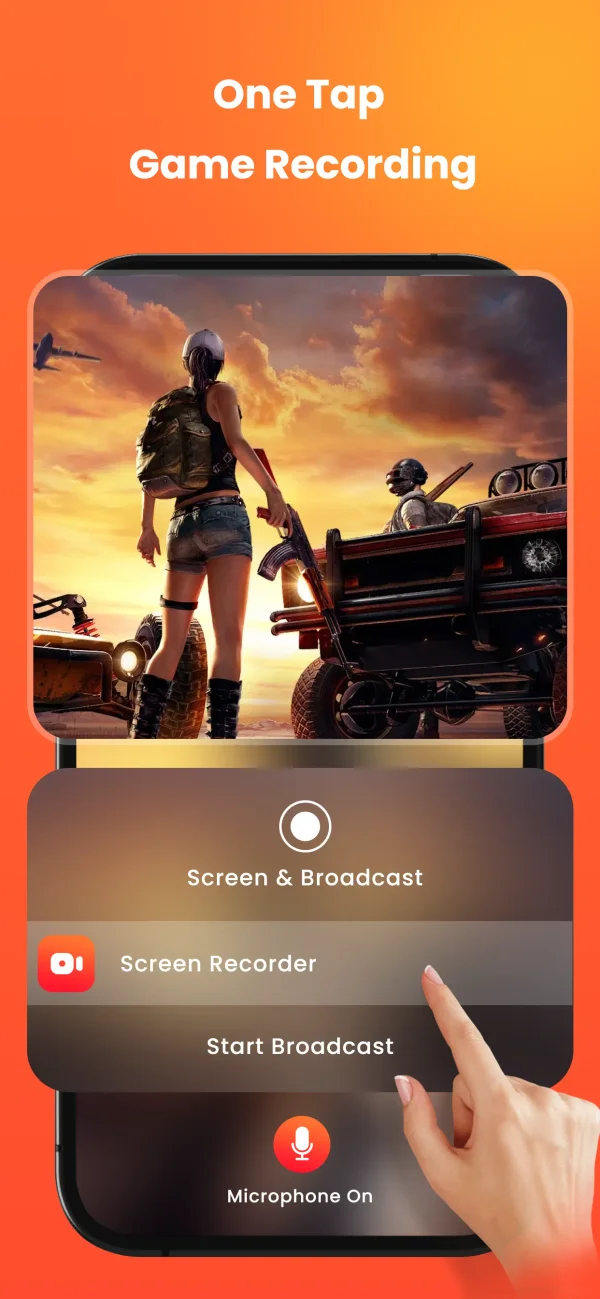
Screen Recorder - Capture It allows you to record your favorite games and apps for tutorials, games walk-through, video demos and training videos on your iPhone and iPad. After recording your screen, you can add video reactions with audio commentary to further enhance your recording!
Screen Recorder - Capture It is a reliable, and easy-to-use stream creator and screen recorder. With Screen Recorder App , you can livestream your screen to YouTube, Facebook and Twitch and record screen videos. Screen Recorder Appr makes it easy to livestream and record content from your screen, like games, live shows, sports, and more.
Free Screen Recorder in FULL HD
* Screen Recorder App supports recording game screen in the highest quality, 1080p, 12Mbps, 60FPS. Of course, you can record screen with adjustable resolution(240p to 1080p), quality, and FPS(15FPS to 60FPS).
Game Recorder with no Time Limit
* This Screen Recorder App is also a convenient game recorder and screen capture tool. It helps you capture screen, record screen and record gameplay video without recording time limit.
Screen Video Recorder with no Watermark
* Still find a screen capture tool without watermark? Download this video recorder to capture screen in a cleaner way. If you want to capture screen, record screen or take a screenshot efficiently, it is a must-have screen recorder.
Screen Recorder with Sound
* Want to record gameplay, video tutorial with sound? This powerful screen recorder with sound is your best choice. It will record your voice fluidly and clearly.
Screen Recorder with Facecam
* Screen Recorder with Facecam helps you record your face and reaction in a small overlay window. It can be dragged freely to any position on the screen and customized to any size.
Screen Recorder with Audio
* It is also a well functional screen recorder with audio, screen recorder with sound. Download this fantastic screen recorder with audio to record your own video now.
RECORD
• One tap to start recording your entire screen (requires iOS 12)
• For iOS 11, we provide easy to follow video tutorials to get you setup fast
• Record everything: games, video tutorials, apps
VIDEO FACE CAM REACTIONS
• Add FaceCam Reactions to your recordings
• Add reactions to your favourite YouTube videos!
• Personalize your reaction by setting the reaction shape, position and size
• Camera Roll videos are supported
AUDIO COMMENTARY
• Record audio only commentary for your videos
VIDEO EDITOR
• Trim your video
• Video filters
• Adjustable playback speed
• Change canvas and background color
• Rotate
ORGANIZER
• Organise your recordings in one simple application with easy access
SHARE
• Save directly to camera roll
• Share and export your recordings to other apps, via email or AirDrop. You can also export your recording to your computer via WiFi or any other app for more specialized video editing.
Video reactions is a perfect way to add personality to your video recordings. You can add video reaction to your recordings so your audience can watch you while you play your favourite game, or when simply recording an app demonstration (Perfect to show your friends how to complete a task, or how to achieve that perfect score in a game).
The combinations are endless, just download and try for yourself.
Subscription Details:
1. One Weekly
- Price: $1.99
2. One Year
- Price: $25.99
2. One Month
- Price: $5.99
Subscription automatically renews unless auto-renew is turned off at least 24-hours before the end of the current period
Account will be charged for renewal within 24-hours prior to the end of the current period, and identify the cost of the renewal
Note:-
Privacy Policy :- https://sites.google.com/view/gautamkpatelprivacypolicy
Terms Of User :-https://gpslivenavigationtermsofuse.blogspot.com/2023/11/screen-recorder.html
What’s new
Version 1.9 · Jul 3, 2024
- Bugs Fixed
- Performance Improvements
App privacy
What Gautam Kakadiya declares on the App Store about how this app handles data.
-
Data used to track you
May be used to track you across apps and websites owned by other companies.
- Identifiers
- Usage data
-
Data not linked to you
May be collected but is not linked to your identity.
- User content
- Identifiers
- Usage data
- Diagnostics
Privacy practices may vary, for example with the features you use or your age.
Information
- Seller
- Gautam Kakadiya
- Category
- Utilities
- Version
- 1.9
- Updated
- Jul 3, 2024
- Released
- Feb 10, 2021
- Size
- 18.6 MB
- Requires
- iOS 13.0 or later
- Age rating
- 4+
- Price
- Free
- In-app purchases
- Yes
- Languages
- English, Hindi
- Copyright
- © GautamK@2021
You might also like
-
 Screen Recorder - RecorderCapture & Edit Your Screen
-
 Screen Recorder: Go RecordFace Cam Reaction Video Editor
-
 Screen Recorder Pro⋆Record Display & Reaction Cam
-
 Screen Recorder- Record GameMy phone display recorder app
-
 Live Recorder: Record ScreenGame Recorder & Live Streaming
-
 Screen Recorder ‑ Record VideoFace Cam, Livestream Recording
-
 Screen Recorder for iPhone HDFacecam, Record Video & Stream
-
 Screen Recorder ®Screen Record - Rec Reactions
-
 Screen Recorder Z - LivestreamFace cam, screen recording
-
 Screen Recorder - Record VideoHigh-Quality Screen Capture