- Age rating4+
- CategoryProductivity
- Developer5mm
- LanguagesJapanese+ 16 more
- Size4.7 MB
Links to the official App Store page
Download.org hosts no file of SmileTime. The button opens its official App Store page, published by 5mm. Listing last checked on Nov 26, 2026.
Screenshots


About
TimeLine Watch shows the events from your Calendar app as a timeline with a time scale on your Apple Watch face, iPhone Home Screen, and Lock Screen. See your current and next event at a glance.
[Apple Watch]
- Complications show your current event and what's next.
- The wide timeline shows a time scale and a red line, so you can see where you are in your day.
- The app lists your current and upcoming events.
[iPhone Widgets]
- Date & Timeline: the date, the day of the week, and a timeline of your current events
- Today's Events: a list of today's events with start times
- Day Timeline: all of today's events on a wide timeline
The medium size also shows a month calendar. Sundays and holidays are shown in red, and Saturdays in blue.
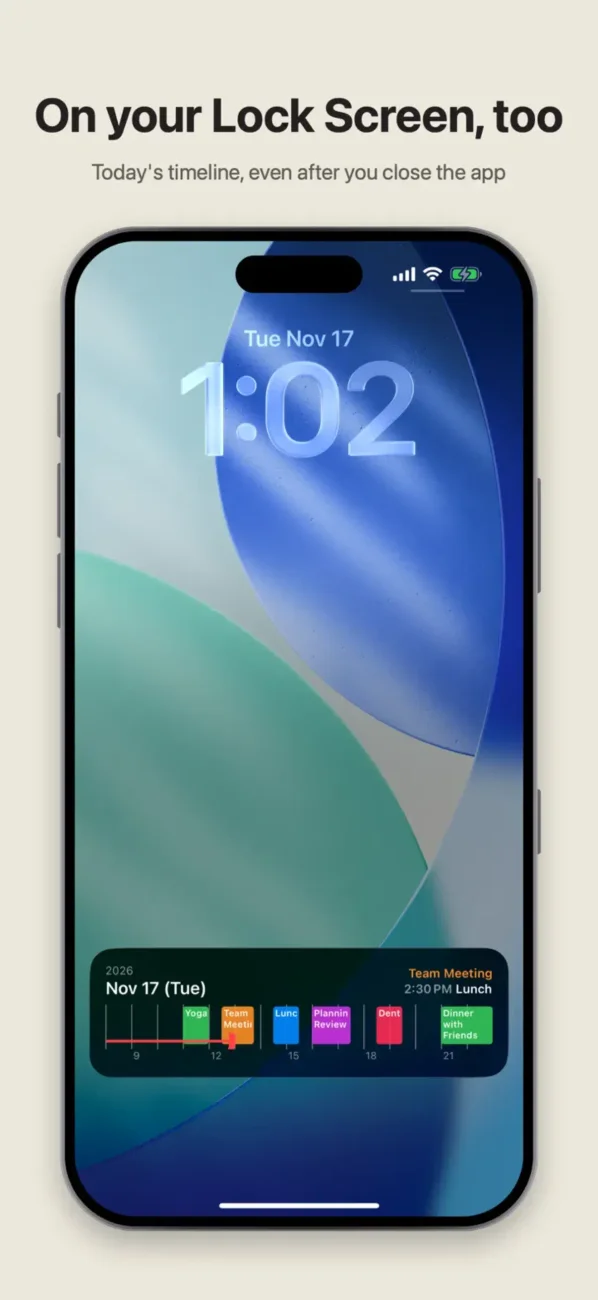
[Lock Screen]
When you close the app, a Live Activity shows today's timeline. You can turn it off in Settings. Because of how iOS works, it ends after up to 8 hours and appears again when you open the app.
[Next Event Notifications]
Get notified of the name and time of your next event before it starts. You can set up to 3 alerts per event, each 1 to 15 minutes before. Notifications on your iPhone also appear on Apple Watch.
[The App]
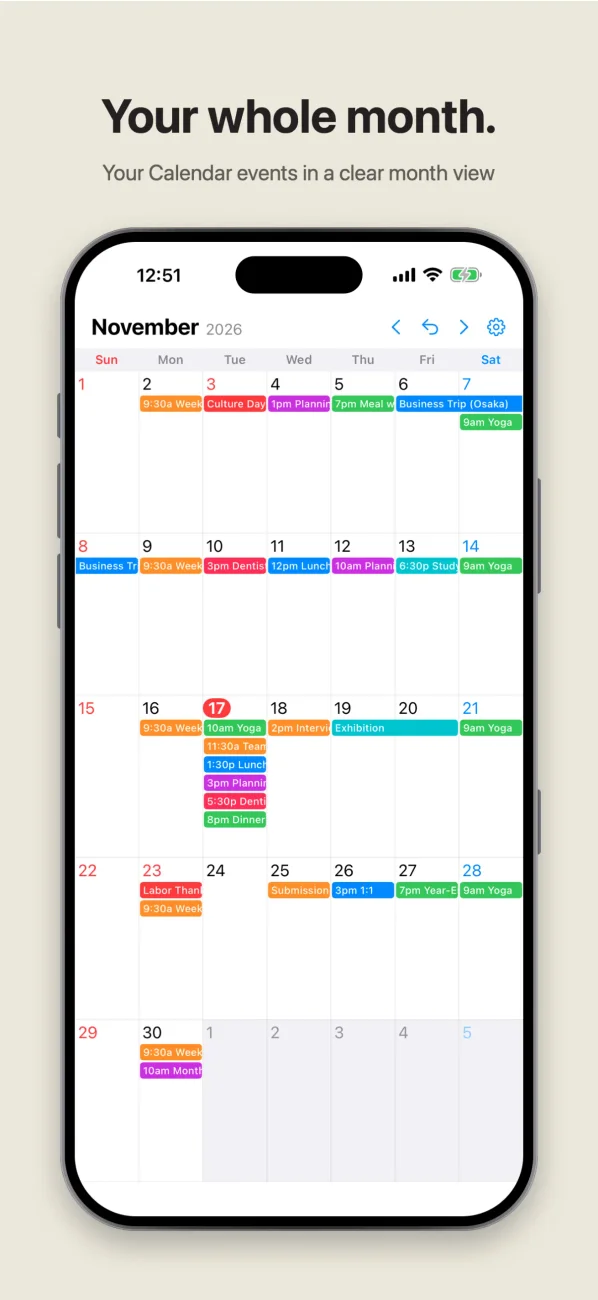
- View your events in a month calendar. Events that span several days are joined as a bar.
- Tap a date to see that day's events.
- Tap an event to rename, reschedule, or delete it. Changes are saved straight to Apple's Calendar.
- When you change an event's time, the events right before and after it can adjust too (move only the shared boundary, move the whole event, or leave them).
- Change alerts, repeat, location, notes, and more in the same editor as Apple's Calendar app.
- Add events from a photo or screenshot of a shift or schedule. Works with schedules in English, Japanese, Korean, and Chinese. Dates and times are read on your device, and the photo is never sent anywhere.
- If the photo has colored bands for each time slot, SmileTime shows the events in those colors (in the app, Live Activities, and on Apple Watch). If there are no bands, colors are picked for you, and events with the same name share a color. In Apple's Calendar, they keep the color of the calendar you choose, like Work or Home.
- Common prefixes repeated on every event, such as a store number, are dropped so only the useful name (like "Sales 1") is kept.
- You can also send a photo or screenshot to SmileTime from the Share button.
- Existing events that overlap the ones you add can be deleted (you can turn this off).
- When events overlap, such as a whole shift and a short task within it, the shorter one is shown first on Apple Watch and in Live Activities.
- Get a notification before your next event, with one of 18 smileys and a few kind words to send you on your way. The smiley and message come only once per event.
- Delivered notifications are cleared from Notification Center after about 5 minutes, and all of them are cleared when you open the app.
- Choose which calendars to show and whether to show all-day events.
- Share the app with friends from the button at the bottom right.
[Before You Start]
- Calendar access is required. Your events stay on your device and are never sent anywhere.
- To keep Apple Watch up to date, open the app on your iPhone at least once every 4 days.
- Apple Watch requires watchOS 26 or later.
What’s new
Version 2.2.2 · Nov 25, 2026
- TimeLine Watch is now SmileTime, so you can head into your next event with a smile, even on a tiring day.
- Add events from a photo or screenshot of a shift or schedule. Times are read for you, and if no date is shown, you pick the day. Everything is read on your device.
- Colored bands for each time slot in the photo are now read, and SmileTime shows those events in the same colors. Photos without bands get colors automatically, and events with the same name share a color. In Apple's Calendar, they keep the color of the calendar you choose.
- Common prefixes repeated on every event, such as a store number, are dropped so only the useful name is added.
- Send a photo or screenshot to SmileTime from the Share button to add its events.
- When adding from a photo, existing events at the same times can be deleted (Delete Overlapping Events, on by default).
- When events overlap, the shorter one now appears first on Apple Watch, in Live Activities, and in widgets.
- A share button at the bottom right of the calendar lets you tell friends about the app.
- Next-event notifications now come with a smiley and a few kind words. There are 18 smiley faces, and a different one may appear each time. If you get several alerts for an event, only the first one has them. You can turn this off in Settings.
- Delivered notifications are now cleared from Notification Center after about 5 minutes, and all of them are cleared when you open the app.
- You can now edit events. Tap an event in a day's list to rename, reschedule, or delete it. Changes are saved to Apple's Calendar.
- When you change an event's time, choose what happens to the events right before and after it: Time, Whole Event, or Off. Set the default in Settings.
- The editor now shows a timeline, so you can see how nearby events will change before you save.
- Use Edit in Calendar to change alerts, repeat, location, notes, and more.
- Tapping a next-event notification now opens that day's events.
- Today's timeline now appears in the Smart Stack on Apple Watch.
- Live Activities now dim the time that has passed and mark the current time with a thin line.
- Back-to-back events of the same color now alternate shades, so you can see where each one ends.
- Next events are easier to read in the rectangular complication on Apple Watch. The count of overlapping events (like +1) is now smaller, so more of the event name fits.
- With larger text on Apple Watch, event names are shown in full, and the complication's time scale stays easy to read.
- Added Korean and Chinese (Simplified and Traditional). You can also add events from photos of Korean and Chinese schedules.
- Requires iOS 18 or later.
App privacy
What 5mm declares on the App Store about how this app handles data.
-
Data not collected
The developer does not collect any data from this app.
Privacy practices may vary, for example with the features you use or your age.
Information
- Seller
- 5mm
- Category
- Productivity
- Version
- 2.2.2
- Updated
- Nov 25, 2026
- Released
- Dec 29, 2025
- Size
- 4.7 MB
- Requires
- iOS 18.0 or later
- Age rating
- 4+
- Languages
- Japanese, Arabic, Italian, Dutch, Swedish, Spanish, Thai, Turkish, German, Hindi, French, Portuguese + 5 more
- Copyright
- © 2026 5mm
You might also like
-
 Simple Memo NotesHandwrite on your smartwatch
-
 PhotoMemo-写真からメモを作成-Productivity
-
 OCR Memo - Scan HandwritingSnap Notes, Sort by Calendar
-
 TypeScan - Scan Text FastGrab Text via Image! Offline
-
 The Text Scanner OfflineOCR text scanner offline
-
 EasyScan: PDF Scanner & OCRScan documents to text & image
-
 Notator | Annotate DocumentsTaking notes, annotating PDFs
-
 Draw Pad Pro - Sketch NotesPencil canvas for quick idea
-
 MyETC - 高速利用料金Productivity
-
 Blue Sketch - Handwritten noteSketch your idea!