
Screenshot Swipe: Smart Notes
Clean camera roll with AI
Designed for iPhone, iPad
Free · In-app purchases
- Age rating4+
- CategoryPhoto & Video
- DeveloperMichael Rode
- LanguagesEnglish
- Size17.6 MB
Links to the official App Store page
Download.org hosts no file of Screenshot Swipe: Smart Notes. The button opens its official App Store page, published by Michael Rode. Listing last checked on Nov 18, 2026.
Screenshots




About
KEEP THE GOOD STUFF
A screenshot is a small idea worth coming back to. Screenshot Swipe helps you review the pile, remember why you saved something, and find it again.
TODAY
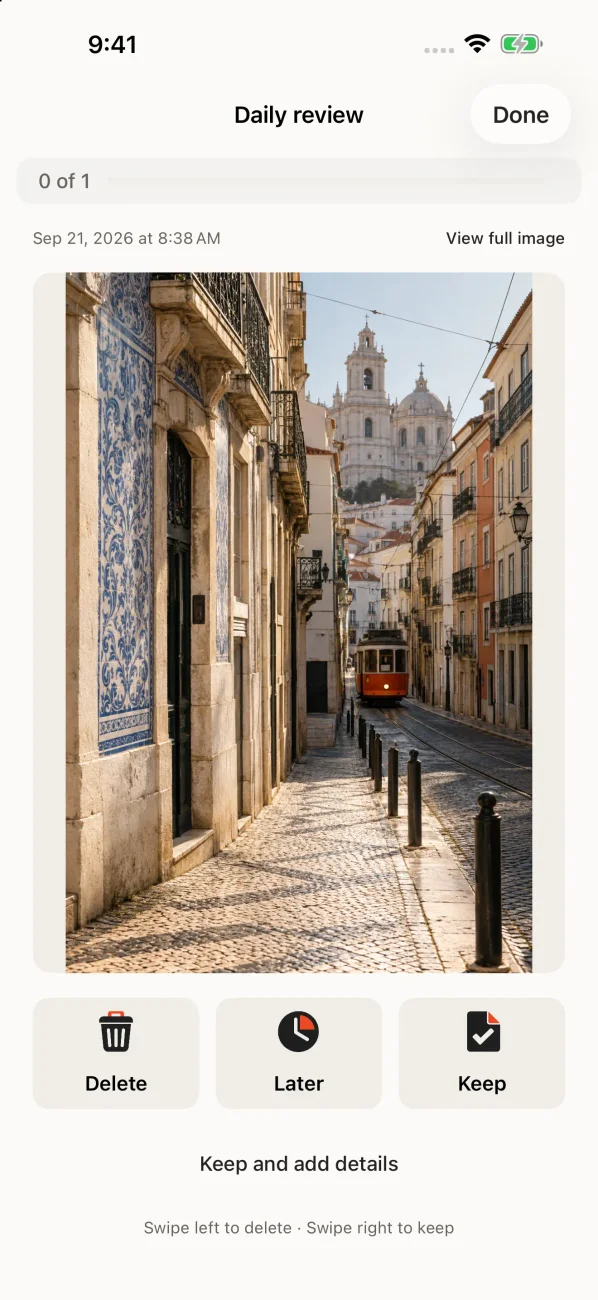
Review a few screenshots at a time. Keep instantly, save for later, or mark unwanted photos for deletion. Undo your latest choice before moving on. Photos asks you to confirm deletions.
YOUR LIBRARY
Add notes, tags, and reminders to your keepers. Search your saved context, filter by tag, and browse collections. Use on-device text search to find words inside screenshots. Export an original photo or create a card with your note and tags.
REMINDERS
Bring useful ideas back at the right time. See upcoming reminders, mark them complete, or schedule another nudge. Set a daily reminder to review recent screenshots.
CLOUD AI STATUS
Cloud AI analysis, including Smart Review and deep library analysis, is temporarily unavailable. On-device text search, notes, tags, reminders, and manual organization remain available.
MADE TO FEEL SIMPLE
A warm paper palette, custom artwork, clear text controls, dark mode, and layouts that adapt to larger text on iPhone and iPad.
YOUR PHOTOS, YOUR CHOICE
Choose which photos the app can access. Notes and tags are stored on your device, and OCR runs on-device. Cloud AI requests are disabled in this version. Apple and RevenueCat handle subscription services. Read the privacy policy for details.
No account is required. Manual review and organization work offline.
Privacy Policy: https://screenshotswipe.com/privacy/
Terms of Use: https://www.apple.com/legal/internet-services/itunes/dev/stdeula/
What’s new
Version 3.1.1 · Oct 16, 2026
Security update: Cloud AI analysis is temporarily paused. On-device text search, notes, tags, reminders, and manual screenshot organization remain available.
App privacy
What Michael Rode declares on the App Store about how this app handles data.
-
Data not linked to you
May be collected but is not linked to your identity.
- User content
Privacy practices may vary, for example with the features you use or your age.
Information
- Seller
- Michael Rode
- Category
- Photo & Video
- Version
- 3.1.1
- Updated
- Oct 16, 2026
- Released
- Jan 20, 2026
- Size
- 17.6 MB
- Requires
- iOS 17.0 or later
- Age rating
- 4+
- Price
- Free
- In-app purchases
- Yes
- Languages
- English
- Copyright
- © 2026 Michael Rode
You might also like
-
 Reel Life: Photo CalendarPhoto Diary, Journal & Memory
-
 FlickpicsSwipe through your memories
-
 ShareGuard: Blur & RedactBlur Screenshots & Metadata
-
 Podcast Video Maker EditorPod Audio Visualizer Creator
-
 MonoSnap - B&W Art Cambecome a master of b&w images
-
 Pro Media MP4 to MP3 ConverterCompress Video, Photo & Audio
-
 SuperRes - Upscale & ColorizeAI Photo Enhance & Colorize
-
 GeoCam: GPS Photo WatermarkTimestamp Camera & Geotag
-
 Your Year: 365 Photo GridMonth & Year Photo Calendar
-
 Photo Cleaner: Delete & SwipeFind Duplicates & Blurry Pics