
- Age rating4+
- CategoryUtilities
- DeveloperZachary Halbrecht
- LanguagesEnglish
- Size29.7 MB
Links to the official App Store page
Download.org hosts no file of ShareTimers. The button opens its official App Store page, published by Zachary Halbrecht. Listing last checked on Nov 18, 2026.
Screenshots


About
Every timer app counts down for one person. ShareTimers counts down for everyone.
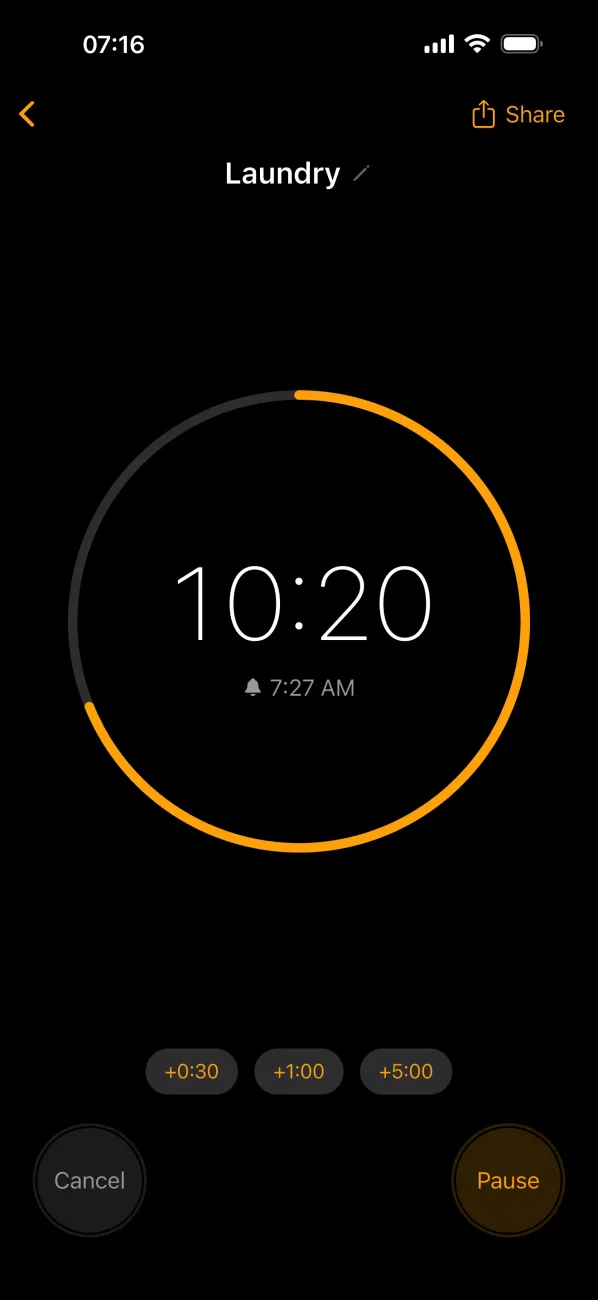
Set a timer, tap share, and send the link to anyone. They see the exact same countdown, ticking live on their screen, in the app or right in their browser. No account, no sign-up, no invite to accept.
SHARED, LIVE, AND EDITABLE
A ShareTimers link isn't a screenshot of a timer. It's the timer. Anyone holding the link can add a minute, pause it, resume it, or rename it — and everyone watching sees the change instantly. When the roast needs another ten minutes, whoever's at the oven adds them, and the whole table knows.
SHARED STOPWATCHES TOO
Counting up works the same way. Publish a running stopwatch, share the link, and everyone follows the same elapsed time and the same laps — useful for races, drills, practice runs, and anything you'd otherwise be calling out splits for.
NO ACCOUNTS. EVER.
There's no login, no profile, and no friend list. Holding the link is the whole permission model. That means you can send a timer to someone who's never heard of this app and they're watching it two seconds later.
WORKS EVERYWHERE
iPhone, iPad and any web browser. People without the app just tap the link and watch the countdown on the web — nothing to install. Links in Messages unfurl with a live preview, and tapping one opens straight to the timer if you have the app.
NOTIFICATIONS THAT KEEP UP
Get notified when your timer ends, even if the app is closed. If someone extends or pauses the timer, your notification reschedules itself automatically — you're alerted at the real end time, not the old one.
BUILT TO FEEL NATIVE
Clean, familiar design that matches the system clock you already know. Timers and stopwatch in one place, recent timers a tap away, and nothing you have to learn.
GOOD FOR
• Cooking together, one timer, everyone in the kitchen
• Laundry, dishwashers, and anything that's "done" for the household
• Workouts, rest intervals, and circuit training with a partner
• Study sessions, Pomodoro blocks, and focus sprints with a group
• Meetings, talks, and speaking slots where someone needs to see the clock
• Games, debates, and turn timers everyone can watch
• Kids and chores, without handing over your phone
• Races and drills, with shared laps on a shared stopwatch
Set it once. Share it everywhere. Everyone stays on the same clock!
What’s new
Version 1.0.2 · Aug 5, 2026
- Bugfixes for less aggressive notifications on timer end
- Updated screenshots
App privacy
What Zachary Halbrecht declares on the App Store about how this app handles data.
-
Data not collected
The developer does not collect any data from this app.
Privacy practices may vary, for example with the features you use or your age.
Information
- Seller
- Zachary Halbrecht
- Category
- Utilities
- Version
- 1.0.2
- Updated
- Aug 5, 2026
- Released
- Aug 3, 2026
- Size
- 29.7 MB
- Requires
- iOS 15.0 or later
- Age rating
- 4+
- Price
- Free
- Languages
- English
- Copyright
- © 2026 ShareTimer.app
You might also like
-
 ShareTimerFreeTimer with Sharing Feature
-
 ShareMyTimerUtilities
-
 Time Cast - Shared StopwatchUtilities
-
 5 Minute TimerSimple, fast, reliable
-
 Flick: 2-Tap TimerType time. Tap Start.
-
 Timer - Countdown memosStopwatch timer
-
 Shansan Super TimerUtilities
-
 Preset Timer ProVersatile Timer & Stopwatch.
-
 Toki - Simple TimerA timer app. Not a clock.
-
 Chain TimersTimers work in sequence