
Simple Bookkeeping: Shortcuts
Snap a receipt, log in one tap
Designed for iPhone
In-app purchases
- Age rating4+
- CategoryFinance
- Developer耀民 王
- LanguagesTraditional Chinese+ 4 more
- Size5.0 MB
Links to the official App Store page
Download.org hosts no file of Simple Bookkeeping: Shortcuts. The button opens its official App Store page, published by 耀民 王. Listing last checked on Nov 12, 2026.
Screenshots



About
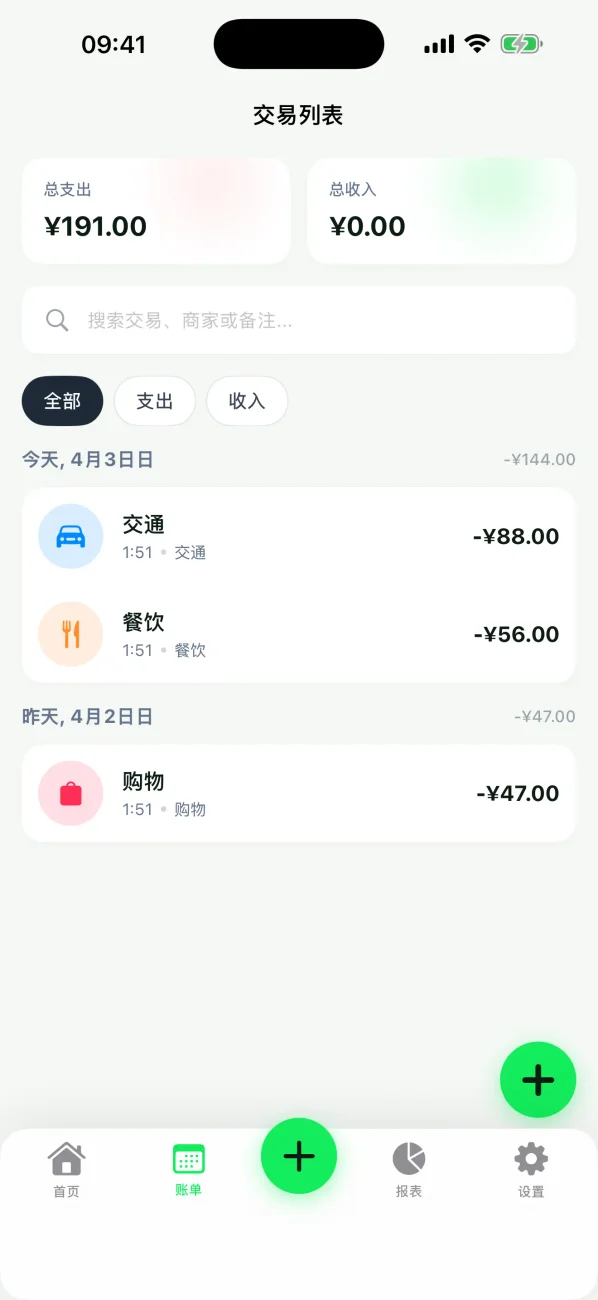
Simple Bookkeeping fills in the amount and date from a receipt photo or a picture in your library. Review it, then tap Confirm and save.
Receipts
One tap opens the camera or your photo library. The amount and date are filled in. Nothing is added until you tap Confirm and save.
Shortcuts
Add Simple Bookkeeping to Shortcuts, then place it on the Home Screen, the Action Button, or Back Tap. One tap records the amount and category without opening the app first. You can add that shortcut from inside the app. You can also say "Use Simple Bookkeeping to log one" to Siri, then answer the prompts for the amount and category.
Widgets
Included with the app. On the Home Screen: today's spending (small; medium has Add and Scan), this month's budget (small and medium, as a ring), recent entries (medium and large), and categories (small and medium, as a donut). On the Lock Screen: today's spending (rectangular and inline) and budget (circular and rectangular). Settings shows how to add them.
Free
- Income, expenses, and categories, in week, month, and year reports
- A default currency in Settings, with 27 currencies and favorites
- Monthly and category budgets for each currency, with alerts at 80% and 100%
- Recurring bills that need confirmation before they post. You can also skip or pause them
- Debts and card balances
- A daily reminder that includes today's spending, plus a streak and a weekly report
- Import a bill CSV exported from another app, preview it, then add the rows. CSV export is included
- Templates for entries you repeat. A tap fills the form; you still save it
- A short first-launch tour you can skip
On your device and in your own iCloud
The ledger is kept on your device and in your own iCloud. Sync is on by default, so your other devices can show the same records. We do not collect this data. No account is required, and there are no ads. The App Store privacy label is Data Not Collected. Face ID can lock the app. The app is in English, Japanese, Korean, Simplified Chinese, and Traditional Chinese.
Bookkeeping and widgets are included. Tips are optional support for the developer.
What’s new
Version 1.7.0 · Oct 21, 2026
· Home Screen widgets: today's spending (small; medium has Add and Scan), this month's budget as a ring (small and medium), recent entries (medium and large), and a category donut (small and medium). Lock Screen: today's spending (rectangular and inline) and budget (circular and rectangular). Widgets are included.
· Bookkeeping, reports, budgets, receipts, import, reminders, and Shortcuts stay free.
· Tabs are now Overview, Records, Reports, and Settings. Reports cover a week, a month, or a year.
· Receipts: one tap opens the camera or photo library. Review the scan, then tap Confirm and save.
· Budgets stay per currency, with alerts at 80% and 100%. Set a default currency in Settings, choose from 27 currencies, and keep favorites.
· Recurring bills need confirmation before they post. You can also skip or pause them.
· A short first-launch tour, a daily reminder that includes today's spending, and a one-tap way to add the Shortcut.
· A streak and a weekly report.
· Import a bill CSV from another app after a preview. Save templates for entries you repeat.
· English, Japanese, Korean, Simplified Chinese, and Traditional Chinese.
App privacy
What 耀民 王 declares on the App Store about how this app handles data.
-
Data not collected
The developer does not collect any data from this app.
Privacy practices may vary, for example with the features you use or your age.
Information
- Seller
- 耀民 王
- Category
- Finance
- Version
- 1.7.0
- Updated
- Oct 21, 2026
- Released
- Dec 4, 2025
- Size
- 5.0 MB
- Requires
- iOS 17.6 or later
- Age rating
- 4+
- In-app purchases
- Yes
- Languages
- Traditional Chinese, Japanese, Simplified Chinese, English, Korean
- Copyright
- © wangyaomin
You might also like
-
 Simple Bookkeeping - no adsEfficient bookkeeping, no ads
-
 简记账 - 个人理财Finance
-
 Flower: Budget & ExpensesSpending Tracker, Map & Recap
-
 Smart Ledger: One-Line BudgetFast, private expense tracking
-
 FC LedgerA concise and efficient ledger
-
 麦子记账 - 无广告简洁快捷自动记账本&预算&存钱记账软件Finance
-
 AI Auto Expense TrackerAutomatic expense tracking
-
 RITO: AI Expense TrackerVoice, Receipts & Budget
-
 Budgetree - Expense TrackerReceipt scan & bill import