
- Age rating4+
- CategoryProductivity
- DeveloperPeakPilot360
- LanguagesEnglish
- Size24.6 MB
Links to the official App Store page
Download.org hosts no file of Simple Day Tracker. The button opens its official App Store page, published by PeakPilot360. Listing last checked on Nov 15, 2026.
Screenshots

About
Know exactly where your time goes. Simple Time Tracker makes it effortless to log your daily activities with just a tap.
No complicated setup. No overwhelming features. Just open the app, tap a task, and start tracking.
TAP TO TRACK
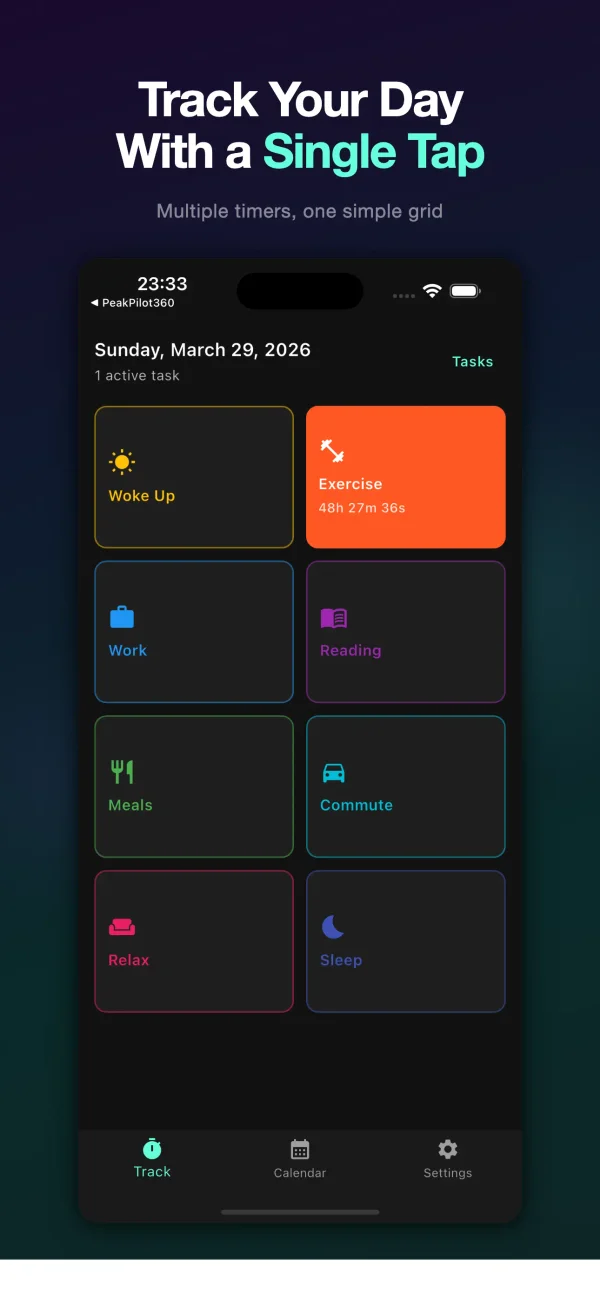
Start timing any activity with a single tap. Track multiple tasks at once — because life doesn't happen one thing at a time. Each task shows its elapsed time live, updating every second.
YOUR TASKS, YOUR WAY
Create custom tasks with personalized names, icons, and colors. Choose from 20 icons and 14 colors to make each task instantly recognizable. Reorder tasks by dragging them into your preferred layout.
SEE YOUR DAY AT A GLANCE
The home screen shows all your tasks in a clean 2-column grid. Active tasks light up with their custom color. Inactive tasks stay subtle. You always know what's running.
CALENDAR OVERVIEW
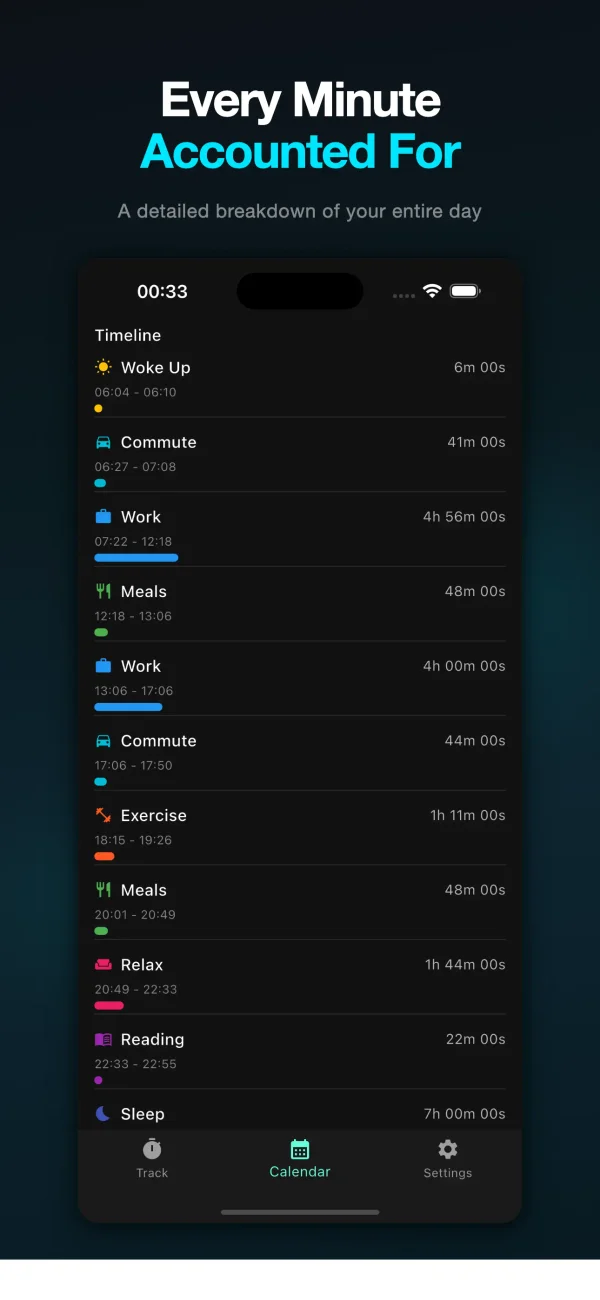
Browse your tracking history month by month. Days with tracked activities show colored markers so you can spot your patterns at a glance. Tap any day to see the full breakdown.
DAY DETAIL VIEW
Every day gets a detailed summary:
- Total time per task with visual progress bars
- Full timeline showing start and stop times
- Proportional duration bars for easy comparison
SMART DAY BOUNDARY
The app uses a 4 AM day boundary instead of midnight — so late-night activities naturally belong to the right day. No more split sessions.
WORKS OFFLINE
All data is stored locally on your device. No account required. No cloud sync. Your time data stays private and always accessible.
8 TASKS TO START
Get going immediately with 8 pre-loaded tasks: Woke Up, Exercise, Work, Reading, Meals, Commute, Relax, and Sleep. Customize or replace them anytime.
Perfect for:
• Tracking daily routines and habits
• Understanding how you spend your time
• Building awareness of time allocation
• Simple personal time logging
Free. No ads. No subscriptions. Just a clean, focused time tracker.
What’s new
Version 1.1 · Apr 6, 2026
New mood tracker.
New wrapped surprise at the end of the month.
New widget support.
App privacy
What PeakPilot360 declares on the App Store about how this app handles data.
-
Data not collected
The developer does not collect any data from this app.
Privacy practices may vary, for example with the features you use or your age.
Information
- Seller
- Gazelle Labs LLC
- Category
- Productivity
- Version
- 1.1
- Updated
- Apr 6, 2026
- Released
- Apr 3, 2026
- Size
- 24.6 MB
- Requires
- iOS 18.0 or later
- Age rating
- 4+
- Price
- Free
- Languages
- English
- Copyright
- © 2025 Gazelle Labs
You might also like
-
 Timely TrackerProductivity
-
 Morning WinsProductivity
-
 Open Working HoursTrack shifts. Protect privacy.
-
 Swipe In - Time TrackerSimple & Minimalist
-
 Deep Focus - Deep Work TimerFocus Timer & Heatmap
-
 Simple Routine: Track HabitsProductivity
-
 Reporter OpenScape FMProductivity
-
 Password Manager – SecureVaultProductivity
-
 Tracky - Time TrackerTime Tracking Made Simple
-
 Remember: To-do List/CalendarSimple daily task planner