
Simple Soccer Subs
Soccer fair play-time tracker
Designed for iPhone, iPad
Free · In-app purchases
- Age rating4+
- CategorySports
- DeveloperAdam Glass
- LanguagesEnglish+ 1 more
- Size13.4 MB
Links to the official App Store page
Download.org hosts no file of Simple Soccer Subs. The button opens its official App Store page, published by Adam Glass. Listing last checked on Nov 20, 2026.
Screenshots



About
Simple Soccer Subs tracks who has played, who is next, and how long everyone has been on - on one screen you can read at arm's length in bright sun.
Drag a substitute onto a player to plan a change. Draw as many as you like, then tap Call Subs and read the list out: who is coming off, who is going on, and the position each of them is taking. Nothing to remember, nothing to write down.
EQUAL PLAY
Pick the standard your league holds you to - everyone plays at least half, or nobody takes a fourth quarter until everyone has had three - and the app tells you before you break it, not after. It marks who must go on, who should sit, and by when.
DEFAULT LINEUPS
Set up your starting side the night before: pick the formation and drag your players into their positions. At the field, Begin Match puts everyone in place - anyone who didn't make it leaves their spot empty for you to fill - and at any break, Restore Lineup puts the side back the way it started. Or let Fill From Preferences place them for you, from the positions each player plays.
WHILE THE MATCH IS ON
- Every player's minutes, live, on the field in front of you - Read them as totals, or as how far each player is from the most, the average and the least - Plan substitutions with arrows, then make them all at once - Quarters instead of minutes for the younger divisions, where the rule is "everybody gets two quarters" - Goals, cards, send-offs and playing short - Change formation mid-match without losing anyone's time - A chirp when a hydration break, a quarter break or halftime runs long, which you can snooze, and a battery that warns you before it runs out - Fix anything: the score, the clock, who scored, who is here
AT FULL TIME
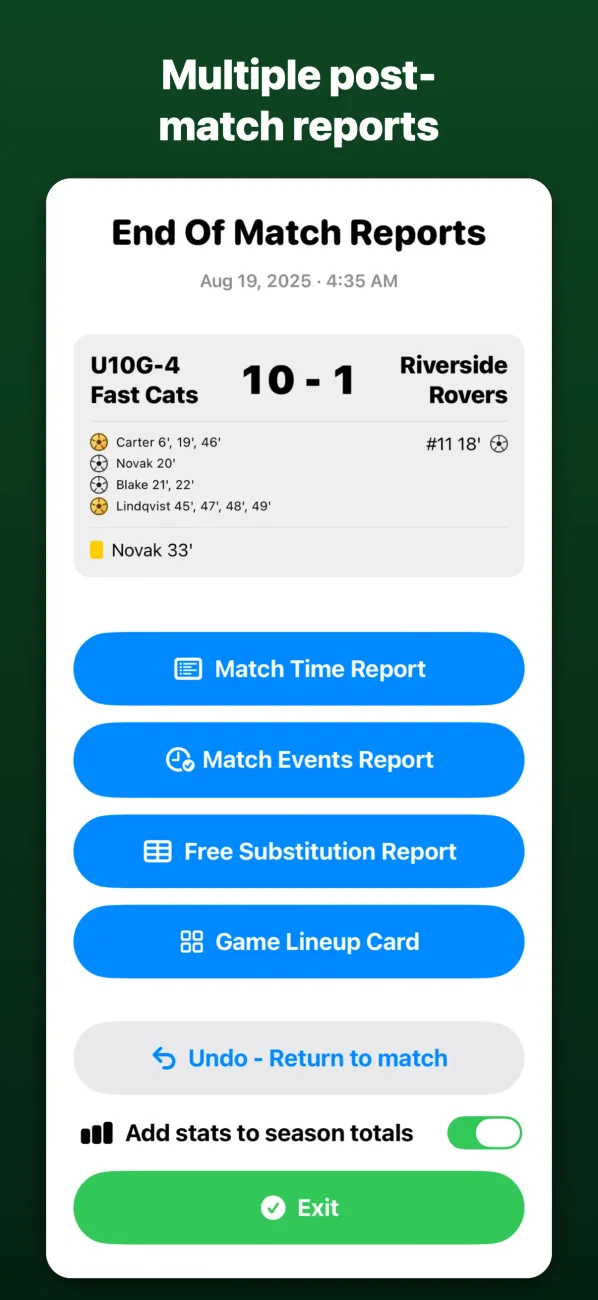
- A play-time report for you, sorted however you like - The free substitution form, filled in and ready to hand over - A game lineup card for matches played in quarters - Every one of them shares as a PDF
MATCH REPORTS
Every match you play is kept. Open one weeks later and all of its reports come back exactly as they were at full time, ready to share again. Search by team, opponent, player or date - one field, and every word of what you type has to match something. Choose which matches count toward each player's season totals, and change your mind whenever you like - adding a match in or taking it out is exact either way. Delete one by mistake and it waits 14 days in Recently Deleted.
YOUR IPHONE AND YOUR IPAD
Turn on Sync data with iCloud and your teams, formations, matches and season totals go from one device to the other through your own iCloud. If you forget your iPad but bring your iPhone, everything from the iPad is there on the phone. It stays off until you turn it on.
TACTICAL PLANNER
A whiteboard for the two minutes at the side of the field. Drag magnets onto the grass - your team, theirs, cones, a ball, numbered markers - and draw the runs and the passes over them. A line bends round a defender, goes dashed for a pass, and can still be moved after you have drawn it. Copy From Active Match puts the team you already have onto the board, names and all, without leaving the match.
ENGLISH AND SPANISH
The whole app in either, switched in Settings, or following your phone. The two league forms print in English, because the official collecting them reads English.
BUILT FOR THE TOUCHLINE
Saturated colors, heavy borders, big type. No subtle shading, no thin gray text, nothing that disappears when the sun comes out.
FREE AT 5v5 The free version is the whole app at 5v5: teams, formations, the match screen, the planner, the reports. One $4 purchase adds 7v7, 9v9 and 11v11. It is not a subscription, and it never will be.
What’s new
Version 1.5 · Nov 19, 2026
Much easier on your battery during a match - and give a card or mark an injury straight from a player on the field.
BATTERY
- The match screen uses far less power while substitutions are planned. The arrows used to keep the whole field redrawing many times a second, for as long as the subs were planned. Now they are drawn once and hold still. Only the rings around the players pulse, for a moment, while you draw or change a plan.
NEW
- Press and hold a player on the field and choose Player Received Card (Received Card on a phone) to give a yellow or red card. A red card takes the player off and leaves the red marker in their spot. Undo takes it back.
- Mark Injured on a player on the field sends them to the bench marked injured. Their spot stays empty for you to fill.
CHANGED
- Cards can be given while substitutions are planned. A planned sub that a red card makes impossible is dropped, and one Undo brings back the card and the arrows together.
- The Cards screen is now black with big rows, like Player Availability, so it reads in bright sun.
- The button at the foot of Equal Play says Close.
FIXED
- In Spanish, Equal Play no longer cuts off a player's time, and its warning reads correctly when it names several players.
App privacy
What Adam Glass declares on the App Store about how this app handles data.
-
Data not collected
The developer does not collect any data from this app.
Privacy practices may vary, for example with the features you use or your age.
Information
- Seller
- Adam Glass
- Category
- Sports
- Version
- 1.5
- Updated
- Nov 19, 2026
- Released
- Sep 3, 2026
- Size
- 13.4 MB
- Requires
- iOS 17.0 or later
- Age rating
- 4+
- Price
- Free
- In-app purchases
- Yes
- Languages
- English, Spanish
- Copyright
- © 2026 Adam Glass
You might also like
-
 Soccer Substitution TrackerFair Playing Time & Lineups
-
 Sport WizardFair coaching made easy
-
 Sub Coach: Soccer LineupsSoccer substitutions & timer
-
 Funino TimerMatchday Coach Assistant
-
 SubPlan: Rotation PlannerSoccer & basketball subs
-
 Squadly: Soccer Playing TimeSubstitutions & fair minutes
-
 Head Royce StatsReal-time stats & live scores
-
 SubCavFair play. Parents watch live.
-
 Legacy | Soccer Sub TimerManage Equal Playing Time
-
 Magic Lineup: Coach & TeamGames, practice & fair minutes